
- Installs
- —
- Apple does not publish download counts
- Rating
- 4.67
- Ratings
- 5.5K
- 5.5K reviews
- Version
- 8.13
- Updated 9 Nov 2026
- Released
- 29 Aug 2009
- Tracked since 10 May 2026
- Size
- 34 MB
- Needs 16.0
Screenshots
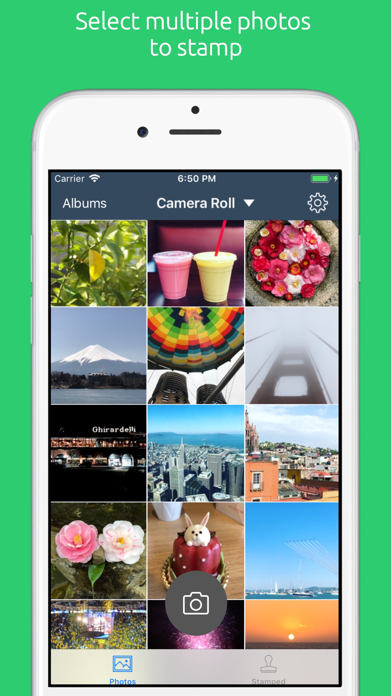


About Timestamp It - Proof Camera
The description on the store listing
Add timestamps, dates, captions, and logos to your photos and videos — instantly.
Timestamp It is a powerful timestamp camera and photo stamping app that helps you create accurate, professional photo and video records for work or personal use. Add a timestamp, custom caption, or logo watermark in seconds, then organize everything into projects that sync across devices.
Work with your team in shared projects. Invite teammates, collaborate on documentation, and keep everyone in sync with secure cloud syncing and shared access to stamped photos and videos.
Perfect for contractors, real estate agents, inspectors, field teams, investigators, and anyone who needs reliable visual documentation. …
Read the full description
Add timestamps, dates, captions, and logos to your photos and videos — instantly. Timestamp It is a powerful timestamp camera and photo stamping app that helps you create accurate, professional photo and video records for work or personal use. Add a timestamp, custom caption, or logo watermark in seconds, then organize everything into projects that sync across devices. Work with your team in shared projects. Invite teammates, collaborate on documentation, and keep everyone in sync with secure cloud syncing and shared access to stamped photos and videos. Perfect for contractors, real estate agents, inspectors, field teams, investigators, and anyone who needs reliable visual documentation. Capture new media or use existing photos and videos from your library. Once stamped, your files can be organized into projects, synced to the cloud, and shared with clients or teammates. How It Works - Capture a new photo or video, or choose one from your library - Customize the timestamp, date format, caption, font, color, and placement - Optionally add your logo or watermark - Save, sync to the cloud, or share instantly Features - Add timestamps, date stamps, and captions to photos and videos - Add your own logo or watermark for professional branding - Customize text font, color, size, and placement - Choose any custom date — past or present - Stamp one or multiple files at once - Organize media into projects - Cloud sync projects across devices - Collaborate with teammates in shared projects - Share projects securely with collaborators or public links - Export stamped photos as ZIP files - Save to camera roll or share via Messages, Email, or Social Media - Quickly organize or delete photos in bulk Timestamp It keeps your photos and videos organized, verified, and ready to share. Terms of Use: https://www.apple.com/legal/internet-services/itunes/dev/stdeula/ Privacy Policy: https://timestampitapp.com/privacy-policy
Installs, last 30 days
Apple does not publish download counts. Estimates are in testing.
Estimated store revenue Estimated Beta
App Store, worldwide, monthly rate from the last 12 chart days to 19 Nov 2026
Below the top 100 grossing apps in the markets we calibrate. In the United States that usually means under about $6.4M a month. App Store purchases and subscriptions only, before Apple's 15 to 30% fee. Ads and web payments are not included.
Ratings
5,507 ratings, 5,507 reviews
- 5 ★83%
- 4 ★9.3%
- 3 ★3.4%
- 2 ★1.0%
- 1 ★3.4%
Recent reviews
Latest public reviews from the store
- 29 Aug 2024
Works
Tested and worked perfectly, now I need you guys to pair up with another app called Pathwave. They could use this for all the pictures we submit to this app for our jobs. They handle the picture taking aspect of all jobs completed for everyone, it’s jobs for Verizon. I would just ask if you could try and reach out and see if they could benefit by having your app integrated with them. From the time stamp to saving pictures to you phone and app simultaneously.
- 7 Feb 2023
I agree with the others.
LOVE IT. its saving my phone gallery right now as my old pictures were hidden in the back of my gallery but i needed to keep the dates and not screenshot to group them all. I just suggest saving each picture one at a time the picture file will be smaller but if you stamp more than one at once your picture files will take more space.
- 4 Dec 2022
File Naming
I run a small business and use TimeStampIt for my photo submissions to local financial institutions. I had a question/recommendation for the developer which was having the ability to rename the files by caption that is typed on the stamp. They were immediately engaged with me and we walked through my entire process and they were very helpful. They have literally cut hours off the process for my little business and I cannot thank them enough. I highly recommend this software and the people behind it. They are awesome…Thanks again!!
- 2 Jun 2020
Revised Review
This is a revision to an earlier 2 star review. My reason for just two stars was that the app constantly requested that I write a review. It was annoying! Why the change? Because of a very quick response from the developer clearly (and with good humor) indicating that they understood my concerns and would seek a remedy to too frequent review requests. They listened! As to the app itself: The most important thing to mention is that the app does what it supposed to do. That is a good thing! It is a simple app, nothing fancy, it gets the job done. It is relatively intuitive. It doesn’t take long to figure out how to use it. There are ads in the free version; upgrading is inexpensive and well worth the <$2.00 price tag. An app that does what is expected at a reasonable price, with developers who care about customer satisfaction’ is what a consumer should reasonably expect. I’ll add a star when I’m convinced that there will be feeer review requests in the future.
What reviewers bring up
Topics mentioned in the latest 8 reviews, by how many reviews mention them
Liked in good reviews (6 reviews)
- picture 3
- saving 3
- stamp 3
- photo 3
- take 3
- developer 2
- important 2
- ability 2
Raised in bad reviews (2 reviews)
- albums 2
- delete 2
- first 2
- away 2
Top chart positions
Latest App Store chart ranks by country, last 10 days
- Countries ranked
- 1 of 50
- Best rank
- #56
- Top 10 placements
- 0
- of 1 chart placements
- Average rank
- #56
Best countries on App Store
- 🇮🇪 Ireland · Top grossing, Photo & Video#56
| Country | Chart | Category | Rank | Best (10 days) | Date |
|---|---|---|---|---|---|
| 🇮🇪 Ireland | Top grossing | Photo & Video | #56 | #56 | 17 Nov 2026 |
Timestamp It - Proof Camera history
Release, install milestones, listing and store changes
- First released on the store 29 Aug 2009
Update frequency
How often Timestamp It - Proof Camera ships a new version, month by month
32 updates in the last 12 months. More often than most similar apps: they shipped a median of 1 updates in the same year.
Recent versions
Current version 8.13
- Version 8.109 Nov 2026
Made for iPhone Duo, and a smoother start. IPHONE DUO • Timestamp It now uses the whole unfolded screen, with its buttons in the side bar like Apple's apps • The photo viewer's controls sit in the side bar, and the photo stays put when you hide them PHOTOS • Jump to any date in your camera roll from the date bubble • Select a photo for stamping right from the photo viewer • Project maps open centered on your photos • A new launch screen, and no more blank screen when opening the app right after restarting your phone • Other fixes and improvements
- Version 8.96 Nov 2026
Made for iPhone Duo, and a smoother start. IPHONE DUO • Timestamp It now uses the whole unfolded screen, with its buttons in the side bar like Apple's apps • The photo viewer's controls sit in the side bar, and the photo stays put when you hide them PHOTOS • Jump to any date in your camera roll from the date bubble • Select a photo for stamping right from the photo viewer • Project maps open centered on your photos • A new launch screen, and no more blank screen when opening the app right after restarting your phone • Other fixes and improvements
- Version 8.4.61 Sep 2026
Everything you've stamped, now in one place — plus faster ways to pull up the exact set of photos you need. STAMPED TAB Every photo you've ever stamped, newest first, across all your projects. Search the lot without opening a single project. FIND A DATE RANGE Tap This Week, Last Month, or pick your own dates to narrow down to those photos. They come back already selected — ready to share, or to export as a PDF report. BACK UP TO GOOGLE DRIVE Send stamped photos straight to your own Drive, and choose which projects go there. Watch uploads happen live, with a green check only once every photo is safely up. YOUR STAMP SETUP, ON EVERY DEVICE Font, color, position and custom rows now carry across your own devices. Set it up once instead of on every phone.
- Version 8.4.531 Aug 2026
Everything you've stamped, now in one place — plus faster ways to pull up the exact set of photos you need. STAMPED TAB Every photo you've ever stamped, newest first, across all your projects. Search the lot without opening a single project. FIND A DATE RANGE Tap This Week, Last Month, or pick your own dates to narrow down to those photos. They come back already selected — ready to share, or to export as a PDF report. BACK UP TO GOOGLE DRIVE Send stamped photos straight to your own Drive, and choose which projects go there. Watch uploads happen live, with a green check only once every photo is safely up. YOUR STAMP SETUP, ON EVERY DEVICE Font, color, position and custom rows now carry across your own devices. Set it up once instead of on every phone.
Listing keywords
Words and phrases Timestamp It - Proof Camera repeats most in its store listing
Top phrases: photos and videos (5), logo or watermark (2), add timestamps (2), font color (2), shared projects (2).
Highlighted words also appear in the title. Counts cover the title, short description and description.
Compliance
What the listing and the app package show
- Store status
- Live
- Upkeep
- Updated 9 Nov 2026
- Age rating
- 4+
Apps like Timestamp It - Proof Camera
 eZy Watermark Photos ClassicWhizpool★ 4.79
 FacePlus - Face EffectsShantou Xunyu Network Technology Co., Ltd★ 4.63
 Photo To Cartoon Yourself Editpixel force private limited★ 4.08
 Clarity WallpaperYuanJing Co.,Ltd.★ 4.66
 Focos LiveMosaic S.r.l.★ 4.55
 Onion Cam2 - StopMotion cameraYosuke Seki★ 4.53
 Video Background Eraser丽譞 牛★ 4.39
 Swipe Cleanup: Storage ManagerMini Tree Technology Limited★ 4.2
 Leap Second - Everyday VideosContarini Ventures, LLC★ 4.56
Timestamp It - Proof Camera: questions and answers
Who makes Timestamp It - Proof Camera?
Timestamp It - Proof Camera is published by ShabzCo, LLC.
When was Timestamp It - Proof Camera last updated?
The latest version (8.13) was released on 9 Nov 2026.
Is Timestamp It - Proof Camera free?
Yes. Timestamp It - Proof Camera is free to download.
Is Timestamp It - Proof Camera still available?
Yes. Timestamp It - Proof Camera is live on App Store as of 19 Nov 2026.
Track Timestamp It - Proof Camera and its competitors
Watch any app for new versions, rating drops, chart moves and removals. Free plan, no card.