
- Installs
- —
- Apple does not publish download counts
- Rating
- 4.06
- Ratings
- 172
- 172 reviews
- Version
- 1.0.19
- Updated 16 Mar 2026
- Released
- 5 May 2020
- Tracked since 10 May 2026
- Size
- 23 MB
- Needs 13.0
Also on Google Play: Timestamper - Activity Tracker (338 ratings)
Screenshots
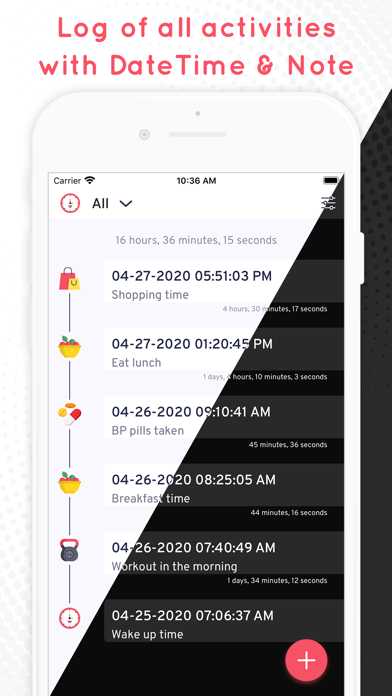


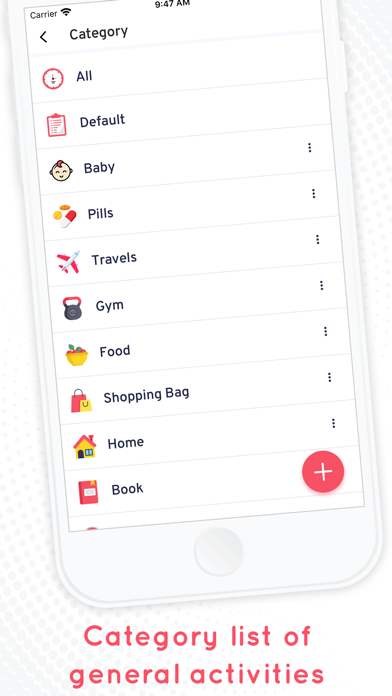

About Timestamper: Activity Tracker
The description on the store listing
Simple and easy activity log keeper is here to help you and solve your many problems.
Keep Track of your day to day activities in a very easy way.
Timestamp your Activities which can even help you in creating good habits.
How Timestamper: Keep Activity Log with Time and Note Works?
• Install Timestamper: Keep Activity Log with Time and Note Application from Appstore.
• Add Your activity by simply clicking on “+”
• Change and select a category from the List
• Add a new Category of activity
• Check all your activities by selecting “All” option
• You can check activities category wise also
• Edit options available for all fields
• Add a Note of your activities
• Change DateTime format as …
Read the full description
Simple and easy activity log keeper is here to help you and solve your many problems. Keep Track of your day to day activities in a very easy way. Timestamp your Activities which can even help you in creating good habits. How Timestamper: Keep Activity Log with Time and Note Works? • Install Timestamper: Keep Activity Log with Time and Note Application from Appstore. • Add Your activity by simply clicking on “+” • Change and select a category from the List • Add a new Category of activity • Check all your activities by selecting “All” option • You can check activities category wise also • Edit options available for all fields • Add a Note of your activities • Change DateTime format as required • On/Off toggle available to Set theme, Location, or to show milliseconds • Select/active Dark mode when needed • Record your Location • Search your log Interesting Features: • Having category wise activity Log • Add Date timestamp, Location, and Note for Activities • You can keep a record of the exact time any activity occurred and also can measure No. of times • Available categories: All, Default, Baby, Book, Food, Gym, Home, Pill, Travel , Cap , Car , Flame , Flowers , Gift , Heart , Hospital, Map , Money , Movie, Music, Night , Pet , Phone , Pizza, Shopping Bag, Sport, Stop Watch, Train, Water, Weather Why have Timestamper: Keep Activity Log with Time and Note Application in Your Smartphone • To Improve Efficiency • To Increase Productivity • Supports in enhancing activeness • Give assistance for Routine Management • To keep a track of Activities • Helps in developing good habits Most Efficient Application For Following Groups of People: • All those who want to keep a record of newborn Baby during stages like Pregnancy, Labour and care until a baby turns Toddler. • Keep a timestamp of Book reading, purchasing, sharing by adding a note related to it • Keep a note of your daily food intake as well as diet plan. For example, 2 Bananas at 11 a.m., Daily dinner time track record, etc. • Add Gym, Exercise, Yoga Session updates with the help of time stamper • Listing entries for Pills/medicine timings that are prescribed by Doctor • Keep a record of your Travel - Beginning of trip with DateTime, new places visited - entry with Datetime & Note - what did you find new during that visit, you can keep a note of it. • Record your Location of hunting, trekking, fishing, exploring, etc. • Enrollment of few of your purchases with DateTime & Note • Maintain a list of Money spent/lent/borrowed with DateTime & Note • Keep a record of your Hospital visits • Listing of your favorite music that you listened at a time, you liked, create a note of it • Details regarding your Vehicles - Cars & Bikes servicing, Fuel, Travel duration, etc • Put all details about your Pet Care to track vaccination, feeding, hair cutting, etc. timings • Note when did you aboard Train/Bus/Ship, a total time of journey etc. and create an event log • Put a Mark on water intake, and be well aware with your routine • Keep a record of your Sports Activities • Make a list of your Shopping also along with Note and Date/time of purchase Certainly, you will love to know your every activities, having records along with Datetime, Note. It’s very easy to add things and get used to it to maintain your daily habits and routine. If you are impressed with the ways of utilizing Application, Then try it by yourself and enjoy your Active - Productive day to day Time with Timestamper: Keep Activity Log with Time and Note Application.
Installs since 29 Aug 2026
Apple does not publish download counts. Estimates are in testing.
Estimated store revenue Estimated Beta
App Store, worldwide, monthly rate from the last 12 chart days to 19 Nov 2026
Below the top 100 grossing apps in the markets we calibrate. In the United States that usually means under about $6.4M a month. App Store purchases and subscriptions only, before Apple's 15 to 30% fee. Ads and web payments are not included.
Ratings
172 ratings, 172 reviews
No rating breakdown published for this app.
Recent reviews
Latest public reviews from the store
- 21 Jun 2025
Useful but limited icons
I’m glad I found this software. As long as I can remember to use the app, it does exactly what I need it to. There is no information or button for submitting recommendations to the developer, so I guess I will leave it here. I wish there were more icons to choose from - in the main view of all categories, only the icons are visible; if I have had to use the same icon for two different things I can’t tell them apart. I also wish it was easier to get the data out - the only option I can see is backing up your data to Google Drive, which saves a .json file of all the timestamps ever entered. I need to use this information in another record keeping software, and there’s quite a bit of manipulating in Excel required to get the new data in there.
- 28 Mar 2025
Great Apo
This app is well extremely designed and fits my purposes perfectly! My only suggested change is to get rid of the last "Ok" before data is recorded. Too often after I enter a note and press "Done" I forget to press the"Ok" because my mind thinks that when I press Done I'm done!
- 3 Jan 2023
Bugs
I love this app, it would be perfect for me if it didn’t have bugs. I initially put in 3 categories with notes, but after closing and reopening it changed my categories to something else and if I try to change it to my preferred category the app crashes. Also would love an option to export besides google backup. The bugs are so annoying I’m considering not using the app anymore.
- 30 Oct 2021
Amazing help with court notes
I’m in a custody battle for my youngest son… I’ve kept notes of everything but, I’m very adhd and they are scattered everywhere. This lets me input the info as I go and has helped me tremendously. The only thing that would make this better would be if they had doc scan/receipt catalog linked to a secure cloud… but it’s a great tool as is. Thank you!
What reviewers bring up
Topics mentioned in the latest 8 reviews, by how many reviews mention them
Liked in good reviews (5 reviews)
- categories 2
- record 2
- change 2
- notes 2
- view 2
- data 2
Raised in bad reviews (2 reviews)
- category 2
- crashes 2
- try 2
Top chart positions
Latest App Store chart ranks by country, last 10 days
Not in any tracked top chart in the last 10 days.
Timestamper: Activity Tracker history
Release, install milestones, listing and store changes
- First released on the store 5 May 2020
Update frequency
How often Timestamper: Activity Tracker ships a new version, month by month
1 updates in the last 12 months. Less often than most similar apps: they shipped a median of 2 updates in the same year.
Recent versions
Current version 1.0.19
- Version 1.0.1916 Mar 2026
- Improve Performance
Listing keywords
Words and phrases Timestamper: Activity Tracker repeats most in its store listing
Top phrases: activity log (6), timestamper keep activity (4), datetime note (4), note application (3), record your location (2).
Highlighted words also appear in the title. Counts cover the title, short description and description.
Compliance
What the listing and the app package show
- Store status
- Live
- Upkeep
- Updated 16 Mar 2026
- Age rating
- 12+
Apps like Timestamper: Activity Tracker
 CV+ Resume MakerMajed Hariri★ 4.66
 2 factor - Authenticator App25 Degrees Apps LLC★ 4.44
 Chore Chart: Family Rewards舜 吕★ 4.69
 HouwiyetiAGENCE NATIONALE DU REGISTRE DES POPULATIONS ET DES TITRES SECURISES★ 4.15
 TheBrain: Smart Notes & LinksTheBrain Technologies LP★ 4.82
 CalamariHubert Lisek★ 4.53
 Coin Pic IdentifierTech Consolidated Inc★ 4.07
 Clippit: AI Text To SpeechSpencer Yen★ 4.59
 Ai humanizer humanize ai textABDELHAFID BASAFOU★ 4.61
Timestamper: Activity Tracker: questions and answers
Who makes Timestamper: Activity Tracker?
Timestamper: Activity Tracker is published by SUSAMP INFOTECH.
When was Timestamper: Activity Tracker last updated?
The latest version (1.0.19) was released on 16 Mar 2026.
Is Timestamper: Activity Tracker free?
Yes. Timestamper: Activity Tracker is free to download.
Is Timestamper: Activity Tracker still available?
Yes. Timestamper: Activity Tracker is live on App Store as of 14 Nov 2026.
Track Timestamper: Activity Tracker and its competitors
Watch any app for new versions, rating drops, chart moves and removals. Free plan, no card.