- Installs
- —
- Apple does not publish download counts
- Rating
- 3.84
- Ratings
- 31
- 31 reviews
- Version
- 4.91
- Updated 5 Mar 2018
- Released
- 14 Sep 2011
- Tracked since 10 May 2026
- Size
- 22 MB
- Needs 8.0
Screenshots
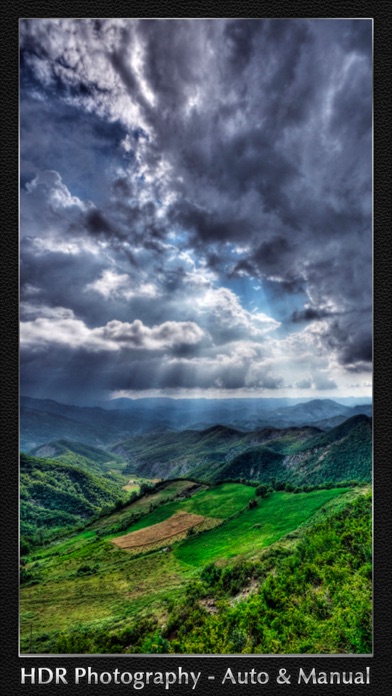

About Top Camera LITE
The description on the store listing
* TOP CAMERA IS NOT SUPPORTED ANYMORE. PLEASE LOOK FOR "TOP CAMERA 2".
Create beautiful photographs using this full-featured camera app designed for the advanced photographer, the beginner and everyone in between.
It combines features found in numerous camera apps and a few unique features and displays them in a no-nonsense, easy to use interface that allows you to concentrate on your creative side. An excellent HDR (High Dynamic Range) feature, VIDEO RECORDING, amazing SLOW SHUTTER mode and the use of FOLDERS for file management make it unique among the all camera apps. Folders, sharing, editing and effects add a whole different dimension you enter when you are finished in the …
Read the full description
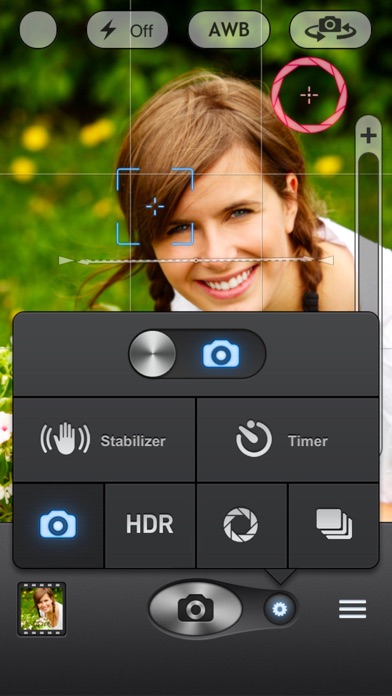
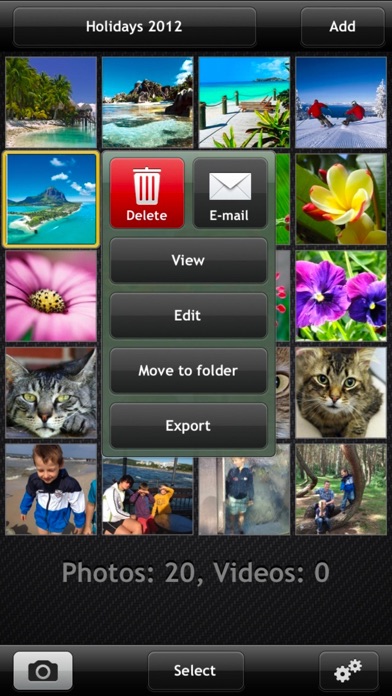
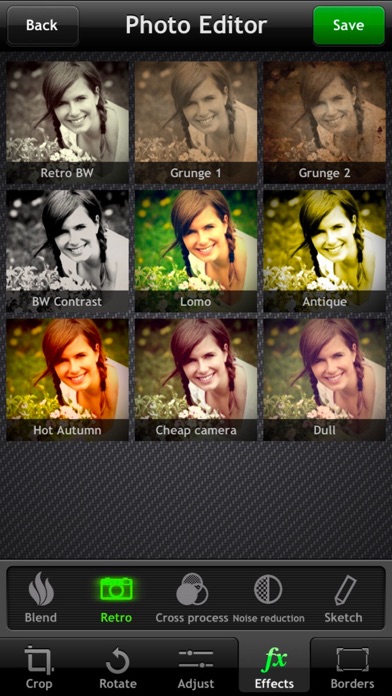
* TOP CAMERA IS NOT SUPPORTED ANYMORE. PLEASE LOOK FOR "TOP CAMERA 2". Create beautiful photographs using this full-featured camera app designed for the advanced photographer, the beginner and everyone in between. It combines features found in numerous camera apps and a few unique features and displays them in a no-nonsense, easy to use interface that allows you to concentrate on your creative side. An excellent HDR (High Dynamic Range) feature, VIDEO RECORDING, amazing SLOW SHUTTER mode and the use of FOLDERS for file management make it unique among the all camera apps. Folders, sharing, editing and effects add a whole different dimension you enter when you are finished in the full-featured shooting mode. This is the lite version of Top Camera and includes all the features of the paid app with low resolution capture. Please consider buying the full version for high resolution support. *** FEATURES *** 1. GENERAL App was designed in cooperation with Artist / Photographer, David Scott Leibowitz to bring you the highest quality in every detail. * file sharing integration * save images to the internal gallery, in system 'Photos' or in both 2. CAMERA In shooting mode, the app provides a host of visual aids to help you take the best photograph possible - quick, intuitive controls, two visual indicators , one to define focus, the 2nd indicator to define exposure, and many more. * "Volume" button shutter * "Sound" activated shutter * Video recording * Video zoom - full resolution, no frames dropped, no quality decrease! * LIVE ADJUSTMENTS: contrast, brightness, saturation, temperature * Stabilizer * Timer * Burst - rapid burst (about 6 photos per second) for low and medium quality * HDR - Auto and Manual mode available with using align algorithm * SLOW SHUTTER - Auto, Manual and Light trail modes * FOLDERS - organize your photos into folders. You can create new folder, delete, reorder, export, change names and move photos from one folder to another. * Zoom slider * AWB/Focus/Exposure lock * Screen Button * Grid * Virtual Horizon * Exposure box * Focus Box 3. PHOTO GALLERY Clicking the picture icon in the lower left corner brings you into the world of Folders, Viewing, Editing and Sharing. When you enter this section of the app, you see the contents of selected folder. * Folders * Export - paste image to clipboard, export to photos or send by e-mail * Share - send one or more images to FACEBOOK, TWITTER, PICASA, YOUTUBE, DROPBOX or FLICKR. * Add new photos - import from 'Photos', paste from clipboard or duplicate selected image * “Select” mode - when you switch to select mode you can quickly select many images, and then delete them, change folder, send by e-mail, share on Facebook/Twitter/Picasa/YouTube/Dropbox/Flickr, export to 'Photos' and copy to clipboard 4. VIEWER “View” button, or double tap on thumbnail will bring up the folder’s images for fullscreen viewing. * full resolution preview * slideshow * display image info * display GPS location in Maps 5. PHOTO EDITOR Tap on “Edit” button to open powerful photo editor. Here you can crop an image, fix your common photo problems like bad lighting, low contrast, fuzzy colors, apply special effects and add frame. If you are not happy, you can always revert to original image. * crop - free mode, keep ratio, square, 2x3, 3x4, 9x16, golden proportions * rotate - rotate 90 degrees left/right, flip horizontal/vertical * adjust - use sliders to adjust brightness, contrast, saturation, improve (definition, sharpen), temperature, tint, shadows, highlights * effect - 72 amazing effects: clarify, fake-hdr, sketch, auto contrast, sepia, greyscale, retro, grunge, lomo, cross process, NOISE REDUCTION and many more * borders - add simple border, vignette or edge blur
Installs
Apple does not publish download counts. Estimates are in testing.
We publish iOS estimates only after they pass a back-test against real numbers. Chart history below is measured.
Estimated store revenue Estimated Beta
App Store, worldwide, monthly rate from the last 12 chart days to 19 Nov 2026
Below the top 100 grossing apps in the markets we calibrate. In the United States that usually means under about $6.4M a month. App Store purchases and subscriptions only, before Apple's 15 to 30% fee. Ads and web payments are not included.
Ratings
31 ratings, 31 reviews
No rating breakdown published for this app.
Recent reviews
Latest public reviews from the store
No reviews in our sample for this app yet.
Top chart positions
Latest App Store chart ranks by country, last 10 days
Not in any tracked top chart in the last 10 days.
Top Camera LITE history
Release, install milestones, listing and store changes
- First released on the store 14 Sep 2011
Recent versions
Current version 4.91
- Version 4.915 Mar 2018
This update from Apple will improve the functionality of this app. No new features are included. - added iOS 11 compatibility
Listing keywords
Words and phrases Top Camera LITE repeats most in its store listing
Top phrases: top camera (4), export to photos (2), facebook twitter picasa (2), picasa youtube dropbox (2), send by mail (2).
Highlighted words also appear in the title. Counts cover the title, short description and description.
Compliance
What the listing and the app package show
- Store status
- Live
- Upkeep
- No update since 5 Mar 2018
- Age rating
- 4+
Apps like Top Camera LITE
 Video CollageaZeR DiLLs★ 4.08
 Vee for VideoMedious★ 2.98
 Beauty Camera -Selfie, StickerBhuvan Gupta★ 4.5
 FinalCamXShenzhen Xiaozhen Technology Co.,Ltd.★ 4.44
 Magic Studio - AI Photo EditorMagicStudio.com★ 4.62
 Foto Impresiones: 1 Hr PhotoSoftwareX★ 4.98
 SnapGeo - AI Location FinderRECEP ASLAN★ 4.24
 Family Photo Maker - AIRick-y Media★ 4.12
 BeautifAI: AI Try OnJAI UYGULAMA VE YAPAY ZEKA TEKNOLOJILERI ANONIM SIRKETI★ 4.36
Top Camera LITE: questions and answers
Who makes Top Camera LITE?
Top Camera LITE is published by Lucky Clan.
When was Top Camera LITE last updated?
The latest version (4.91) was released on 5 Mar 2018.
Is Top Camera LITE free?
Yes. Top Camera LITE is free to download.
Is Top Camera LITE still available?
Yes. Top Camera LITE is live on App Store as of 1 Jul 2026.
Track Top Camera LITE and its competitors
Watch any app for new versions, rating drops, chart moves and removals. Free plan, no card.