
- Installs
- —
- Apple does not publish download counts
- Rating
- 4.41
- Ratings
- 2.8K
- 2.8K reviews
- Version
- 2.2.0
- Updated 7 Jul 2026
- Released
- 26 Jun 2023
- Tracked since 11 May 2026
- Size
- 6 MB
- Needs 15.0
Also on Google Play: TradeLocker (3.8K ratings)
Screenshots



About TradeLocker
The description on the store listing
TradeLocker is the next-gen day trading platform built by listening to the needs and preferences of over 2.5 million traders.
It's designed to help both novice and experienced users make quick and accurate market decisions.
Experience the future of trading with TradeLocker, featuring high-quality charts and indicators for well-informed decisions, advanced risk management tools such as stop loss and take profit features, and a versatile platform for trading anytime, anywhere, and on any device.
TradeLocker Features:
- TradingView Charting
Gain access to hundreds of customizable charts and custom indicators with our TradingView integration.
- Risk Calculator
Set a SL price and specify …
Read the full description
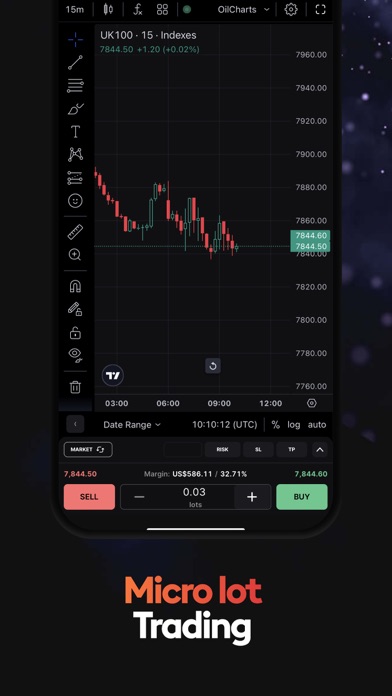
TradeLocker is the next-gen day trading platform built by listening to the needs and preferences of over 2.5 million traders. It's designed to help both novice and experienced users make quick and accurate market decisions. Experience the future of trading with TradeLocker, featuring high-quality charts and indicators for well-informed decisions, advanced risk management tools such as stop loss and take profit features, and a versatile platform for trading anytime, anywhere, and on any device. TradeLocker Features: - TradingView Charting Gain access to hundreds of customizable charts and custom indicators with our TradingView integration. - Risk Calculator Set a SL price and specify the $ amount you are willing to risk and the platform will automatically calculate the order amount. - SL&TP Calculator Auto-calculate Stop Loss & Take Profit values in $, %, ticks or the market price. - Trailing Stop Loss Unlike a regular stop loss that remains at a set level, a trailing stop loss automatically adjusts if the trade moves in a favourable direction. - On-Chart Trading Execute trades directly on the chart for a more streamlined experience. - One-Click Trading Streamline your trading and open positions quicker with a single click. - Micro Lot Trading Trade a minimum lot size of 0.01 to spread high-volume trading risks. - Trader-Friendly Interface Easily navigate and perform trading activities on our clean, customizable and intuitive interface. - 500+ Trading Assets Choose your favorite instrument pairs, including Forex majors, crypto, stocks and shares, metals, indices and more. How to start using TradeLocker: Currently, TradeLocker is only accessible via a broker (both Demo and Live accounts) or through a prop firm challenge (Demo). Not sure which broker to use? Simply go to tradelocker.com, fill out a form and choose available brokers or prop firms. Once you've chosen a broker, select TradeLocker as your platform of choice and your broker will send you an email with your credentials. If you're ready to take your trading to the next level, download TradeLocker and join the future of trading. Let’s connect on Discord where you can chat with our team, discuss potential features, share feedback and exchange experiences with fellow traders. "Neither this app or its contents should be regarded as professional or financial advice. This app is a suite of trading tools, meant to be used in connection with an account held by a trader with their brokerage firm. If you intend on using this app for real trading, you should understand how various financial products work and the risks you will be undertaking on your own. By using this app you will have access to information of a general nature (i.e., that does not address the circumstances of any particular individual). If you require further information, or otherwise a more comprehensive or complete statement of the related matters and regulations, you should seek the advice of a lawyer, your brokerage firm, or from a licensed financial service provider before you start trading."
Installs, last 30 days
Apple does not publish download counts. Estimates are in testing.
Estimated store revenue Estimated Beta
App Store, worldwide, monthly rate from the last 12 chart days to 19 Nov 2026
Below the top 100 grossing apps in the markets we calibrate. In the United States that usually means under about $6.4M a month. App Store purchases and subscriptions only, before Apple's 15 to 30% fee. Ads and web payments are not included.
Ratings
2,829 ratings, 2,829 reviews
- 5 ★78%
- 4 ★7.5%
- 3 ★2.5%
- 2 ★2.2%
- 1 ★10%
Recent reviews
Latest public reviews from the store
- 28 Mar 2026
Easy to use modern interface
TradeLocker stands out immediately for its clean, modern design. The interface feels intuitive, even if you’re coming from platforms like MetaTrader or ESPECIALLY TRADOVATE. Everything is where you expect it to be—placing trades, managing risk, and analyzing charts doesn’t feel cluttered or confusing. One of its biggest strengths is how easy it is to navigate. You don’t need hours of setup or tutorials to get comfortable. The layout is smooth, responsive, and clearly built with newer traders in mind, while still giving enough functionality for experienced traders. Charting is solid, with fast execution and minimal lag, which is crucial if you’re scalping or trading intraday like oil or indices. The platform also does a good job balancing simplicity with performance—you’re not overwhelmed with unnecessary features, but you still have what you need to trade effectively. Overall, TradeLocker delivers exactly what most traders want: a modern, user-friendly platform that doesn’t slow you down. It’s especially appealing if you’re tired of outdated, clunky trading software and want something that feels built for today’s market.
- 21 Jul 2025
Raise my anxiety less please.
I genuinely appreciate the sleek interface and features your platform offers, but I’ve been experiencing significant frustration and anxiety with a core functionality of the app — specifically, the process of setting a stop loss (SL) or take profit (TP) on an existing trade. At the moment, it feels unnecessarily difficult and stressful to manage risk once a position is open. The app seems to require that SL/TP levels be set before executing a trade, along with the need to select between “market” or “pending” orders. This multi-step process adds unnecessary friction in fast-moving markets where speed and simplicity are critical. What’s even more concerning is that every time I attempt to add or adjust an SL/TP after entering a trade, it stays in “draft” mode. These draft levels don’t seem to actually execute, and price often blows right past them — as if they were never set. This makes it extremely hard to feel in control of my risk, and I often find myself panicking trying to get my stop in place while the trade is already moving. Please consider simplifying the post-entry workflow. Ideally, I’d like the ability to enter a trade quickly and then simply dr
- 15 Apr 2025
An honest opinion from a previous trading view user
Don’t get me wrong I like trading view, I haven’t fully explored the indicators on TradeLocker or even at all, and was kind of wishy washy with the interface at first. But now that I understand it I love it. It’s actually very easy to use and extremely responsive in the times I’ve used it, no lag experienced so far. No issues with orders. I am used to bybit on a phone so swiping tabs is familiar with me to go between charts and open positions. Drag and drop feature works seamlessly. Now that I’ve got the hang of it I can place scalping trend continuation trades very fast. Good job TradeLocker I’ll be here for now!
- 18 Mar 2024
Great platform!
I don’t quite understand all the negative reviews.. I switched platforms due to my prop firm made me due to regulatory issues with traders in the US. I love tradingview and I now can mark up my charts for supply and demand levels with ease and trade off those areas. Execution is pretty spot on and it’s very easy to set stops. Also when you increase your lot size it auto calculates for risk before you place the trades and when you pull stops up or down, it’ll show you how much you’re risking as well. (which I really love that!) Only thing I’m not sure of is setting trailing stops, but overall if you like tradingview you’ll love tradelocker!
What reviewers bring up
Topics mentioned in the latest 8 reviews, by how many reviews mention them
Liked in good reviews (4 reviews)
- tradelocker 4
- trades 4
- charts 4
- execution 3
- platform 3
- trading 3
- issues 3
- experienced 2
Raised in bad reviews (2 reviews)
- making 2
- change 2
- close 2
- open 2
Top chart positions
Latest App Store chart ranks by country, last 10 days
Not in any tracked top chart in the last 10 days.
TradeLocker history
Release, install milestones, listing and store changes
- First released on the store 26 Jun 2023
Update frequency
How often TradeLocker ships a new version, month by month
2 updates in the last 12 months. Less often than most similar apps: they shipped a median of 3 updates in the same year.
Recent versions
Current version 2.2.0
- Version 2.2.07 Jul 2026
Authentication handle, UX improvements
- Version 2.1.120 Mar 2026
New environments Improved Auth
Listing keywords
Words and phrases TradeLocker repeats most in its store listing
Top phrases: stop loss (5), future of trading (2), trailing stop loss (2), brokerage firm (2), take profit (2).
Highlighted words also appear in the title. Counts cover the title, short description and description.
Compliance
What the listing and the app package show
- Store status
- Live
- Upkeep
- Updated 7 Jul 2026
- Age rating
- 17+
Apps like TradeLocker
 Republic: Private InvestingRepublic.co★ 4.75
 MTC Federal Mobile BankingMTC Federal Credit Union★ 4.76
 Crescent BankCrescent Bank★ 4.87
 DuGood Federal Credit UnionDuGood Federal Credit Union★ 4.82
 U.S. Bank Access® OnlineMobileU.S. Bancorp★ 4.45
 Innovations FCU Mobile BankingInnovations Financial Credit Union★ 4.82
 NVB MobileNodaway Valley Bank★ 4.86
 My Nymeo MobileNymeo Federal Credit Union★ 4.82
 Identity Guard: ID ProtectionIntersections Inc.★ 4.71
TradeLocker: questions and answers
Who makes TradeLocker?
TradeLocker is published by TradeLocker Limited.
When was TradeLocker last updated?
The latest version (2.2.0) was released on 7 Jul 2026.
Is TradeLocker free?
Yes. TradeLocker is free to download.
Is TradeLocker still available?
Yes. TradeLocker is live on App Store as of 19 Nov 2026.
Track TradeLocker and its competitors
Watch any app for new versions, rating drops, chart moves and removals. Free plan, no card.