
- Installs
- —
- Apple does not publish download counts
- Rating
- 4.63
- Ratings
- 15.2K
- 15.2K reviews
- Version
- 1.4.8
- Updated 29 Oct 2026
- Released
- 25 Jan 2021
- Tracked since 10 May 2026
- Size
- 178 MB
- Needs 15.0
Screenshots


About uScan - PDF Document Scanner
The description on the store listing
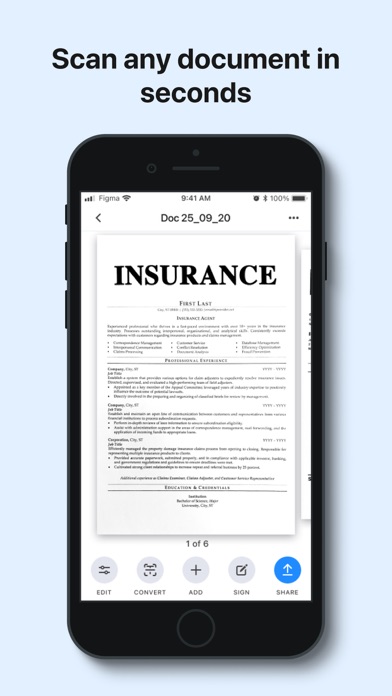
uScan is a fast scanner app that will turn your phone into a portable scanner that fits in your pocket!
Go paperless with our fast PDF scanner – keep high-quality documents handy.
Become more productive with our powerful free scanner app:
1. SCAN & EDIT ANY DOCUMENT
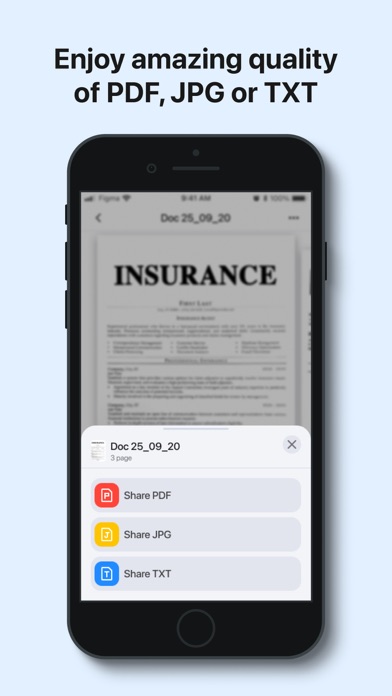
Scan anything you need, including receipts, contracts, paper notes, fax papers and books. Save, and share any document in just a few taps as multipage PDF or JPEG files.
A must-have for accountants, realtors, managers, small business owners, lawyers or students.
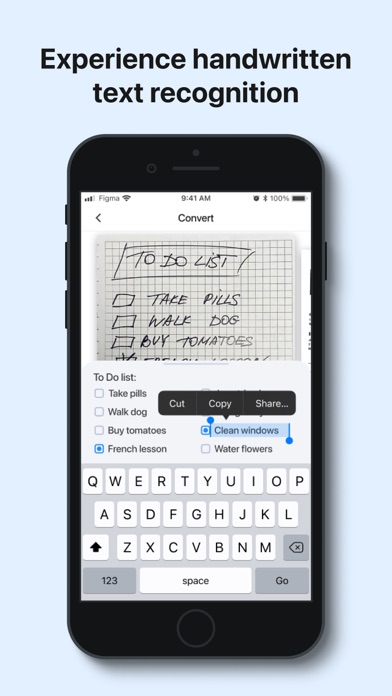
2. CONVERT IMAGE INTO EDITABLE TEXT
Extract text from any scanned page or image, edit it, and save as a new text document. Our highly accurate OCR scanner recognizes …
Read the full description
uScan is a fast scanner app that will turn your phone into a portable scanner that fits in your pocket! Go paperless with our fast PDF scanner – keep high-quality documents handy. Become more productive with our powerful free scanner app: 1. SCAN & EDIT ANY DOCUMENT Scan anything you need, including receipts, contracts, paper notes, fax papers and books. Save, and share any document in just a few taps as multipage PDF or JPEG files. A must-have for accountants, realtors, managers, small business owners, lawyers or students. 2. CONVERT IMAGE INTO EDITABLE TEXT Extract text from any scanned page or image, edit it, and save as a new text document. Our highly accurate OCR scanner recognizes all popular languages. 3. SIGN DOCUMENTS IN JUST ONE TAP Add an electronic signature to your contracts, invoices or bills and send them to business partners, colleagues, or clients on the go. 4. GET HIGH-QUALITY PDF or DOC files Our advanced scanning technology removes shadows, corrects perspective and distortion. Scan anything and get a professional looking PDF or DOC file. Keep the entire office in your pocket and increase your productivity at work, use scanner pro features to manage all your paperwork with ease. Additional features: - Smart image editor - Variety of filters B&W, grayscale or color - Easy sharing options - Multi Page scanning - Automatic shutter and border detection for any scannable object - File manager with folders and drag & drop - Built-in storage - Offline mode PRO scanner features: - Unlimited number of scans and folders - Text Recognition (OCR) - Signature Information about auto-renewal of subscription: - Subscription automatically renews unless auto-renew is turned off at least 24-hours before the end of the current period. - Subscriptions can be managed by the user and auto-renewal can be turned off by going to the user’s Account Settings after purchase. - Any unused portion of the free trial period will be forfeited when the user purchases a subscription. - Payment will be charged to iTunes Account at confirmation of purchase. - An account will be charged for renewal within 24 hours prior to the end of the current period. The amount charged will depend on the selected plan. Privacy Policy: https://lopofist.limited/scanner/privacy.html Terms Of Service: https://lopofist.limited/scanner/tos.html Subscription Terms: https://lopofist.limited/scanner/subscription.html
Installs, last 30 days
Apple does not publish download counts. Estimates are in testing.
Estimated store revenue Estimated Beta
App Store, worldwide, monthly rate from the last 14 chart days to 21 Nov 2026
Below the top 100 grossing apps in the markets we calibrate. In the United States that usually means under about $6.4M a month. App Store purchases and subscriptions only, before Apple's 15 to 30% fee. Ads and web payments are not included.
Ratings
15,150 ratings, 15,150 reviews
No rating breakdown published for this app.
Recent reviews
Latest public reviews from the store
- 11 Mar 2026
Only once
I have only used this once and will not use again $6.99 a week is to much money for me I use this for personal not business
- 9 May 2022
Garry Denson
I’ve used different scanner apps over the years and this app is the best. Very easy to use and the feature that converts typing is awesome. I have recommended this app to all of my friends and family. Thanks for creating this.
- 15 Apr 2021
Best scanning app
Overall, this is my favorite scanning app. It’s my go-to first choice. uScan is quick, nice-looking, and handles multiple use cases. The border detection is pretty good, and smart naming with the ability to rename the document and the ability to auto-upload to cloud services are both really nice. Due to the Coronavirus virus - we must work from home. I needed the simplest way to do work things remotely. My sister is a spring student at a major university found this app for me. It's obvious that the developers of uScan made the user experience a priority. And that's what makes this my default scanning app (along with the excellent scanning accuracy of course). I know only a few applications that have such useful thing: single-page scans are saved as JPEG without having to save to camera roll, it is really useful for me! In the past scanners I used, I found the OCR to be completely useless, but when I tested this feature in uScan, I found that it's either vastly improved compared to other scanner apps or I was just really lucky with it for a change. Nevertheless, it works great for me, I will gladly recommend this app to all my friends!
- 9 Apr 2021
Fast, convenient!
While looking for a free scanning app, I stumbled upon uScan. I work in commercial construction and use this app every day for work. I use it to send my weekly hours, any reports or receipts that need to be completed. I also scan parts of my drawings for use in the field or for sending to other foremen and workers on large jobs that are far away from me. This app is easy to use and has changed my workflow for the better. It works great for my job, but I use it for many other purposes. For some reason, my daughter-in-law needed a photograph of her husband. My daughter calls and asks if I can take the authorization form she forgot to the school. Instead of driving there, I scan it, email it to the teacher, and then send the text to my daughter as an extra measure. Another daughter was going on an international school trip, the teacher needed a copy of her passport, immediately she was there. Not to mention, uScan is great for the job, where I use it primarily for archiving receipts that need to be billed to specific customers. I have immediate access to the scanner! No lost receipts and it's completely secure! I do not want without it.
What reviewers bring up
Topics mentioned in the latest 8 reviews, by how many reviews mention them
Liked in good reviews (4 reviews)
- scanner 3
- completely 2
- scanning 2
- feature 2
- friends 2
- without 2
- needed 2
- uscan 2
Raised in bad reviews (4 reviews)
- iphone 2
- week 2
- less 2
- try 2
Top chart positions
Latest App Store chart ranks by country, last 10 days
- Countries ranked
- 40 of 50
- Best rank
- #18
- Top 10 placements
- 0
- of 40 chart placements
- Average rank
- #80.3
Best countries on App Store
- 🇯🇵 Japan · Top grossing, Business#18
- 🇲🇽 Mexico · Top grossing, Business#52
- 🇨🇭 Switzerland · Top grossing, Business#54
- 🇸🇬 Singapore · Top grossing, Business#55
- 🇦🇷 Argentina · Top grossing, Business#60
- 🇨🇱 Chile · Top grossing, Business#65
| Country | Chart | Category | Rank | Best (10 days) | Date |
|---|---|---|---|---|---|
| 🇯🇵 Japan | Top grossing | Business | #18 | #15 | 20 Nov 2026 |
| 🇲🇽 Mexico | Top grossing | Business | #52 | #50 | 20 Nov 2026 |
| 🇨🇭 Switzerland | Top grossing | Business | #54 | #41 | 20 Nov 2026 |
| 🇸🇬 Singapore | Top grossing | Business | #55 | #52 | 20 Nov 2026 |
| 🇦🇷 Argentina | Top grossing | Business | #60 | #51 | 20 Nov 2026 |
| 🇨🇱 Chile | Top grossing | Business | #65 | #42 | 20 Nov 2026 |
| 🇹🇷 Türkiye | Top grossing | Business | #66 | #66 | 19 Nov 2026 |
| 🇬🇷 Greece | Top grossing | Business | #68 | #39 | 19 Nov 2026 |
| 🇨🇿 Czechia | Top grossing | Business | #68 | #64 | 18 Nov 2026 |
| 🇳🇿 New Zealand | Top grossing | Business | #69 | #54 | 20 Nov 2026 |
uScan - PDF Document Scanner history
Release, install milestones, listing and store changes
- First released on the store 25 Jan 2021
Update frequency
How often uScan - PDF Document Scanner ships a new version, month by month
4 updates in the last 12 months. More often than most similar apps: they shipped a median of 3 updates in the same year.
Recent versions
Current version 1.4.8
- Version 1.4.829 Oct 2026
Thank you for staying with us! In this version we made bug fixes to improve the user experience.
- Version 1.4.720 Jul 2026
Thank you for staying with us! In this version we made bug fixes to improve the user experience.
- Version 1.4.630 Jun 2026
Thank you for staying with us! In this version we made bug fixes to improve the user experience.
- Version 1.4.514 Apr 2026
Thank you for staying with us! In this version we made bug fixes to improve the user experience.
Listing keywords
Words and phrases uScan - PDF Document Scanner repeats most in its store listing
Top phrases: pdf or doc (2), auto renewal (2), current period (2), high quality (2), turned off (2).
Highlighted words also appear in the title. Counts cover the title, short description and description.
Compliance
What the listing and the app package show
- Store status
- Live
- Upkeep
- Updated 29 Oct 2026
- Age rating
- 4+
Apps like uScan - PDF Document Scanner
 HoneyBook - Small Business CRMHoneyBook Inc.★ 4.77
 CoyoteGOCoyote Logistics LLC★ 4.65
 Trainline Business EUCapitaine Train★ 4.74
 Invoice Generator - ZohoZoho Corporation★ 4.87
 2nd Line - Second phone numberPatel Sardarben★ 4.59
 Cisco JabberCisco★ 4.57
 ScheduleFlex by ShiftboardShiftboard, Inc.★ 4.7
 Avigilon Alta OpenOpenPath Security, Inc.★ 4.8
 HD Supply Easy Order AppHD Supply, Inc.★ 4.82
uScan - PDF Document Scanner: questions and answers
Who makes uScan - PDF Document Scanner?
uScan - PDF Document Scanner is published by Lopofist Limited.
When was uScan - PDF Document Scanner last updated?
The latest version (1.4.8) was released on 29 Oct 2026.
Is uScan - PDF Document Scanner free?
Yes. uScan - PDF Document Scanner is free to download.
Is uScan - PDF Document Scanner still available?
Yes. uScan - PDF Document Scanner is live on App Store as of 21 Nov 2026.
Track uScan - PDF Document Scanner and its competitors
Watch any app for new versions, rating drops, chart moves and removals. Free plan, no card.