
- Installs
- —
- Apple does not publish download counts
- Rating
- 4.79
- Ratings
- 9.8K
- 9.8K reviews
- Version
- 4.4.1
- Updated 28 Oct 2026
- Released
- 9 Mar 2020
- Tracked since 10 May 2026
- Size
- 283 MB
- Needs 16.0
Screenshots


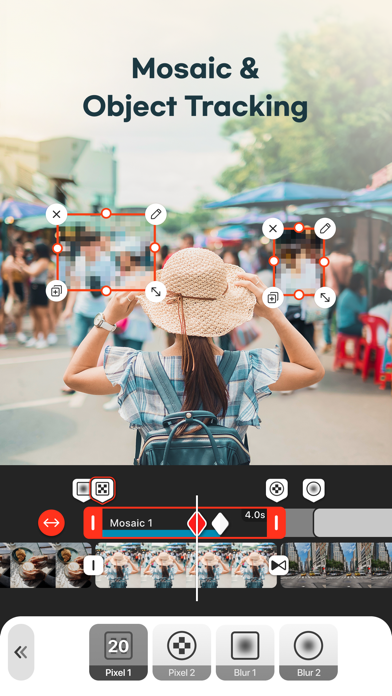


About VDIT - Video Caption Editor
The description on the store listing
Looking for a free video editor that’s powerful, fast, and beginner-friendly? VDIT is a mobile video editing app designed for creators who want full control over their videos, from cut editing to professional-level effects. Whether you're making Reels, Shorts, YouTube videos, or daily vlogs, VDIT helps you create, style, and export your content in high quality.
No need to pay upfront—VDIT gives you powerful free tools to get started. Try our Quick Start feature and create stunning, viral videos with just one tap! As your editing skills grow, you can explore premium features at your own pace.
Create faster with smart AI editing tools
Even if you've never used AI tools before, VDIT helps …
Read the full description
Looking for a free video editor that’s powerful, fast, and beginner-friendly? VDIT is a mobile video editing app designed for creators who want full control over their videos, from cut editing to professional-level effects. Whether you're making Reels, Shorts, YouTube videos, or daily vlogs, VDIT helps you create, style, and export your content in high quality. No need to pay upfront—VDIT gives you powerful free tools to get started. Try our Quick Start feature and create stunning, viral videos with just one tap! As your editing skills grow, you can explore premium features at your own pace. Create faster with smart AI editing tools Even if you've never used AI tools before, VDIT helps you edit faster with smart automation. - Create fast, accurate AI Auto captions without privacy concerns. - Simply add video clips to templates, and your video is created automatically. - Instantly remove backgrounds with AI. - Auto-track moving objects to pin text, stickers, and PIP layers. - Convert text into natural voiceovers with built-in text-to-speech (TTS). - Reduce background noise in audio and video for clearer results. Add cinematic effects and stylish subtitles - Apply 160+ aesthetic filters and visual effects. - Import your own LUTs to apply custom color styles. - Add personality with subtitle templates, drawing tools, and shape overlays. - Great for daily vlogs, travel content, or aesthetic reels with emotional music and captions. Edit seamlessly across iPhone and iPad - Easily edit subtitles, music, and overlays with a touch-friendly interface. - Boost your workflow with undo/redo and iPad keyboard shortcuts. - Share your projects across devices anytime. Style your video with text, subtitles, and stickers You can easily add and customize subtitles to match your style. - Choose from 140+ subtitle and title presets. - Use handwritten fonts, animated text, and motion effects. - Automatically track and blur faces with AI Face Detection Blur. - Use motion blur, dust, and Blur Invert to create cinematic edits. Enhance your video with royalty-free music and sound effects - 400+ royalty-free background music tracks and sound effects included. - Extract audio from video, record voice, or import your own music. - Automatically adjust music to match your video’s duration. - Export audio from your video and save it in M4A, MP3, or WAV with preferred quality. Fine-tune every clip with advanced editing features - Trim, split, reverse, or control speed precisely. - Add freeze frames, cinematic pan/zoom (Ken Burns), and transitions. - Overlay videos, photos, GIFs, and Live Photos. - Create dynamic edits with keyframes, speed curves, and background blur. Export and share your videos in high quality Perfect for social media, business, and marketing, with no watermark on your exports. - Choose from SD, HD, QHD, FHD, or 4K output at 24–60 FPS. - Edit fast with preset ratios for Reels, Shorts, TikTok, and YouTube. - Save as video, GIF, or still image. - Customize codec, bitrate, HDR settings for professional results. Unlock all premium features with VDIT PRO - Enjoy full access with a monthly or annual subscription. - You can cancel anytime, and your premium features will stay active until your current billing period ends. - You can turn off auto-renewal anytime in iTunes account settings. - Your plan stays active until the end of the current billing period. Partial refunds are not available. VDIT is a video editing app that grows with you.Need help figuring out how to use AI background removal or text editing? Visit [Settings > Help] in the app or contact us at [email protected]. Turn everyday moments into unforgettable memories with VDIT. Instagram: https://www.instagram.com/vditapp Terms of Use: https://www.imgbase.me/vdit/terms/termsofuse.html
Installs, last 30 days
Apple does not publish download counts. Estimates are in testing.
Estimated store revenue Estimated Beta
App Store, worldwide, monthly rate from the last 12 chart days to 19 Nov 2026
Below the top 100 grossing apps in the markets we calibrate. In the United States that usually means under about $6.4M a month. App Store purchases and subscriptions only, before Apple's 15 to 30% fee. Ads and web payments are not included.
Ratings
9,845 ratings, 9,845 reviews
- 5 ★87%
- 4 ★8.0%
- 3 ★2.4%
- 2 ★0.8%
- 1 ★1.3%
Recent reviews
Latest public reviews from the store
- 11 Feb 2026
Excellent application
This is an excellent app you take pictures and make it into a video put your music to it or their music. I’ve downloaded Apple Music and some of the area with some of it, they don’t let you use it because of copyright so I’m looking for another app that allows that because we have laws here that we can use music from artist we have last year. It is free share copyright act from 1976, so that’s the only flaw that they have, I’d like to see them come up with taking a picture and make it into a AI movement video that would be cool
- 15 Feb 2024
REALLY good and easy to use!!
I’ve been a premium subscriber for over a year now. I will be totally up-front in saying that I had *zero* video editing experience before I got this app, and really just downloaded it to make a funny video of my cat. I’ve now graduated to making some pretty amazing content…and can do so with ease and in much less time than you’d think. I can assure you that the premium subscription is ABSOLUTELY worth it if you are a frequent content maker, or just want access to the myriad of features that the app offers. Highly recommend!!
- 11 Feb 2024
Makes my creations pro & easy to edit
I luv this app it’s easy to use with professional results. Worked so seamless without pop ups unless I clicked a pro feature. After a few edits I knew I was going to unlock pro! I don’t like auto pay so I’m going to buy with the one lifetime payment. When creating video it can be so frustrating. When adding photo or video clips each item I select is numbered in sequence so it’s easy to set this up and add or remove in easy to understand steps. I can not only add audio clips I can place them where I want from a few photos or the entire video with separate volume controls for each audio I can add as many audio clips as I wanted without messing up my creation if I change my mind. Until I found this app I was not sure I was going to be able to create my own movies and look like the pros! I’ll use this app as far as I can and buy another app for more fancy features etc. Thanks for this app it’s more than I could ever dream of doing on my own.
- 3 Oct 2021
Lookie Dis! Made in my PHONE‼️👏🙋♂️
I AM still (so) Amazed, the quality of control Dis App Allows me to Do. Such a Cool Tool 😎👍 dis Video App be! And yet, what gets easily overlooked, Is just how many 'n much, I can easily do (produce) and share, ALL on Dis Small Cell Phone!! What used to take a huge studio full of Equip, I can Now easily do, even better, using just the Tip of my Finger ☝️👉👇, on a small screen on a device that's smaller than My Foot. 👣👍 This app has solved problem issues I don't even need to resolve. An "Absolutely Brilliant" App that has pre-solved so many issues, I only need to think about the message within the final Video. The Absolutely Amazing‼️👍👏 👌
What reviewers bring up
Topics mentioned in the latest 8 reviews, by how many reviews mention them
Liked in good reviews (5 reviews)
- video 5
- features 3
- application 2
- downloaded 2
- experience 2
- absolutely 2
- another 2
- allows 2
Raised in bad reviews (3 reviews)
- editing 3
- delete 3
- project 2
- videos 2
- adjust 2
- simply 2
- other 2
- these 2
Top chart positions
Latest App Store chart ranks by country, last 10 days
- Countries ranked
- 2 of 50
- Best rank
- #38
- Top 10 placements
- 0
- of 3 chart placements
- Average rank
- #69.7
Best countries on App Store
- 🇰🇷 South Korea · Top grossing, Photo & Video#38
- 🇻🇳 Vietnam · Top grossing, Photo & Video#97
| Country | Chart | Category | Rank | Best (10 days) | Date |
|---|---|---|---|---|---|
| 🇰🇷 South Korea | Top grossing | Photo & Video | #38 | #36 | 19 Nov 2026 |
| 🇰🇷 South Korea | Top free | Photo & Video | #74 | #63 | 19 Nov 2026 |
| 🇻🇳 Vietnam | Top grossing | Photo & Video | #97 | #97 | 18 Nov 2026 |
VDIT - Video Caption Editor history
Release, install milestones, listing and store changes
- First released on the store 9 Mar 2020
Update frequency
How often VDIT - Video Caption Editor ships a new version, month by month
10 updates in the last 12 months. More often than most similar apps: they shipped a median of 1 updates in the same year.
Recent versions
Current version 4.4.1
- Version 4.4.028 Oct 2026
- Optimized VDIT for iPhone Duo. - Added Dark Mode support that follows your device’s appearance setting. - 20 new background music tracks for birthdays and weddings. - Bug fixes and performance improvements. We’re always improving VDIT for a better, more reliable editing experience. If you have feedback or run into any issues, contact us anytime through the app.
- Version 4.2.227 Aug 2026
- AI Auto Edit: let AI edit your clips based on your chosen video length and editing pace. Your selected music is then trimmed or looped to fit the finished video. - Save Clips Individually: export selected clips from your project as individual videos with your edits applied. - Edit Text Styles for Selected Text: apply bold, italic, underline, and strikethrough formatting to selected text. - Audio Boost Up to 500%: increase your audio volume up to 500%. - Template Search: find the templates you need faster. - Bug fixes and performance improvements. We’re always improving VDIT to deliver a better editing experience and reliable performance. If you have feedback or run into any issues, contact us anytime through the app.
- Version 4.2.119 Aug 2026
- AI Auto Edit: let AI edit your clips based on your chosen video length and editing pace. Your selected music is then trimmed or looped to fit the finished video. - Save Clips Individually: export selected clips from your project as individual videos with your edits applied. - Edit Text Styles for Selected Text: apply bold, italic, underline, and strikethrough formatting to selected text. - Audio Boost Up to 500%: increase your audio volume up to 500%. - Template Search: find the templates you need faster. - Bug fixes and performance improvements. We’re always improving VDIT to deliver a better editing experience and reliable performance. If you have feedback or run into any issues, contact us anytime through the app.
- Version 4.2.04 Aug 2026
- AI Auto Edit: let AI edit your clips based on your chosen video length and editing pace. Your selected music is then trimmed or looped to fit the finished video. - Save Clips Individually: export selected clips from your project as individual videos with your edits applied. - Edit Text Styles for Selected Text: apply bold, italic, underline, and strikethrough formatting to selected text. - Audio Boost Up to 500%: increase your audio volume up to 500%. - Template Search: find the templates you need faster. We’re always improving VDIT to deliver a better editing experience and reliable performance. If you have feedback or run into any issues, contact us anytime through the app.
Listing keywords
Words and phrases VDIT - Video Caption Editor repeats most in its store listing
Top phrases: premium features (3), current billing period (2), faster with smart (2), active until (2), ai auto (2).
Highlighted words also appear in the title. Counts cover the title, short description and description.
Compliance
What the listing and the app package show
- Store status
- Live
- Upkeep
- Updated 28 Oct 2026
- Age rating
- 4+
Apps like VDIT - Video Caption Editor
 Blurrr-Music video editorTBPS INTERNATIONAL★ 4.64
 OpenCut: No WatermarkJay Patel★ 4.68
 minutiae: Real Lifeminutiae, LLC★ 4.68
 Ghost Lens AR Fun Movie MakerShenzhen Qianhai Happy Tour Network Technology Co., Ltd.★ 4.5
 Slow-Fast Motion Video EditorAlan Cushway★ 4.71
 Phonty - Perfect Photo EditorSenfoni★ 4.41
 FilterRoom - Face EditorOneUnity Digital Development Limited★ 4.24
 IntroTube: Intro Video MakerPolymath Company Limited★ 4.56
 All Video SaverAditya Sharma★ 4.27
VDIT - Video Caption Editor: questions and answers
Who makes VDIT - Video Caption Editor?
VDIT - Video Caption Editor is published by ImgBase, Inc..
When was VDIT - Video Caption Editor last updated?
The latest version (4.4.1) was released on 28 Oct 2026.
Is VDIT - Video Caption Editor free?
Yes. VDIT - Video Caption Editor is free to download.
Is VDIT - Video Caption Editor still available?
Yes. VDIT - Video Caption Editor is live on App Store as of 19 Nov 2026.
Track VDIT - Video Caption Editor and its competitors
Watch any app for new versions, rating drops, chart moves and removals. Free plan, no card.