
- Installs
- —
- Apple does not publish download counts
- Rating
- 3.14
- Ratings
- 14
- 14 reviews
- Version
- 2
- Updated 24 Jan 2023
- Released
- 25 Apr 2019
- Tracked since 10 May 2026
- Size
- 67 MB
- Needs 15.0
Screenshots
About VectorPad: Image Vectorisation
The description on the store listing
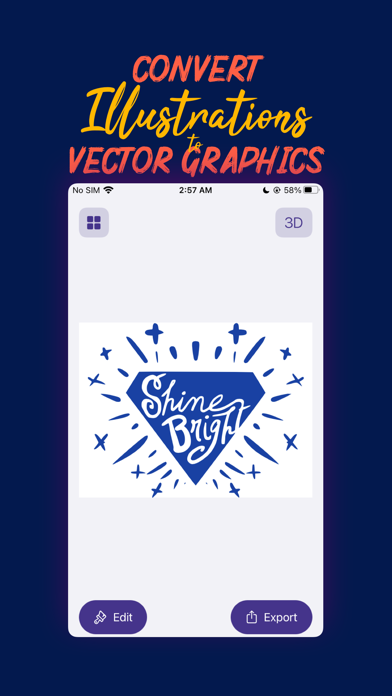
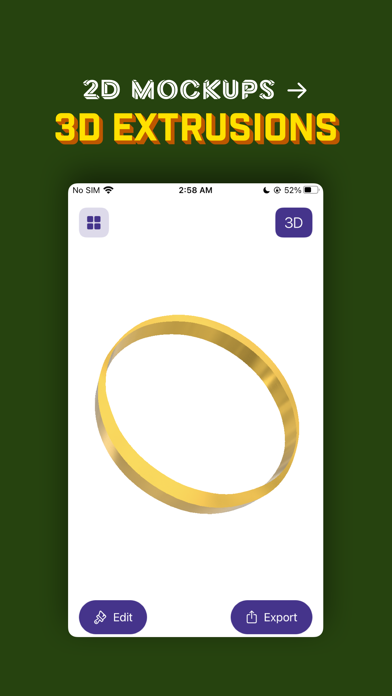
VectorPad makes it easy for you to turn your designs into Vector Graphics and 3D extrusions, be it sketches on paper, or drawings made in an illustration app.
Convert to Vector Graphics
Capture an image of your sketch, pick an image file from the Cloud or just drop an image into Vectorpad, and it creates a scalable vector artwork for your illustration in no time at all.
Export Anywhere
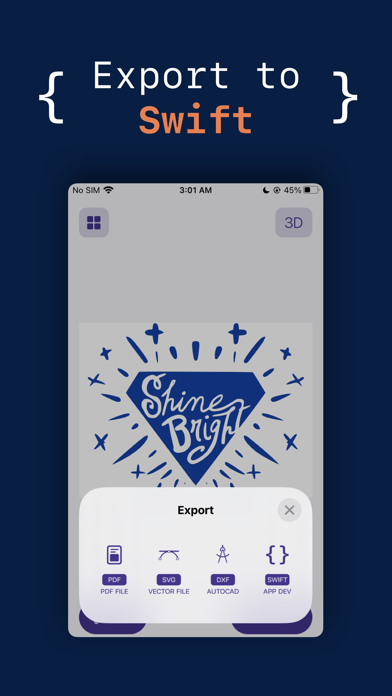
VectorPad allows you to convert your graphics into multiple file formats - SVG (Scalable Vector Graphics), PDF, DXF (Drawing Exchange Format for CAD software) and Swift code with native graphics in seconds.
It’s your go to tool for creating Vector Illustrations, Logos, Animation Assets, Game Assets, UI …
Read the full description
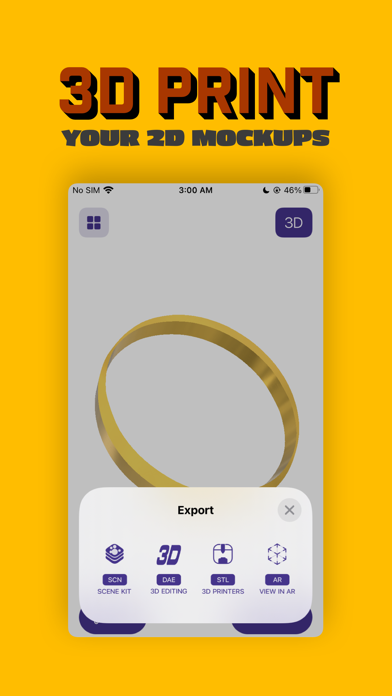
VectorPad makes it easy for you to turn your designs into Vector Graphics and 3D extrusions, be it sketches on paper, or drawings made in an illustration app. Convert to Vector Graphics Capture an image of your sketch, pick an image file from the Cloud or just drop an image into Vectorpad, and it creates a scalable vector artwork for your illustration in no time at all. Export Anywhere VectorPad allows you to convert your graphics into multiple file formats - SVG (Scalable Vector Graphics), PDF, DXF (Drawing Exchange Format for CAD software) and Swift code with native graphics in seconds. It’s your go to tool for creating Vector Illustrations, Logos, Animation Assets, Game Assets, UI Assets, Architectural Blueprints and much more. Create 3D Graphics VectorPad also lets you generate 3D Extrusions from your sketches or image files. It makes it easy for you to generate 3D graphics, which can be used in professional 3D editing software, for Rapid Prototyping, and as Three Dimensional Assets in your next iOS Game. You can also edit the 3D object to change its size and materials that are physically rendered and offer a real and authentic outlook to your 3D Drawing. 3D Printing has never been easier You can use VectorPad to export your object into a STL file, which could be sent to a 3D printer to print real objects. View in AR Want to see how your creation looks like in a real world. VectorPad offers an option to view your 3D Objects in Augmented Reality. VectorPad’s advanced augmented reality viewer leverages ARKit 2 to offer realistic renders with real time environment maps, shadows and lighting. View and Export other 3D Files You can even pick a previously generated 3D object and export it in a different format of your choice. Industry Standard Export Options You can export your 3D Graphics into industry standard formats like DAE (widely used in 3D Editing software), STL (for 3D Printing) and SCN (SceneKit document). — Export options in VectorPad can be unlocked by subscribing to VectorPad+ at a recurring monthly fee. VectorPad+ is offered in two options: 1. VectorPad+ 2D Access: Allows users to unlock all export options for two dimensional vector graphics. VectorPad+ 2D is available at $2.99 per month with a 7 day free trial. 2. VectorPad+ All Access: Unlocks all export options for both two dimensional vector graphics, and three dimensional extrusions. VectorPad+ All Access is available at $4.99 per month with a 7 day free trial. Please Note: VectorPad+ is charged to your iTunes Account at confirmation of purchase. It will renew on the day before the current subscription period ends. You can cancel auto renewal any time from the settings screen. You can switch between the two subscription options after you pick one, but your trial period will end immediately if you do, so it’s best to wait till your free week is over before changing. Subscription automatically renews unless auto-renew is turned off at least 24 hours before the end of the current period. Your account will be charged for renewal within 24 hours prior to the end of the current period. Subscriptions may be managed by the user and auto renewal may be turned off by going to the settings after the purchase. Any used portion of a free trial period, if offered will be forfeited when the user purchases a subscription to that publication, where applicable. You can read the terms of use at: squircleapps.com/vectorpad/terms — At the moment VectorPad only supports monochromatic vectorisations. i.e. any image that you pick is first converted into its black and white representation and then vectorised. The darker areas form the vector graphic and the lighter areas are left out.
Installs
Apple does not publish download counts. Estimates are in testing.
We publish iOS estimates only after they pass a back-test against real numbers. Chart history below is measured.
Estimated store revenue Estimated Beta
App Store, worldwide, monthly rate from the last 12 chart days to 19 Nov 2026
Below the top 100 grossing apps in the markets we calibrate. In the United States that usually means under about $6.4M a month. App Store purchases and subscriptions only, before Apple's 15 to 30% fee. Ads and web payments are not included.
Ratings
14 ratings, 14 reviews
No rating breakdown published for this app.
Recent reviews
Latest public reviews from the store
No reviews in our sample for this app yet.
Top chart positions
Latest App Store chart ranks by country, last 10 days
Not in any tracked top chart in the last 10 days.
VectorPad: Image Vectorisation history
Release, install milestones, listing and store changes
- First released on the store 25 Apr 2019
Update frequency
How often VectorPad: Image Vectorisation ships a new version, month by month
0 updates in the last 12 months. Less often than most similar apps: they shipped a median of 1 updates in the same year.
Recent versions
Current version 2
- Version 224 Jan 2023
Introducing VectorPad 2: VectorPad 2 has been redesigned from the ground up for faster vectorisations and more reliable exports. iCloud Sync is now supported. Improvements to the Swift format export. AR Visualisations now appear in a better view.
Listing keywords
Words and phrases VectorPad: Image Vectorisation repeats most in its store listing
Top phrases: vector graphics (5), export options (4), 3d graphics (3), 3d editing software (2), dimensional vector graphics (2).
Highlighted words also appear in the title. Counts cover the title, short description and description.
Compliance
What the listing and the app package show
- Store status
- Live
- Upkeep
- No update since 24 Jan 2023
- Registered in
- India
- Age rating
- 4+
Apps like VectorPad: Image Vectorisation
 Library of AviationNazmi Yavuz★ 4.82
 MyNOVECNorthern Virginia Electric Cooperative★ 2.28
 打工人小组件光翔 卓★ 4.96
 TruckbaysTruckbays LLC★ 4.3
 Tornado PRO PlayerMohammed Altam★ 4.44
 VDX - Video ManagerARISEPEAK LP★ 1.74
 TV CastingZeasn Info Technology Co., Ltd.★ 1.86
 Mil-Dot BallisticsTom Holsten★ 3.82
 MySontiqSontiq, Inc.★ 2.4
VectorPad: Image Vectorisation: questions and answers
Who makes VectorPad: Image Vectorisation?
VectorPad: Image Vectorisation is published by Squircle Apps LLP, a developer based in IN.
When was VectorPad: Image Vectorisation last updated?
The latest version (2) was released on 24 Jan 2023.
Is VectorPad: Image Vectorisation free?
Yes. VectorPad: Image Vectorisation is free to download.
Is VectorPad: Image Vectorisation still available?
Yes. VectorPad: Image Vectorisation is live on App Store as of 1 Jul 2026.
Track VectorPad: Image Vectorisation and its competitors
Watch any app for new versions, rating drops, chart moves and removals. Free plan, no card.