
- Installs
- —
- Apple does not publish download counts
- Rating
- 4.82
- Ratings
- 6.4K
- 6.4K reviews
- Version
- 1.35.0
- Updated 26 Oct 2026
- Released
- 22 Nov 2020
- Tracked since 10 May 2026
- Size
- 233 MB
- Needs 17.2
Also on Google Play: vFlat Scan - PDF Scanner, OCR (178K ratings)
Screenshots


About vFlat Scan - PDF Scanner, OCR
The description on the store listing
An Ultra-convenient, Lightning-fast, High-quality scanning app vFlat.
Main features of vFlat
Auto-Recognizing of Scan Area
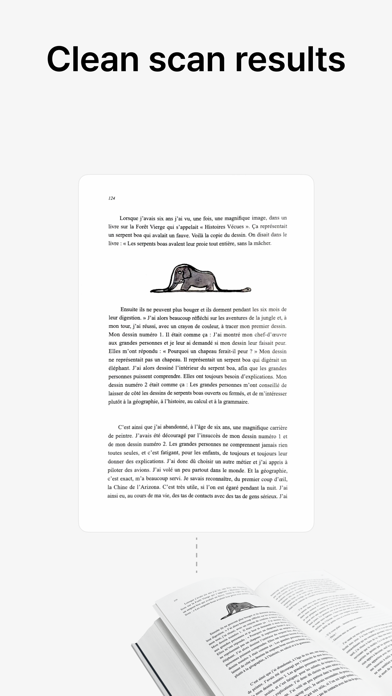
vFlat automatically recognizes borders of documents or book pages to scan. You can get clear-cut scan results from any angle without manual cropping.
Automatic Capturing
It recognizes the scan target and captures automatically without having to press the button repeatedly. Scanning is quicker and easier when capturing hundreds of book pages or a lot of paperwork.
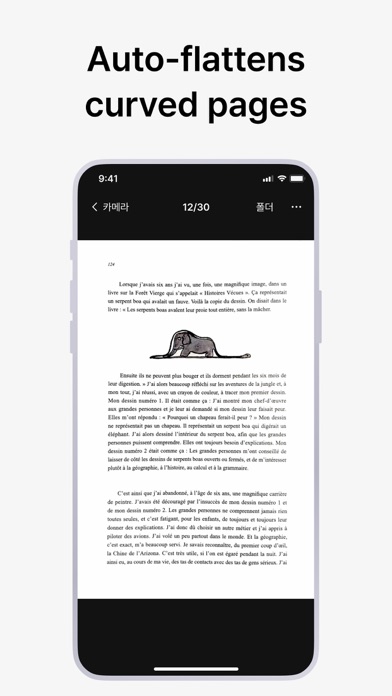
Flattening Curved Pages
It automatically straightens the curved surface of book pages. vFlat Scans as if they were captured with a professional book scanner, without having to taking pieces of the book. …
Read the full description
An Ultra-convenient, Lightning-fast, High-quality scanning app vFlat. Main features of vFlat Auto-Recognizing of Scan Area vFlat automatically recognizes borders of documents or book pages to scan. You can get clear-cut scan results from any angle without manual cropping. Automatic Capturing It recognizes the scan target and captures automatically without having to press the button repeatedly. Scanning is quicker and easier when capturing hundreds of book pages or a lot of paperwork. Flattening Curved Pages It automatically straightens the curved surface of book pages. vFlat Scans as if they were captured with a professional book scanner, without having to taking pieces of the book. Two-page Capturing The left and right pages of a book are captured with a single click and they are automatically divided and saved. Get fast results, even when scanning thick books. Free Text Recognition (OCR) It converts scanned images to text for free through text recognition. You can copy the converted text and easily share it with friends or colleagues. Exporting to various formats (PDF, JPG, TXT) You can convert scanned images into PDF files and image files(JPG) and text files(TXT). You can convert the file into a format suitable for your purpose. Terms of Use and Privacy Policy vFlat does not collect your personal information and scan data without your explicit consent. · Terms of Use https://vflat.page.link/terms_en · Privacy Policy https://vflat.page.link/privacy_en Information on access rights · Camera: Camera access is required to take a document. · Photo Library: Access permission is required to save captured images to the photo library. (Optional) We look forward to hearing from you! If you like vFlat, please leave a review. Please send your comments and suggestions about vFlat to the channels below. · Email: [email protected]
Installs, last 30 days
Apple does not publish download counts. Estimates are in testing.
Estimated store revenue Estimated Beta
App Store, worldwide, monthly rate from the last 13 chart days to 20 Nov 2026
Below the top 100 grossing apps in the markets we calibrate. In the United States that usually means under about $6.4M a month. App Store purchases and subscriptions only, before Apple's 15 to 30% fee. Ads and web payments are not included.
Ratings
6,381 ratings, 6,381 reviews
No rating breakdown published for this app.
Recent reviews
Latest public reviews from the store
- 14 Feb 2026
Feature Request: Use native Apple Photo Picker for imports!!!!!
vFlat Scan is an incredible tool for scanning, but the current photo import interface is a major bottleneck for power users. Currently, the app uses a custom wrapper for the photo library that is significantly less functional than the standard iOS implementation. If you import photos from an external camera (which many of us do for high-quality scans), the app forces a "Recents" view that sorts by "date added" rather than "date taken," leading to a completely scrambled order. I currently wasted a ton of credits before i realized it was importing them all in the wrong order and wasted 2 hours finding a workaround to keep them in order by creating manual albums in the native Photos app just to get vFlat to recognize the correct chronological order. Also pretty silly it doesn’t let me import jpg scans from Files app either :/. PLEASE PLEASE update the app to use the official Apple PHPicker API or add the following features: Native 'Photo Library' View: Allow us to view the full library sorted by original metadata (Date Taken). Album Search Bar: For users with hundreds of albums, scrolling through a random list is impossible. We need a way to filter/search for specific albums.
- 5 Feb 2026
Best scanner app, with frustrating limitations
This has become the only scanner app I use. By far the fastest page recognition and best straightening/flattening I’ve seen. If you’re scanning pages of a book, every scan turns out the same width and height, which other apps struggle with for some reason. Which makes the false limitations to force users into paying a subscription so disappointing. There is quite literally no reason for exporting to PDF to be locked behind a subscription. There is literally no ongoing development required to support exporting an image as a PDF and it’s honestly amazing the developer has manage to strip this extremely basic functionality from the app. You can export the scans as images and then create a PDF of those outside of the app, but be aware of this frustrating limitation going in.
- 27 Oct 2025
Confusing interface and doesn’t always straighten text
At first it didn’t straighten out the lines of a scanned book at all - its most important feature. But when I downloaded the paid version it at least tried. This isn’t a smart business strategy - making the trial version ineffective. But anyway… Even the paid version is not perfect. It is good enough for personal use I suppose, but takes some practice and trial and error to scan flat documents properly, and scanning books fails to create acceptable scans 25% of the time. Text would not be straightened near the spine, or some words would be enlarged or out of focus, or part of the page would be cropped out. You really have to flatten the book pages to get it to work more often that that. So one star lost for that. It loses an additional star for its confusing user interface on both the iPhone and PC. It is awkward to upload scans, view date/time of each one on the PC, and even see which pages go with which documents. On the PC it just shows you a list of all the pages (as JPGs) that you’ve ever scanned. Combining the pages is a very manual process requiring Adobe Acrobat Pro or similar tool. The interface on the phone app isn’t much better. It needs a lot of work.
- 24 Jun 2024
Arguably the best in market
I love digitalizing books and I always wanted the best scanning results for my big textbook. A good scanning has many features, including anti-shaking, brightness, contrast, cropping, straightening, etc. I tried a professional KIC book scanner at my university which turned out to be super slow and there was a lot of glaring. Tried Adobe Scan (claimed to be the best), but the resolution was terrible. Tried Scanner Pro, and its brightness$contrast was just disaster; its cropping is also another level of catastrophe. Microsoft Lens is also useless for scanning. However, this app gets everything. Simply the best.
What reviewers bring up
Topics mentioned in the latest 8 reviews, by how many reviews mention them
Liked in good reviews (5 reviews)
- scan 5
- book 4
- chapter 3
- pages 3
- different 2
- dark mode 2
- features 2
- contrast 2
Raised in bad reviews (0 reviews)
No topic comes up twice.
Top chart positions
Latest App Store chart ranks by country, last 10 days
- Countries ranked
- 14 of 50
- Best rank
- #10
- Top 10 placements
- 1
- of 17 chart placements
- Average rank
- #67.8
Best countries on App Store
- 🇰🇷 South Korea · Top grossing, Productivity#10
- 🇻🇳 Vietnam · Top grossing, Productivity#39
- 🇹🇭 Thailand · Top grossing, Productivity#52
- 🇫🇮 Finland · Top grossing, Productivity#53
- 🇯🇵 Japan · Top grossing, Productivity#55
- 🇨🇿 Czechia · Top grossing, Productivity#57
| Country | Chart | Category | Rank | Best (10 days) | Date |
|---|---|---|---|---|---|
| 🇰🇷 South Korea | Top grossing | Productivity | #10 | #10 | 20 Nov 2026 |
| 🇰🇷 South Korea | Top free | Productivity | #23 | #22 | 20 Nov 2026 |
| 🇻🇳 Vietnam | Top grossing | Productivity | #39 | #29 | 20 Nov 2026 |
| 🇹🇭 Thailand | Top grossing | Productivity | #52 | #52 | 20 Nov 2026 |
| 🇫🇮 Finland | Top grossing | Productivity | #53 | #53 | 14 Nov 2026 |
| 🇯🇵 Japan | Top grossing | Productivity | #55 | #42 | 20 Nov 2026 |
| 🇨🇿 Czechia | Top grossing | Productivity | #57 | #57 | 15 Nov 2026 |
| 🇭🇺 Hungary | Top grossing | Productivity | #64 | #56 | 15 Nov 2026 |
| 🇷🇺 Russia | Top grossing | Productivity | #80 | #80 | 16 Nov 2026 |
| 🇳🇴 Norway | Top grossing | Productivity | #82 | #82 | 18 Nov 2026 |
vFlat Scan - PDF Scanner, OCR history
Release, install milestones, listing and store changes
- First released on the store 22 Nov 2020
Update frequency
How often vFlat Scan - PDF Scanner, OCR ships a new version, month by month
8 updates in the last 12 months. More often than most similar apps: they shipped a median of 4 updates in the same year.
Recent versions
Current version 1.35.0
- Version 1.34.226 Oct 2026
minor bugs are fixed.
- Version 1.33.1026 Aug 2026
minor bugs are fixed.
- Version 1.33.927 Jul 2026
minor bugs are fixed.
- Version 1.33.81 Jul 2026
minor bugs are fixed
Listing keywords
Words and phrases vFlat Scan - PDF Scanner, OCR repeats most in its store listing
Top phrases: book pages (3), photo library (2), privacy policy (2), scanned images (2), text recognition (2).
Highlighted words also appear in the title. Counts cover the title, short description and description.
Compliance
What the listing and the app package show
- Store status
- Live
- Upkeep
- Updated 26 Oct 2026
- Age rating
- 4+
Apps like vFlat Scan - PDF Scanner, OCR
 Galaxy VPN - Fast & SecurityBLUE REV SOAR TECHNOLOGY LIMITED★ 4.61
 Miro: your visual workspaceRealtimeBoard Inc.★ 4.69
 A Cleaner: Storage CleanupHONG KONG LITTLE BEAR INFORMATION TECHNOLOGY CO., LIMITED★ 4.3
 Add Watermark -Batch ProcessSaraswati Javalkar★ 4.84
 PlatoVPN Fast:Super VPN ProxyMogoTech Inc.★ 4.73
 Group Text | Mass MessageMass Text LLC★ 4.34
 ViVi Keyboard: Theme & ChatbotMetaverse Technology LTD★ 4.27
 Drukpa Lunar CalendarLich Viet JSC★ 4.75
 Microsoft 365 AdminMicrosoft Corporation★ 4.65
vFlat Scan - PDF Scanner, OCR: questions and answers
Who makes vFlat Scan - PDF Scanner, OCR?
vFlat Scan - PDF Scanner, OCR is published by VoyagerX, Inc..
When was vFlat Scan - PDF Scanner, OCR last updated?
The latest version (1.35.0) was released on 26 Oct 2026.
Is vFlat Scan - PDF Scanner, OCR free?
Yes. vFlat Scan - PDF Scanner, OCR is free to download.
Is vFlat Scan - PDF Scanner, OCR still available?
Yes. vFlat Scan - PDF Scanner, OCR is live on App Store as of 20 Nov 2026.
Track vFlat Scan - PDF Scanner, OCR and its competitors
Watch any app for new versions, rating drops, chart moves and removals. Free plan, no card.