
- Installs
- —
- Apple does not publish download counts
- Rating
- —
- Ratings
- —
- Version
- 2.1
- Updated 7 Mar 2021
- Released
- 25 Aug 2015
- Tracked since 10 May 2026
- Size
- 37 MB
- Needs 10.7
Screenshots
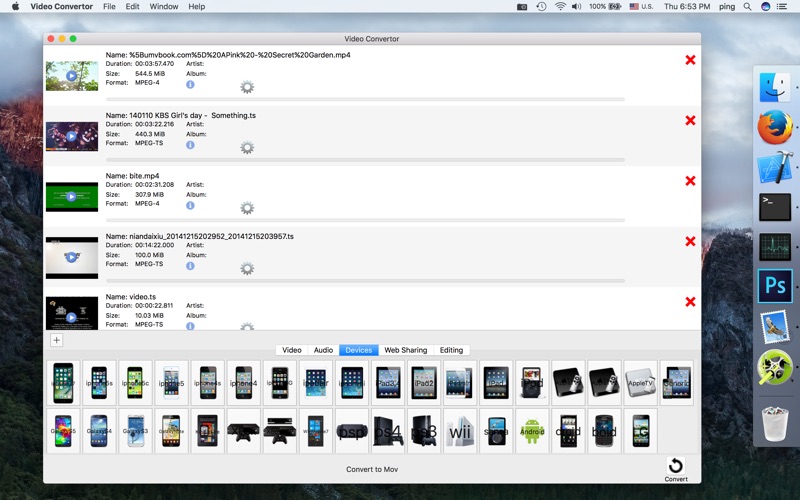


About Video Convertor
The description on the store listing
Video Convertor is a video and audio converter app. It supports almost all input formats. You can converter video and music to other video or audio formats. You can extract audio from video. It supported video editor. Automatic detect input format and output format, if the same will only copy the file but not covert.
Supported more than 100 input formats: mpg, mpeg, mpeg 2, vob, voc, dat, mp4, m4v, ts, rm, rmvb, wmv, asf, mkv, avi, 3gp, 3g2, mp3, mpc, m4a, wav, flv, f4v, mov, h264/x264, 1080p/720p HD, avr etc.
Supported 35 devices output formats:iPhone 7,6, 6 Plus, iPhone 5s, iPhone 5c, iPhone 5, iPhone 4s, iPhone 4, iPhone 3G,3GS, iPad Air 1,2, iPad mini 2,3, iPad 3,4, iPad 2, iPad mini, …
Read the full description
Video Convertor is a video and audio converter app. It supports almost all input formats. You can converter video and music to other video or audio formats. You can extract audio from video. It supported video editor. Automatic detect input format and output format, if the same will only copy the file but not covert. Supported more than 100 input formats: mpg, mpeg, mpeg 2, vob, voc, dat, mp4, m4v, ts, rm, rmvb, wmv, asf, mkv, avi, 3gp, 3g2, mp3, mpc, m4a, wav, flv, f4v, mov, h264/x264, 1080p/720p HD, avr etc. Supported 35 devices output formats:iPhone 7,6, 6 Plus, iPhone 5s, iPhone 5c, iPhone 5, iPhone 4s, iPhone 4, iPhone 3G,3GS, iPad Air 1,2, iPad mini 2,3, iPad 3,4, iPad 2, iPad mini, iPad, iPod, Apple TV 3, Apple TV 2, Apple TV, Apple Generic, Galaxy S5, Galaxy S4, Galaxy S3, Galaxy Note, Kindle Fire, Xbox One, Xbox 360, Windows Phone, PSP, Playstation 4, Playstation 3, Nintendo Wii, Sandisk Sansa, Android Generic, Motorola Droid, BlackBerry Bold, LG Optimus. Supported 15 video output formats:Mov, Mp4, Wmv, Avi, M4v, Mpeg2, Divx, Mkv, Mpeg1, Dv, Vob, 3gp, 3gp2, WebM, asf. Supported 6 web sharing formats:YouTube, Facebook, Vimeo, Flv, F4v, SWF. Supported 10 software editing formats:iMovie, Final Cut Pro 7, Final Cut Pro X, iDVD, ProRes, ProRes HD, ProRes LT, ProRes Proxy, DNxHD 720P, DNxHD 1080P. Supported 33 audio output formats:mp3,aac,ringtone,itunes,m4a,wav,aiff,amr,flac,ac3,ogg,caf,Apple Lossless,TrueAudio,wma,eac3,spx,w64,adx,ast,au,dts,ffm,lbc,sf,mmf,rso,wv,voc,adts,mka,mp2,opus. Batch Conversion • You can convert a lot of files at one time • You can add a file or remove a file Powerful Video Edit • Support trim, crop, rotate the video • It can make some video files to be one • You can add a new audio to the video • You can remove the video’s audio • You can adjust the play speed • Support undo and redo • You can use it to play the video • Over 60 video effects such as AgingTV, Blur, Brightness, Burn, C41,ect. • Supported Audio Effects: DC Offset, DelayAudio, Denoise, ReverseAudio, TimeStretchRT, Vocoder, etc. • Supported Video Transitions: BandSlide, BandWipe, Wipe, Zoom, Flash, Slide, ShapeWipe , etc. • Supported Audio Transitions:Crossfade • Picture in Picture • Add title Video Play • Support play your Video Get Audio Information • Get information include: format, file size, duration, overall bit rate, album, track name, bit rate, channel(s), sampling rate, language etc Track Information Editing • You can edit title, artist, album, genre, date, track, language,comment, etc Advanced Settings • You can set the sampling rate, channels • You can select the codec: copy or codec • You can change the volume • You can set how many threads to converted the file • You can set the start time and the duration to trim the music Update to ffmpeg 2.4 Support Retina If you have any questions or suggestions, please e-mail me. email:[email protected].
Installs
Apple does not publish download counts. Estimates are in testing.
We publish iOS estimates only after they pass a back-test against real numbers. Chart history below is measured.
Estimated store revenue Estimated Beta
App Store, worldwide, monthly rate from the last 13 chart days to 20 Nov 2026
Below the top 100 grossing apps in the markets we calibrate. In the United States that usually means under about $6.4M a month. App Store purchases and subscriptions only, before Apple's 15 to 30% fee. Ads and web payments are not included.
Ratings
No rating breakdown published for this app.
Recent reviews
Latest public reviews from the store
No reviews in our sample for this app yet.
Top chart positions
Latest App Store chart ranks by country, last 10 days
Not in any tracked top chart in the last 10 days.
Video Convertor history
Release, install milestones, listing and store changes
- First released on the store 25 Aug 2015
Recent versions
Current version 2.1
- Version 2.17 Mar 2021
fix some bug
Listing keywords
Words and phrases Video Convertor repeats most in its store listing
Top phrases: apple tv apple (3), apple tv (3), output formats (3), supported audio (3), supported video (3).
Highlighted words also appear in the title. Counts cover the title, short description and description.
Compliance
What the listing and the app package show
- Store status
- Live
- Upkeep
- No update since 7 Mar 2021
- Age rating
- 4+
Apps like Video Convertor
 Video CollageaZeR DiLLs★ 4.08
 Vee for VideoMedious★ 2.98
 Beauty Camera -Selfie, StickerBhuvan Gupta★ 4.5
 FinalCamXShenzhen Xiaozhen Technology Co.,Ltd.★ 4.44
 Magic Studio - AI Photo EditorMagicStudio.com★ 4.62
 Foto Impresiones: 1 Hr PhotoSoftwareX★ 4.98
 SnapGeo - AI Location FinderRECEP ASLAN★ 4.24
 Family Photo Maker - AIRick-y Media★ 4.12
 BeautifAI: AI Try OnJAI UYGULAMA VE YAPAY ZEKA TEKNOLOJILERI ANONIM SIRKETI★ 4.36
Video Convertor: questions and answers
Who makes Video Convertor?
Video Convertor is published by 育平 姚.
When was Video Convertor last updated?
The latest version (2.1) was released on 7 Mar 2021.
Is Video Convertor free?
No. Video Convertor is a paid app priced at $4.99.
Is Video Convertor still available?
Yes. Video Convertor is live on App Store as of 10 May 2026.
Track Video Convertor and its competitors
Watch any app for new versions, rating drops, chart moves and removals. Free plan, no card.