
- Installs
- —
- Apple does not publish download counts
- Rating
- —
- Ratings
- —
- Version
- 3.1.1
- Updated 15 Jul 2022
- Released
- 15 Jun 2016
- Tracked since 10 May 2026
- Size
- 86 MB
- Needs 12.0
Also on Google Play: ViSoft VR
Screenshots
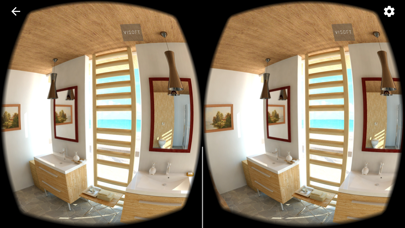
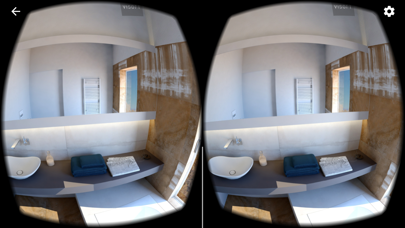
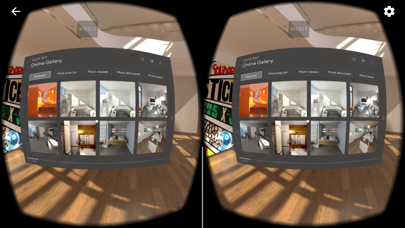
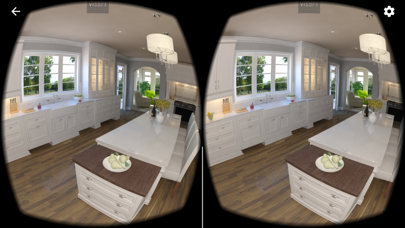
About ViSoft VR
The description on the store listing
The 3D glasses solution for the unique virtual buying experience!
Discover the huge diversity of our own reference projects and our customers’ projects. Start using ViSoft VR today to bring your own digital tile and sanitary showroom to reality! Let your customers discover multiple rooms, simply with visual navigation.
With ViSoft Premium 2016 you can generate a Virtual Reality-Panorama from any project with the ViSoft Live module. Select “ViSoft 360 – Generate panorama image” in the “View“, “Advanced“ menu. Mark the checkbox “Virtual Reality“ and select which rendering engine you would like to use. We recommend to use of Photo Tuning, of course you can use the ViSoft Premium real-time …
Read the full description
The 3D glasses solution for the unique virtual buying experience! Discover the huge diversity of our own reference projects and our customers’ projects. Start using ViSoft VR today to bring your own digital tile and sanitary showroom to reality! Let your customers discover multiple rooms, simply with visual navigation. With ViSoft Premium 2016 you can generate a Virtual Reality-Panorama from any project with the ViSoft Live module. Select “ViSoft 360 – Generate panorama image” in the “View“, “Advanced“ menu. Mark the checkbox “Virtual Reality“ and select which rendering engine you would like to use. We recommend to use of Photo Tuning, of course you can use the ViSoft Premium real-time visualization also. Select the rendering quality and start rendering. How to bring your own project to the VR glasses 1. Download the ViSoft VR app from Apples App Store. If the app is not displayed to you in the App Store, your iPhone is not ready for iOS 8.0, which is a minimum requirement to run the app. Therefore you need the iPhone 4S or higher. 2. Create your VR-panorama as described above. Connect your iPhone with your PC or Mac by cable and start iTunes. 3. Open your iPhone in iTunes and select the menu option „Apps“. 4. Scroll down to the “File Sharing“ section. Select ViSoft VR from the list. 5. Select the “Panoramas” folder in the list of ViSoft VR Documents and click the “Save to...” button. Select a folder where you want to store this folder on your PC or Mac. 6. Navigate to that folder with the Finder (explorer) and open the “Panoramas” folder. Add your own panorama to this folder. 8. By default, this folder contains a 3D-panorama called “default.vipr”. This project is the project first displayed after the program start. If you like, you can replace this project with a project of your own with the same name. One project in this folder has to be named „default.vipr“, otherwise only a grey background is displayed at program start. 9. Return to iTunes and click the „Add…“-button. Select the Panoramas folder and click „Add“ 9. Restart ViSoft VR. Your panorama is now ready to discover! 10. The Panorama database of ViSoft VR is dynamically filled with projects from our ViSoft 360-cloud. If you want to avoid that, in order to show only your own projects, please switch your phone to flight mode. You have questions about the VR-App? If you have questions about the functionality of ViSoft VR or our future developments, do not hesitate to contact our hotline: 07031/4916599 or [email protected]
Installs
Apple does not publish download counts. Estimates are in testing.
We publish iOS estimates only after they pass a back-test against real numbers. Chart history below is measured.
Estimated store revenue Estimated Beta
App Store, worldwide, monthly rate from the last 13 chart days to 20 Nov 2026
Below the top 100 grossing apps in the markets we calibrate. In the United States that usually means under about $6.4M a month. App Store purchases and subscriptions only, before Apple's 15 to 30% fee. Ads and web payments are not included.
Ratings
No rating breakdown published for this app.
Recent reviews
Latest public reviews from the store
No reviews in our sample for this app yet.
Top chart positions
Latest App Store chart ranks by country, last 10 days
Not in any tracked top chart in the last 10 days.
ViSoft VR history
Release, install milestones, listing and store changes
- First released on the store 15 Jun 2016
Recent versions
Current version 3.1.1
- Version 3.1.115 Jul 2022
Minor UI changes
Listing keywords
Words and phrases ViSoft VR repeats most in its store listing
Top phrases: visoft vr (8), panoramas folder (3), pc or mac (2), select the panoramas (2), button select (2).
Highlighted words also appear in the title. Counts cover the title, short description and description.
Compliance
What the listing and the app package show
- Store status
- Live
- Upkeep
- No update since 15 Jul 2022
- Age rating
- 4+
Apps like ViSoft VR
 AITSO - Talking AI ChatbotDrum Starz★ 3.18
 李雷和韩梅梅2023:恋爱养成RPG晖 郑★ 4.5
 SoSkillsSoSkills★ 4.58
 Horror Movie ClassicsMacMillan Interactive Communications, LLC★ 4.84
 GranPlayerLuxza★ 2.68
 CineWisenet★ 4.38
 CGR CinémasThe Boxoffice Company France★ 4.82
 Sound Effects!TMSOFT★ 3.4
 Skill Addicts – Play & LearnSKillAddicts s.r.o★ 4.2
ViSoft VR: questions and answers
Who makes ViSoft VR?
ViSoft VR is published by ViSoft GmbH.
When was ViSoft VR last updated?
The latest version (3.1.1) was released on 15 Jul 2022.
Is ViSoft VR free?
Yes. ViSoft VR is free to download.
Is ViSoft VR still available?
Yes. ViSoft VR is live on App Store as of 10 May 2026.
Track ViSoft VR and its competitors
Watch any app for new versions, rating drops, chart moves and removals. Free plan, no card.