
- Installs
- —
- Apple does not publish download counts
- Rating
- —
- Ratings
- —
- Version
- 1.0
- Updated 31 Jul 2020
- Released
- 30 Jul 2020
- Tracked since 11 May 2026
- Size
- 12 MB
- Needs 10.14
Screenshots

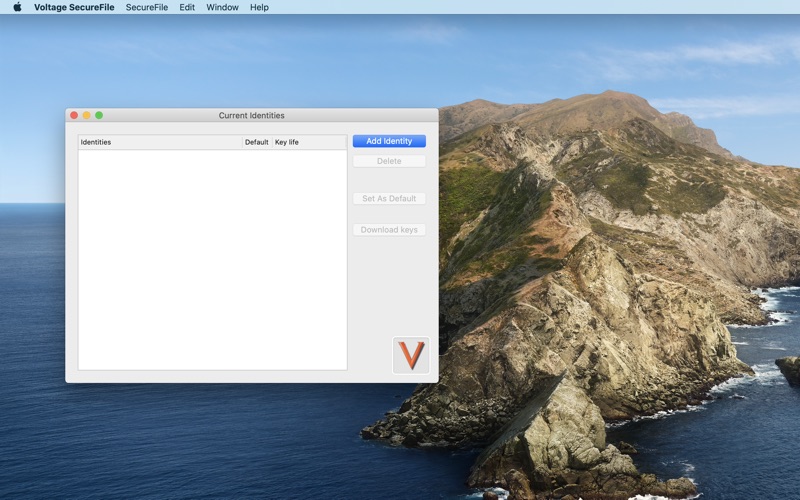

About Voltage SecureFile
The description on the store listing
Voltage SecureFile provides information encryption to protect files and documents used by individuals and groups whether those files are on the desktop, network share, or collaboration portal. Unlike information security offerings that use complex keys or can only protect certain file types, transport mechanisms or storage locations, SecureFile encrypts the information itself. SecureFile persistently protects all file types, enabling secure business information workflows without the risk of data loss or policy violations. Voltage SecureFile app is supported Mac running 11.14 or later.
Encryption Powered by Voltage Identity-Based Encryption (IBE), SecureFile limits access to encrypted data …
Read the full description
Voltage SecureFile provides information encryption to protect files and documents used by individuals and groups whether those files are on the desktop, network share, or collaboration portal. Unlike information security offerings that use complex keys or can only protect certain file types, transport mechanisms or storage locations, SecureFile encrypts the information itself. SecureFile persistently protects all file types, enabling secure business information workflows without the risk of data loss or policy violations. Voltage SecureFile app is supported Mac running 11.14 or later. Encryption Powered by Voltage Identity-Based Encryption (IBE), SecureFile limits access to encrypted data to specified individuals and groups without the need to exchange certificates or memorize passwords. - SecureFile’s core features and benefits make it possible to: - Encrypt files anytime, for anyone, anywhere - Support secure external file sharing—both electronically and through removable media - Create secure files, on the desktop, and assign access rights via a simple right click process - Add or rescind access rights based on group policies - Secures information regardless of where it resides - Ensures optimum security with the lowest overhead cases How to configure application: 1. Get the “Policy file URL” of Secure server and set in “Preferences” screen 2. Set the “Folder path” in “Preferences” screen 3. On “Current Identities” screen, press “Add identity” button 4. Enter email address and press “Add” button 5. On “The server requires authentication” pop up, select “Continue” button 6. Application will launch default browser and load URL to authenticate user 7. Enter the details in browser page and press “Sign in” or “Sign up” 8. On successful authentication, “token.evat” file will get download 9. Tap on “token.evat” it will add new identity in application How to encrypt file: 1. Launch the application 2. Select “Secure File” -> “Encrypt File” menu 3. Application will show finder window to select the File to encrypt 4. Press “Encrypt” button 5. On successful encryption application will set File extension as “.vsf” How to decrypt file: 1. Launch the application 2. Select “Secure File” -> “Decrypt File” menu 3. Application will show finder window to select the encrypted file to decrypt 4. Press “Decrypt” button 5. On successful decryption, application will show original file.
Installs
Apple does not publish download counts. Estimates are in testing.
We publish iOS estimates only after they pass a back-test against real numbers. Chart history below is measured.
Estimated store revenue Estimated Beta
App Store, worldwide, monthly rate from the last 12 chart days to 19 Nov 2026
Below the top 100 grossing apps in the markets we calibrate. In the United States that usually means under about $6.4M a month. App Store purchases and subscriptions only, before Apple's 15 to 30% fee. Ads and web payments are not included.
Ratings
No rating breakdown published for this app.
Recent reviews
Latest public reviews from the store
No reviews in our sample for this app yet.
Top chart positions
Latest App Store chart ranks by country, last 10 days
Not in any tracked top chart in the last 10 days.
Voltage SecureFile history
Release, install milestones, listing and store changes
- First released on the store 30 Jul 2020
Update frequency
How often Voltage SecureFile ships a new version, month by month
0 updates in the last 12 months. Less often than most similar apps: they shipped a median of 1 updates in the same year.
Recent versions
Current version 1.0
- Version 1.031 Jul 2020
Listing keywords
Words and phrases Voltage SecureFile repeats most in its store listing
Top phrases: application will show (3), voltage securefile (3), application select secure (2), button on successful (2), file menu application (2).
Highlighted words also appear in the title. Counts cover the title, short description and description.
Compliance
What the listing and the app package show
- Store status
- Live
- Upkeep
- No update since 31 Jul 2020
- Age rating
- 4+
Apps like Voltage SecureFile
 Robin - Mobile AppRobin Powered, Inc★ 3.32
 Bright AisleMedia Solutions Corp★ 2.52
 Rhingie: phone call 2nd numberDating onlain, ooo★ 3.96
 PayClockLathem Time Corporation★ 2.08
 云电话-网络电话虚拟隐私小号国辉 李★ 4.74
 QuicklynQuicklyn★ 4.86
 Diligent BoardsDiligent Corporation★ 3.32
 DATABASICSDATABASICS★ 3.8
 vMEyeSuperGuangzhou Kedi Intelligence Technology Co., Ltd.★ 3.14
Voltage SecureFile: questions and answers
Who makes Voltage SecureFile?
Voltage SecureFile is published by OpenText.
When was Voltage SecureFile last updated?
The latest version (1.0) was released on 31 Jul 2020.
Is Voltage SecureFile free?
Yes. Voltage SecureFile is free to download.
Is Voltage SecureFile still available?
Yes. Voltage SecureFile is live on App Store as of 11 May 2026.
Track Voltage SecureFile and its competitors
Watch any app for new versions, rating drops, chart moves and removals. Free plan, no card.