
- Installs
- —
- Apple does not publish download counts
- Rating
- 1.0
- Ratings
- 1
- 1 reviews
- Version
- 1.3
- Updated 14 Jan 2026
- Released
- 4 Mar 2024
- Tracked since 10 May 2026
- Size
- 14 MB
- Needs 15.6
Also on Google Play: Watch Accuracy Checker (32 ratings)
Screenshots


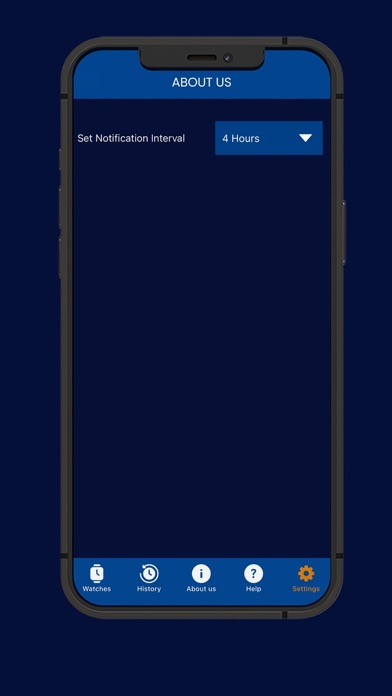
About Watch Accuracy Checker
The description on the store listing
This simple, free and easy to use app will help you measure and track the accuracy of your Mechanical, Automatic or Quartz wrist watches.
Features of the app:
- Take a snap and add a watch you want to check for accuracy.
- Edit Watch if needed.
- No restrictions on number of watches that can be added and tracked.
- Check accuracy of your watch in against current global time.
- Start and Stop timer as per your requirement.
- Timer runs in foreground and background as well.
- Ability to run tracker for multiple watches.
- Ability to reset the timer in case it is needed.
- Screenshot is captured when timer is stopped which makes it easy to
compare seconds lost or gained.
- History of …
Read the full description
This simple, free and easy to use app will help you measure and track the accuracy of your Mechanical, Automatic or Quartz wrist watches. Features of the app: - Take a snap and add a watch you want to check for accuracy. - Edit Watch if needed. - No restrictions on number of watches that can be added and tracked. - Check accuracy of your watch in against current global time. - Start and Stop timer as per your requirement. - Timer runs in foreground and background as well. - Ability to run tracker for multiple watches. - Ability to reset the timer in case it is needed. - Screenshot is captured when timer is stopped which makes it easy to compare seconds lost or gained. - History of tracking is maintained in the app. - Time elapsed along with time stamp is shown in tracking history. - Notifications to the user about running tracker so user knows how long tracker has been on. - Settings available to set the notification interval for the tracker. How to use this app? Objective of this app is to give you the ability to check accuracy of your wrist watch. Our app has an accurate system watch which is used as the reference. You need to perform following steps to achieve the objective. 1. Add your Watch 2. Track Watch 3. View track history to check watch accuracy How to Add Watch? - Click on ‘My Watches’ in footer menu. - The click + icon. - Enter name of watch. - Take picture of the watch. - Click ‘Add’. - It will be added in My Watch List. How to Track Watch? - Click on ‘My Watches’ in footer menu. - Click on ‘History’ button for the watch. - Tracker screen will open with phone’s camera on and app’s reference watch with only Seconds hand in it. - Start and Restart button is there on tracker screen. - Clicking on Start button starts the tracking and button changes to “Stop”. - Before starting tracking, you need to super impose the app’s reference watch on to your wrist watch. - As soon as your wrist watch’s second hand reaches zero and matches the static second hand of the app you need to start tracking. - After a few hours have passed, when you are ready to stop the tracking, then again, you need to super impose the app’s reference watch on to your wrist watch. - Clicking on “Stop” button will stop the tracking. - When tracking is stopped, a screenshot is taken by the app and is saved in history of the watch. - This screenshot show app’s reference watch along with your wrist watch. It will show time of tracking and elapsed time of tracking. - Based on position of ‘Seconds hand’ of your wrist watch and app’s watch in the screenshot, you can check the accuracy of your watch. - If both are on same position, your watch is accurate. How to view Tracking History of a Watch? - Click on ‘My Watches’ in footer menu. - Click on ‘History’ button for the watch. - Tracking History of the Watch will be displayed. - Record will show time of tracking and elapsed time of tracking.
Installs
Apple does not publish download counts. Estimates are in testing.
We publish iOS estimates only after they pass a back-test against real numbers. Chart history below is measured.
Estimated store revenue Estimated Beta
App Store, worldwide, monthly rate from the last 13 chart days to 20 Nov 2026
Below the top 100 grossing apps in the markets we calibrate. In the United States that usually means under about $6.4M a month. App Store purchases and subscriptions only, before Apple's 15 to 30% fee. Ads and web payments are not included.
Ratings
1 ratings, 1 reviews
No rating breakdown published for this app.
Recent reviews
Latest public reviews from the store
No reviews in our sample for this app yet.
Top chart positions
Latest App Store chart ranks by country, last 10 days
Not in any tracked top chart in the last 10 days.
Watch Accuracy Checker history
Release, install milestones, listing and store changes
- First released on the store 4 Mar 2024
Update frequency
How often Watch Accuracy Checker ships a new version, month by month
1 updates in the last 12 months. About as often as similar apps, which shipped a median of 1 updates in the same year.
Recent versions
Current version 1.3
- Version 1.314 Jan 2026
-Two or more watches can now be tracked simultaneously. -Elapsed time is now displayed correctly. -Camera opening issue fixed. -Only the rear (back) camera can be used. -The Add Watch floating icon design has been updated. -Time tracking continues even if the app is closed or interrupte
Listing keywords
Words and phrases Watch Accuracy Checker repeats most in its store listing
Top phrases: wrist watch (5), app’s reference watch (4), app’s reference (4), reference watch (4), watch click (4).
Highlighted words also appear in the title. Counts cover the title, short description and description.
Compliance
What the listing and the app package show
- Store status
- Live
- Upkeep
- Updated 14 Jan 2026
- Age rating
- 4+
Apps like Watch Accuracy Checker
 Library of AviationNazmi Yavuz★ 4.82
 MyNOVECNorthern Virginia Electric Cooperative★ 2.28
 打工人小组件光翔 卓★ 4.96
 TruckbaysTruckbays LLC★ 4.3
 Tornado PRO PlayerMohammed Altam★ 4.44
 VDX - Video ManagerARISEPEAK LP★ 1.74
 TV CastingZeasn Info Technology Co., Ltd.★ 1.86
 Mil-Dot BallisticsTom Holsten★ 3.82
 MySontiqSontiq, Inc.★ 2.4
Watch Accuracy Checker: questions and answers
Who makes Watch Accuracy Checker?
Watch Accuracy Checker is published by Cogniter Technologies Pvt Ltd.
When was Watch Accuracy Checker last updated?
The latest version (1.3) was released on 14 Jan 2026.
Is Watch Accuracy Checker free?
Yes. Watch Accuracy Checker is free to download.
Is Watch Accuracy Checker still available?
Yes. Watch Accuracy Checker is live on App Store as of 1 Jul 2026.
Track Watch Accuracy Checker and its competitors
Watch any app for new versions, rating drops, chart moves and removals. Free plan, no card.