
WebDebug - Web debugging tool
- Installs
- —
- Apple does not publish download counts
- Rating
- 4.48
- Ratings
- 23
- 23 reviews
- Version
- 1.7
- Updated 3 Jul 2024
- Released
- 24 Jun 2020
- Tracked since 10 May 2026
- Size
- 75 MB
- Needs 12.0
Screenshots




About WebDebug - Web debugging tool
The description on the store listing
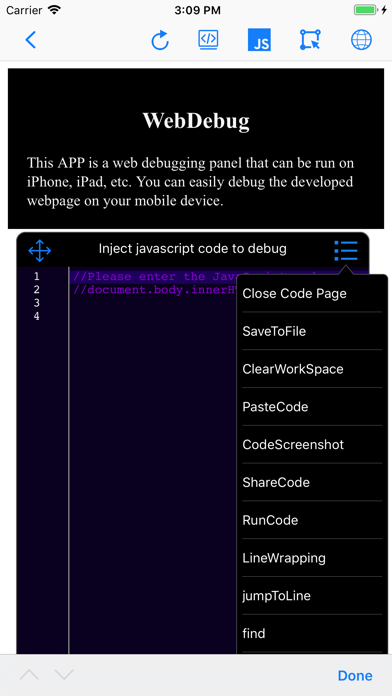
This app is a web debugging panel that can be run on iPhone, iPad, and other devices. You can conveniently debug web pages on your mobile phone. It supports local static websites, allows for testing multiple projects locally, and manages various document files.
Features:
- Debug by inputting the URL
- Debug by scanning a QR code to open the URL
- Automatically save debugging page link information to the database and record debugging time
- View console logs
- View system information
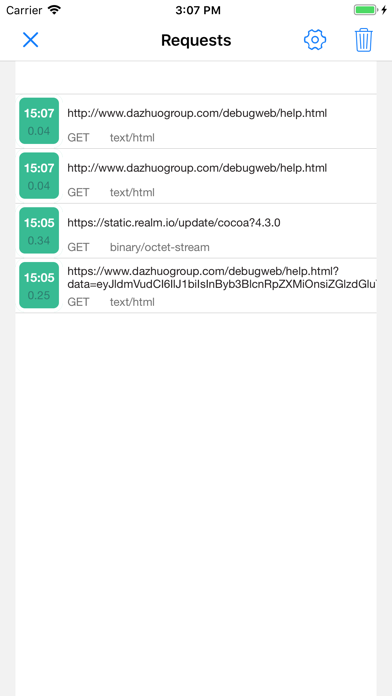
- View network requests
- View page element structure
- View cookies, localStorage, and SessionStorage
- Input JavaScript commands, e.g., alert(document.body.outerHTML);
- Inject JavaScript code snippets or …
Read the full description
This app is a web debugging panel that can be run on iPhone, iPad, and other devices. You can conveniently debug web pages on your mobile phone. It supports local static websites, allows for testing multiple projects locally, and manages various document files. Features: - Debug by inputting the URL - Debug by scanning a QR code to open the URL - Automatically save debugging page link information to the database and record debugging time - View console logs - View system information - View network requests - View page element structure - View cookies, localStorage, and SessionStorage - Input JavaScript commands, e.g., alert(document.body.outerHTML); - Inject JavaScript code snippets or plugins for web page debugging (e.g., injecting jq, vue plugins or JS code snippets), with the console displaying return values - Web page code editing and preview function - Code auto-suggestions for HTML, JavaScript, CSS, and content - Keyboard extensions - Tokenization of debugging code for easy input - HTML, CSS, and JavaScript code input with auto-suggestions, auto-bracket matching, line numbering, code folding, and more - Syntax error correction for HTML, CSS, and JavaScript code input, further enhancing mobile testing capabilities Version 1.5 introduces the following new features: 1. Static server function: You can now start a local static server on your phone, supporting the creation of multiple local websites for testing. It supports WiFi, WebDAV file management, remote file downloading with decompression, direct preview of most document, video, audio, image files, and various code files on your phone. 2. Automatic injection of window.onerror code before page loading: Now, before the page loads, the application will automatically inject some code into the webpage that helps capture potential errors and print these error messages to the application's console. You can also choose to send these error reports to a backend server for further analysis and processing. 3. Show network requests when shaking the phone: When you shake your phone, the application will display the network requests made by the current page. This can help you better understand the communication between the application and the server. Additionally, you can choose to send the recorded HTTP request logs via email for further analysis. 4. jQuery-like element selector function: The application has added a feature similar to using jQuery's element selector, which means you can select and manipulate various DOM elements on the webpage more precisely, allowing for more flexible customization of page behavior and styles. 5. Code injection function: Now, you can mix HTML and JS code in the webpage being loaded. This feature supports multiple injection scenarios, meaning you can conveniently control or intercept page requests and execute custom code on the page. 6. Added dozens of code themes and code editing commands: You can easily use code auto-suggestions and customize code themes. Unlimited Access Subscription: - With this subscription, you can enjoy unlimited access to all features within the app. - Subscriptions are charged weekly, monthly, or yearly, depending on the selected subscription plan. - Payment will be charged to your iTunes account upon confirmation of purchase. - You can turn off auto-renewal at least 24 hours before the current subscription period ends; otherwise, the subscription will automatically renew. - The renewal fee will be charged to your account within 24 hours before the end of the current subscription period, depending on the chosen plan. - Users can manage their subscriptions and can turn off auto-renewal in their account settings after purchase. - Any unused portion of a free subscription trial period will be forfeited upon purchase. Privacy Policy: https://www.dazhuogroup.com/debugweb/privacy_statement_en.php Terms of Use: https://www.dazhuogroup.com/debugweb/terms_of_use_en.php
Installs
Apple does not publish download counts. Estimates are in testing.
We publish iOS estimates only after they pass a back-test against real numbers. Chart history below is measured.
Estimated store revenue Estimated Beta
App Store, worldwide, monthly rate from the last 8 chart days to 15 Nov 2026
Below the top 100 grossing apps in the markets we calibrate. In the United States that usually means under about $6.4M a month. App Store purchases and subscriptions only, before Apple's 15 to 30% fee. Ads and web payments are not included.
Ratings
23 ratings, 23 reviews
No rating breakdown published for this app.
Recent reviews
Latest public reviews from the store
No reviews in our sample for this app yet.
Top chart positions
Latest App Store chart ranks by country, last 10 days
- Countries ranked
- 7 of 50
- Best rank
- #71
- Top 10 placements
- 0
- of 7 chart placements
- Average rank
- #86.9
Best countries on App Store
- 🇫🇷 France · Top grossing, Developer Tools#71
- 🇬🇷 Greece · Top grossing, Developer Tools#73
- 🇦🇺 Australia · Top grossing, Developer Tools#87
- 🇬🇧 United Kingdom · Top grossing, Developer Tools#91
- 🇨🇿 Czechia · Top free, Developer Tools#91
- 🇹🇷 Türkiye · Top grossing, Developer Tools#97
| Country | Chart | Category | Rank | Best (10 days) | Date |
|---|---|---|---|---|---|
| 🇫🇷 France | Top grossing | Developer Tools | #71 | #71 | 8 Nov 2026 |
| 🇬🇷 Greece | Top grossing | Developer Tools | #73 | #70 | 15 Nov 2026 |
| 🇦🇺 Australia | Top grossing | Developer Tools | #87 | #52 | 10 Nov 2026 |
| 🇬🇧 United Kingdom | Top grossing | Developer Tools | #91 | #52 | 14 Nov 2026 |
| 🇨🇿 Czechia | Top free | Developer Tools | #91 | #91 | 9 Nov 2026 |
| 🇹🇷 Türkiye | Top grossing | Developer Tools | #97 | #43 | 14 Nov 2026 |
| 🇵🇹 Portugal | Top grossing | Developer Tools | #98 | #91 | 15 Nov 2026 |
WebDebug - Web debugging tool history
Release, install milestones, listing and store changes
- First released on the store 24 Jun 2020
Recent versions
Current version 1.7
- Version 1.73 Jul 2024
Version 1.7 Update Introduction 1. iOS 17 Compatibility: Added support for iOS 17 and fixed potential crashes when downloading files on iOS 17. 2. Search Engine Functionality: Introduced a new search engine feature, allowing users to search content using their preferred search engines, and it has passed testing. 3. Script Version Management: Added script versioning feature, making it convenient to save each modification as a version, especially useful for frequent testing scenarios. 4. GitHub API Support: Enabled support for searching code repositories via the GitHub API, allowing for package downloads or online previews. 5. Frontend Toolset: Introduced hundreds of commonly used frontend tools, supporting offline use. 6. Custom Keyboard Suggestions: Added a feature for custom keyboard suggestions, enabling users to add frequently used content to the keyboard suggestions for automatic word segmentation input. 7. Extended Keyboard Display Control: Expanded keyboard functionality to support hiding or showing the keyboard. 8. Editor Menu Customization: Enabled customization of the editor menu, allowing users to set their preferred menu commands. 9. Other Issue Fixes: Addressed other known issues, improving software stability and performance. This update brings several practical features and improvements, further enhancing user experience and productivity.
Listing keywords
Words and phrases WebDebug - Web debugging tool repeats most in its store listing
Top phrases: auto suggestions (3), javascript code (3), network requests (3), choose to send (2), code auto suggestions (2).
Highlighted words also appear in the title. Counts cover the title, short description and description.
Compliance
What the listing and the app package show
- Store status
- Live
- Upkeep
- No update since 3 Jul 2024
- Age rating
- 4+
Apps like WebDebug - Web debugging tool
 C/C++ LLVM Clang小文 黄★ 4.32
 iProxy - Sys admin toolsN-Lab★ 4.06
 WA Virtual Number - WANoMarkakod Reklam Tasarim ve Yazilim Hizmetleri Ticaret Limited★ 4.44
 StoreView: App Screenshot ToolElshan Aliyev★ 4.53
 Yomo: Docker & Portainer春晖 杜★ 4.79
 Termux -TERMUX LIMITED LIABILITY COMPANY★ 4.4
 Debug Anywhere浩鑫 庄★ 4.62
 SSL CheckerOrave Technologies★ 4.61
 SQL Server Mobile ClientFilippo Maguolo★ 4.21
WebDebug - Web debugging tool: questions and answers
Who makes WebDebug - Web debugging tool?
WebDebug - Web debugging tool is published by Shanghai Dazhuo Information Technology Co., Ltd..
When was WebDebug - Web debugging tool last updated?
The latest version (1.7) was released on 3 Jul 2024.
Is WebDebug - Web debugging tool free?
No. WebDebug - Web debugging tool is a paid app.
Is WebDebug - Web debugging tool still available?
Yes. WebDebug - Web debugging tool is live on App Store as of 1 Jul 2026.
Track WebDebug - Web debugging tool and its competitors
Watch any app for new versions, rating drops, chart moves and removals. Free plan, no card.