
- Installs
- —
- Apple does not publish download counts
- Rating
- 4.46
- Ratings
- 28
- 28 reviews
- Version
- 1.18.0
- Updated 8 Jun 2026
- Released
- 4 Oct 2016
- Tracked since 10 May 2026
- Size
- 122 MB
- Needs 13.0
Screenshots

About WilhelmSK
The description on the store listing
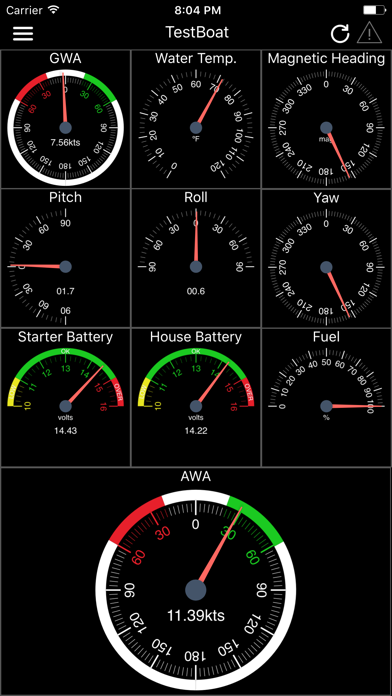
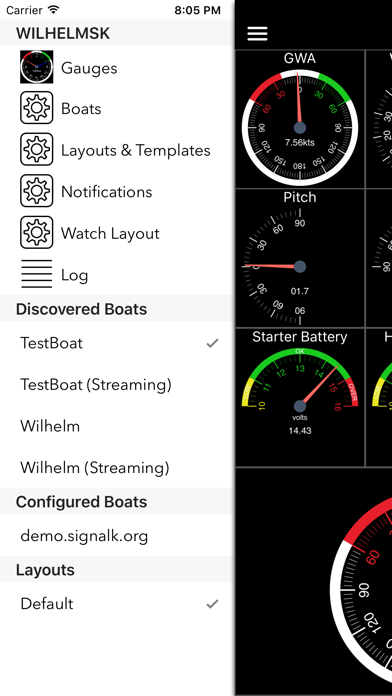
WilhelmSK is a highly customizable display, monitoring and control dashboard for your boat.
WilhelmSK works best wth Signal K Server .
It can also connect directly to some devices:
º NMEA 0183 over TCP or UDP. (from for example, Digital Yacht's Smart WLN10)
º Any modern Navico (Lowrance, Simnet or B&G) GoFree MFDs
º NMEA 2000 via Yacht Device's YDWG-02
º NMEA 2000 via Actisense W2k-1
º Victron Venus GX or CCGX
º Victron VRM
º Chetco SeaSmart Devices
º Chetco HelmSmart
RayMarine Auto Pilot Support (via node-server or the YDWG only)
º View or change current mode (Standby, Auto, Wind, Track)
º View current target heading or Wind direction
º Change target heading or …
Read the full description
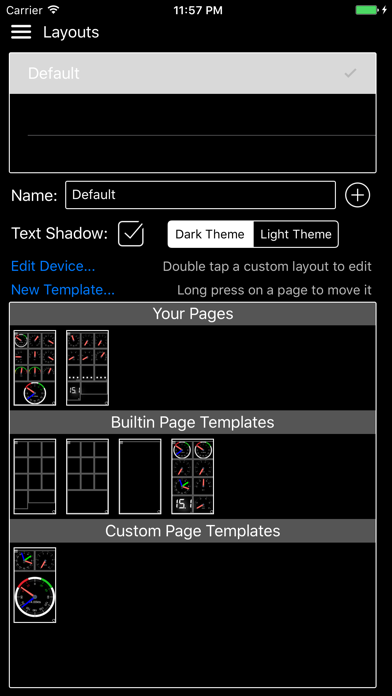
WilhelmSK is a highly customizable display, monitoring and control dashboard for your boat. WilhelmSK works best wth Signal K Server . It can also connect directly to some devices: º NMEA 0183 over TCP or UDP. (from for example, Digital Yacht's Smart WLN10) º Any modern Navico (Lowrance, Simnet or B&G) GoFree MFDs º NMEA 2000 via Yacht Device's YDWG-02 º NMEA 2000 via Actisense W2k-1 º Victron Venus GX or CCGX º Victron VRM º Chetco SeaSmart Devices º Chetco HelmSmart RayMarine Auto Pilot Support (via node-server or the YDWG only) º View or change current mode (Standby, Auto, Wind, Track) º View current target heading or Wind direction º Change target heading or Wind direction º Acknowledge "Turn To Waypoint' Active Captain: º You can view Active Captain Points of Interest and review or comment on them. º Go to Settings->Appearance to show Active Captain Points of Interest on the maps. Alarms and Notifications º View list of current current alarms º Acknowledge RayMarine "Turn To Waypoint' * º Push notification support * º Setup server side alarms * º Set an anchor alarm with the push of a button * Navionics Maps If you already have the Navionics Boating application with an active subscription, you can now use the same Navionics charts in WilhelmSK. Ensure you are a registered user with Navionics and have a Username and Password. If you have not registered, go to the Navionics Boating App’s Main Menu, click on the top “Me” option and then click Login. In WilhelmSK click the login button on the bottom right of the map and enter your Navionics login information. Features: - Raymarine MFD: display and interact with a RayMarine MFD (discovered via Bonjour) - Fusion stereo (control zone volumes, source input, play, pause etc.) - Create a gauge for any value available via SignalK - Sophisticated anchor alarm (requires node server and signalk-anchoralarm-plugin) - Customize gauge display using SignalK meta.zones - Customize gauge range, min/max, etc. - Save custom gauges to node server or the cloud for use on other devices - Wind Angle gauges can optionaly be rotated so that they always point ot the bow of the boat, regaurless of device positioning - Place gauges by long pressing on a gauge and choosing a differnt one - Make a gauge full screen by double tapping - Multiple layout support. Create a differnt layout for Steaming, Sailing, Home Monitoring, etc. - Customize the nuber of pages and their layout - Manuall connection configuration synced accross devices via iCloud - Automatic connection selection based on current ip (usefull when Bonjour is not available and you have multiple boats) - Two themes, dark and light - Animated gauge needles - iPad Slideover and Split View support (Your gauge configuration can be customized for these views) - Connections can be configured to be refreshed manually or at a specific time interval - Design your own custom gauge templates - Share your custom templates via Air Drop, eMail, Text, etc. - Edit ApplyTV or other device layouts and templates remotely using your iPhone or iPad - Most gauges can be configured to be digital or analog - Enter the SignalK path and title for any gauge to show data not supported by default - Displays AIS targets in the Map views - Configure node server plugins inside of the app - IP and RTSP camera display * Some advanced features require signalk-server-node and special plugins installed. Setup Instructions at https://github.com/sbender9/wilhelmsk-node-server-setup
Installs
Apple does not publish download counts. Estimates are in testing.
We publish iOS estimates only after they pass a back-test against real numbers. Chart history below is measured.
Estimated store revenue Estimated Beta
App Store, worldwide, monthly rate from the last 13 chart days to 20 Nov 2026
Below the top 100 grossing apps in the markets we calibrate. In the United States that usually means under about $6.4M a month. App Store purchases and subscriptions only, before Apple's 15 to 30% fee. Ads and web payments are not included.
Ratings
28 ratings, 28 reviews
No rating breakdown published for this app.
Recent reviews
Latest public reviews from the store
- 15 Aug 2023
Developer is very responsive
Very good developer
- 8 May 2023
Great App - but can you use to local iPhone GPS?
Really great App. Easy to connect, reliable, everything great but I don’t have a GPS on my boat so I’d like to use the iPhone GPS directly or connecting to a GPS server app such as GPS2IP. Is this configuration supported?
- 24 Feb 2021
So glad I found this app
This app saved me from complicating my system. I already had all the hardware I needed and this enabled me to get what I was needing out of it. It get the signal from my multiplexer, which for me is my Vesper, and all the NMEA 2000 sensors that feed into it. Thanks Scott.
- 13 Jul 2020
Excellent app and fast support!!
I have a basic raymarine seatalk ng system on a sailboat. It includes a p70/ACU-200/EV-1 autopilot, wireless wind (T120 and T112), micro-talk gateway, Axiom 7 MFD, and YDWG. Not only can I see wind, gps, and rudder reference data in this app, but I can also control the autopilot!! It took only a few minutes to setup and even though I had the settings incorrect on my first go, Scott Bender’s advice fixed it right away. Definitely reach out before giving up!
What reviewers bring up
Topics mentioned in the latest 14 reviews, by how many reviews mention them
Liked in good reviews (11 reviews)
- data 7
- boat 4
- nmea 4
- wilhelmsk 3
- system 3
- ipad 3
- responsive 2
- developer 2
Raised in bad reviews (3 reviews)
No topic comes up twice.
Top chart positions
Latest App Store chart ranks by country, last 10 days
- Countries ranked
- 4 of 50
- Best rank
- #17
- Top 10 placements
- 0
- of 4 chart placements
- Average rank
- #36
Best countries on App Store
- 🇪🇸 Spain · Top paid, Navigation#17
- 🇮🇹 Italy · Top paid, Navigation#18
- 🇫🇷 France · Top paid, Navigation#28
- 🇺🇸 United States · Top paid, Navigation#81
WilhelmSK history
Release, install milestones, listing and store changes
- First released on the store 4 Oct 2016
Update frequency
How often WilhelmSK ships a new version, month by month
3 updates in the last 12 months. More often than most similar apps: they shipped a median of 1 updates in the same year.
Recent versions
Current version 1.18.0
- Version 1.18.08 Jun 2026
* Update watch units preferences on the fly when changed on the phone * Support Head Up and Course Up in Navionics Maps * Add silence/ack/clear buttons to Alerts List * In app documentation source picker + external docs repo * Add option to display the value on Sliders * Support rangeMin, rangeMax, stepSize for sliders * Limit path selection for switch gauges * Fix permissions errors when sharing layouts, etc. * General stability and performance improvements * Notes/POIs working again on Maps using V2 API * Remove Active Captain support * Fix keyboard hiding fields on connection settings * Fix, send boolean instead of 0 or 1 for switches if the incoming value is boolean * Show connection errors on the Watch * Removed ODB II Support * Add back the old Thermostat Gauge * Only light up top bar alarm indicator if there are un-acked alarms * Fix freshness indicator red on Electrical Overview because of hidden sections * Fix shortcuts and widgets crashing if no connection is selected Introducing Widgets! * Widgets are available on * Home Screen, * Lock Screen (including the line obove the time), * StandBy Mode * Today View Shortcuts allowing buttons in Control Center, Automations, Siri Support * Set A Multi Switch (set victron inverter on, charge only, etc) * Flip A Switch (turn a switch on or off) * Toggale A Switch (taggle the switch state) * Launch WilhelmSK * Drop/Set/Raise Anchor * Control a fusion stereo * Send a PUT to any path * Get the value of a path * Control the state and heading of an autopilot, advance waypoint Builtin Siri Commands * "Drop the anchor in WilhelmSK" * "Raise the anchor in WilhelmSK" * "Set the anchor in WilhelmSK" * "Tack to port in WilhelmSK" * "Tack to starboard in WilhelmSK" * "Toggle the [switch displayName] in WilhelmSK" * "Turn the Autipilot Ten Degrees To Port in WilhelmSK" * "Turn the Autipilot One Degree To Starboard in WilhelmSK" You can creat Shortcuts with different names, and you won't have to say "in WilhelmSK" These new features only work with Signal K connections
- Version 1.7.312 May 2026
1.17.3: * Fix Non-SK connection types not working, YDGW, W2K-1, etc. * Use V2 notifications api for push notification actions * Fix black box when long pressing on push notifications * Show MOB location on maps * Draw a line from the boat to the active waypoint on maps * Add MOB button in title bar (V2 API only) * Add support for V2 notifications API (off by default) * Remove check for alarm silencer plugin, not used any more * Thermostat gauge now supports setting the temperature and mode * Fix rudder backwards on Autopilot and Multi Gauge * Fix multiswitch crashing when there is no meta data * Update Non-SK nmea2000 code to the lastest * Add simrap autopilot support for non-SK NMEA 2000 connections * Add simrad AP states to Apple Watch * Fix Freeboard Gauge and WebGauge not passing login info to sk apps * Fix track not showing on maps * Use V2 SK API for autopilot * Fix anchor alarm warning circle showing when anchoring process restarted * Fix discovered connections failing with special characters in host name * Fix draw MultiSwitch buttons in proper order * Fix Advanced Gauge Config sliders now update the value continuously * Built with Xcode v26, look and feel changes * Add option to protect MiltiSwitch gauges to prevent accidental activation * Add Alternator data to the Electrical Overview Gauge * Sliders can now adjust values that are not ratios 1.17.2: * Fix crash related to null zones in meta data * Fixed more issues connection to Victron VRM SK * Fixed issues connection to Victron VRM SK * Better logging for Victron VRM SK connections * Fixed Local Critical Notifications Not Working 1.17.1 * Added support for critical alerts * Added ability to connect to a Signal K Server runnning on Venus OS via VRM * Added a "Anchor Watch" gauge for iOS/Watch/Widgets * Added Electrical Overview Gauge for the Watch * Added new "Veritcal Stack" gauge * The Watch App now supports WatchOS 10 * Added freshness and activity inicators to Watch App * The new Layouts and Templates editor is back! * Fixed boat drawing on Maps when the beam or length are zero * Swap colors on the analog rudder gauge * Fix bar ruddergauge was backwards 1.17.0: The Watch app has been completely re-written and now supports complications and widgets. Complications and widgets only work with a Signal K Server. Introducing Widgets! * Widgets are available on * Home Screen, * Lock Screen (including the line obove the time), * StandBy Mode * Today View Shortcuts allowing buttons in Control Center, Automations, Siri Support * Set A Multi Switch (set victron inverter on, charge only, etc) * Flip A Switch (turn a switch on or off) * Toggale A Switch (taggle the switch state) * Launch WilhelmSK * Drop/Set/Raise Anchor * Control a fusion stereo * Send a PUT to any path * Get the value of a path * Control the state and heading of an autopilot, advance waypoint Builtin Siri Commands * "Drop the anchor in WilhelmSK" * "Raise the anchor in WilhelmSK" * "Set the anchor in WilhelmSK" * "Tack to port in WilhelmSK" * "Tack to starboard in WilhelmSK" * "Toggle the [switch displayName] in WilhelmSK" * "Turn the Autipilot Ten Degrees To Port in WilhelmSK" * "Turn the Autipilot One Degree To Starboard in WilhelmSK" You can creat Shortcuts with different names, and you won't have to say "in WilhelmSK" These new features only work with Signal K connections
- Version 1.17.218 Mar 2026
1.17.21: * Fix crash related to null zones in meta data * Fixed more issues connection to Victron VRM SK * Fixed issues connection to Victron VRM SK * Better logging for Victron VRM SK connections * Fixed Local Critical Notifications Not Working 1.17.1 * Added support for critical alerts * Added ability to connect to a Signal K Server runnning on Venus OS via VRM * Added a "Anchor Watch" gauge for iOS/Watch/Widgets * Added Electrical Overview Gauge for the Watch * Added new "Veritcal Stack" gauge * The Watch App now supports WatchOS 10 * Added freshness and activity inicators to Watch App * The new Layouts and Templates editor is back! * Fixed boat drawing on Maps when the beam or length are zero * Swap colors on the analog rudder gauge * Fix bar ruddergauge was backwards 1.17.0: The Watch app has been completely re-written and now supports complications and widgets. Complications and widgets only work with a Signal K Server. Introducing Widgets! * Widgets are available on * Home Screen, * Lock Screen (including the line obove the time), * StandBy Mode * Today View Shortcuts allowing buttons in Control Center, Automations, Siri Support * Set A Multi Switch (set victron inverter on, charge only, etc) * Flip A Switch (turn a switch on or off) * Toggale A Switch (taggle the switch state) * Launch WilhelmSK * Drop/Set/Raise Anchor * Control a fusion stereo * Send a PUT to any path * Get the value of a path * Control the state and heading of an autopilot, advance waypoint Builtin Siri Commands * "Drop the anchor in WilhelmSK" * "Raise the anchor in WilhelmSK" * "Set the anchor in WilhelmSK" * "Tack to port in WilhelmSK" * "Tack to starboard in WilhelmSK" * "Toggle the [switch displayName] in WilhelmSK" * "Turn the Autipilot Ten Degrees To Port in WilhelmSK" * "Turn the Autipilot One Degree To Starboard in WilhelmSK" You can creat Shortcuts with different names, and you won't have to say "in WilhelmSK" These new features only work with Signal K connections
Listing keywords
Words and phrases WilhelmSK repeats most in its store listing
Top phrases: node server (4), active captain (3), active captain points (2), heading or wind (2), points of interest (2).
Highlighted words also appear in the title. Counts cover the title, short description and description.
Compliance
What the listing and the app package show
- Store status
- Live
- Upkeep
- Updated 8 Jun 2026
- Age rating
- 4+
Apps like WilhelmSK
 Canals.UKMARK MANSER★ 4.74
 Chevron Car WashDigital Mosaic Corporation★ 1.62
 hitta.sehittapunktse AB★ 4.6
 NextStop - NYC SubwayPliable Matter LLC★ 3.74
 E-Charge HKHong Kong EV Power Limited★ 4.34
 Simply NorthBusyBytes GmbH★ 4.08
 Doyle GuidesChris Doyle Publishing Limited★ 4.32
 Speedometer Speed MPH TrackerRihab Mehboob★ 4.62
 Property Line Finder - ParcelHealth & Wellness Apps Limited★ 4.28
WilhelmSK: questions and answers
Who makes WilhelmSK?
WilhelmSK is published by Scott Bender.
When was WilhelmSK last updated?
The latest version (1.18.0) was released on 8 Jun 2026.
Is WilhelmSK free?
No. WilhelmSK is a paid app priced at $19.99.
Is WilhelmSK still available?
Yes. WilhelmSK is live on App Store as of 1 Jul 2026.
Track WilhelmSK and its competitors
Watch any app for new versions, rating drops, chart moves and removals. Free plan, no card.