
- Installs
- —
- Apple does not publish download counts
- Rating
- —
- Ratings
- —
- Version
- 1.5.3
- Updated 28 Apr 2025
- Released
- 31 Oct 2014
- Tracked since 11 May 2026
- Size
- 4 MB
- Needs 10.15
Screenshots
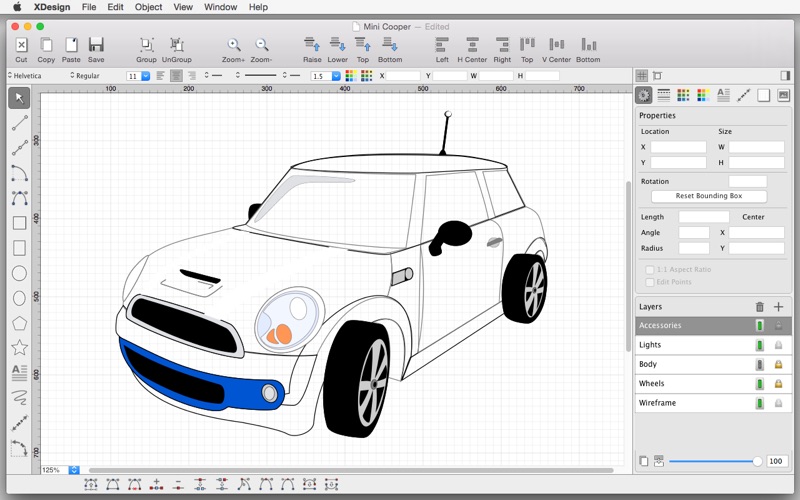
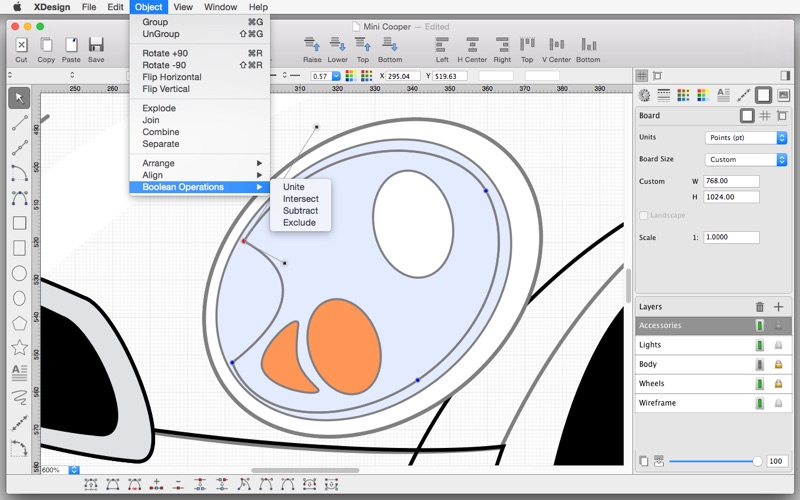
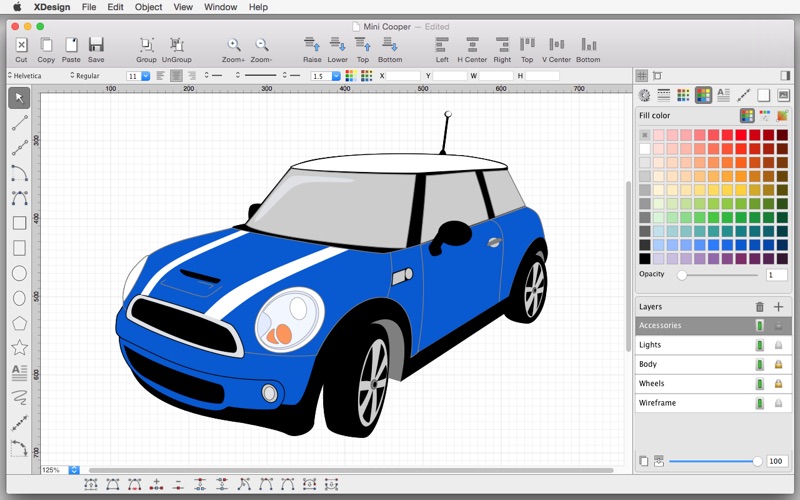


About XDesign
The description on the store listing
Precision 2D vector drawing & design for the Mac
Make professional quality designs, illustrations and technical drawings on the Mac with XDesign, and on the move with iDesign.
Full feature compatibility and automatic sync of designs via iCloud with iDesign (Mac version of XDesign - Available on the iOS AppStore), keep all your designs in sync automatically between your Mac, iPad and iPhone.
Check out the XDesign Product Tour (YouTube) & User Guide (PDF) - at www.touchaware.com.
FEATURES
- Create designs using the traditional keyboard, mouse and large screen on the Mac using XDesign
- Full feature compatible with iDesign for iOS to take your designs on the move on your iPad/Phone
- …
Read the full description
Precision 2D vector drawing & design for the Mac Make professional quality designs, illustrations and technical drawings on the Mac with XDesign, and on the move with iDesign. Full feature compatibility and automatic sync of designs via iCloud with iDesign (Mac version of XDesign - Available on the iOS AppStore), keep all your designs in sync automatically between your Mac, iPad and iPhone. Check out the XDesign Product Tour (YouTube) & User Guide (PDF) - at www.touchaware.com. FEATURES - Create designs using the traditional keyboard, mouse and large screen on the Mac using XDesign - Full feature compatible with iDesign for iOS to take your designs on the move on your iPad/Phone - Toolbars and panels with easy access to frequently used functions for a fast work flow - Unlimited fast and smooth multitouch zoom with sharp and clear images Standard Tools & Functions - Line, polyline, square, rectangle, circle, arc, ellipse, polygons, stars & path tools - Copy and paste selected shapes and groups - Group and ungroup shapes hierarchically to create complex designs - Edit points, convert shapes to path, close shapes, add and remove points, break, weld, explode and join - Keyboard input options for setting the shape attributes and dimension values - Precise rotation with ability to rotate at user defined center - Object alignment tools - Fill color and pen color swatches with opacity controls, custom RGB mixer - Stroke width, line style, line caps and corner join styles, arrow ends and dash patters - Text insertion with fonts, styles, sizes, paragraph alignments, multilingual, rotate/resize - Set a background image for tracing/marking over it - Insert images, copy, paste, move, resize and position them accordingly - Multilevel Undo/Redo for all edit operations - Undo/Redo individual points and move previous points even while creating multisegment lines and paths - Autosave for all operations to ensure work is saved at all times Layers - Create multiple layers to organize & separate design components - Add, remove, merge, reorder, lock, hide layers independently - Set layer transparency Advanced Tools for Graphics Design - Advanced path editing options for corner, smooth and symmetric control points, straighten and curve segments - Text to path conversion - Boolean operations on shapes, unite, intersect, subtract, exclude - Freehand drawing, auto smoothened paths - Gradients / color blends Advanced Tools for Technical Drawing - Circle and Arc tool based on center, start/end point, radius and angle of arc - Dimensioning tools, length as well as angular with customisable settings - Support for Feet+Inches+Fractions (U.S & older unit system) - Architectural formatting option for Dimensions, to format values in Feet + Inches (eg. 12' 3 1/4" ) - Dynamic grid supporting feet, inches and inch fractions at different zoom levels Units & Board Setup - Support for standard board sizes (A1 to A5, B4, B5, Letter, Tabloid) and custom board sizes. - Set a drawing scale of upto 10,000 times screen size with four decimal place precision - Full set of standard unit systems, Points, Inches, Feet, MM, CM and Meters - Unit aware Grid with customisable settings for grid lines and separators - Snap to grid, snap to object and points, rotation snap and custom snap settings for precise positioning - Unit aware rulers Export/Import & Print - Export designs to JPEG, PNG, PDF & SVG formats for Hi-Res professional quality output - Import SVG files (from email attachments using “Open In” option and also via Dropbox) - Full iCloud support and automatic sync of designs between devices, design files can be saved locally or on iCloud - Standard support for printing
Installs
Apple does not publish download counts. Estimates are in testing.
We publish iOS estimates only after they pass a back-test against real numbers. Chart history below is measured.
Estimated store revenue Estimated Beta
App Store, worldwide, monthly rate from the last 13 chart days to 20 Nov 2026
Below the top 100 grossing apps in the markets we calibrate. In the United States that usually means under about $6.4M a month. App Store purchases and subscriptions only, before Apple's 15 to 30% fee. Ads and web payments are not included.
Ratings
No rating breakdown published for this app.
Recent reviews
Latest public reviews from the store
No reviews in our sample for this app yet.
Top chart positions
Latest App Store chart ranks by country, last 10 days
Not in any tracked top chart in the last 10 days.
XDesign history
Release, install milestones, listing and store changes
- First released on the store 31 Oct 2014
Recent versions
Current version 1.5.3
- Version 1.5.328 Apr 2025
Updated to support macOS 15 Sequoia. - Fixed decimal values for numeric input not updating property values in macOS Sequoia. - Other minor bug fixes.
Listing keywords
Words and phrases XDesign repeats most in its store listing
Top phrases: feet inches (3), sync of designs (2), advanced tools (2), automatic sync (2), board sizes (2).
Highlighted words also appear in the title. Counts cover the title, short description and description.
Compliance
What the listing and the app package show
- Store status
- Live
- Upkeep
- Updated 28 Apr 2025
- Age rating
- 4+
Apps like XDesign
 AI Cut - Photo Generate & EditBeijing Changhai Internet Technology Co., Ltd.★ 4.1
 Birthday Invitations Makerwilliam leandro aristizabal giraldo★ 4.7
 AI VistaSCIENJOY META TECHNOLOGY LLC★ 2.9
 Logotipo - AI Logo GeneratorMobile Ocean★ 4.02
 Anime AI Maker: DreamtuneLYKOV STUDIO LTD★ 4.34
 DIY Wallpaper Maker DIYScreenEvgenii Fomin★ 4.68
 Vintage Camera - Film FiltersPlane Cubes★ 4.42
 Color Widgets - WallpapersFlying Pigeons LLC★ 4.34
 Artimind - AI Video GeneratorAPERO TECHNOLOGIES GROUP PTE.LTD★ 1.41
XDesign: questions and answers
Who makes XDesign?
XDesign is published by TouchAware Limited.
When was XDesign last updated?
The latest version (1.5.3) was released on 28 Apr 2025.
Is XDesign free?
No. XDesign is a paid app priced at $19.99.
Is XDesign still available?
Yes. XDesign is live on App Store as of 11 May 2026.
Track XDesign and its competitors
Watch any app for new versions, rating drops, chart moves and removals. Free plan, no card.