
- Installs
- —
- Apple does not publish download counts
- Rating
- 3.52
- Ratings
- 130
- 130 reviews
- Version
- 3.10.2
- Updated 2 Oct 2026
- Released
- 10 Aug 2022
- Tracked since 10 May 2026
- Size
- 97 MB
- Needs 15.0
Also on Google Play: xTiles: notes, tasks, projects (729 ratings)
Screenshots




About xTiles: notes, tasks, projects
The description on the store listing
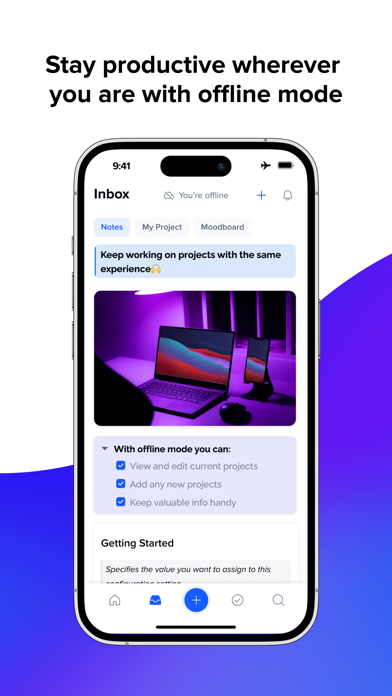
At your desk, on the go, online or offline, enjoy the powerful capabilities of xTiles!
Free your creativity with the same beautiful experience, whatever you’re on.
ORGANIZE EVERYTHING IN ONE PLACE
• Jot down quick notes, ideas, and voice recordings.
• Snap sketches and upload photos from your camera.
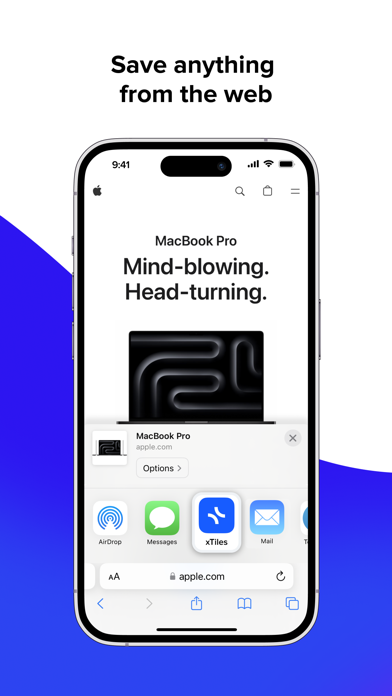
• Save text, images & links from the web.
STAY ON TOP OF DAILY WORK
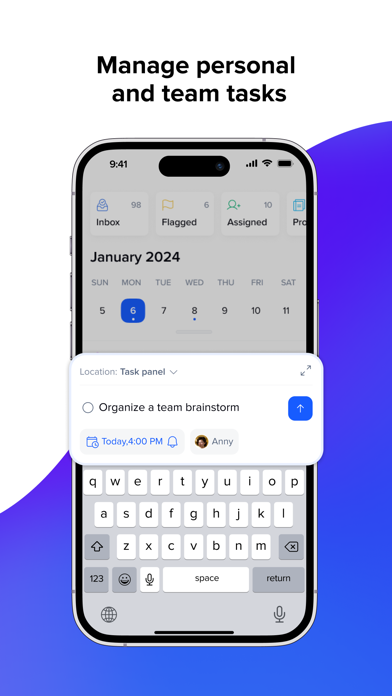
• Keep your workflow organized with to-do lists.
• Get organized with calendars and reminders.
• Pin keynotes and ideas for quick access to them.
JUMP INTO ANY PROJECT FAST
• Find anything you saved to xTiles in seconds.
• View and work without the lag and fall with a visually appealing experience.
CONTINUE WORK IN A …
Read the full description
At your desk, on the go, online or offline, enjoy the powerful capabilities of xTiles! Free your creativity with the same beautiful experience, whatever you’re on. ORGANIZE EVERYTHING IN ONE PLACE • Jot down quick notes, ideas, and voice recordings. • Snap sketches and upload photos from your camera. • Save text, images & links from the web. STAY ON TOP OF DAILY WORK • Keep your workflow organized with to-do lists. • Get organized with calendars and reminders. • Pin keynotes and ideas for quick access to them. JUMP INTO ANY PROJECT FAST • Find anything you saved to xTiles in seconds. • View and work without the lag and fall with a visually appealing experience. CONTINUE WORK IN A VISUAL WAY When you're back at your computer, flexibly organize your ideas and projects into visual boards with a drag-and-drop interface. INSTANT SYNCING Anything you save to the app is instantly synced to all of your devices. Native app store content on your devices, so you’ll never lose your flow. Ideas can strike you at any time! Be ready to convert them into something more! Terms of Use: https://www.apple.com/legal/internet-services/itunes/dev/stdeula/ Privacy Policy: https://xtiles.app/en/privacypolicy
Installs since 29 Aug 2026
Apple does not publish download counts. Estimates are in testing.
Estimated store revenue Estimated Beta
App Store, worldwide, monthly rate from the last 12 chart days to 19 Nov 2026
Below the top 100 grossing apps in the markets we calibrate. In the United States that usually means under about $6.4M a month. App Store purchases and subscriptions only, before Apple's 15 to 30% fee. Ads and web payments are not included.
Ratings
130 ratings, 130 reviews
No rating breakdown published for this app.
Recent reviews
Latest public reviews from the store
- 28 Jul 2025
PERFECT APP FOR ADHD
I recently discovered I am on the spectrum of ADHD. And I would always struggle with procrastination and can be quite scatter brained and not be able to focus. I used to hand write lists to help me keep track of what tasks I need to take care of each day and I would also keep random docs on my laptop desktop. However, this process never seemed to be as fruitful as I’d hoped. It wasn’t until I came across xTiles and decided to give it a try and wow, I am so happy I did. I love the intuitive functions / user interface and just having all my “brain dumps” and lists in one place. I love to use and make different templates for different areas of my life. But just having it all organized in one location I can consistently check back on is so helpful for me to keep things at top of mind. I had tried using Notion to organize my mind but it was simply too difficult for my ADHD brain to find efficient. I love xTiles and am excited to see how this app will continue to evolve and grow!
- 27 Feb 2025
Great app, but
Great app, use it for my reading logs, my homework assignments to keep it organized, and even my 2025 vision board. Only thing is that I would definitely enjoy a widget for this app, where I can choose a specific project that I would like to display and it should show me a preview of the project. It would be helpful to just get a quick look like for my homework assignments instead of having to open the app and look for the project. Definitely an easier alternative to notion.
- 2 Oct 2024
A sincere team and an app that is improving.
As evidenced by the other reviews, this program is desktop-first where the app is more for reference rather than management. That works for me, so I don’t have any complaints. I like that it has an inbox where I can drop ideas on-the-go and put them where they need to go later. Always experiment with the free plan first to make sure it suits your needs before buying anything, but know that the developers behind it do care about the user, so it’s worth it. I delivered some harsh feedback about the app and they immediately fixed it within a couple days!
- 28 Feb 2024
More to be desired
I heard about xtiles on tiktok and i think its a fantastic alternative to notion. Its very simple and straightforward while being easy to navigate which is a compliment of the ui. I like being able to workshop bigger ideas without being limited to small cards like trello. However the editing capability of the app is lacking, for example you cant create a board by itself, you have to duplicate a template and edit that instead. Theres so many elements I expect to be able to edit but I just cant. I am an ipad user at heart and I really want this app to be functional on its own. Wishing for more updates in the future to bring the app to its full potential.
What reviewers bring up
Topics mentioned in the latest 8 reviews, by how many reviews mention them
Liked in good reviews (4 reviews)
- organized 3
- interface 2
- helpful 2
- project 2
- laptop 2
- having 2
- notion 2
- brain 2
Raised in bad reviews (2 reviews)
- desktop 2
- ipad 2
Top chart positions
Latest App Store chart ranks by country, last 10 days
Not in any tracked top chart in the last 10 days.
xTiles: notes, tasks, projects history
Release, install milestones, listing and store changes
- First released on the store 10 Aug 2022
Update frequency
How often xTiles: notes, tasks, projects ships a new version, month by month
5 updates in the last 12 months. More often than most similar apps: they shipped a median of 1 updates in the same year.
Recent versions
Current version 3.10.2
- Version 3.8.52 Oct 2026
- AI Captured: fixed editing Select/Multiselect values in tables and image proportions in cards - Refreshed the Daily screen look - Improved tablet adaptation - Fixed opening collection cards via nested links and mentions - Other fixes and improvements
- Version 3.6.426 Aug 2026
- Smoother daily screen experience - Tap a notification, land exactly where you need to be — task and event details now open instantly from push alerts - More control over recurring tasks
- Version 3.1.31 Jul 2026
- Connect your Google Calendar to view, create, and edit events without leaving xTiles. - Open and work inside sub-projects. - New URL column type for table blocks. - Tasks now show icons for reminders and recurring schedules. - A new page-switching animation. - Bug fixes and performance improvements.
- Version 3.0.112 Jun 2026
- Before - just a list of tasks. Now - Daily: your whole day with time-blocking, today's notes, and My Planner sync. - A new unified editor lets you create and edit both tasks and events. - The Overdue section has been updated with a dedicated filter for overdue tasks. - Styles and page navigation have been refreshed across all projects. - Notifications have been redesigned with clearer, more distinct icons. - Performance improvements.
Listing keywords
Words and phrases xTiles: notes, tasks, projects repeats most in its store listing
Highlighted words also appear in the title. Counts cover the title, short description and description.
Compliance
What the listing and the app package show
- Store status
- Live
- Upkeep
- Updated 2 Oct 2026
- Age rating
- 4+
Apps like xTiles: notes, tasks, projects
 WardBulletJared Green★ 4.31
 Tally Counter WidgetT-Logic★ 4.42
 Widget: Custom Widgets GalleryPlanner X LLC★ 4.32
 Zoho Sheet—Spreadsheet on iPadZoho Corporation★ 4.58
 Texts on VideoGyoom★ 4.58
 NuminarNuminar Inc★ 4.56
 KilnLinkSkutt Ceramic Products, Inc.★ 1.88
 Mowr TechnologiesMowr Technologies LLC★ 4.55
 Jungle.Yaccov Snir★ 3.34
xTiles: notes, tasks, projects: questions and answers
Who makes xTiles: notes, tasks, projects?
xTiles: notes, tasks, projects is published by xtiles inc.
When was xTiles: notes, tasks, projects last updated?
The latest version (3.10.2) was released on 2 Oct 2026.
Is xTiles: notes, tasks, projects free?
Yes. xTiles: notes, tasks, projects is free to download.
Is xTiles: notes, tasks, projects still available?
Yes. xTiles: notes, tasks, projects is live on App Store as of 14 Nov 2026.
Track xTiles: notes, tasks, projects and its competitors
Watch any app for new versions, rating drops, chart moves and removals. Free plan, no card.