
2022最新版 パスワード管理は指紋認証のパスマネージャー
This app is an old version. Search for "Passmanager" on GooglePlay and use "Passmanager 2" which comes third.
- Installs
- 31.83K
- Measured
- Rating
- 4.3
- Ratings
- 166
- Version
- 1.9.3
- Updated 9 Jul 2021
- Released
- 29 Oct 2018
- Tracked since 13 May 2026
- Size
- 12 MB
- Needs 6.0
Screenshots

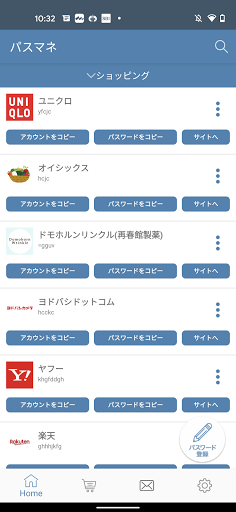


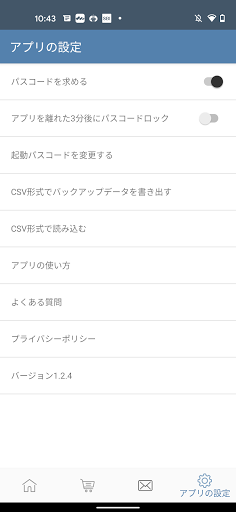
About 2022最新版 パスワード管理は指紋認証のパスマネージャー
The description on the store listing
PassManager (pass manager) is an application that can easily manage passwords. It is no exaggeration to say that it is the definitive version of the password management application.
Key features of PassManager:
--------------------
■ Automatic login function
■ Faster login with less typing!
■ Easy operation with fingerprint authentication
■ A strong password can be generated automatically
■ Easy jump to Chrome
The feature is that you can easily manage passwords with fingerprint authentication and log in to registered sites with a single button. (password autofill)
Of course, you can also register with a 6-digit password.
Jump to the registered site as it is with one …
Read the full description
PassManager (pass manager) is an application that can easily manage passwords. It is no exaggeration to say that it is the definitive version of the password management application. Key features of PassManager: -------------------- ■ Automatic login function ■ Faster login with less typing! ■ Easy operation with fingerprint authentication ■ A strong password can be generated automatically ■ Easy jump to Chrome The feature is that you can easily manage passwords with fingerprint authentication and log in to registered sites with a single button. (password autofill) Of course, you can also register with a 6-digit password. Jump to the registered site as it is with one button. Copy and paste in the password field! After all, the auto-login feature is very convenient. Automatically enter the password registered in the web browser in the app You can now consistently log in. (password autofill) Have you ever run into this kind of problem? -I don't remember too many IDs and account passwords. - Many accounts use the same password -Forgot your password? now what shall we do -Unable to manage multiple accounts and passwords solve these problems. Why PassManager is Secure ・Do not connect to the Internet ・Fingerprint authentication ・The built-in password generator generates passwords. It can generate strong random passwords. Simplest to make than any password manager app. Register the password you want to register from the button on the upper right. Manage all passwords with 1password (one password). After booting, log in with your fingerprint. Tap the button from the registered password list. Then the password is copied to the clipboard and you can jump to the website as it is. Passwords that can be managed are web, app, You can manage various passwords and IDs such as basic authentication. [Security/Encryption method] AES256 Leave password management to us
Installs since 29 Aug 2026 Measured
Exact Google Play install counts, collected daily
Ratings
166 ratings
- 5 ★0.0%
- 4 ★0.0%
- 3 ★0.0%
- 2 ★0.0%
- 1 ★0.0%
Recent reviews
Latest public reviews from the store
- 31 Jul 2012
ログアウト機能がないのはセキュリティ上、よろしくないのではないだろうか。改善を期待する。
Top chart positions
Latest Google Play chart ranks by country, last 10 days
Not in any tracked top chart in the last 10 days.
2022最新版 パスワード管理は指紋認証のパスマネージャー history
Release, install milestones, listing and store changes
- Reached 10,000+ installs 11 Mar 2020
- Reached 5,000+ installs 14 Aug 2019
- Reached 1,000+ installs 30 Jan 2019
- Reached 500+ installs 2 Jan 2019
- Reached 100+ installs 21 Nov 2018
- Reached 5+ installs 9 Nov 2018
- First released on the store 29 Oct 2018
Update frequency
How often 2022最新版 パスワード管理は指紋認証のパスマネージャー ships a new version, month by month
0 updates in the last 12 months. Less often than most similar apps: they shipped a median of 2 updates in the same year.
Recent versions
Current version 1.9.3
- Version 1.9.36 Jul 2021
自動ログインした後、画面左上の戻るボタンでホーム画面に戻れるようになりました。
- Version 1.9.221 Dec 2020
- Version 1.9.04 Dec 2020
- Version 1.8.322 Nov 2020
Listing keywords
Words and phrases 2022最新版 パスワード管理は指紋認証のパスマネージャー repeats most in its store listing
Top phrases: fingerprint authentication (3), manage passwords (2), password autofill (2), password management (2).
Highlighted words also appear in the title. Counts cover the title, short description and description.
Business model and tech
From the store listing, the SDKs in the app package and its declared permissions
- Business model
- Free to downloadIn-app purchasesShows ads
- Built with
- No cross-platform framework or game engine detected
- Ad networks (1)
- AdMob
- Subscriptions and payments
- Google Play billing
- Analytics and crash reports
- Firebase
- Sensitive access
- Photos, videos and files
2 ad, attribution and analytics SDKs detected. SDKs are read from the app package and permissions from the store listing, so code that loads later is not seen.
Technology
11 SDKs found in the app package
Ad networks
Advertising and install-attribution SDKs found in the app package
- AdMob
9 permissions
0 special access, 2 sensitive, 7 standard
- Change or delete shared storageSensitive
- Read shared storageSensitive
- Read how it was installed (install referrer)BIND_GET_INSTALL_REFERRER_SERVICEStandard
- Keep the phone awakeStandard
- Start when the phone turns onStandard
- Use the fingerprint readerUSE_FINGERPRINTStandard
- Full internet accessStandard
- See network connectionsStandard
- In-app purchases with Google PlayStandard
Compliance
What the listing and the app package show
- Store status
- Live
- Upkeep
- No update since 9 Jul 2021
- Registered in
- Japan
- Privacy policy
- Linked on the listing
- Advertising
- Shows ads
- In-app purchases
- Offered
- Age rating
- Everyone
- Sensitive permissions
- 2 sensitive of 9
- Location access
- No
- Camera and microphone
- Neither
Apps like 2022最新版 パスワード管理は指紋認証のパスマネージャー
SnagID - Snagging & InspectionAppculus – Audit, Inspection, Checklists & Utility22.7K installs★ 3.65
SimLab AR/VR ViewerSimulation Lab software23K installs★ 3.8
Allo: AI Second Business PhoneThe Mobile-First Company26.7K installs★ 3.7
DDA at Your ServiceCivic Solutions Pvt. Ltd.54.2K installs★ 2.6
DevHub for GitHubBruno Lemos13.4K installs★ 4.5
RBX Skins & Clothes MakerVenus Gold88.1K installs★ 3.29
CC RecyclesCity of Corpus Christi, Texas7.6K installs★ 4.77
Arcade: El principioArcadeLab14.2K installs★ 4.8
Password SecureAppInsane18.4K installs★ 4.05
2022最新版 パスワード管理は指紋認証のパスマネージャー: questions and answers
How many downloads does 2022最新版 パスワード管理は指紋認証のパスマネージャー have?
2022最新版 パスワード管理は指紋認証のパスマネージャー has 31,833 installs on Google Play, measured from the store's own count on 14 Nov 2026.
Who makes 2022最新版 パスワード管理は指紋認証のパスマネージャー?
2022最新版 パスワード管理は指紋認証のパスマネージャー is published by 株式会社つくってみた, a developer based in JP.
When was 2022最新版 パスワード管理は指紋認証のパスマネージャー last updated?
The latest version (1.9.3) was released on 9 Jul 2021.
Is 2022最新版 パスワード管理は指紋認証のパスマネージャー free?
Yes. 2022最新版 パスワード管理は指紋認証のパスマネージャー is free to download and offers in-app purchases, and it shows ads.
Is 2022最新版 パスワード管理は指紋認証のパスマネージャー still available?
Yes. 2022最新版 パスワード管理は指紋認証のパスマネージャー is live on Google Play as of 14 Nov 2026.
Track 2022最新版 パスワード管理は指紋認証のパスマネージャー and its competitors
Watch any app for new versions, rating drops, chart moves and removals. Free plan, no card.