ACCDB MDB Database Manager - V
Open Microsoft Access Database on Android Device with Access Database Manager.
- Installs
- 4.96K
- Measured
- Rating
- 1.0
- Ratings
- 128
- 31 reviews
- Version
- 3.0.5
- Updated 16 Feb 2019
- Released
- 21 Mar 2014
- Tracked since 13 May 2026
- Size
- 5 MB
- Needs 4.1
Screenshots




About ACCDB MDB Database Manager - V
The description on the store listing
Open Microsoft Access database on your Android Device with Access Database Manager, you can view it easily with Zoom, Sort and Paging. You can even edit it directly on your phone or pad with in-app purchase feature 'Edit Data'.
We have just released Pro version 'Access Database Manager Pro' without any in-app product in Google Play.
****** 'Access Database Manager' available on Android, Mac and iOS ******
Demo video on YouTube: https://www.youtube.com/user/woiapp
User Guide: http://support.woiapp.com/android_accessdb_help/
Support Access Database Version:
• Microsoft Access 2000
• Microsoft Access 2002
• Microsoft Access 2003
• Microsoft Access 2007
• Microsoft Access …
Read the full description
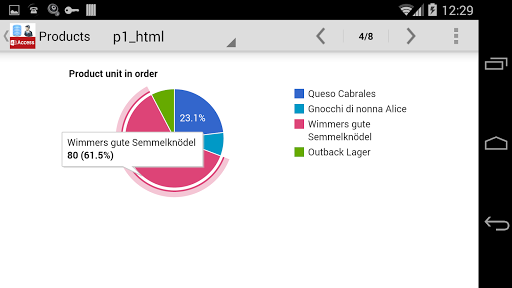
Open Microsoft Access database on your Android Device with Access Database Manager, you can view it easily with Zoom, Sort and Paging. You can even edit it directly on your phone or pad with in-app purchase feature 'Edit Data'. We have just released Pro version 'Access Database Manager Pro' without any in-app product in Google Play. ****** 'Access Database Manager' available on Android, Mac and iOS ****** Demo video on YouTube: https://www.youtube.com/user/woiapp User Guide: http://support.woiapp.com/android_accessdb_help/ Support Access Database Version: • Microsoft Access 2000 • Microsoft Access 2002 • Microsoft Access 2003 • Microsoft Access 2007 • Microsoft Access 2010 • Microsoft Access 2013 <b>Features</b> • Support mdb and accdb MS Access database format. • Build-in file explorer to find database files on your Android Device • Open Database from Dropbox , Email Attachment and other File Explorer/File Manager • Share/Send database file via email or Dropbox • View table data with paging list • Sort table data by touch on the column header • Share table data in CSV file format • Zoom View Table Data • UI Theme Cool Black and White • UI works well on phone and pad device • Open encrypt database (version 2000~2010) • Big database support, tested on 300MB size database, table rows over 2 million • Cancel current data load by touch the Back button when it's too much data • Set max rows on menu Setting UI ( If your phone have very limit memory, change this lower if app crash because not enough of memory ) • Browser data after 'Max View Rows' by touch next to fetch next bulk(Max View Rows) of rows. The first,last,sort only apply to current bulk rows. <b>In-app Purchase "DB Creator"</b> • Create Database • Create Table UI Guide • Create View based on filter and columns • Create contact table by import phone contacts or call log • Create SMS table by import phone SMS (use it for backup or search) <b>In-app Purchase "QuickLook":</b> • View Row Detail data • View photo in the database • Share detail record data via email • Show geo location data on map • HTML View with Customisable Template, template included sample Pie Char, Bar Chart, Line Chart, you can modify it to suit your needs. (Chart need internet access to use Google Service.) <b>In-app Purchase "Edit Data"</b> • 10+ Input Controls, include Text Input, Number Input, Color Chooser, Checkbox, Dropdown single select, multi-select, Geolocation Map, Camera/Photo Image, Barcode Scan ... • Insert/Delete/Update Row Data • Quick Update Single Field • Date Time control for update date value • Color Picker to update column 'color' • Photo update support, take photo or select from photo library • Import CSV data to table • Delete all rows • Get Geolocation data by search address field, and update it to your data ( the data format is {lat:12.346,lon:78.012} ) • Update Geolocation data by point and choose on Map ( Two format support: 1. latitude,longitude column 2. {lat:12.346,lon:78.012} ) <b>In-app Purchase "Advanced Search and Filter"</b> • Filter on specific column • Combined search criteria on columns • Select column to show • Drag Drop Re-order column to show • Create Search Form to reuse with customize UI <b>In-app Purchase "Convert DB"</b> • Choose file from build-in file explorer or Dropbox to find CSV, XLS, PDB files and convert it automatically • Convert Excel (XLS format support only, XLSX not support yet) to Access database directly • Convert CSV file to Access Database directly • Convert Palm Database standard PDB format file to Access Database <b>In-app Purchase "Form Designer"</b> • Design your customised edit/update form • All data editor control reuse support • Native UI Control Please send us email if you have any issues with this App, we are glad to help: [email protected]
Installs since 29 Aug 2026 Measured
Exact Google Play install counts, collected daily
Ratings
128 ratings, 31 reviews
- 5 ★20%
- 4 ★20%
- 3 ★0.0%
- 2 ★0.0%
- 1 ★60%
Recent reviews
Latest public reviews from the store
- 6 Sep 2023
Brain wash👍👍
- 19 Aug 2023
yes it's me!.
- 16 Jul 2023
Like to play solitare
- 8 Feb 2023
Good Game. Always truthfull.
Top chart positions
Latest Google Play chart ranks by country, last 10 days
Not in any tracked top chart in the last 10 days.
ACCDB MDB Database Manager - V history
Release, install milestones, listing and store changes
- Reached 1,000+ installs 23 Jul 2014
- Reached 500+ installs 15 May 2014
- Reached 100+ installs 9 Apr 2014
- First released on the store 21 Mar 2014
Recent versions
Current version 3.0.5
- Version 3.0.515 Feb 2019
* If you can't find local files/SDCard/local storage, please go to System setting enable this App's storage access privilege. * New find Cloud file button on first screen.
- Version 2.9.727 Oct 2016
- Version 2.9.513 Feb 2016
- Version 2.9.35 Nov 2015
Listing keywords
Words and phrases ACCDB MDB Database Manager - V repeats most in its store listing
Top phrases: access database (11), microsoft access (8), access microsoft access (5), microsoft access microsoft (5), access microsoft (5).
Highlighted words also appear in the title. Counts cover the title, short description and description.
Business model and tech
From the store listing, the SDKs in the app package and its declared permissions
- Business model
- Paid, $4.99In-app purchases
- Built with
- No cross-platform framework or game engine detected
- Ad networks (0)
- None detected
- Subscriptions and payments
- Google Play billing
- Analytics and crash reports
- Google Analytics
- Sensitive access
- Photos, videos and files
1 ad, attribution and analytics SDKs detected. SDKs are read from the app package and permissions from the store listing, so code that loads later is not seen.
Technology
6 SDKs found in the app package
7 permissions
0 special access, 2 sensitive, 5 standard
- Change or delete shared storageSensitive
- Read shared storageSensitive
- Full internet accessStandard
- See network connectionsStandard
- Read email attachmentsStandard
- Google Play license checkStandard
- In-app purchases with Google PlayStandard
Compliance
What the listing and the app package show
- Store status
- Live
- Upkeep
- No update since 16 Feb 2019
- Registered in
- China
- Privacy policy
- Linked on the listing
- Advertising
- No ads declared
- In-app purchases
- Offered
- Age rating
- Everyone
- Sensitive permissions
- 2 sensitive of 7
- Location access
- No
- Camera and microphone
- Neither
Apps like ACCDB MDB Database Manager - V
The OpayTHEOPAY33.3K installs★ 4.29
VAS PlatformVAS Dev20.5K installs★ 3.88
ENGAGEEngage Mobilize Inc6.5K installs★ 3.17
Paramount Bank Mobile appCraft Silicon8.6K installs★ 3.67
happiBehappiBe5.7K installs★ 4.7
eEmployeeEfftronics Systems Pvt Ltd3.3K installs★ 2.8
Mobile ManifestEVER.AG, LLC17K installs★ 2.28
BYK Additive GuideBYK-Chemie GmbH15.8K installs★ 5.0
BuyBotGoAmz Arbitrage Apps46K installs★ 4.45
ACCDB MDB Database Manager - V: questions and answers
How many downloads does ACCDB MDB Database Manager - V have?
ACCDB MDB Database Manager - V has 4,955 installs on Google Play, measured from the store's own count on 14 Nov 2026.
Who makes ACCDB MDB Database Manager - V?
ACCDB MDB Database Manager - V is published by John Li, a developer based in CN.
When was ACCDB MDB Database Manager - V last updated?
The latest version (3.0.5) was released on 16 Feb 2019.
Is ACCDB MDB Database Manager - V free?
No. ACCDB MDB Database Manager - V is a paid app priced at $4.99.
Is ACCDB MDB Database Manager - V still available?
Yes. ACCDB MDB Database Manager - V is live on Google Play as of 14 Nov 2026.
Track ACCDB MDB Database Manager - V and its competitors
Watch any app for new versions, rating drops, chart moves and removals. Free plan, no card.