
ADB Shell [Tasker Plugin]
Tasker plugin to perform a shell command on an ADB-enabled device.
- Installs
- 125K
- Measured
- Rating
- 4.13
- Ratings
- 225
- 15 reviews
- Version
- 6.3b
- Updated 7 Dec 2022
- Released
- 23 Feb 2017
- Tracked since 10 May 2026
- Size
- 3 MB
- Needs 4.4
Screenshots

About ADB Shell [Tasker Plugin]
The description on the store listing
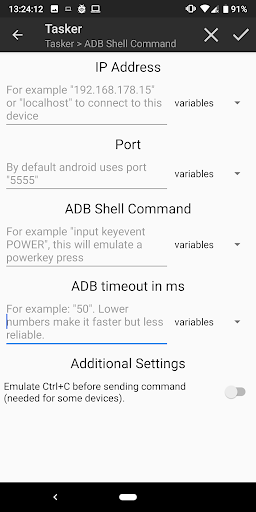
This Tasker plugin allows you to send a (series of) ADB Shell command(s) to a remote device (or the device itself) that has ADB over WiFi enabled.
This app obviously does need Tasker to work as it's a plugin (https://play.google.com/store/apps/details?id=net.dinglisch.android.taskerm, this is a paid app with a 7 days free trial). Again, without Tasker it WON'T WORK. Was I clear enough? Anyways...
On the target device you can do anything you would normally be able to do when using the terminal or ADB Shell of that device. This includes opening apps, moving files, simulating input et cetera (The sky is the limit and Google is your friend).
My app can be used as an action in Tasker and …
Read the full description
This Tasker plugin allows you to send a (series of) ADB Shell command(s) to a remote device (or the device itself) that has ADB over WiFi enabled. This app obviously does need Tasker to work as it's a plugin (https://play.google.com/store/apps/details?id=net.dinglisch.android.taskerm, this is a paid app with a 7 days free trial). Again, without Tasker it WON'T WORK. Was I clear enough? Anyways... On the target device you can do anything you would normally be able to do when using the terminal or ADB Shell of that device. This includes opening apps, moving files, simulating input et cetera (The sky is the limit and Google is your friend). My app can be used as an action in Tasker and needs to be configured properly when added to a task to work. NOTE: - You can send multiple commands at once by separating them with a ";". - All commands in a single action are automatically followed with an "exit" command so to close the ADB connection. This means that if you want to send multiple commands that are depending on each other, you will need to put them in a single Tasker action and separate them with ";". - If you want multiple actions of my plugin to run after each other in a Tasker task, please keep the timeout set as is. Tasker will continue when the command is sent. - The first time you try to connect to another device via ADB it will ask you if you trust the device. For this plugin to work correctly, you'll need to always "trust this computer". - The output of the console can be viewed and reused from within Tasker. This can be done by accessing %output1, %output2 etc. or by iteration over %output() using a for loop. - The plugin will generate two key files on your device to be able to make a secure ADB connection to the devices. Now for some useful commands! - A command I myself use a lot is to turn my ADB over WiFi enabled AndroidTV (Nvidia SHIELD) on or off by sending the command "input keyevent POWER", this simulates a power button press. - Of course you can vary which key to press, for example to press the arrow keys you can do "input keyevent DPAD_RIGHT" or “…LEFT” etc. - Another simple command is "reboot", which will, you guessed it, reboot the device! You can also put "reboot -p" here to power it down. - A cool thing to be able to do is to launch apps on the device. You will have to Google a bit to find the Main activity of an app. This example will open Chrome on the device: "am start -n com.android.chrome/com.google.android.apps.chrome.Main". - When you fill in “localhost” in the IP address field, every command will be executed on the device itself! This works even without root if you, of course, have ADB over WiFi enabled (can be activated from a pc using “adb tcpip 5555”). Of course there are many other commands, the sky is the limit! This is my first ever published app, so please leave feedback and submit bugs so I can try my best to fix them! Any tips are more than welcome! The idea to create this app came from https://play.google.com/store/apps/details?id=com.cgutman.androidremotedebugger, which allows the user to connect to a remote device via an interface in the app itself. Please read the description of that app too, it contains some tips on enabling ADB over WiFi. I use the same AdbLib Java library in my app. I use the AdbLib library found at https://github.com/cgutman/AdbLib and use https://github.com/cgutman/AdbLibTest as an example for how to use the library. I adapted this example to work with a given command and converted it to a Tasker plugin. For help, you can email me or visit the XDA-Developers thread at https://forum.xda-developers.com/u/tasker-tips-tricks/plugin-remote-adb-shell-t3562013. This thread also contains some useful tips for accessing the local device running the task without root. Now open source at https://github.com/Jolanrensen/ADBPlugin!
Installs since 29 Aug 2026 Measured
Exact Google Play install counts, collected daily
Ratings
225 ratings, 15 reviews
- 5 ★68%
- 4 ★2.3%
- 3 ★16%
- 2 ★0.0%
- 1 ★13%
Recent reviews
Latest public reviews from the store
- 3 Feb 2023
Highly recommend Crack ADAT and crack INBDE for American board preparation for their updated practice questions as well for ease of understanding basics through tutorials in order to score high in the exam. ❤️🎉 All the very best ! 👍🏻
- 1 Apr 2022
All the tutors are amazing, knowledgeable, professional and knows how to deliver the information to the students in a way that makes the learning process very easy and interesting. In my opinion this is the greatest online crash course for the ADAT preparations. They respond quickly to emails , overall a comprehensive course, eventhough it's an online platform, whatever you need to pass the exam, you have it here in this course. I would highly recommend crackADAT to anyone who wants to take ADAT
- 30 Apr 2020
Extremely useful and worthy. The fact that I can just go on the app whenever I want and practice questions is amazing.
Top chart positions
Latest Google Play chart ranks by country, last 10 days
Not in any tracked top chart in the last 10 days.
ADB Shell [Tasker Plugin] history
Release, install milestones, listing and store changes
- Reached 100,000+ installs 7 Dec 2022
- Reached 50,000+ installs 18 Jan 2022
- Reached 10,000+ installs 10 Mar 2019
- Reached 5,000+ installs 29 Apr 2018
- Reached 1,000+ installs 22 Aug 2017
- Reached 500+ installs 2 Jul 2017
- Reached 100+ installs 30 Mar 2017
- Reached 50+ installs 19 Mar 2017
Recent versions
Current version 6.3b
- Version 6.3b16 Jan 2020
• 6.3 - Plugin is now way faster using Tasker's intent service system! - Added donation option - a: small bugfix - b: reverted something to make it faster • 6.2 - Thanks to those who do not understand that this is a Tasker Plugin. Because of you I got the idea you should be able to test the plugin without Tasker, so now you can! - Let's see if this takes care of the 1 star reviews haha
- Version 6.3a2 Jan 2020
- Version 6.214 Aug 2019
- Version 6.16 Nov 2018
Listing keywords
Words and phrases ADB Shell [Tasker Plugin] repeats most in its store listing
Top phrases: adb over wifi (4), tasker plugin (4), adb shell (3), wifi enabled (3), send multiple commands (2).
Highlighted words also appear in the title. Counts cover the title, short description and description.
Business model and tech
From the store listing and declared permissions
- Business model
- Free to downloadIn-app purchases
- Sensitive access
- No sensitive permission declared
Compliance
What the listing and the app package show
- Store status
- Live
- Upkeep
- No update since 7 Dec 2022
- Registered in
- Netherlands
- Privacy policy
- Linked on the listing
- Advertising
- No ads declared
- In-app purchases
- Offered
- Age rating
- Everyone
Apps like ADB Shell [Tasker Plugin]
My India VPNAppPulse Tech42.2K installs★ 4.42
Light Bulb Security CameraRockyTeach63.1K installs★ 2.88
TCL Smart TV Screen mirroringTech-Tools95.2K installs★ 3.85
Easy Schedule Notebookoxdb.net51.5K installs★ 5.0
Land Parcels Areas CalculatorGeoZidan46K installs★ 1.73
Gallery Vault - Hide PhotoMerryblue51K installs★ 4.2
Heat Index Calculator - How toVnMobileSolutions Inc.3.7K installs★ 4.24
2D OwnerTechnologyGateway46K installs★ 4.8
3D Print Cost CalculatorReme Le Hane38.5K installs★ 3.95
ADB Shell [Tasker Plugin]: questions and answers
How many downloads does ADB Shell [Tasker Plugin] have?
ADB Shell [Tasker Plugin] has 124,736 installs on Google Play, measured from the store's own count on 14 Nov 2026.
Who makes ADB Shell [Tasker Plugin]?
ADB Shell [Tasker Plugin] is published by Jolan Rensen, a developer based in NL.
When was ADB Shell [Tasker Plugin] last updated?
The latest version (6.3b) was released on 7 Dec 2022.
Is ADB Shell [Tasker Plugin] free?
Yes. ADB Shell [Tasker Plugin] is free to download and offers in-app purchases.
Is ADB Shell [Tasker Plugin] still available?
Yes. ADB Shell [Tasker Plugin] is live on Google Play as of 14 Nov 2026.
Track ADB Shell [Tasker Plugin] and its competitors
Watch any app for new versions, rating drops, chart moves and removals. Free plan, no card.