Advanced PDF tool
Advanced PDF tool Edit, Merge, Convert, Reorder your pdf
- Installs
- 32
- Measured
- Rating
- —
- Ratings
- —
- Version
- Varies with device
- Updated 28 Mar 2026
- Released
- 12 Apr 2023
- Tracked since 14 May 2026
- Size
- —
Screenshots


About Advanced PDF tool
The description on the store listing
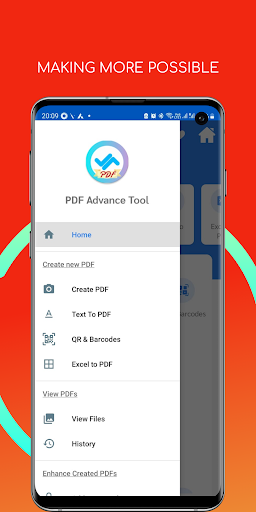
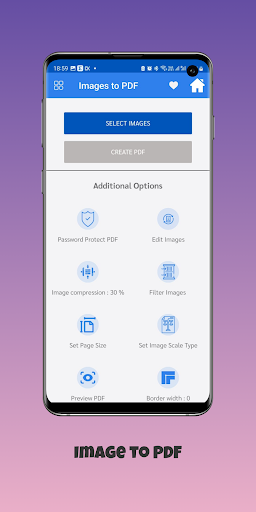
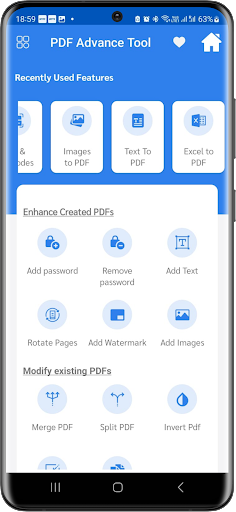
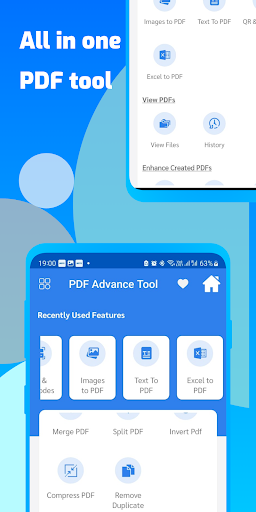
Advanced PDF tool allow you to merge, split, reorder, delete, encrypt, decrypt, rotate, crop and reformat PDF pages, to add information, header, footer and watermark, to convert images to PDF, PDF to images or PostScript to PDF, to delete, flatten and list form fields, to scan to pdf, to create transparent image, and more..
No watermarks! FREE for Personal or Commercial use! FREE distribution!
✔️ Extensive tools collection
Advanced PDF tool offers you a collection of tools that you can use to work productively with PDFs and other files. The Advanced PDF tool leave nothing to be desired. There is hardly anything in the PDF area that you cannot do with Advanced PDF tool.
✔️ …
Read the full description
Advanced PDF tool allow you to merge, split, reorder, delete, encrypt, decrypt, rotate, crop and reformat PDF pages, to add information, header, footer and watermark, to convert images to PDF, PDF to images or PostScript to PDF, to delete, flatten and list form fields, to scan to pdf, to create transparent image, and more.. No watermarks! FREE for Personal or Commercial use! FREE distribution! ✔️ Extensive tools collection Advanced PDF tool offers you a collection of tools that you can use to work productively with PDFs and other files. The Advanced PDF tool leave nothing to be desired. There is hardly anything in the PDF area that you cannot do with Advanced PDF tool. ✔️ 100% free of charge You can use all Advanced PDF tool features free of charge and without any restrictions. ✔️ Easy to use The Advanced PDF tool were developed to be as easy to use as possible. Intuitive usability was the goal. We have achieved this goal and that is why the Advanced PDF tools are so popular. ✔️ Merge - Merge or Combine two or more PDF files into a single PDF file. ✔️ Split, Reorder or Delete - Split, Extract, Reorder or Delete PDF pages from a PDF file into a new file. ✔️ Encrypt and Decrypt with Security Options - Encrypt or Decrypt PDF documents (Master Password or User Password may be required). Protect PDF files with passwords and prevent PDF files from being printed, copied, changed, filled, extracted, signed, assembled or merged. Supports Adobeý Standard 40-bit Encryption and Adobeý Advanced 128-bit Encryption ✔️ Rotate and Crop - Rotate a PDF page by 0, 90, 180 and 270 degree. Crop a page to modify its layout of Print or View by specifying its margins. ✔️ Reformat - Put multiple pages into one page to save paper and inks when printing hard copies. Add note lines for handout. ✔️ Header and Footer - Add Headers and Footers to present information, such as date, time, page numbers, or the title of the document, in the top or bottom margins of a document. ✔️ Watermark by Stylized Text Add Stylized Text Stamp. Watermark by Image Add Stamp using image file (bmp, jpg, gif, png, tiff, and wmf). ✔️ Convert Images to PDF - Convert images (bmp, jpg, gif, png, tiff, and wmf) into a PDF file with layout options. ✔️ Convert PDF into images - Save PDF pages into images (png, jpg, bmp and tiff) with DPI options. ✔️ PDF Form Fields: Delete, Flatten, List Delete, Flatten or List the PDF Form Fields inside a PDF file. ✔️ Convert PostScript(PS) File into PDF Convert PS files into PDF files so Adobe Reader can read them. Add Information Add information (title, author, subject, keywords, created, creator, producer, version) to PDF documents. ✔️ Free Scanner Scan your paper form or photo as an image file (PNG, JPG, BMP, TIF, GIF) or a PDF file.
Installs since 14 Nov 2026 Measured
Exact Google Play install counts, collected daily
Daily history starts once this app is in our daily install sample.
Ratings
- 5 ★0.0%
- 4 ★0.0%
- 3 ★0.0%
- 2 ★0.0%
- 1 ★0.0%
Recent reviews
Latest public reviews from the store
No reviews in our sample for this app yet.
Top chart positions
Latest Google Play chart ranks by country, last 10 days
Not in any tracked top chart in the last 10 days.
Advanced PDF tool history
Release, install milestones, listing and store changes
- Reached 10+ installs 28 Mar 2026
- Reached 5+ installs 13 Mar 2025
- First released on the store 12 Apr 2023
Listing keywords
Words and phrases Advanced PDF tool repeats most in its store listing
Top phrases: advanced pdf (9), advanced pdf tool (8), pdf tool (8), pdf file (5), pdf files (4).
Highlighted words also appear in the title. Counts cover the title, short description and description.
Business model and tech
From the store listing and declared permissions
- Business model
- Free to downloadShows ads
- Sensitive access
- No sensitive permission declared
Compliance
What the listing and the app package show
- Store status
- Live
- Upkeep
- Updated 28 Mar 2026
- Registered in
- India
- Privacy policy
- Linked on the listing
- Advertising
- Shows ads
- In-app purchases
- None declared
- Age rating
- Everyone
Apps like Advanced PDF tool
들어서 화면켜기Won3.5K installs★ 4.0
Height PredictionEcliptic App Ventures45.9K installs★ 2.4
Speicers`Pro VPNEldiablolucifer202021.2K installs★ 4.14
Lightning Tracker with AlertsYaksh Software4.3K installs★ 3.0
Mana Pathi (Unit Converter)Shirish Koirala2.2K installs★ 4.6
Multi-tab Calc - A simple app.Naoyuki Rikiji1.3K installs★ 5.0
Photo Recovery PlusBillApps7.1K installs★ 4.53
Just Silence. Scheduled.Akid Soft1.6K installs★ 5.0
- WoWp AssistantВиталий Робиновский2K installs★ 4.2
Advanced PDF tool: questions and answers
How many downloads does Advanced PDF tool have?
Advanced PDF tool has 32 installs on Google Play, measured from the store's own count on 14 Nov 2026.
Who makes Advanced PDF tool?
Advanced PDF tool is published by RAHUL CV, a developer based in IN.
When was Advanced PDF tool last updated?
The latest version (Varies with device) was released on 28 Mar 2026.
Is Advanced PDF tool free?
Yes. Advanced PDF tool is free to download, and it shows ads.
Is Advanced PDF tool still available?
Yes. Advanced PDF tool is live on Google Play as of 14 Nov 2026.
Track Advanced PDF tool and its competitors
Watch any app for new versions, rating drops, chart moves and removals. Free plan, no card.