
Advanced Tools Pro
All in one to explore, manage and set-up your android device!
- Installs
- 13.89K
- Measured
- Rating
- 4.6
- Ratings
- 330
- 82 reviews
- Version
- 2.3.9
- Updated 11 Aug 2026
- Released
- 1 Aug 2011
- Tracked since 14 May 2026
- Size
- 8 MB
- Needs 5.0
Screenshots




About Advanced Tools Pro
The description on the store listing
A complete set of tools to manage your device, Advanced Tools Pro is: file manager, task manager, app manager, system manager and much more with the device-related tools (sensors, gps, cpu, display, flashlight).
Even more options available for root users.
Pro version is the premium choice, all the features unlocked and no ads.
**** NOTES ****
Logcat tool requires READ_LOG permission to run properly, non-root users can grant READ_LOG permission by using ADB commands, see related info inside the app.
**** BASIC HINTS ****
Open the main menu to access all the tools available, swipe from the left edge to the right or tap the dedicated button.
File Manager - for any of the …
Read the full description
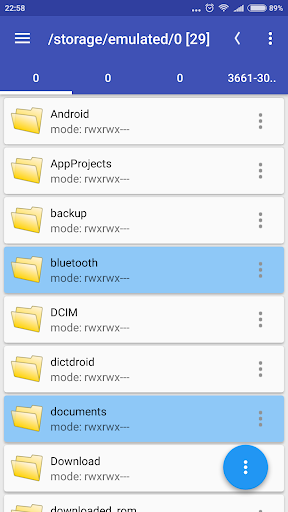
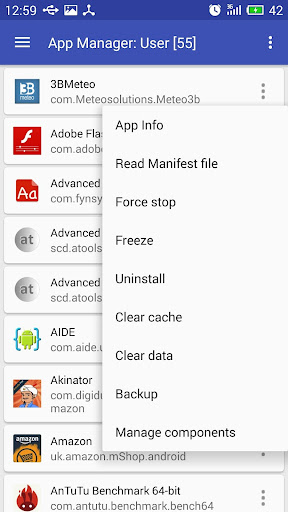
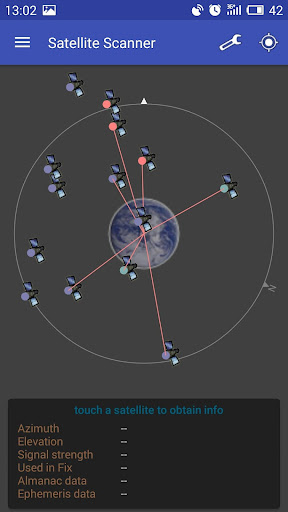
A complete set of tools to manage your device, Advanced Tools Pro is: file manager, task manager, app manager, system manager and much more with the device-related tools (sensors, gps, cpu, display, flashlight). Even more options available for root users. Pro version is the premium choice, all the features unlocked and no ads. **** NOTES **** Logcat tool requires READ_LOG permission to run properly, non-root users can grant READ_LOG permission by using ADB commands, see related info inside the app. **** BASIC HINTS **** Open the main menu to access all the tools available, swipe from the left edge to the right or tap the dedicated button. File Manager - for any of the item in the list, single tap to open, long-press to select. Open the top-right menu (three dots) for more options. **** SOME OF THE THINGS YOU CAN DO **** FILE MANAGER * Operate on two different tabs * File operations between tabs (no need to navigate back!) * Access/modify RO folders, system, data, etc. (root) * Copy, cut, paste, delete, rename files or folders * Add new folders * Add new text files * Integrated mini text editor * Search files or folders * Get file or folder details * Set file or folder permissions (root) * Zip/unzip files or whole folders * Browse zip file's contents * Unzip selected contents from a zip file * Browse APK file's contents * Send files via bluetooth * Share supported files * Storage info with pie charts * Set starting folders (shortcuts) * FTP: download/upload files or whole folders * FTP: browse FTP contents, add new folders APP MANAGER * Detailed info about each installed application * Uninstall apps * Freeze system apps (root) * Uninstall system apps (root) * Backup and restore apps * Clear app cache/data * Startup apps (grant/deny auto-start) * Manage app components! (Pro only) * View content of manifest file (Pro only) SYSTEM MANAGER * Plenty of info about system, memory, graphic, hw, battery * Change LCD density (root) * Change the heap size (root) * Change "max events per second" value (root) * Change the WiFi scan interval (root) * more properties from build.prop file * Change "min free kbytes" value (root) * Change "vfs cache pressure" value (root) * Change swappiness value (root) * Change dirty ratio and dirty background ratio (root) * more kernel's VM and sysctl parameters * Configure Android's internal task killer * Access special settings and info * View filesystem * View dmesg (Kernel Debug Messages) * View live logcat * Record, filter, stop, resume logcat * Detect CarrierIQ * Floating RAM meter (Pro only) TASK MANAGER * Kill selected applications * Filter system processes (security options) * Info about running services SENSOR ANALYZER * Scan and analyze all the sensors installed * Compass tool * Compass calibration tool * Magnetic field detector GPS STATUS AND FIX * Get all the info passed by GPS device * Fast fix tool to get signal fixed in less time * Scan satellites and get dedicated info * Get your current location's address CPU MONITOR * CPU Time in State monitor * Real-time CPU meter * Floating CPU meter (Pro only) * Set CPU scaling frequencies and governor (root) DISPLAY * Detailed info about screen device * Blue light filter for eyes comfort * Dim filter for smart brightness control ATOOLS TERMINAL (Pro only) * Pseudo terminal emulator * Execute linux commands * Quick buttons for mount and set permissions OTHERS * Quick launch from notification bar * Use the camera flashlight as a torch * Light and dark themes * Customizable font style and text size Enjoy Advanced Tools Pro!
Installs since 29 Aug 2026 Measured
Exact Google Play install counts, collected daily
Ratings
330 ratings, 82 reviews
- 5 ★81%
- 4 ★8.9%
- 3 ★4.0%
- 2 ★1.8%
- 1 ★4.0%
Recent reviews
Latest public reviews from the store
- 20 Sep 2025
niceeee
- 23 Jul 2025
great app
- 20 May 2025
Great. 😃
- 12 Apr 2025
University of Michigan Data Scientist -Approved-
What reviewers bring up
Topics mentioned in the latest 50 reviews, by how many reviews mention them
Liked in good reviews (27 reviews)
- logcat 4
- device 3
- option 2
- note 2
- file 2
- read 2
Raised in bad reviews (17 reviews)
- samsung 3
- opening 3
- screen 3
- logs 3
- freezes 2
- crashes 2
Top chart positions
Latest Google Play chart ranks by country, last 10 days
Not in any tracked top chart in the last 10 days.
Advanced Tools Pro history
Release, install milestones, listing and store changes
- Reached 10,000+ installs 5 Jul 2021
- Reached 5,000+ installs 2 Nov 2018
- First released on the store 1 Aug 2011
Update frequency
How often Advanced Tools Pro ships a new version, month by month
4 updates in the last 12 months. More often than most similar apps: they shipped a median of 0 updates in the same year.
Recent versions
Current version 2.3.9
- Version 2.3.911 Aug 2026
2.3.9 - Fixes and improvements 2.3.5 - New: Integrated PDF viewer and TIFF viewer - New: Glass-like UI elements (optional) - New: List filter in file manager 1.99.1 - New: Display section added - New: Screen Info tool - New: Smart Dim tool - Black theme added - Updated info for Logcat tool (how to get logs on non-rooted devices) - Blue Light Filter tool to protect your eyes - Drag and drop (move or copy files) - Support for OTG USB storage - Tutorials and help by categories
- Version 2.3.822 May 2026
2.3.8 - New: List filter in file manager - Fixes and improvements 2.3.5 - New: Integrated PDF viewer and TIFF viewer - New: Glass-like UI elements (optional) 1.99.1 - New: Display section added - New: Screen Info tool - New: Smart Dim tool - Black theme added - Updated info for Logcat tool (how to get logs on non-rooted devices) - Blue Light Filter tool to protect your eyes - Drag and drop (move or copy files) - Support for OTG USB storage - Tutorials and help by categories
- Version 2.3.520 Mar 2026
2.3.5 - New: Integrated PDF viewer and TIFF viewer - New: Glass-like UI elements (optional) - Fixes and improvements 2.0.0 - Completely redesigned UI - New tools and options 1.99.1 - New: Display section added - New: Screen Info tool - New: Smart Dim tool - Black theme added - Updated info for Logcat tool (how to get logs on non-rooted devices) - Blue Light Filter tool to protect your eyes - Drag and drop (move or copy files) - Support for OTG USB storage - Tutorials and help by categories
- Version 2.3.410 Jan 2026
Listing keywords
Words and phrases Advanced Tools Pro repeats most in its store listing
Top phrases: root change (6), value root change (4), info about (4), value root (4), advanced tools pro (3).
Highlighted words also appear in the title. Counts cover the title, short description and description.
Business model and tech
From the store listing and declared permissions
- Business model
- Paid, $4.95
- Sensitive access
- No sensitive permission declared
Compliance
What the listing and the app package show
- Store status
- Live
- Upkeep
- Updated 11 Aug 2026
- Registered in
- Italy
- Privacy policy
- Linked on the listing
- Advertising
- No ads declared
- In-app purchases
- None declared
- Age rating
- Everyone
Apps like Advanced Tools Pro
Apk GeneratorAks Apps92.9K installs★ 3.54
Total Control 2.0Extraflame S.p.A.30K installs★ 2.67
Bubble LevelEONSOFT55K installs★ 4.83
EASI DriverHungrypanda Au Pty Ltd43.8K installs★ 3.67
Waste calendarZampogna Gianluca33.5K installs★ 3.0
Offline Password ManagerYogesh Dama21.4K installs★ 3.77
OBD Pluswanbaolu46.9K installs★ 2.67
Dreamy Light Jar ThemesTheme Design Apps for Android31.1K installs★ 4.75
- Apk Plus Sharing app - Application ManagerApp Sharing Management Lab226K installs★ 4.56
Advanced Tools Pro: questions and answers
How many downloads does Advanced Tools Pro have?
Advanced Tools Pro has 13,892 installs on Google Play, measured from the store's own count on 12 Nov 2026.
Who makes Advanced Tools Pro?
Advanced Tools Pro is published by SCDevs, a developer based in IT.
When was Advanced Tools Pro last updated?
The latest version (2.3.9) was released on 11 Aug 2026.
Is Advanced Tools Pro free?
No. Advanced Tools Pro is a paid app priced at $4.95.
Is Advanced Tools Pro still available?
Yes. Advanced Tools Pro is live on Google Play as of 12 Nov 2026.
Track Advanced Tools Pro and its competitors
Watch any app for new versions, rating drops, chart moves and removals. Free plan, no card.