
Alarm Clock
Alarm clocks and intelligent algorithm for alarm activations
- Installs
- 9.77K
- Measured
- Rating
- 1.8
- Ratings
- 55
- Version
- 6.0.0
- Updated 29 Jun 2026
- Released
- 14 Sep 2022
- Tracked since 13 May 2026
- Size
- —
Screenshots


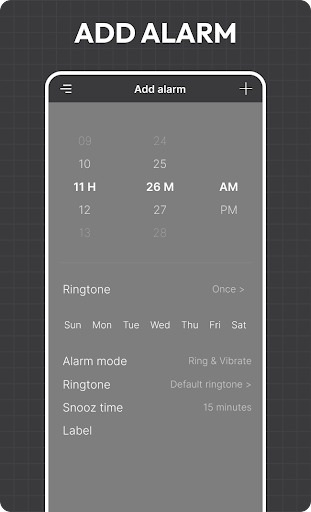
About Alarm Clock
The description on the store listing
<b>Alarm Clock</b> is the Android alarm clock application and it comes installed by default. Alarm clocks and intelligent algorithm for alarm activation. Alarm Clock is designed to free you from annoyance, will help you stay on top of your task.
<b>Alarm clock</b> is monitor times of various locations around the world. Clock that is designed to alert an individual at a specified time, The recommended amount of sleep for a healthy. ALARM CLOCK is a clock that can be set to sound an alarm at a desired time.
Alarms for waking up or in order to notify the user of something at any given time of the day and night. Set your time zone and create a widget with other time zones so you can see …
Read the full description
<b>Alarm Clock</b> is the Android alarm clock application and it comes installed by default. Alarm clocks and intelligent algorithm for alarm activation. Alarm Clock is designed to free you from annoyance, will help you stay on top of your task. <b>Alarm clock</b> is monitor times of various locations around the world. Clock that is designed to alert an individual at a specified time, The recommended amount of sleep for a healthy. ALARM CLOCK is a clock that can be set to sound an alarm at a desired time. Alarms for waking up or in order to notify the user of something at any given time of the day and night. Set your time zone and create a widget with other time zones so you can see the hour in various. You can see the hour in various places around the world with just a glance. You can create your own custom alarms to wake you up or notify you of something at any. <b>FEATURE OF ALARM CLOCK</b> 1) Easy and quick to set and Smart Alarm reminder. 2) Add local time in major countries of the world. 3) Customize your reminder in your own way with repeat options. 4) Stopwatch to support recording and sharing by circle. 5) You can set Alarms, Add Timers, and run a stopwatch. 6) Can choose Day or Night theme for good visibility. 7) It will remind you with alarm notification sound. 8)You can add labels when you set up alarm. 9) Quickly start the countdown function to preset the time settings commonly used. 10) Easy to manage alarm volume. 11) Notify me of upcoming alarms. Like 1 hour before, 2 hour before and nev1er. 12) Alarm silence in set like 1 min, 5 min up to 30 minutes. 13) Easy to set alarm snooze duration. <b>World Clock</b> If your location is missing, find a place in the same time zone & change the clock. You can now find out on the global in the world clock. Do you want to know time in different country or city? This app is perfect world clock and meeting planner. Use the Time zone converter. Find the local time easily. <b>Timer</b> A timer is a specialized type of clock which is used to measure time intervals. Save frequently used values for the timer. Timer are goes off but you want to repeat the countdown. You can add time only when time starts, write add timer Easy to delete timer <b>Stopwatch</b> Do you want to start or stop the stopwatch timer with a simple tap? Stopwatch app for a variety of home and professional needs, and it’s also known as Digital Stopwatch Tap the reset button to restart the milliseconds stopwatch and start from zero. <b>Stopwatch</b> app which is specifically designed with milliseconds stopwatch for the best user experience. <b>Light OR Dark Mode</b> Understanding that you want to reduce eye fatigue at night. Go to setting the show general setting so easy to to change dark and light mode.
Installs since 29 Aug 2026 Measured
Exact Google Play install counts, collected daily
Ratings
55 ratings
- 5 ★20%
- 4 ★0.0%
- 3 ★0.0%
- 2 ★0.0%
- 1 ★80%
Recent reviews
Latest public reviews from the store
- 1 Apr 2026
This app is so informative!
- 17 Jan 2026
Not bad but desperately needs widgets. would pay for premium if there were good widgets.
Top chart positions
Latest Google Play chart ranks by country, last 10 days
Not in any tracked top chart in the last 10 days.
Alarm Clock history
Release, install milestones, listing and store changes
- Reached 5,000+ installs 3 Feb 2024
- Reached 1,000+ installs 7 Mar 2023
- Reached 500+ installs 5 Feb 2023
- Reached 100+ installs 7 Dec 2022
- First released on the store 14 Sep 2022
Update frequency
How often Alarm Clock ships a new version, month by month
1 updates in the last 12 months. About as often as similar apps, which shipped a median of 1 updates in the same year.
Recent versions
Current version 6.0.0
- Version 6.0.029 Jun 2026
🚀 Improved app performance for faster and smoother operation 🛠️ Fixed various issues and enhanced overall stability Update now to enjoy the latest improvements and a better experience!
- Version 5.0.024 Jul 2025
- Improved performance & stability - Sleek new UI for easy alarm setup - Enhanced snooze & repeat features - Android Security patch update applied - Bug fixes for a smoother experience Stay secure and wake up on time — update now!
- Version 4.0.02 Jun 2024
- Version 3.0.026 Oct 2023
Listing keywords
Words and phrases Alarm Clock repeats most in its store listing
Top phrases: alarm clock (7), world clock (4), algorithm for alarm (2), clocks and intelligent (2), hour in various (2).
Highlighted words also appear in the title. Counts cover the title, short description and description.
Business model and tech
From the store listing and declared permissions
- Business model
- Free to downloadShows ads
- Sensitive access
- Draws over other appsAdvertising ID
14 permissions
2 special access, 1 sensitive, 11 standard
- Draw over other appsSpecial access
- Set exact alarmsSCHEDULE_EXACT_ALARMSpecial access
- Show notificationsPOST_NOTIFICATIONSSensitive
- Read the advertising IDAD_IDStandard
- Control vibrationStandard
- Foreground service (data sync)FOREGROUND_SERVICE_DATA_SYNCStandard
- Foreground service (media playback)FOREGROUND_SERVICE_MEDIA_PLAYBACKStandard
- Keep the phone awakeStandard
- Run a foreground serviceFOREGROUND_SERVICEStandard
- Start when the phone turns onStandard
- Full internet accessStandard
- See network connectionsStandard
Compliance
What the listing and the app package show
- Store status
- Live
- Upkeep
- Updated 29 Jun 2026
- Registered in
- India
- Privacy policy
- Linked on the listing
- Advertising
- Shows ads
- In-app purchases
- None declared
- Age rating
- Everyone
- Sensitive permissions
- 1 sensitive, 2 special access of 14
- Location access
- No
- Camera and microphone
- Neither
Apps like Alarm Clock
Smart talkieHangzhou Zhidou Technology Co., Ltd.4.1K installs★ 4.45
WiFi File Browser ProBytes Lounge2K installs★ 5.0
AI Puzzle SolverSolver Works8.8K installs★ 2.75
CharacterBookмакс апшер7.3K installs★ 3.42
Flashlight: LED Torch + ScreenApplab Studios8.6K installs★ 4.41
RUserLAnd Technologies2.6K installs★ 2.63
Onforu HomeOnforu19.1K installs★ 2.22
Countdown Calendar - WidgetTuxerito24.4K installs★ 1.8
CodeAssist - Android IDESketchub225K installs★ 5.0
Alarm Clock: questions and answers
How many downloads does Alarm Clock have?
Alarm Clock has 9,766 installs on Google Play, measured from the store's own count on 14 Nov 2026.
Who makes Alarm Clock?
Alarm Clock is published by Rein Tools, a developer based in IN.
When was Alarm Clock last updated?
The latest version (6.0.0) was released on 29 Jun 2026.
Is Alarm Clock free?
Yes. Alarm Clock is free to download, and it shows ads.
Is Alarm Clock still available?
Yes. Alarm Clock is live on Google Play as of 14 Nov 2026.
Track Alarm Clock and its competitors
Watch any app for new versions, rating drops, chart moves and removals. Free plan, no card.