ALDLdroid
OBD1 ECMs application. Data log or tune directly from your phone or tablet!
- Installs
- 4.81K
- Measured
- Rating
- 4.61
- Ratings
- 169
- 87 reviews
- Version
- 1.52
- Updated 22 Oct 2026
- Released
- 25 Nov 2013
- Tracked since 13 May 2026
- Size
- 3 MB
- Needs 4.0
Screenshots



About ALDLdroid
The description on the store listing
ALDLdroid is an application for OBD1 GM (ALDL) ECMs. It is currently compatible with both 160 baud and 8192 baud protocols.
ALDLdroid is compatible with TunerPro files (ADX) for data logging, just make sure you have the ADX file for your ECM before purchasing the app. If the app doesn't come pre-packaged with the ADX file you need, you will need to add your file to the ADX directory of the ALDLdroid folder on your Android device once you've started the app for the first time and the folders structure has been created.
The application has also been used beyonds GM ECMs. With the proper XDF file (make sure your file is not encrypted), it can do tuning file editing on other …
Read the full description
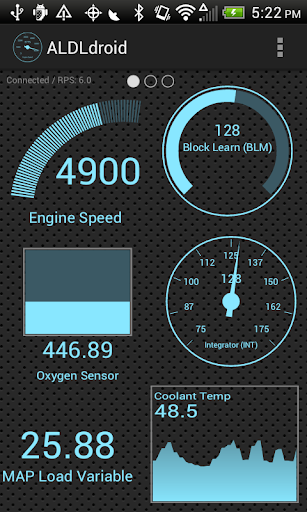
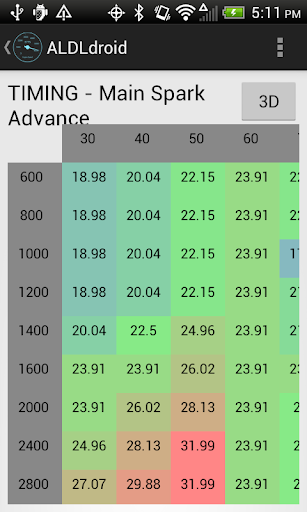
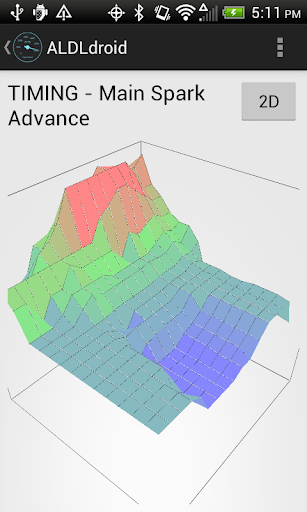
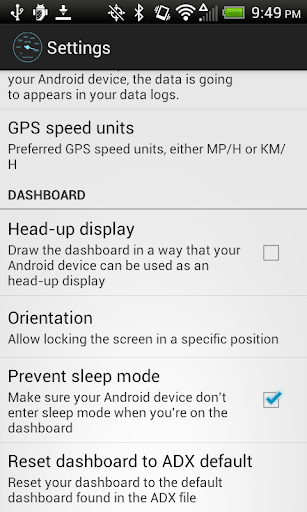
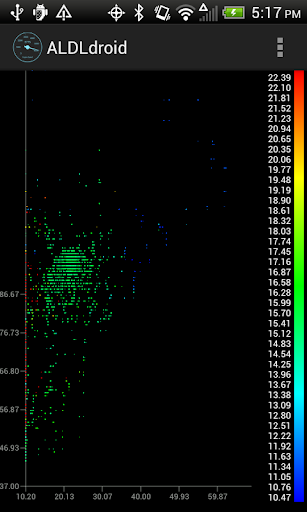
ALDLdroid is an application for OBD1 GM (ALDL) ECMs. It is currently compatible with both 160 baud and 8192 baud protocols. ALDLdroid is compatible with TunerPro files (ADX) for data logging, just make sure you have the ADX file for your ECM before purchasing the app. If the app doesn't come pre-packaged with the ADX file you need, you will need to add your file to the ADX directory of the ALDLdroid folder on your Android device once you've started the app for the first time and the folders structure has been created. The application has also been used beyonds GM ECMs. With the proper XDF file (make sure your file is not encrypted), it can do tuning file editing on other car/motorcycle brands such as BMW N54, Buell, DSM, Ducati, Ford, Holden, Nissan, Porsche, Volvo, Fiat, Renault, etc. Just make sure your can source the XDF file for your application before purchasing the app. The tuning section uses TunerPro files as well (XDF) to allow editing BIN files. Real-time tuning is currently supported with the Moates Ostrich and the Moates AutoProm hardware. Real-time tuning for NVRAM based ECUs has also been added (only tested with Australian ECUs such as the Delco '808). Chip programming is also possible using the Moates BURN1/BURN2 hardware. Currently, connection to the ECM can be made using Bluetooth or USB (FTDI). Make sure that your Android device support one of these two connection methods. USB host mode is supported on most devices these days but note that having a USB port on your Android device doesn't automatically means it support USB host mode. For GM OBD-I, ALDL adapters to connect the application to your GM ECM for data logging can be purchased here if you don't already own one: - Bluetooth version: <a href="https://www.google.com/url?q=https%3A%2F%2Freddevilriver.com%2Fhome-page%2Fols%2Fcategories%2Fbluetooth-scan-devices&sa=D&sntz=1&usg=AOvVaw3o1WqPcArX4KYQZsGy3OUL">https://reddevilriver.com/home-page/ols/categories/bluetooth-scan-devices</a> - USB version: <a href="https://www.google.com/url?q=https%3A%2F%2Freddevilriver.com%2Faldl.html&sa=D&sntz=1&usg=AOvVaw0aBiO-vvWferBXQVYtfZdO">https://reddevilriver.com/aldl.html</a> or <a href="http://www.google.com/url?q=http%3A%2F%2Faldlcable.com%2F&sa=D&sntz=1&usg=AOvVaw1PbcaItjpRAIWFcKHT49CE">http://aldlcable.com/</a> By double tapping on any page of the dashboard, you enter the dashboard edit mode. That mode allow full customization (add/edit/delete) of the dashboard indicators. You can easily drag indicators where you want them. You can also add indicators in the format you want: gauge, basic readout, bar graph or histogram. Colors can be customized along with some styling. Alarms can be set and once your alarm value has been entered to trigger an alarm, an indicator can be configured to turn red and/or the Android app can vibrate. The app includes a couple log viewers. One allow you to see your data logs in a scatter plot format where you can select the X/Y/Z axis from columns of your data log files. The second one allow you to see your GPS data on a map and can be merged with the third viewer that is the regular log viewer that can shows time series of data from any columns of your data log files. See screenshots to see all three of them. No refund can be made after the 15 minutes allowed by Google Play. It would probably be a good idea to check with online communities that use the same ECM as you if they had success with this app before purchasing. If you're running into any issue with the app, don't panic, just email me and I will try my best to help. Don't write a bad review until you gave me a chance to help :) Note that I might not have access to your exact setup (Car ECM, Android device, etc) so please provide as much information as possible. I'm not responsible for any damage that could be caused by this app to your vehicle or anything else (although I really don't see how anything bad could happen). Buy and use at your own risks. Drive safe! Like us on facebook: <a href="https://www.google.com/url?q=https%3A%2F%2Fwww.facebook.com%2Faldldroid&sa=D&sntz=1&usg=AOvVaw2ZEbWe4kIudyZ2wxDnOo4o">https://www.facebook.com/aldldroid</a>
Installs since 29 Aug 2026 Measured
Exact Google Play install counts, collected daily
Ratings
169 ratings, 87 reviews
- 5 ★84%
- 4 ★7.9%
- 3 ★2.4%
- 2 ★2.4%
- 1 ★3.7%
Recent reviews
Latest public reviews from the store
- 12 May 2026
a great app!
- 5 May 2026
It's a good app with great experience. But, it would be great if there are detail stats with graph chart and exact episode numbers on profile
- 3 May 2026
Hello devs, I'm really loving the convenience of your app provided to us users, and a suggestion for the sake of convenience, would you let us copy the titles just by holding it down? Thank you.
- 28 Apr 2026
Quite buggy currently, hope it gets better and better, sometimes It's very annoying that, when I finished a episode and press +1, it just don't let me until I restart the app, keep rollback when I press save, sometimes even restart, it shows nothing in my list, I assume this app require internet all the time to run/load ? if so, then I suggest make it a offline/temporary save, like backup files, keeping it in app folder until it detect internet, then compare date and update it online.
What reviewers bring up
Topics mentioned in the latest 10 reviews, by how many reviews mention them
Liked in good reviews (8 reviews)
- anilist 3
- mal 3
- episode 2
- sync 2
- both 2
- far 2
Raised in bad reviews (0 reviews)
No topic comes up twice.
Top chart positions
Latest Google Play chart ranks by country, last 10 days
Not in any tracked top chart in the last 10 days.
ALDLdroid history
Release, install milestones, listing and store changes
- Moved from Maps & Navigation to Auto & Vehicles 11 Aug 2019
- Reached 1,000+ installs 6 Jan 2017
- First released on the store 25 Nov 2013
Update frequency
How often ALDLdroid ships a new version, month by month
3 updates in the last 12 months. More often than most similar apps: they shipped a median of 1 updates in the same year.
Recent versions
Current version 1.52
- Version 1.5222 Oct 2026
• Tuning: XDF float and hex values, and TunerPro 5 base offsets, now read and edit correctly • Constant sliders follow the XDF's range; multi-cell selection scrolls at the table's edge; smoothing fixed • Log viewer: playback speed (0.5× to 4×), cursor and zoom fixes • Data logs are saved to and listed from the folder you pick • Dropbox sync fixes • ADX files that stopped loading in 1.50 load again • Many other fixes for crashes and typos
- Version 1.4812 Mar 2026
- Added possibility of renaming data logs file in Manage data logs section - Added a confirmation dialog before deleting data log files to prevent accidental deletions - Modernize some code for newer Android versions - Fixed a few dialogs not displaying nicely in dark mode - Histogram log viewer proper edge to edge - Allow to delete a dashboard page - Add extensive styling options to all dashboard indicator types
- Version 1.471 Dec 2025
- Version 1.4630 Sep 2025
Listing keywords
Words and phrases ALDLdroid repeats most in its store listing
Top phrases: android device (4), before purchasing (3), data log (3), data log files (2), real time tuning (2).
Highlighted words also appear in the title. Counts cover the title, short description and description.
Business model and tech
From the store listing, the SDKs in the app package and its declared permissions
- Business model
- Paid, $24.99
- Built with
- No cross-platform framework or game engine detected
- Ad networks (0)
- None detected
- Sensitive access
- LocationPhone and callsPhotos, videos and filesNearby devices
0 ad, attribution and analytics SDKs detected. SDKs are read from the app package and permissions from the store listing, so code that loads later is not seen.
Technology
25 SDKs found in the app package
15 permissions
0 special access, 7 sensitive, 8 standard
- Change or delete shared storageSensitive
- Read shared storageSensitive
- Approximate locationSensitive
- Precise locationSensitive
- Connect to paired Bluetooth devicesBLUETOOTH_CONNECTSensitive
- Find nearby Bluetooth devicesBLUETOOTH_SCANSensitive
- Read phone status and identitySensitive
- Control vibrationStandard
- Access Bluetooth settingsStandard
- Pair with Bluetooth devicesStandard
- Full internet accessStandard
- See network connectionsStandard
Compliance
What the listing and the app package show
- Store status
- Live
- Upkeep
- Updated 22 Oct 2026
- Registered in
- Canada
- Privacy policy
- Linked on the listing
- Advertising
- No ads declared
- In-app purchases
- None declared
- Age rating
- Everyone
- Sensitive permissions
- 7 sensitive of 15
- Location access
- Yes, while in use
- Camera and microphone
- Neither
Apps like ALDLdroid
MyGeely - جيليWallan Trading Company81.3K installs★ 2.86
DTE PowerControlDTE Systems26.9K installs★ 2.86
Car-costs and fuel logAlexander Tartar29.6K installs★ 3.5
ANCAP RESCUEANCAP103K installs★ 4.0
Viewer for BlackVueCrazydog58.5K installs★ 4.2
AovoPRO.Shenzhen high-end manufacturing Co.,Ltd61.3K installs★ 2.43
MoboKeyRoboArt - Artisans of Technology58.9K installs★ 2.9
VMAX connectVMAX Global Ltd.39.1K installs★ 3.33
Car Problems and RepairsEMA Developer117K installs★ 4.14
ALDLdroid: questions and answers
How many downloads does ALDLdroid have?
ALDLdroid has 4,810 installs on Google Play, measured from the store's own count on 14 Nov 2026.
Who makes ALDLdroid?
ALDLdroid is published by Sébastien Giroux, a developer based in CA.
When was ALDLdroid last updated?
The latest version (1.52) was released on 22 Oct 2026.
Is ALDLdroid free?
No. ALDLdroid is a paid app priced at $24.99.
Is ALDLdroid still available?
Yes. ALDLdroid is live on Google Play as of 14 Nov 2026.
Track ALDLdroid and its competitors
Watch any app for new versions, rating drops, chart moves and removals. Free plan, no card.