
All Document Reader
Office File Reader: Your all-in-one document viewer
- Installs
- 681K
- Measured
- Rating
- 4.04
- Ratings
- 1.1K
- 33 reviews
- Version
- 1.0.8
- Updated 26 Jun 2025
- Released
- 12 Jul 2023
- Tracked since 12 May 2026
- Size
- —
Screenshots



About All Document Reader
The description on the store listing
📊📑📁 Office File Reader is a powerful and user-friendly Android application designed to provide you with a seamless experience in reading and managing various office files right from your mobile device. With its intuitive interface and robust functionality, this app allows you to effortlessly access and view different types of office documents, enabling you to stay productive on the go.
Key Features:
1️⃣ Document Formats Support: 📄🗃️
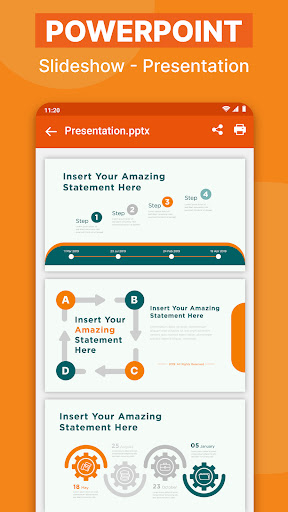
Easily view text documents, spreadsheets, presentations, and PDF files in formats such as DOC, DOCX, XLS, XLSX, PPT, PPTX, and PDF.
2️⃣ Text Document Viewer: 📝
Effortlessly read and navigate through text documents, such as letters, reports, …
Read the full description
📊📑📁 Office File Reader is a powerful and user-friendly Android application designed to provide you with a seamless experience in reading and managing various office files right from your mobile device. With its intuitive interface and robust functionality, this app allows you to effortlessly access and view different types of office documents, enabling you to stay productive on the go. Key Features: 1️⃣ Document Formats Support: 📄🗃️ Easily view text documents, spreadsheets, presentations, and PDF files in formats such as DOC, DOCX, XLS, XLSX, PPT, PPTX, and PDF. 2️⃣ Text Document Viewer: 📝 Effortlessly read and navigate through text documents, such as letters, reports, contracts, resumes, and more. 3️⃣ Spreadsheet Viewer: 📊 Stay organized and on top of your data by accessing and viewing spreadsheets on the go. Analyze data, review formulas, and make informed decisions anytime, anywhere. 4️⃣ Presentation Viewer: 🖥️ Never miss a beat during presentations. Open and view PowerPoint or Google Slides files, ensuring smooth transitions and engaging experiences. 5️⃣ PDF Reader: 📚 Access and read PDF files with ease. Enjoy zooming, scrolling, and page navigation features for a seamless reading experience. 6️⃣ User-Friendly Interface: 🖼️ Enjoy an intuitive and user-friendly interface. Organize files into folders, sort them, and quickly locate what you need with the built-in search functionality. 7️⃣ Offline Access: 🌐 Access your office files even offline. Download and save files to your device for viewing and reviewing without an internet connection. 8️⃣ Quick Printing: 🖨️ Print documents directly from the app. Easily obtain physical copies of your important reports, contracts, or any other document. 9️⃣ File Conversion to PDF: 🔄📄 Convert various document formats to PDF files within the app. Preserve formatting and ensure compatibility across devices and platforms. Experience the power of Office File Reader today! 🚀✨ Download the app now to effortlessly manage, view, print, and convert your office files on your Android device. Unlock a seamless and efficient document management experience that keeps you productive wherever you are! 📱💪💼
Installs since 19 Jul 2026 Measured
Exact Google Play install counts, collected daily
Ratings
1,087 ratings, 33 reviews
- 5 ★64%
- 4 ★8.7%
- 3 ★11%
- 2 ★2.7%
- 1 ★14%
Recent reviews
Latest public reviews from the store
- 16 Apr 2026
good
- 12 Jul 2025
Excellent App
- 14 Dec 2024
আমি জেনে ছবি তুলে পিডিএফ করতে পারি
- 29 Nov 2024
পিক টু মি
Top chart positions
Latest Google Play chart ranks by country, last 10 days
Not in any tracked top chart in the last 10 days.
All Document Reader history
Release, install milestones, listing and store changes
- Reached 500,000+ installs 26 Jun 2025
- Reached 100,000+ installs 15 Nov 2023
- Reached 50,000+ installs 18 Sep 2023
- Reached 10,000+ installs 21 Aug 2023
- Reached 5,000+ installs 7 Aug 2023
- Reached 1,000+ installs 24 Jul 2023
- Reached 500+ installs 22 Jul 2023
- First released on the store 12 Jul 2023
Update frequency
How often All Document Reader ships a new version, month by month
0 updates in the last 12 months. Less often than most similar apps: they shipped a median of 2 updates in the same year.
Recent versions
Current version 1.0.8
- Version 1.0.83 Jan 2025
- Version 1.0.527 Jul 2023
Listing keywords
Words and phrases All Document Reader repeats most in its store listing
Top phrases: office file reader (3), file reader (3), office file (3), office files (3), pdf files (3).
Highlighted words also appear in the title. Counts cover the title, short description and description.
Business model and tech
From the store listing, the SDKs in the app package and its declared permissions
- Business model
- Free to downloadIn-app purchasesShows ads
- Built with
- No cross-platform framework or game engine detected
- Ad networks (2)
- AdMobFacebook Audience Network
- Subscriptions and payments
- Google Play billing
- Attribution and measurement
- AdjustOpen Measurement
- Analytics and crash reports
- Firebase
- Sensitive access
- CameraPhotos, videos and filesAdvertising ID
4 ad, attribution and analytics SDKs detected. SDKs are read from the app package and permissions from the store listing, so code that loads later is not seen.
Technology
50 SDKs found in the app package
Ad networks
Advertising and install-attribution SDKs found in the app package
- AdMob
- Adjust
- Facebook Audience Network
- Open Measurement
22 permissions
1 special access, 4 sensitive, 17 standard
- Manage all filesMANAGE_EXTERNAL_STORAGESpecial access
- Take photos and videosSensitive
- Change or delete shared storageSensitive
- Read shared storageSensitive
- Show notificationsPOST_NOTIFICATIONSSensitive
- Ad attribution (Privacy Sandbox)ACCESS_ADSERVICES_ATTRIBUTIONStandard
- Ad topics (Privacy Sandbox)ACCESS_ADSERVICES_TOPICSStandard
- Read how it was installed (install referrer)BIND_GET_INSTALL_REFERRER_SERVICEStandard
- Read the advertising IDAD_IDStandard
- Read the advertising ID (Privacy Sandbox)ACCESS_ADSERVICES_AD_IDStandard
- Add home screen shortcutsStandard
- Keep the phone awakeStandard
Compliance
What the listing and the app package show
- Store status
- Live
- Upkeep
- Updated 26 Jun 2025
- Registered in
- Vietnam
- Privacy policy
- Linked on the listing
- Advertising
- Shows ads
- In-app purchases
- None declared
- Age rating
- Everyone
- Sensitive permissions
- 4 sensitive, 1 special access of 22
- Location access
- No
- Camera and microphone
- Camera
Apps like All Document Reader
Launcher Phone OSDroid Keypad - Photo Keyboard, Theme Keyboard528K installs★ 3.23
GoodSyncSiber Systems Inc187K installs★ 4.46
One Swipe Notes - Quick NotesYogesh Dama79.7K installs★ 4.07
Urdu Keyboard: Voice, StickersEver Shine Spot641K installs★ 4.0
Brink: Win & Earn USDC DailyCodegreenie Systems52.2K installs★ 4.65
HidePass - Password ManagerSiso Mobile280K installs★ 4.34
FileNext: Cloud Drive & PlayerSabnode100K installs★ 3.0
VoiceClock -GACKPO-IceImo-P(アイス芋P)87.3K installs★ 4.67
Notes - Easy NotepadGlad Appvestor268K installs★ 4.04
All Document Reader: questions and answers
How many downloads does All Document Reader have?
All Document Reader has 680,948 installs on Google Play, measured from the store's own count on 15 Nov 2026.
Who makes All Document Reader?
All Document Reader is published by Security Lab., a developer based in VN.
When was All Document Reader last updated?
The latest version (1.0.8) was released on 26 Jun 2025.
Is All Document Reader free?
Yes. All Document Reader is free to download, and it shows ads.
Is All Document Reader still available?
Yes. All Document Reader is live on Google Play as of 15 Nov 2026.
Track All Document Reader and its competitors
Watch any app for new versions, rating drops, chart moves and removals. Free plan, no card.