All Document Reader:PDF Viewer
View and edit all type documents ( pdf, docx, ppt, xls,, ..) easily with our app
- Installs
- 4.62M
- Measured
- Rating
- 4.37
- Ratings
- 15.9K
- 84 reviews
- Version
- 2.0.35
- Updated 9 Nov 2026
- Released
- 29 Dec 2022
- Tracked since 12 May 2026
- Size
- —
Screenshots





About All Document Reader:PDF Viewer
The description on the store listing
All Document Reader - PDF Viewer and Editor: Powerful office editor app!
This is a smart office file reader application that helps you open office, read PDF and read all documents. The all document viewer app helps you to open all file or view any document on your mobile.
No need to open the computer, only with your mobile, you can manage all files and read all documents in PDF, PPT, XLS, TXT or WORD file format.
❓ Why should you choose our file manager & file viewer app ❓
✔️ Edit your document with just a single click.
✔️ Create document using given template or with your own style
✔️ Scan document with your camera and export.
✔️ No internet required, documents viewer offline. …
Read the full description
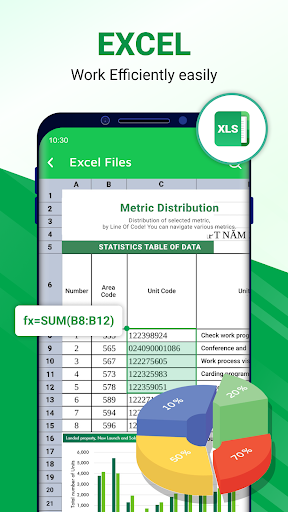
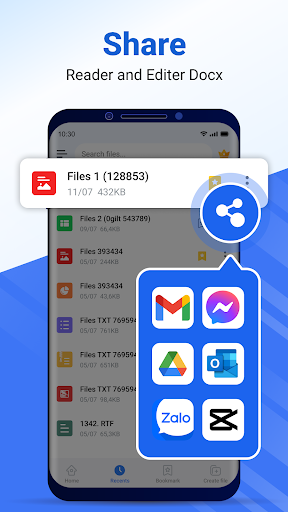
All Document Reader - PDF Viewer and Editor: Powerful office editor app! This is a smart office file reader application that helps you open office, read PDF and read all documents. The all document viewer app helps you to open all file or view any document on your mobile. No need to open the computer, only with your mobile, you can manage all files and read all documents in PDF, PPT, XLS, TXT or WORD file format. ❓ Why should you choose our file manager & file viewer app ❓ ✔️ Edit your document with just a single click. ✔️ Create document using given template or with your own style ✔️ Scan document with your camera and export. ✔️ No internet required, documents viewer offline. ✔️ Search and sort the file list, manage documents. ✔️ Move your favorite documents to “Bookmark” so you can read them again later. ✔️ All in one document reader: PDF, DOC, DOCX, XLS, PPT, TXT files from internal storage, email, cloud, web and external storage. ✔️ Various tools that support you finish your tasks 📂Main features of Document Reader - PDF Viewer app: - All files including PDF file, Word, Excel, PowerPoint, txt... are managed and organized in folder structure view. - Edit all files including PDF, Word, Excel, PowerPoint, txt, ... - Dark theme - File Converter, Split PDF, Merge PDF, File Printing.. - Set password to protect your documents - Compress PDF documents 📔 Smart PDF Reader - Full screen mode for the best reading experience - Zoom in and out of the pages as needed - Go to page directly by entering the page number - Add text, draw over pdf file. - Rename, save is supported. ⭐️ Document creator & scanner - Create PDF, Spreadsheet, Word, or PowerPoint using given template. - Easily scanning & joinning document support. ⭐️ Word reader 📘 - Correct word document by insert, delete, replace word within a click. - Docx viewer, all doc viewers with a simple and elegant reader screen which has the essential controls. - Quickly find any desired Docx file with the simple search option. ⭐️ Spreadsheet reader, xlsx viewer 📗 - Amazing editor feature: Add new sheet, modify row & column with multiple data type. - Calculate your sheet using formula. - Xls reader to view all excel file formats. - View file xls, xlsx, txt with high quality. ⭐️ PPT files reader 📙 - Edit existing slide or add new slide. - Support PPT files, pptx reader with high resolution and fast performance. - Search, delete document files easily. 🔄 Converter: Convert alls type of docs - Image to PDF: convert images (JPG, JPEG, PNG, BMP, WEBP) into PDFs - PDF to image: convert PDFs into images (JPG, PNG) and save directly to your album - Share the converted files with just one click ⭐️ Share with 1 touch - Share your document to others in a single tap. ⭐️ Supported formats, any type file opener - PDF reader, PDF opener - Word document: docc, docx, docs - Excel reader document: xls viewer, xlsx reader - Slide document: ppt, pps, ppsx, pptx viewer - Other Word office reader and files: txt, odt, zip This file reader for all format app is definitely an efficient office and productivity tool for reading documents files. Use our all document manager app to read all files with all the functionality. Share all document editor apps today and start collaborating your work with this office reader app. Thank you for choosing our All Document Reader - PDF Viewer and Editor app.
Installs since 19 Jul 2026 Measured
Exact Google Play install counts, collected daily
Ratings
15,913 ratings, 84 reviews
- 5 ★81%
- 4 ★6.0%
- 3 ★4.0%
- 2 ★1.0%
- 1 ★8.0%
Recent reviews
Latest public reviews from the store
- 16 May 2026
v good
- 12 May 2026
Very good app
- 9 May 2026
ok
- 23 Apr 2026
Excellent 👌
What reviewers bring up
Topics mentioned in the latest 50 reviews, by how many reviews mention them
Liked in good reviews (42 reviews)
- helpful 3
Raised in bad reviews (8 reviews)
- ads 3
Top chart positions
Latest Google Play chart ranks by country, last 10 days
- Countries ranked
- 2
- Best rank
- #116
- Top 10 placements
- 0
- of 2 chart placements
- Average rank
- #142
Best countries on Google Play
- 🇲🇽 Mexico · Top free, Productivity#116
- 🇧🇷 Brazil · Top free, Productivity#168
All Document Reader:PDF Viewer history
Release, install milestones, listing and store changes
- Reached 1,000,000+ installs 8 Sep 2024
- Reached 500,000+ installs 9 Apr 2024
- First released on the store 29 Dec 2022
Update frequency
How often All Document Reader:PDF Viewer ships a new version, month by month
1 updates in the last 12 months. About as often as similar apps, which shipped a median of 1 updates in the same year.
Recent versions
Current version 2.0.35
- Version 2.0.3523 Nov 2025
🌟 Fix converter tools stop working! 🌟 New feature "Sign PDF" 🌟 New feature "Organize PDF" 🌟 New feature "Index PDF" 🌟 New feature "Auto Scroll Document" 🌟 Optimize performance and interaction 🌟 Fix minor bugs 🌟 Improve user experience
- Version 2.0.348 Aug 2025
🌟 Fix converter tools stop working! 🌟 New feature "Sign PDF" 🌟 New feature "Organize PDF" 🌟 New feature "Index PDF" 🌟 New feature "Auto Scroll Document" 🌟 Optimize performance and interaction 🌟 Fix minor bugs 🌟 Improve user experience
- Version 2.0.332 Aug 2025
- Version 2.0.321 Aug 2025
Listing keywords
Words and phrases All Document Reader:PDF Viewer repeats most in its store listing
Top phrases: reader pdf (6), document reader pdf (5), document reader (5), reader pdf viewer (4), pdf viewer (4).
Highlighted words also appear in the title. Counts cover the title, short description and description.
Business model and tech
From the store listing, the SDKs in the app package and its declared permissions
- Business model
- Free to downloadIn-app purchasesShows ads
- Built with
- No cross-platform framework or game engine detected
- Ad networks (3)
- AdMobAppLovinFacebook Audience Network
- Subscriptions and payments
- Google Play billing
- Attribution and measurement
- Open Measurement
- Analytics and crash reports
- Firebase
- Sensitive access
- CameraPhotos, videos and filesAdvertising ID
4 ad, attribution and analytics SDKs detected. SDKs are read from the app package and permissions from the store listing, so code that loads later is not seen.
Technology
36 SDKs found in the app package
Ad networks
Advertising and install-attribution SDKs found in the app package
- AdMob
- AppLovin
- Facebook Audience Network
- Open Measurement
24 permissions
1 special access, 4 sensitive, 19 standard
- Manage all filesMANAGE_EXTERNAL_STORAGESpecial access
- Take photos and videosSensitive
- Change or delete shared storageSensitive
- Read shared storageSensitive
- Show notificationsPOST_NOTIFICATIONSSensitive
- Ad attribution (Privacy Sandbox)ACCESS_ADSERVICES_ATTRIBUTIONStandard
- Ad topics (Privacy Sandbox)ACCESS_ADSERVICES_TOPICSStandard
- Read how it was installed (install referrer)BIND_GET_INSTALL_REFERRER_SERVICEStandard
- Read the advertising IDAD_IDStandard
- Read the advertising ID (Privacy Sandbox)ACCESS_ADSERVICES_AD_IDStandard
- Add home screen shortcutsStandard
- Control vibrationStandard
Compliance
What the listing and the app package show
- Store status
- Live
- Upkeep
- Updated 9 Nov 2026
- Registered in
- Vietnam
- Privacy policy
- Linked on the listing
- Advertising
- Shows ads
- In-app purchases
- Offered
- Age rating
- Everyone
- Sensitive permissions
- 4 sensitive, 1 special access of 24
- Location access
- No
- Camera and microphone
- Camera
Apps like All Document Reader:PDF Viewer
Noti - Notes in notificationsAPPSTREE729K installs★ 4.36
Fancy Text For ChatBhima Apps1.9M installs★ 3.81
Canon PRINT BusinessCanon Inc.8.1M installs★ 3.48
QuicK AI Writer - AI ChatBotXinxin Tools1.6M installs★ 4.47
DS fileSynology Inc.5.4M installs★ 2.61
OPPO Clone PhoneColorOS36.7M installs★ 3.58
Minimalist Launcher - FlowThinklikepro412K installs★ 4.41
UK49s Lunch & Teatime ResultsSunshine Developer648K installs★ 4.33
Tareas ZeusUpaxer Technologies599K installs★ 3.14
All Document Reader:PDF Viewer: questions and answers
How many downloads does All Document Reader:PDF Viewer have?
All Document Reader:PDF Viewer has 4,618,390 installs on Google Play, measured from the store's own count on 15 Nov 2026.
Who makes All Document Reader:PDF Viewer?
All Document Reader:PDF Viewer is published by funshipstudio, a developer based in VN.
When was All Document Reader:PDF Viewer last updated?
The latest version (2.0.35) was released on 9 Nov 2026.
Is All Document Reader:PDF Viewer free?
Yes. All Document Reader:PDF Viewer is free to download and offers in-app purchases, and it shows ads.
Is All Document Reader:PDF Viewer still available?
Yes. All Document Reader:PDF Viewer is live on Google Play as of 15 Nov 2026.
Track All Document Reader:PDF Viewer and its competitors
Watch any app for new versions, rating drops, chart moves and removals. Free plan, no card.