
Always On Display Clock Widget
Always On Display Digital Clock, Picture Clock & Analog clock with date & time
- Installs
- 458K
- Measured
- Rating
- 4.28
- Ratings
- 1.4K
- 13 reviews
- Version
- 1.14.2
- Updated 20 Sep 2026
- Released
- 23 May 2023
- Tracked since 12 May 2026
- Size
- —
Screenshots




About Always On Display Clock Widget
The description on the store listing
You can show clock always on display with Digital, Analog, and emoji clock timers and see the time or notification without taping or switching ON the device. To show digital clock always on display we use AMOLED feature of smart phone. This super amoled feature is called ambient display or active display. Always on display digital clock keep a limited portion of the screen on during sleep mode.
This AOD display clock will keep always ON display of the phone and with a clock on it. On the display along with the clock, it also shows the date, day, and battery percentage. Super amoled lock screen clock widget does not drain battery because, always on display clock on screen just turns on …
Read the full description
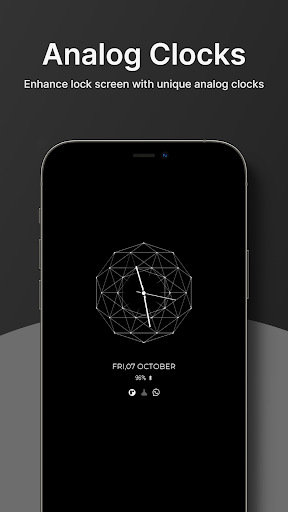
You can show clock always on display with Digital, Analog, and emoji clock timers and see the time or notification without taping or switching ON the device. To show digital clock always on display we use AMOLED feature of smart phone. This super amoled feature is called ambient display or active display. Always on display digital clock keep a limited portion of the screen on during sleep mode. This AOD display clock will keep always ON display of the phone and with a clock on it. On the display along with the clock, it also shows the date, day, and battery percentage. Super amoled lock screen clock widget does not drain battery because, always on display clock on screen just turns on those pixels LED required to show text, image or graphics while other pixels turned off. Free AMOLED display clock screen saver is used to display clock on screen. This lock screen clock widget have both Analog clocks and LED digital clock templates. To display on lock screen clock download this amazing time widget app. Also, the always clock on display will help to see the time easily at wake-up from sleep without unlocking your mobile, as time will be Always ON Screen. LED digital clock comes with many digital , analog , emoji , picture or calendar clocks so you can choose any of them and personalize your lock screen with attractive clock widgets. To display live clock wallpaper clock you need to set clock theme in this amazing time widget app. Photo Clock Wallpaper app provides information about current date/time and all notifications. LED digital clock widget app helps you to display attractive LED Digital Clocks in your smartphone lock screen with all information of notification and date/time. Analog Clocks show basic information on Super AMOLED screen. Download photo clock wallpaper app that provides information about date, time and notification on super amoled screen clock widget. If you have LED digital clock widget app you don’t even need to touch your phone screen to see whats going on in your mobile. This analog clock widget is design to show basic info on Super AMOLED screen. Full Detailed information will always displayed on your clock widget and you can minimize this screen by using single tap or double tap and even you can slide to disable this Free AMOLED display clock screen saver. You can customize any live clock wallpaper from customization section inside app. FEATURES • DIGITAL CLOCK : customize LED digital clock live wallpaper for your lock screen with with multiple color options for your text , digits and clock. • ANALOG CLOCK : always on display personalize multiple analog clock watch faces for your smartphone to show stylish analog clock on your super amoled screen. • EMOJI CLOCK : this app comes with multiple stylish and unique emoji and stickers which can be used on your lock screen. • PICTURE CLOCK : you can set live picture clock wallpaper for your smartphone which will be displayed along with clock and notification details. • CALENDAR CLOCK : enhance your routine and display by having calendar on your AMOLED Display. • EDGE LIGHT : personalize your smartphone display by having edge light on your border of smartphone to make it look more pleasant. In case of any queries contact [email protected]
Installs since 24 Jul 2026 Measured
Exact Google Play install counts, collected daily
Ratings
1,387 ratings, 13 reviews
- 5 ★71%
- 4 ★19%
- 3 ★0.0%
- 2 ★0.0%
- 1 ★9.5%
Recent reviews
Latest public reviews from the store
- 13 May 2026
Best app for daily business calculations . Works like a calculator and instantly saves sales when pressing "=". Daily, monthly & yearly reports are very useful. Unlimited cash memo, JPG sharing, discounts & payment editing make it perfect for shop owners. 🙏 Only wish cash memo had more than 6 item lines.
- 29 Jan 2026
অ্যাপস টা ভালো। কিন্তু মেমো গুলো সেভ থাকে না। ভবিষ্যৎ অনুসন্ধানের জন্য ব্রেকআপ ফাইল থাকলে ভালো হতো।
- 12 Dec 2025
👍
- 2 Jan 2024
Great Calculator for chromebook
What reviewers bring up
Topics mentioned in the latest 10 reviews, by how many reviews mention them
Liked in good reviews (6 reviews)
- calculator 2
Raised in bad reviews (3 reviews)
No topic comes up twice.
Top chart positions
Latest Google Play chart ranks by country, last 10 days
Not in any tracked top chart in the last 10 days.
Always On Display Clock Widget history
Release, install milestones, listing and store changes
- Reached 100,000+ installs 9 Mar 2024
- Reached 50,000+ installs 3 Feb 2024
- Reached 10,000+ installs 5 Nov 2023
- Reached 5,000+ installs 22 Oct 2023
- Reached 1,000+ installs 13 Aug 2023
- Moved from Personalization to Tools 30 Jul 2023
- Reached 500+ installs 16 Jul 2023
- First released on the store 23 May 2023
Update frequency
How often Always On Display Clock Widget ships a new version, month by month
6 updates in the last 12 months. More often than most similar apps: they shipped a median of 0 updates in the same year.
Recent versions
Current version 1.14.2
- Version 1.14.210 Jul 2026
- Fixed minor bugs and crashes
- Version 1.14.110 Jul 2026
- Fixed minor bugs and crashes
- Version 1.1428 Apr 2026
- Version 1.13.115 Feb 2026
- Fixed minor bugs and crashes
Listing keywords
Words and phrases Always On Display Clock Widget repeats most in its store listing
Top phrases: digital clock (9), always on display (8), clock widget (8), lock screen (7), display clock (6).
Highlighted words also appear in the title. Counts cover the title, short description and description.
Business model and tech
From the store listing and declared permissions
- Business model
- Free to downloadIn-app purchasesShows ads
- Subscriptions and payments
- Google Play billing
- Sensitive access
- CameraPhone and callsPhotos, videos and filesDraws over other appsAdvertising ID
27 permissions
3 special access, 4 sensitive, 20 standard
- Change system settingsSpecial access
- Draw over other appsSpecial access
- Set exact alarmsSCHEDULE_EXACT_ALARMSpecial access
- Take photos and videosSensitive
- Read shared storageSensitive
- Show notificationsPOST_NOTIFICATIONSSensitive
- Read phone status and identitySensitive
- Ad attribution (Privacy Sandbox)ACCESS_ADSERVICES_ATTRIBUTIONStandard
- Ad topics (Privacy Sandbox)ACCESS_ADSERVICES_TOPICSStandard
- Read how it was installed (install referrer)BIND_GET_INSTALL_REFERRER_SERVICEStandard
- Read the advertising IDAD_IDStandard
- Read the advertising ID (Privacy Sandbox)ACCESS_ADSERVICES_AD_IDStandard
Compliance
What the listing and the app package show
- Store status
- Live
- Upkeep
- Updated 20 Sep 2026
- Privacy policy
- Linked on the listing
- Advertising
- Shows ads
- In-app purchases
- Offered
- Age rating
- Everyone
- Sensitive permissions
- 4 sensitive, 3 special access of 27
- Location access
- No
- Camera and microphone
- Camera
Apps like Always On Display Clock Widget
Age Calculator AppCalc de Calc265K installs★ 3.8
PlacasVE: Consulta de placasPurpleDevApps99.7K installs★ 3.03
Font SizeByte Sculptor Apps320K installs★ 4.5
Landa vpnamiraxy4151K installs★ 3.85
Wifi UnlockerTime, Translator, Downloader and Blocker App58.9K installs★ 4.47
Camel VPNMutaz Awad338K installs★ 4.02
PDF Toolkit: Viewer & Editoryaohuo1.3M installs★ 3.59
QRsetupBUFFALO INC.2.6M installs★ 2.9
Quick Ringtone Maker - Cut MP3Galaxy studio apps418K installs★ 4.13
Always On Display Clock Widget: questions and answers
How many downloads does Always On Display Clock Widget have?
Always On Display Clock Widget has 458,291 installs on Google Play, measured from the store's own count on 19 Nov 2026.
Who makes Always On Display Clock Widget?
Always On Display Clock Widget is published by Trexx App Solution.
When was Always On Display Clock Widget last updated?
The latest version (1.14.2) was released on 20 Sep 2026.
Is Always On Display Clock Widget free?
Yes. Always On Display Clock Widget is free to download and offers in-app purchases, and it shows ads.
Is Always On Display Clock Widget still available?
Yes. Always On Display Clock Widget is live on Google Play as of 19 Nov 2026.
Track Always On Display Clock Widget and its competitors
Watch any app for new versions, rating drops, chart moves and removals. Free plan, no card.