周辺便利天気 -気象庁天気予報ブラウザアプリ&雨雲雷レーダー
6-screen split, Japan Meteorological Agency weather forecast & radar browser app. Check the weather conditions quickly with 6 information on one screen. You can see the weather conditions, weather forecasts, and detailed information about the area all over the country!
- Installs
- 96.94K
- Measured
- Rating
- 4.1
- Ratings
- 504
- Version
- Varies with device
- Updated 8 Mar 2026
- Released
- 2 Oct 2013
- Tracked since 13 May 2026
- Size
- 8 MB
- Needs 4.1
Screenshots


About 周辺便利天気 -気象庁天気予報ブラウザアプリ&雨雲雷レーダー
The description on the store listing
◇◇◇Compatible with the February 2021 Japan Meteorological Agency renewal website! ◇◇◇
Easily check the weather anytime, anywhere with your smartphone or tablet!
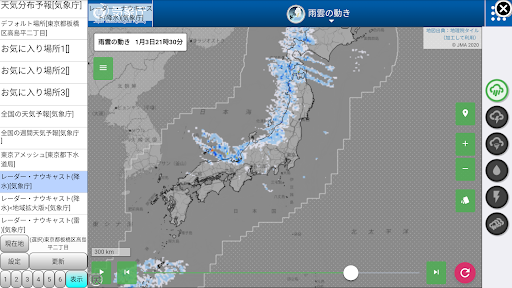
With a 6-split screen optimized for smartphones and tablets, you can easily check and compare radar images, meteorological satellite images, etc. of precipitation, rain clouds, and lightning strikes around you, as well as daily weather forecasts.
Easily check the daily weather! The information displayed immediately after startup can be customized!
Split screen display made possible by the large screen of smartphones
Easy, quick and convenient centering around your current location
Introducing the "Convenient Surrounding …
Read the full description
◇◇◇Compatible with the February 2021 Japan Meteorological Agency renewal website! ◇◇◇ Easily check the weather anytime, anywhere with your smartphone or tablet! With a 6-split screen optimized for smartphones and tablets, you can easily check and compare radar images, meteorological satellite images, etc. of precipitation, rain clouds, and lightning strikes around you, as well as daily weather forecasts. Easily check the daily weather! The information displayed immediately after startup can be customized! Split screen display made possible by the large screen of smartphones Easy, quick and convenient centering around your current location Introducing the "Convenient Surrounding Weather" app that allows you to check and understand various weather information in the surrounding area! Compatible with Android OS Ver.5 or later. Convenient weather in the area is provided by the Japan Meteorological Agency's disaster prevention information, weather forecasts, weekly weather forecasts, upcoming rain, current snow, radar nowcast, weather satellite images, AMeDAS (temperature, wind direction, wind speed, precipitation, sunshine hours, snow depth, humidity), Weather warnings, typhoon information, etc., or lightning strike information from various power company sites, Live Lightning site (blitzortung.org) and Ministry of Land, Infrastructure, Transport and Tourism's X-band MP radar rainfall information, Tokyo Amesh The purpose is to allow easy and convenient confirmation without changing screens. This is a viewer (browser) app for the Japan Meteorological Agency website, various electric power company websites, XRAIN site, and Tokyo Amesh site. Before you go out, feel free to check the rainfall, rain clouds, lightning strikes, etc. in the surrounding area using radar images! Easily check tomorrow's weather and weekly weather! Please feel free to use it in your daily life. *Power company lightning strike information is only displayed in the Tohoku, Chubu, Kinki, Chugoku, Shikoku, and Kyushu regions; it is not displayed in the Kanto, Hokkaido, and Okinawa regions. *Some sites may not be displayed correctly in WebView's 6-split display (depending on server specifications). Please display an alternative site. When you first start up, the screen shows where the rain clouds are, whether lightning is likely to occur, etc. The settings allow you to quickly view radar images such as: This information structure is especially useful for information on the occurrence of torrential rain, showers, heavy rain, thunderstorms, and lightning strikes during the summer. The first time you turn it on, you can quickly see the weather conditions. I think each person has different information that they want to see quickly, so select the bottom button and menu to see what is displayed at startup. You can customize it, so please use it with the convenient settings that suit you. --- App features --- ・Obtain your current location, and the center of each weather information/radar screen will be near your current location. It is easier to understand the surrounding weather conditions. ・A default region is set without having to obtain your current location, and you can quickly check the weather information for that region. ・Simultaneous display of rain, lightning, tornadoes, satellite images, etc. on a 6-split or 4-split screen It is easier to understand the surrounding weather conditions. ・Each split screen can be used as a shortcut or favorite. You can easily access the weather information you want. You can quickly view the entire image using the "zoom in" button at the top right of each screen. ・Radar Nowcast and AMeDAS have a national version and a regional expansion version. You can quickly and easily understand weather conditions by comparing the national situation with detailed local information. - Standard animations can be used on the Japan Meteorological Agency website. ・Obtain the name of the prefecture/city/ward/town/village of your current location, and get disaster prevention information, weather forecasts, etc. for your city. You can easily access information for your area, such as weekly weather forecasts. - By setting your favorite regions, you can quickly reference weather information for other regions. --- About starting use --- First, set your default region. Please select from 3 levels: Prefecture → City → Machi-chome Oaza. This setting can also be changed later from the settings. Once set, it will be displayed as the default location from next time. The 6 screen status will be displayed immediately from next time. --- Precautions for use --- Viewing may become unavailable due to changes in the URL of the Japan Meteorological Agency, various electric power companies, the XRAIN site, the Tokyo Amesh site, or other reasons. Please use under Wifi or 3G/4G/5G network environment. --- If it does not load due to an error --- ・Please check whether you are connected to the Internet. - Make sure the date and time are set to the current time. --- If it still does not load due to an error after checking the above --- ・Please close the app once. Press the back button on the main screen and when the dialog appears Please exit the app. Then restart the app. - (If it still doesn't work) Please turn off the power of the device (smartphone) and then restart the main unit by turning on the power. - There may be something wrong with the server. Please wait a while and try accessing. lastly ・(If that doesn't work) ※※You will need to reconfigure the data (default region, screen split)※※: Please uninstall and reinstall the app. If you want to initialize the screen split settings and then reset them. You can initialize by uninstalling and reinstalling the app. - If you find any other links that appear to be broken, please report them by email (please refer to inquiries at http://www.katapu.net/).
Installs since 26 Aug 2026 Measured
Exact Google Play install counts, collected daily
Ratings
504 ratings
- 5 ★0.0%
- 4 ★0.0%
- 3 ★0.0%
- 2 ★0.0%
- 1 ★0.0%
Recent reviews
Latest public reviews from the store
- 7 Jan 2018
Simple and elegant, all I need from flashlight app. Interesting idea with styling app for brand.
- 25 Dec 2017
Very useful app. Thanks
- 25 Dec 2017
Works good. I love it!
Top chart positions
Latest Google Play chart ranks by country, last 10 days
Not in any tracked top chart in the last 10 days.
周辺便利天気 -気象庁天気予報ブラウザアプリ&雨雲雷レーダー history
Release, install milestones, listing and store changes
- First released on the store 2 Oct 2013
Update frequency
How often 周辺便利天気 -気象庁天気予報ブラウザアプリ&雨雲雷レーダー ships a new version, month by month
1 updates in the last 12 months. About as often as similar apps, which shipped a median of 1 updates in the same year.
Recent versions
Current version Varies with device
- Version 3.0.28 Mar 2026
- Version 2.8.227 Jun 2025
- Version 2.8.119 Mar 2025
- Version 2.7.323 Dec 2024
Listing keywords
Words and phrases 周辺便利天気 -気象庁天気予報ブラウザアプリ&雨雲雷レーダー repeats most in its store listing
Top phrases: japan meteorological (6), weather conditions (6), weather forecasts (6), japan meteorological agency (5), current location (5).
Highlighted words also appear in the title. Counts cover the title, short description and description.
Business model and tech
From the store listing, the SDKs in the app package and its declared permissions
- Business model
- Free to downloadIn-app purchasesShows ads
- Built with
- No cross-platform framework or game engine detected
- Ad networks (3)
- AdMobAmazon Mobile AdsFacebook Audience Network
- Subscriptions and payments
- Google Play billing
- Analytics and crash reports
- Firebase
- Sensitive access
- LocationNearby devicesAdvertising ID
4 ad, attribution and analytics SDKs detected. SDKs are read from the app package and permissions from the store listing, so code that loads later is not seen.
Technology
27 SDKs found in the app package
Ad networks
Advertising and install-attribution SDKs found in the app package
- AdMob
- Amazon Mobile Ads
- Facebook Audience Network
18 permissions
0 special access, 2 sensitive, 16 standard
- Approximate locationSensitive
- Precise locationSensitive
- Ad attribution (Privacy Sandbox)ACCESS_ADSERVICES_ATTRIBUTIONStandard
- Ad topics (Privacy Sandbox)ACCESS_ADSERVICES_TOPICSStandard
- Read how it was installed (install referrer)BIND_GET_INSTALL_REFERRER_SERVICEStandard
- Read the advertising IDAD_IDStandard
- Read the advertising ID (Privacy Sandbox)ACCESS_ADSERVICES_AD_IDStandard
- Keep the phone awakeStandard
- Run a foreground serviceFOREGROUND_SERVICEStandard
- Pair with Bluetooth devicesStandard
- Connect to and disconnect from Wi-FiStandard
- Full internet accessStandard
Compliance
What the listing and the app package show
- Store status
- Live
- Upkeep
- Updated 8 Mar 2026
- Registered in
- Japan
- Privacy policy
- Linked on the listing
- Advertising
- Shows ads
- In-app purchases
- None declared
- Age rating
- Everyone
- Sensitive permissions
- 2 sensitive of 18
- Location access
- Yes, while in use
- Camera and microphone
- Neither
Apps like 周辺便利天気 -気象庁天気予報ブラウザアプリ&雨雲雷レーダー
Mausam AI – Smart Weather AppUjjawal Apps90K installs★ 3.91
WeatherPop Español (Aviso)WeatherPop75.1K installs★ 4.67
Severe Weather AlertsQuinn Conrad119K installs★ 4.19
ColorfulClouds WeatherColorfulclouds263K installs★ 3.45
- Police Airjet Tank Robot MultiRobot Transform GameAction Robot Games820K installs★ 4.3
WOAI 4 Zone WeatherSinclair Broadcast Group Inc34.3K installs★ 4.73
Sumo Wrestling 2020 Live FightGarden of Dreams Games468K installs★ 3.33
Sun AlarmVolker Voecking Software Engineering47.6K installs★ 3.91
Alaska's Weather SourceGray Media34.5K installs★ 4.57
周辺便利天気 -気象庁天気予報ブラウザアプリ&雨雲雷レーダー: questions and answers
How many downloads does 周辺便利天気 -気象庁天気予報ブラウザアプリ&雨雲雷レーダー have?
周辺便利天気 -気象庁天気予報ブラウザアプリ&雨雲雷レーダー has 96,943 installs on Google Play, measured from the store's own count on 18 Nov 2026.
Who makes 周辺便利天気 -気象庁天気予報ブラウザアプリ&雨雲雷レーダー?
周辺便利天気 -気象庁天気予報ブラウザアプリ&雨雲雷レーダー is published by katapu.net, a developer based in JP.
When was 周辺便利天気 -気象庁天気予報ブラウザアプリ&雨雲雷レーダー last updated?
The latest version (Varies with device) was released on 8 Mar 2026.
Is 周辺便利天気 -気象庁天気予報ブラウザアプリ&雨雲雷レーダー free?
Yes. 周辺便利天気 -気象庁天気予報ブラウザアプリ&雨雲雷レーダー is free to download, and it shows ads.
Is 周辺便利天気 -気象庁天気予報ブラウザアプリ&雨雲雷レーダー still available?
Yes. 周辺便利天気 -気象庁天気予報ブラウザアプリ&雨雲雷レーダー is live on Google Play as of 18 Nov 2026.
Track 周辺便利天気 -気象庁天気予報ブラウザアプリ&雨雲雷レーダー and its competitors
Watch any app for new versions, rating drops, chart moves and removals. Free plan, no card.