AndroWriter document editor
Create and edit documents, reports, books, quick memos in formats .doc or .docx
- Installs
- 1.43M
- Measured
- Rating
- 2.4
- Ratings
- 2.2K
- 42 reviews
- Version
- 443
- Updated 14 May 2025
- Released
- 11 Apr 2017
- Tracked since 12 May 2026
- Size
- 8 MB
- Needs 4.1
Screenshots


About AndroWriter document editor
The description on the store listing
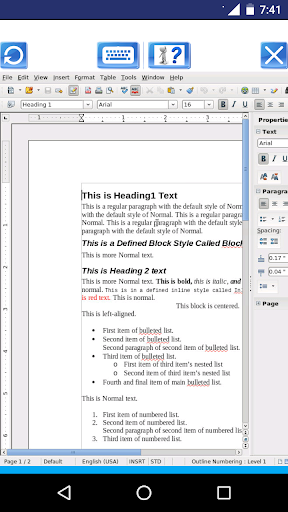
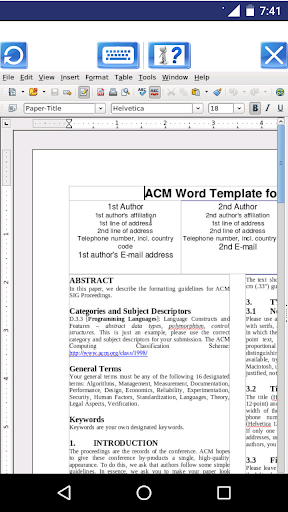
AndroWriter is a word processor and publishing tool that supports different document formats, including .docx, and .doc. It allows to create and edit documents, reports, books, and it is enough for a quick memo. It contains two main modules:
* The document editor module, which provides the following functionality:
- Wizards for standard documents such as letters, faxes, agendas, minutes, or carrying out more complex tasks such as mail merges. You can also create your own templates, or download templates from the Templates repository.
- Advanced Styles and Formatting.
- Table of Contents & References to increase the usefulness of your long, complex documents by generating a table …
Read the full description
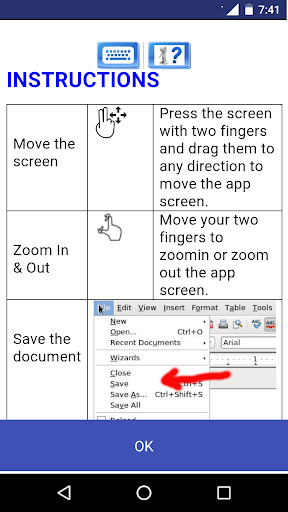
AndroWriter is a word processor and publishing tool that supports different document formats, including .docx, and .doc. It allows to create and edit documents, reports, books, and it is enough for a quick memo. It contains two main modules: * The document editor module, which provides the following functionality: - Wizards for standard documents such as letters, faxes, agendas, minutes, or carrying out more complex tasks such as mail merges. You can also create your own templates, or download templates from the Templates repository. - Advanced Styles and Formatting. - Table of Contents & References to increase the usefulness of your long, complex documents by generating a table of contents or indexing terms, bibliographical references, illustrations, tables, and other objects. - Text frames and linking for publishing tasks like newsletters and flyers - Notes and comments on the side of the document. This makes notes a lot easier to read. - AutoCorrect dictionary to trap typing mistakes on the fly, checking your spelling as you type. - AutoComplete to reduce typing effort. It also suggests common words and phrases to complete while you are typing. - It supports OpenOffice OpenDocument formats (.odt, .ott, .oth, and .odm), but it can open the formats used by OOo 1.x (.sxw, .stw, and .sxg) and the following text document formats: + Microsoft Word 6.0/95/97/2000/XP (.doc and .dot) + Microsoft Word 2003 XML (.xml) + Microsoft Word 2007 XML (.docx, .docm, .dotx, .dotm) + Microsoft WinWord 5 (.doc) + WordPerfect Document (.wpd) + WPS 2000/Office 1.0 (.wps) + .rtf, .txt, and .csv + StarWriter formats (.sdw, .sgl, .vor) + DocBook (.xml) + Unified Office Format text (.uot, .uof) + Ichitaro 8/9/10/11 (.jtd and .jtt) + Hangul WP 97 (.hwp) + T602 Document (.602, .txt) + AportisDoc (Palm) (.pdb) + Pocket Word (.psw) A guide about how to use this app can be found at http://www.offidocs.com. But note that the AndroWriter app has its own instructions when the document is being edited. It has several buttons for the operations: - "Write mode", use a finger to modify the document. - "Move mode", drag your two fingers to move the app and the document with your fingers. - "Zoom In & Out", swipe your two fingers to zoom in or zoom out the app and document. - "Save the document" -> "Click in File > Save the document opened keeping the current format" to save the document in the server. It will be saved locally when you click in Exit button. - "KeyBoard", which opens or closes the phone keyboard that allows you to write any text. - "Exit", which closes the editor view and saves locally the document as it is downloaded from the cloud. * The file manager module, which provides the following functionality: - Home directory when you first load the file manager. - All operations with files and folders: copy, move, upload, create folder/file, rename, archive, extract, edit, etc. - Bookmarks over the files or directories. - View the file or directory properties: name, location, size, date. - Light and Elegant client UI supporting phones and tablets. - Grid, List and Icons views available. - Sort by name, last modified, size or type. - FTP access integrated. - Search for files - Recent files - Open Source
Installs, last 30 days Measured
Exact Google Play install counts, collected daily
Ratings
2,203 ratings, 42 reviews
- 5 ★27%
- 4 ★2.4%
- 3 ★4.9%
- 2 ★13%
- 1 ★52%
Recent reviews
Latest public reviews from the store
- 14 Sep 2024
Love this site I can do my work day from my living room
- 15 Dec 2023
Good
- 17 Jul 2023
If this program what I think it is -- you're better off using this from GMX in laptop mode easier to navigate there are programs on Android-OS if needing to save as .odt or .rft out there though this one if on Chromebook would be better designated. Not a bad app if you know the origins of the program in & out -- I collect word processors on Windows OS then tested counterparts on iOS and Android OS for my cousin working on an anthology.
- 16 Jul 2023
Nice and good
What reviewers bring up
Topics mentioned in the latest 50 reviews, by how many reviews mention them
Liked in good reviews (7 reviews)
No topic comes up twice.
Raised in bad reviews (42 reviews)
- online 4
- edit 4
- waste 3
- documents 2
- unusable 2
- rubbish 2
- crashes 2
- useful 2
Top chart positions
Latest Google Play chart ranks by country, last 10 days
Not in any tracked top chart in the last 10 days.
AndroWriter document editor history
Release, install milestones, listing and store changes
- Reached 1,000,000+ installs 29 Mar 2021
- Reached 500,000+ installs 1 Mar 2020
- Reached 100,000+ installs 5 Sep 2018
- Reached 50,000+ installs 13 Mar 2018
- Reached 10,000+ installs 11 Aug 2017
- Reached 5,000+ installs 20 Jun 2017
- Reached 1,000+ installs 3 May 2017
- Reached 500+ installs 24 Apr 2017
Update frequency
How often AndroWriter document editor ships a new version, month by month
0 updates in the last 12 months. Less often than most similar apps: they shipped a median of 4 updates in the same year.
Recent versions
Current version 443
- Version 44314 May 2025
Bugs fixed and enhanced editor
- Version 4.4.26 Sep 2024
- Version 4.4.119 Dec 2023
- Version 4.1.717 Apr 2023
Listing keywords
Words and phrases AndroWriter document editor repeats most in its store listing
Top phrases: save the document (3), microsoft word (3), create and edit (2), documents reports books (2), edit documents reports (2).
Highlighted words also appear in the title. Counts cover the title, short description and description.
Business model and tech
From the store listing, the SDKs in the app package and its declared permissions
- Business model
- Free to download
- Built with
- Cordova
- Ad networks (0)
- None detected
- Sensitive access
- Photos, videos and files
0 ad, attribution and analytics SDKs detected. SDKs are read from the app package and permissions from the store listing, so code that loads later is not seen.
Technology
20 SDKs found in the app package
5 permissions
0 special access, 2 sensitive, 3 standard
- Change or delete shared storageSensitive
- Read shared storageSensitive
- Full internet accessStandard
- See network connectionsStandard
- Internal app permissionDYNAMIC_RECEIVER_NOT_EXPORTED_PERMISSIONStandard
Compliance
What the listing and the app package show
- Store status
- Live
- Upkeep
- Updated 14 May 2025
- Registered in
- Estonia
- Privacy policy
- Linked on the listing
- Advertising
- No ads declared
- In-app purchases
- None declared
- Age rating
- Everyone
- Sensitive permissions
- 2 sensitive of 5
- Location access
- No
- Camera and microphone
- Neither
Apps like AndroWriter document editor
HiOrg-ServerHiOrg Server GmbH205K installs★ 3.7
Georgian keyboardSimple Keyboard, theme & emoji662K installs★ 4.05
Zoho CalendarZoho Corporation279K installs★ 3.33
Super-Bright LED FlashlightUnicorn Photo Editor Games Apps683K installs★ 4.26
Quick Translate All LanguagesMonkey AI Studio241K installs★ 4.73
Disk & Storage Analyzer [PRO]Mobile Infographics Tools41.5K installs★ 4.16
GoSignInfoCert SpA701K installs★ 2.0
Year View CalendarDevWolf258K installs★ 4.65
Type ግዕዝ All Language KeyboardData Science Ethiopia395K installs★ 4.56
AndroWriter document editor: questions and answers
How many downloads does AndroWriter document editor have?
AndroWriter document editor has 1,427,655 installs on Google Play, measured from the store's own count on 19 Nov 2026.
Who makes AndroWriter document editor?
AndroWriter document editor is published by OffiDocs Mobile Apps, a developer based in EE.
When was AndroWriter document editor last updated?
The latest version (443) was released on 14 May 2025.
Is AndroWriter document editor free?
Yes. AndroWriter document editor is free to download.
Is AndroWriter document editor still available?
Yes. AndroWriter document editor is live on Google Play as of 19 Nov 2026.
Track AndroWriter document editor and its competitors
Watch any app for new versions, rating drops, chart moves and removals. Free plan, no card.