Angle Cam - Geotag Camera
Add DateTime, Location, Pitch angle, Azimuth and Altitude to Photo with Anglecam
- Installs
- 102K
- Measured
- Rating
- —
- Ratings
- —
- Version
- Varies with device
- Updated 1 Apr 2026
- Released
- 1 Feb 2022
- Tracked since 12 May 2026
- Size
- —
Screenshots
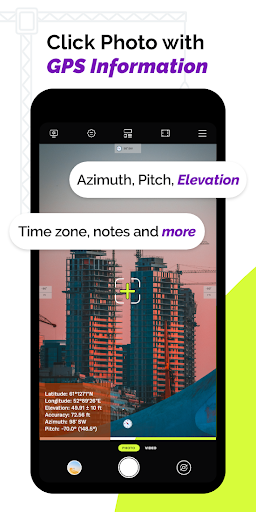
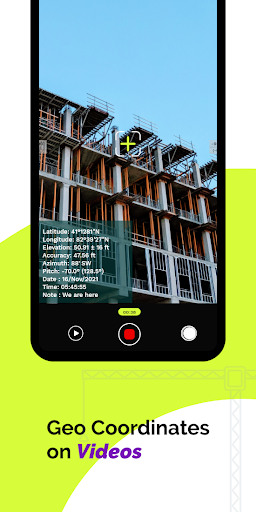
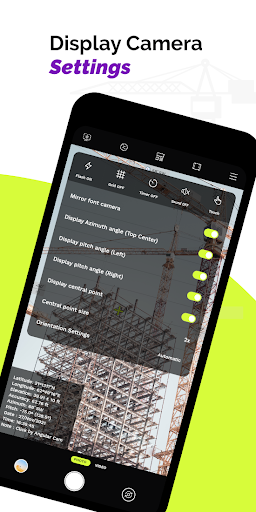


About Angle Cam - Geotag Camera
The description on the store listing
The Angle Cam lite is the best geotagging app that enables you to add date timestamp, latitude and longitude to address, pitch angle, your comments or notes, azimuth and altitude to your camera photos and live camera videos.
For you, we combined this Angle Cam lite app with a Timestamp camera, GPS camera & Notecam. So you can get all the stamps on your photos and videos.
GPS Angle Cam lite App can be used for a variety of purposes such as preparing work reports for construction sites, land surveys, delivery-related works, and any fieldwork duties. Professionals in navigation, astronomy, engineering, mapping, and mining can gain the most from this AngleCam lite.
For people who work …
Read the full description
The Angle Cam lite is the best geotagging app that enables you to add date timestamp, latitude and longitude to address, pitch angle, your comments or notes, azimuth and altitude to your camera photos and live camera videos. For you, we combined this Angle Cam lite app with a Timestamp camera, GPS camera & Notecam. So you can get all the stamps on your photos and videos. GPS Angle Cam lite App can be used for a variety of purposes such as preparing work reports for construction sites, land surveys, delivery-related works, and any fieldwork duties. Professionals in navigation, astronomy, engineering, mapping, and mining can gain the most from this AngleCam lite. For people who work on the field, it is crucial to measure the pitch angle, azimuth and altitude of the current location. With Angle cam, you can easily measure azimuth and pitch angle with your smartphone camera with the exact date time and location. Automatically watermark AngleCam timestamp, pitch angle, and azimuth to your images Stunning Features of Angle Cam - Geotag Camera:- → Angle cam with GPS camera and Notecam App → Stamp date and time in both photos and videos → Amazing date and time format to choose from → Auto-add longitude and latitude of the current location on camera photos → One geotagging app with all custom stamps → Different camera settings for capturing photos of your choice → Use as a GPS tracker for your fieldwork → GPS camera with longitude and latitude, altitude and azimuth, pitch angle → Editable personalized stamp with On/Off toggle switch to add the required stamp on your photos → Write important work notes or project notes or photo captions on images → This angle cam has a wide variety of text colors, different types of GPS coordinates, units, azimuth & pitch angle The use of AngleCam lite is Very Simple Install the Angle Cam lite App → On/Off toggle and choose the stamp → Select text color, size, and style → Set the required stamp setting → Capture photos. Then stamp!!! All the stamps will be automatically watermarked on your pictures. Why Should you Have GPS Angle Cam lite App? – To get longitude and latitude of current location stamp on both photos and videos – One AngleCam app with 3 cameras: Angle Cam, GPS Camera, and Notecam Camera – Different camera settings to get a perfect click with all GPS information – To watermark photos with date and time stamp, GPS coordinates, altitude and azimuth, and write relatable notes or comments on camera photos – Automatically measure azimuth and pitch angle – On/Off toggle to include those stamp details you want and exclude others – With this amazing anglecam app, you can quickly create personalized stamps for your images We Designed this Wonderful Angle Cam lite App for Following Group of People ~ For civil engineers and surveyors; For them, this AngleCam lite works as a survey cam. Use this AngleCam app for site surveying or land surveying work ~ For those professionals who are working in the field. Submit your fieldwork by a photo. Simply add date timestamp, current location latitude and longitude, pitch angle, altitude azimuth ~ Explorers can take full advantage of this Angle Cam geotagging app ~ Law enforcement officers and private security personnel can use this angle cam in their patrolling work. Easily watermark latitude and longitude to address with current date and time ~ For incident reporting; Geotag photos with specific location latitude and longitude & current time and date ~ People can use this Anglecam Lite app to capture their memories and keep them secured ~ Solar technician can measure the azimuth angle of the solar panel to generate greater amount of electricity from the sun’s ray ~ Professionals from navigation, mining, or engineering area can use this angle cam app in their work The struggle is over!! Now with GPS Angle Cam lite App, easily add DateTime, GPS coordinates, pitch angle, azimuth and altitude, and comments on photos and videos.
Installs since 16 Nov 2026 Measured
Exact Google Play install counts, collected daily
Daily history starts once this app is in our daily install sample.
Ratings
- 5 ★0.0%
- 4 ★0.0%
- 3 ★0.0%
- 2 ★0.0%
- 1 ★0.0%
Recent reviews
Latest public reviews from the store
- 12 Jun 2025
Generally excellent app, but very recently it's started to not display the Year tag for certain random albums. It's so strange: scrolling through the albums under a particular artist will show the year for some albums but not for others. Albums tagged with multiple artists will display the Year when viewing the album under one of the artists, but when the same album is viewed under the other artist it will not display the Year. Obviously a bug but I can't figure what triggers it.
- 6 Nov 2022
Best Squeezebox control app. I have one issue: if I want to have the widget set to "always connect" mode, the app takes me to the android battery settings where I need to give the app permission to run in the background. I can see all my installed apps in that list, but no Squeeze Ctrl. What am I doing wrong?
- 30 Mar 2021
Of all my apps this one has consistently gotten better since I originally started using it. It is probably the app I have used the longest. For reference I used it for the first time on an HP TouchPad running Android. Great work from the Developer.
- 20 Sep 2020
The slide action didn't agree with my device, maybe because its old. Also not liking having to buy a tablet mode. Makes me think it was an afterthought. Used for a few minutes and decided the interface wasn't for me as it seems too erratic.
What reviewers bring up
Topics mentioned in the latest 10 reviews, by how many reviews mention them
Liked in good reviews (6 reviews)
- controlling 2
- squeezebox 2
- background 2
- settings 2
- android 2
- several 2
- devices 2
- better 2
Raised in bad reviews (1 reviews)
No topic comes up twice.
Top chart positions
Latest Google Play chart ranks by country, last 10 days
Not in any tracked top chart in the last 10 days.
Angle Cam - Geotag Camera history
Release, install milestones, listing and store changes
- Reached 50,000+ installs 9 Oct 2023
- Reached 10,000+ installs 20 Jul 2022
- Reached 5,000+ installs 25 May 2022
- Reached 1,000+ installs 2 Mar 2022
- Reached 500+ installs 16 Feb 2022
- First released on the store 1 Feb 2022
Update frequency
How often Angle Cam - Geotag Camera ships a new version, month by month
1 updates in the last 12 months. More often than most similar apps: they shipped a median of 0 updates in the same year.
Recent versions
Current version Varies with device
- Version 1.0.261 Apr 2026
- Version 1.0.256 Nov 2025
- Version 1.0.249 Oct 2025
- Version 1.0.2327 Aug 2025
Listing keywords
Words and phrases Angle Cam - Geotag Camera repeats most in its store listing
Top phrases: angle cam (16), pitch angle (10), angle cam lite (7), cam lite (7), azimuth and altitude (4).
Highlighted words also appear in the title. Counts cover the title, short description and description.
Business model and tech
From the store listing, the SDKs in the app package and its declared permissions
- Business model
- Free to downloadIn-app purchasesShows ads
- Built with
- No cross-platform framework or game engine detected
- Ad networks (1)
- AdMob
- Subscriptions and payments
- Google Play billing
- Analytics and crash reports
- Firebase
- Sensitive access
- LocationCameraMicrophonePhotos, videos and filesAdvertising ID
2 ad, attribution and analytics SDKs detected. SDKs are read from the app package and permissions from the store listing, so code that loads later is not seen.
Technology
38 SDKs found in the app package
Ad networks
Advertising and install-attribution SDKs found in the app package
- AdMob
31 permissions
1 special access, 10 sensitive, 20 standard
- Change system settingsWRITE_SETTINGSSpecial access
- Record audioSensitive
- Take photos and videosSensitive
- Change or delete shared storageSensitive
- Read photosREAD_MEDIA_IMAGESSensitive
- Read photos and videos the user picksREAD_MEDIA_VISUAL_USER_SELECTEDSensitive
- Read shared storageSensitive
- Read videosREAD_MEDIA_VIDEOSensitive
- Approximate locationSensitive
- Precise locationSensitive
- Show notificationsPOST_NOTIFICATIONSSensitive
- Ad attribution (Privacy Sandbox)ACCESS_ADSERVICES_ATTRIBUTIONStandard
Compliance
What the listing and the app package show
- Store status
- Live
- Upkeep
- Updated 1 Apr 2026
- Registered in
- India
- Privacy policy
- Linked on the listing
- Advertising
- Shows ads
- In-app purchases
- Offered
- Age rating
- Everyone
- Sensitive permissions
- 10 sensitive, 1 special access of 31
- Location access
- Yes, while in use
- Camera and microphone
- Both
Apps like Angle Cam - Geotag Camera
GB CamOscar R.C.7K installs★ 3.42
Stop Motion: Dreamlapse CameraShush Creative28.8K installs★ 3.0
RGM ThermalCAM 1-external camRGM Vision10.1K installs★ 3.36
Kuvat.fi uploaderMediadrive Ltd3.1K installs★ 2.7
Beautiful Rose Flower FramesMy Photo Apps15.2K installs★ 2.5
Vintage Retro Camera - Retro FArt Photo Studio21K installs★ 3.67
Red Eye Corrector: RedFixerpaciosdev apps7.8K installs★ 1.67
Night Dual Photo FramesWallpaper Collection14.1K installs★ 4.0
DOF Calculatorio:io21K installs★ 3.67
Angle Cam - Geotag Camera: questions and answers
How many downloads does Angle Cam - Geotag Camera have?
Angle Cam - Geotag Camera has 102,354 installs on Google Play, measured from the store's own count on 16 Nov 2026.
Who makes Angle Cam - Geotag Camera?
Angle Cam - Geotag Camera is published by All Excellent Apps, a developer based in IN.
When was Angle Cam - Geotag Camera last updated?
The latest version (Varies with device) was released on 1 Apr 2026.
Is Angle Cam - Geotag Camera free?
Yes. Angle Cam - Geotag Camera is free to download and offers in-app purchases, and it shows ads.
Is Angle Cam - Geotag Camera still available?
Yes. Angle Cam - Geotag Camera is live on Google Play as of 16 Nov 2026.
Track Angle Cam - Geotag Camera and its competitors
Watch any app for new versions, rating drops, chart moves and removals. Free plan, no card.