
aniControl
aniControl is an app to control aniFree products such as aniLight v1.
- Installs
- 483
- Measured
- Rating
- —
- Ratings
- —
- Version
- Varies with device
- Updated 8 Sep 2025
- Released
- 25 Jun 2024
- Tracked since 12 May 2026
- Size
- —
Screenshots
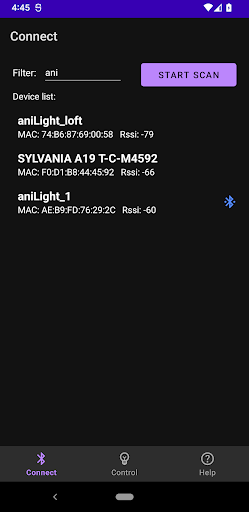


About aniControl
The description on the store listing
Use aniControl to control your aniLight v1 product via Bluetooth Low Energy (BLE), including changing device settings (such as Light brightness, RGB light color, White color temperature, Delay time, etc.) and performing Over-the-Air (OTA) firmware update to keep your device up to date.
First, you need to operate aniLight to enter BLE mode:
① Power aniLight off: Press and hold the left PWR button for 3 seconds until red light runs counterclockwise once.
② Enter BLE mode: Press and hold the right SET button. While SET button is held, press and hold PWR button for 3 seconds until BLUE (not green) light runs clockwise once. Then release both buttons.
Go to CONNECT tab to scan and find …
Read the full description
Use aniControl to control your aniLight v1 product via Bluetooth Low Energy (BLE), including changing device settings (such as Light brightness, RGB light color, White color temperature, Delay time, etc.) and performing Over-the-Air (OTA) firmware update to keep your device up to date. First, you need to operate aniLight to enter BLE mode: ① Power aniLight off: Press and hold the left PWR button for 3 seconds until red light runs counterclockwise once. ② Enter BLE mode: Press and hold the right SET button. While SET button is held, press and hold PWR button for 3 seconds until BLUE (not green) light runs clockwise once. Then release both buttons. Go to CONNECT tab to scan and find aniLight v1 device with the name of "aniLight_1". Tap it to connect or disconnect it. Go to CONTROL tab to change its name or settings of the connected aniLight, or perform firmware upgrade. You need to press the SAVE button to save your changes to the device. Go to Help tab for more detailed information. BLE mode needs more power to run. So after finishing the settings change, re-enter the normal mode: ① Power the unit off. ② Power the unit on normally: Press and hold PWR button for 3 seconds until green light runs clockwise once. If the device battery is low, connecting the recharging cable to it first. If the red recharging indicator does not light up, press and hold the PWR button for 3 seconds until red light runs counterclockwise once. Please keep it being recharged for some time, then perform the firmware upgrade. After successful firmware upgrade to v1.2, the device will reboot to the normal non-BLE mode. If you want to use the BLE features, you need to power it off then on to BLE mode. The settings key operation has changed for v1.2, please check the Help tab for more detailed information. This app only works for aniLight v1 product. It does not support aniLight v3 which uses BLE Mesh instead.
Installs since 2 Sep 2026 Measured
Exact Google Play install counts, collected daily
Daily history starts once this app is in our daily install sample.
Ratings
- 5 ★0.0%
- 4 ★0.0%
- 3 ★0.0%
- 2 ★0.0%
- 1 ★0.0%
Recent reviews
Latest public reviews from the store
No reviews in our sample for this app yet.
Top chart positions
Latest Google Play chart ranks by country, last 10 days
Not in any tracked top chart in the last 10 days.
aniControl history
Release, install milestones, listing and store changes
- Reached 100+ installs 8 Sep 2025
- Reached 50+ installs 7 Oct 2024
- First released on the store 25 Jun 2024
Listing keywords
Words and phrases aniControl repeats most in its store listing
Top phrases: press and hold (5), ble mode (5), button for seconds (4), anilight v1 (4), light runs (4).
Highlighted words also appear in the title. Counts cover the title, short description and description.
Business model and tech
From the store listing and declared permissions
- Business model
- Free to download
- Sensitive access
- LocationPhotos, videos and filesNearby devices
10 permissions
0 special access, 6 sensitive, 4 standard
- Change or delete shared storageSensitive
- Read shared storageSensitive
- Approximate locationSensitive
- Precise locationSensitive
- Connect to paired Bluetooth devicesBLUETOOTH_CONNECTSensitive
- Find nearby Bluetooth devicesBLUETOOTH_SCANSensitive
- Access Bluetooth settingsStandard
- Pair with Bluetooth devicesStandard
- Full internet accessStandard
- Internal app permissionDYNAMIC_RECEIVER_NOT_EXPORTED_PERMISSIONStandard
Compliance
What the listing and the app package show
- Store status
- Live
- Upkeep
- Updated 8 Sep 2025
- Privacy policy
- Linked on the listing
- Advertising
- No ads declared
- In-app purchases
- None declared
- Age rating
- Everyone
- Sensitive permissions
- 6 sensitive of 10
- Location access
- Yes, while in use
- Camera and microphone
- Neither
Apps like aniControl
Kalendarz Ogrodniczy CzuksanowWitold Czuksanow18.3K installs★ 3.9
Universal Smart TV Remote CtrlVertex Forge Apps2.6K installs★ 4.87
KlevioKlevio46.4K installs★ 3.0
AnthemIQAnthem Broadband6.9K installs★ 4.3
Curtain IdeasSmartongroup27.5K installs★ 4.0
ZoopGo PartnerRIMS Bizzserve Pvt. Ltd20.4K installs★ 3.7
Клевер сервисVELSOFT, OOO2.2K installs★ 5.0
DropcountrKUBRA Data Transfer Ltd11.3K installs★ 2.75
EPEVEREPEVER18.7K installs★ 1.63
aniControl: questions and answers
How many downloads does aniControl have?
aniControl has 483 installs on Google Play, measured from the store's own count on 2 Sep 2026.
Who makes aniControl?
aniControl is published by aniFree.
When was aniControl last updated?
The latest version (Varies with device) was released on 8 Sep 2025.
Is aniControl free?
Yes. aniControl is free to download.
Is aniControl still available?
Yes. aniControl is live on Google Play as of 2 Sep 2026.
Track aniControl and its competitors
Watch any app for new versions, rating drops, chart moves and removals. Free plan, no card.