
ApkShare
ApkShare is a tool , help you to install, uninstall, backup or share apk.
- Installs
- 45.77M
- Measured
- Rating
- 4.5
- Ratings
- 284K
- 6.3K reviews
- Version
- v20260902
- Updated 2 Sep 2026
- Released
- 17 Aug 2010
- Tracked since 13 May 2026
- Size
- 4 MB
- Needs 4.1
Screenshots
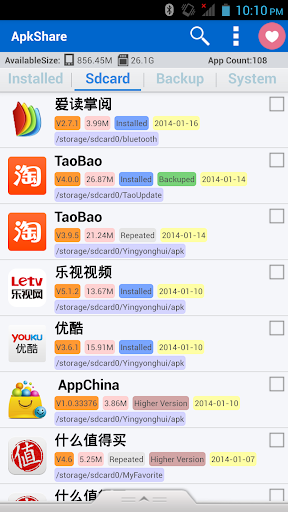


About ApkShare
The description on the store listing
ApkShare is a versatile applied management software for managing Apk uninstalled and Apk installed .
We support:
* Support App installation, uninstall, backup, sharing and setting up the shortcut,
* Support silent installation and uninstall after ROOT permission conferred, and uninstall system App
* Support all kinds of models from Android1.5 to Android P system
* Support Android device screens of various resolution
* Support multiple-languages: English, Simplified Chinese, Traditional Chinese, Arabic.
* Support dual SD card models
* Support via WiFi hotspots, realize face-to-face sharing function.
* Support RTL layout and the Arabic region.
Main functions:
* …
Read the full description
ApkShare is a versatile applied management software for managing Apk uninstalled and Apk installed . We support: * Support App installation, uninstall, backup, sharing and setting up the shortcut, * Support silent installation and uninstall after ROOT permission conferred, and uninstall system App * Support all kinds of models from Android1.5 to Android P system * Support Android device screens of various resolution * Support multiple-languages: English, Simplified Chinese, Traditional Chinese, Arabic. * Support dual SD card models * Support via WiFi hotspots, realize face-to-face sharing function. * Support RTL layout and the Arabic region. Main functions: * Installation: The App files on the storage card can be scanned automatically. The third-party App used for installation can be easily going with installation or batch installation. * Silent installation: After opening ROOT lab function, without intervention, it can complete the installation automatically. * Uninstall: Program installed in the phones can be scanned automatically. Uninstall or batch uninstall can be expected to be completed in a button. * Silent uninstall: After opening ROOT lab function, without intervention, it can complete the uninstall automatically. * Start: For the programs installed or the App built-in, it can be launched in a button. * Backup: Support installation package backup of App programs. App programs package installed can be backup in the storage card. The default location is / sdcard / apkshare / backup. Backup location can be modified by setting. Documents backup can be sent to your friends through various ways or other devices for installation. *Documents share: You can send the App to your friends by e-mail, Bluetooth, etc. Sending email through GMAIL, the maximum attachment can be 25M. It is therefore suggested that you had better use it in a good network environment. *Documents connection: The App link on GooglePlay can be shared in various ways, convenient for good friends to view the App information. It supports batch operations. *A shortcut creation: Support establishing an App quick entrance on the desktop in launcher . *Details: Opening the detailed interface of App management is convenient for the cleanup of the App cache and movement of the App location. *Electronics market search: Jumping to the App details in the electronic market directly is convenient for you to get the best and latest App. *Status bar staying: Supporting the App staying in the status bar can be convenient to start the App directly. *Information copy to the clipboard: Copy the information to the clipboard is convenient to apply in a variety of places. * Sort: A sorting function is added, executing the sequence according to the rank, the package name, the size and the location. * Transmit via WiFi: Via WiFi hotspots, realize face-to-face sharing function. We need your support: * Give us the score and your feedback, tell us whether you like or dislike it, and tell us why? * Give us the better advice and tell us what kind of functions you need. * Help us translate our software, so that we can support more languages (such as Japanese, Korean, Spanish, Portuguese, French, etc.). In "Settings" - "Translation and Acknowledgments" function, through which you can present to me your translation Contact: Email: [email protected] Welcome to contact us directly at any time. Notice!!!! If you use Android6.0 or above , Please set "trust this application". Operational Approach : Open Settings-->Apps-->ApkShare-->Permissions-->Set individual permissions-->Trust this application. After this operate , Restart Apkshare ! I will upload new version to support the newest android version as soon as possible.
Installs, last 30 days Measured
Exact Google Play install counts, collected daily
Ratings
284,330 ratings, 6,263 reviews
- 5 ★79%
- 4 ★5.9%
- 3 ★4.6%
- 2 ★3.0%
- 1 ★7.6%
Recent reviews
Latest public reviews from the store
No reviews in our sample for this app yet.
Top chart positions
Latest Google Play chart ranks by country, last 10 days
Not in any tracked top chart in the last 10 days.
ApkShare history
Release, install milestones, listing and store changes
- Reached 10,000,000+ installs 7 Sep 2016
- Reached 5,000,000+ installs 14 Aug 2015
- First released on the store 17 Aug 2010
Update frequency
How often ApkShare ships a new version, month by month
2 updates in the last 12 months. Less often than most similar apps: they shipped a median of 5 updates in the same year.
Recent versions
Current version v20260902
- Version v202609022 Sep 2026
Improved app performance and reduced package size through enhanced release optimization. Includes reliability improvements.
- Version v202510319 Dec 2025
1.Support Android SDK35 2.Fix some bugs
- Version v2024041515 Apr 2024
- Version v2023012827 Jan 2023
Listing keywords
Words and phrases ApkShare repeats most in its store listing
Top phrases: after opening root (2), face sharing function (2), face to face (2), function without intervention (2), hotspots realize face (2).
Highlighted words also appear in the title. Counts cover the title, short description and description.
Business model and tech
From the store listing, the SDKs in the app package and its declared permissions
- Business model
- Free to downloadIn-app purchasesShows ads
- Built with
- No cross-platform framework or game engine detected
- Ad networks (1)
- AdMob
- Subscriptions and payments
- Google Play billing
- Analytics and crash reports
- Firebase
- Sensitive access
- Photos, videos and filesAdvertising ID
2 ad, attribution and analytics SDKs detected. SDKs are read from the app package and permissions from the store listing, so code that loads later is not seen.
Technology
19 SDKs found in the app package
Ad networks
Advertising and install-attribution SDKs found in the app package
- AdMob
15 permissions
3 special access, 2 sensitive, 10 standard
- Ask to uninstall appsREQUEST_DELETE_PACKAGESSpecial access
- Install other appsREQUEST_INSTALL_PACKAGESSpecial access
- Manage all filesMANAGE_EXTERNAL_STORAGESpecial access
- Change or delete shared storageSensitive
- Read shared storageSensitive
- Read how it was installed (install referrer)BIND_GET_INSTALL_REFERRER_SERVICEStandard
- Read the advertising IDAD_IDStandard
- Add home screen shortcutsStandard
- Keep the phone awakeStandard
- Run a foreground serviceFOREGROUND_SERVICEStandard
- Full internet accessStandard
- See network connectionsStandard
Compliance
What the listing and the app package show
- Store status
- Live
- Upkeep
- Updated 2 Sep 2026
- Privacy policy
- Linked on the listing
- Advertising
- Shows ads
- In-app purchases
- Offered
- Age rating
- Everyone
- Sensitive permissions
- 2 sensitive, 3 special access of 15
- Location access
- No
- Camera and microphone
- Neither
Apps like ApkShare
Browser TV Web - BrowseHereTCL Group79.8M installs★ 4.56
SkyVPN - Fast Secure VPNDingtone Communications Ltd28.4M installs★ 4.43
Hide Something: photos, videosCOLIFER LAB13.7M installs★ 4.61
2Accounts - Dual Apps Space2Accounts59.3M installs★ 4.22
Decoration Text KeyboardSami4Apps38M installs★ 4.37
WiFi Analyzerolgor.com17.3M installs★ 4.59
System app removerjumobiledo19.5M installs★ 2.96
My Data Manager: Data UsageST Advanced17.4M installs★ 4.44
StickifyStickify16.3M installs★ 4.59
ApkShare: questions and answers
How many downloads does ApkShare have?
ApkShare has 45,768,722 installs on Google Play, measured from the store's own count on 19 Nov 2026.
Who makes ApkShare?
ApkShare is published by NewPower Studios.
When was ApkShare last updated?
The latest version (v20260902) was released on 2 Sep 2026.
Is ApkShare free?
Yes. ApkShare is free to download and offers in-app purchases, and it shows ads.
Is ApkShare still available?
Yes. ApkShare is live on Google Play as of 19 Nov 2026.
Track ApkShare and its competitors
Watch any app for new versions, rating drops, chart moves and removals. Free plan, no card.