
좋은 가계부
A good household account book that becomes more convenient the more you use it! Create a household account book easily with various functions and settings.
- Installs
- 1.25M
- Measured
- Rating
- 4.91
- Ratings
- 34K
- 127 reviews
- Version
- 4.7.3
- Updated 9 Oct 2026
- Released
- 30 Jul 2015
- Tracked since 10 May 2026
- Size
- 5 MB
- Needs 4.4
Screenshots


About 좋은 가계부
The description on the store listing
♡ Functions of a good household account book
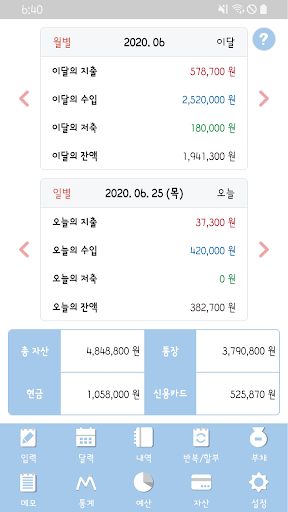
▶ Main screen
- You can select and use the screen you want between the base screen and the calendar screen.
▶ Select the data you want to see
- You can select the data you want to view by pressing the title of the main, calendar, or history screen (this month's balance, total assets, monthly balance, or total expenses).
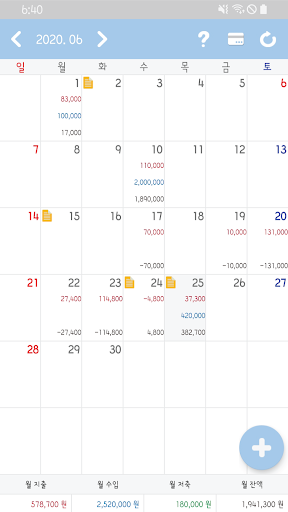
▶ Selectable calendar screen
- You can select the data you want to view by pressing and holding the date part of the calendar screen.
▶ Search and inquiry
- You can search for the data you want to see by pressing the magnifying glass button at the top right of the history and statistics screen. …
Read the full description
♡ Functions of a good household account book ▶ Main screen - You can select and use the screen you want between the base screen and the calendar screen. ▶ Select the data you want to see - You can select the data you want to view by pressing the title of the main, calendar, or history screen (this month's balance, total assets, monthly balance, or total expenses). ▶ Selectable calendar screen - You can select the data you want to view by pressing and holding the date part of the calendar screen. ▶ Search and inquiry - You can search for the data you want to see by pressing the magnifying glass button at the top right of the history and statistics screen. ▶ Asset management suited to daily life - You can manage your assets by dividing them into cash, bankbook, check card, and credit card. - Credit cards can be managed by usage period, payment date, and linked bank account, and the accumulated card amount can be deducted by entering the card payment. - Those who do not need the asset function can turn it on or off in the settings. ▶ Easy-to-view statistics - You can check statistics by dividing by asset, category, and amount. ▶ Automated text input - You can enter details using past text input and text automation functions. ▶ Automatic input through app recognition - You can enter details through push analysis of bank and card company apps. ▶ Easy repetitive input and installment - You can automatically repeat and enter installments on the desired date at any time: daily, weekly, or monthly. - When entering a holiday, you can set the date forward or backward. ▶ Meticulous debt entry - You can easily enter borrowed money, lent money, repaid money, and received money. ▶ Reduce consumption through budget - You can manage your monthly expenses, income, and savings by adding a budget by category. ▶ Simple note - You can also write a simple note along with a photo. ▶ Upper classification, lower classification functions - You can enter the household account book by upper or lower classification by setting it to ON or OFF. ▶ Password - By setting a password, only the user can verify it. ▶ Theme and amount color - You can change the color of the top bar, top, and bottom of the household account book. - You can change the color of expenses, income, savings, transfers, debt, and balance. ▶ Credit card settings - You can choose whether to include credit card spending or card payment. - Card payment can be set automatically or manually. ▶ Configurable widget - You can use your own widget with the data you want to see, transparency, and theme settings. ▶ Data management using Excel - You can create the details of your household account book as an Excel file. ▶ Start date and currency settings - You can change the start date of the month or week. - You can change the currency symbol. ▶ Easy data management - You can back up and restore data to Google Drive. If you have any questions about additional features, bugs, fixes, or questions, please email us and we will respond as soon as possible. We will take your valuable comments into consideration. Email address: [email protected] Permission Description ▶ SMS (optional) - This permission is required to read received text and automatically enter it. ▶ Photos, videos, files (selected) - This permission is required to load photos. ▶ Camera (optional) - This is the permission required to take pictures. ▶ Notification (optional) - This permission is required to display notifications on the top bar. ※ Even if you do not agree to the optional access permission, you can use the service excluding the functions of the permission.
Installs, last 30 days Measured
Exact Google Play install counts, collected daily
Ratings
34,006 ratings, 127 reviews
- 5 ★94%
- 4 ★4.8%
- 3 ★0.0%
- 2 ★0.0%
- 1 ★0.8%
Recent reviews
Latest public reviews from the store
No reviews in our sample for this app yet.
Top chart positions
Latest Google Play chart ranks by country, last 10 days
Not in any tracked top chart in the last 10 days.
좋은 가계부 history
Release, install milestones, listing and store changes
- First released on the store 30 Jul 2015
Update frequency
How often 좋은 가계부 ships a new version, month by month
17 updates in the last 12 months. More often than most similar apps: they shipped a median of 5 updates in the same year.
Recent versions
Current version 4.7.3
- Version 4.7.39 Oct 2026
♡ 4.7.3 업데이트 내용 - 내역 화면 일괄 삭제에 전체 선택, 전체 해제 추가. - 구글 드라이브 접근 권한 체크 방식 변경. - 기타 버그 수정. ♡ 4.7.2 업데이트 내용 - 구글 드라이브 접근 권한 체크 추가. - 텔로 SE 문자 분석 추가. - 기타 버그 수정. ♡ 4.7.1 업데이트 내용 - IBK카드 어플 인식 추가. - 구글 드라이브 연결 방식 변경. - 어플 인식 알림 접근 허용 방식 개선. - 기타 버그 수정. ♡ 4.7.0 업데이트 내용 - 구글 드라이브 연결 버그 수정. ♡ 4.6.9 업데이트 내용 - 구글 드라이브 데이터 백업 및 복구 방식 개선. - 현대 배민 문자 분석 추가. - 기타 버그 수정. ♡ 4.6.8 업데이트 내용 - 현대 ZERO, 현대 네이버, 현대 M BOOST, 현대 X BOOST, 현대 지마켓스마일, 현대 기아멤버스, 현대 문자 분석 추가. - 기타 버그 수정.
- Version 4.6.824 Aug 2026
♡ 4.6.8 업데이트 내용 - 현대 ZERO, 현대 네이버, 현대 M BOOST, 현대 X BOOST, 현대 지마켓스마일, 현대 기아멤버스, 현대 문자 분석 추가. - 기타 버그 수정. ♡ 4.6.7 업데이트 내용 - LGU+ M, 코웨이 문자 분석 추가. - i-ONE뱅크 기업 어플 인식 추가. - 기타 버그 수정. ♡ 4.6.6 업데이트 내용 - 엑셀 파일 이메일 보내기 파일 전송 방식 개선. - 우리, 제주은행 문자 분석 추가. - 카카오뱅크 어플 인식 분석 추가. - 기타 버그 수정. ♡ 4.6.5 업데이트 내용 - LG전자, 로카365, 코웨이 X LOCA, 텔로T라이트, 우리카드 문자 분석 추가. - 기타 버그 수정.
- Version 4.6.624 Jul 2026
♡ 4.6.6 업데이트 내용 - 엑셀 파일 이메일 보내기 파일 전송 방식 개선. - 우리, 제주은행 문자 분석 추가. - 카카오뱅크 어플 인식 분석 추가. - 기타 버그 수정. ♡ 4.6.5 업데이트 내용 - LG전자, 로카365, 코웨이 X LOCA, 텔로T라이트, 우리카드 문자 분석 추가. - 기타 버그 수정. ♡ 4.6.4 업데이트 내용 - 어플 실행 후 수정 팝업의 내용에 자동 완성 기능 추가. - 어플 인식 신한 SOL뱅크 이름 신한 슈퍼SOL 로 변경. - LG구독, 하나카드, iM뱅크 문자 분석 추가. - 권한 체크 및 허용 방식 변경. - 기타 버그 수정. ♡ 4.6.3 업데이트 내용 - kt-M 문자 분석 추가. - 강릉페이 어플 인식 분석 추가. ♡ 4.6.2 업데이트 내용 - LGU+M, SKT-M, Himart-M 문자 분석 추가. - 이미지 불러오기 버그 수정.
- Version 4.6.515 Jul 2026
♡ 4.6.5 업데이트 내용 - LG전자, 로카365, 코웨이 X LOCA, 텔로T라이트, 우리카드 문자 분석 추가. - 기타 버그 수정. ♡ 4.6.4 업데이트 내용 - 어플 실행 후 수정 팝업의 내용에 자동 완성 기능 추가. - 어플 인식 신한 SOL뱅크 이름 신한 슈퍼SOL 로 변경. - LG구독, 하나카드, iM뱅크 문자 분석 추가. - 권한 체크 및 허용 방식 변경. - 기타 버그 수정. ♡ 4.6.3 업데이트 내용 - kt-M 문자 분석 추가. - 강릉페이 어플 인식 분석 추가. ♡ 4.6.2 업데이트 내용 - LGU+M, SKT-M, Himart-M 문자 분석 추가. - 이미지 불러오기 버그 수정. ♡ 4.6.1 업데이트 내용 - 내역에 일괄 삭제 기능 추가. - 경남은행, 광주BC 문자 분석 추가. - KB Pay, 하나Pay, 경기지역화폐 어플 인식 분석 추가. - 이미지 불러오기 방식 개선. - 자동완성 1글자 부터 가능하게 변경. - 기타 버그 수정.
Listing keywords
Words and phrases 좋은 가계부 repeats most in its store listing
Top phrases: household account book (6), account book (6), household account (6), data you want (5), permission is required (3).
Highlighted words also appear in the title. Counts cover the title, short description and description.
Business model and tech
From the store listing and declared permissions
- Business model
- Free to downloadShows ads
- Sensitive access
- No sensitive permission declared
Compliance
What the listing and the app package show
- Store status
- Live
- Upkeep
- Updated 9 Oct 2026
- Registered in
- South Korea
- Privacy policy
- Linked on the listing
- Advertising
- Shows ads
- In-app purchases
- None declared
- Age rating
- Everyone
Apps like 좋은 가계부
Merrick Bank MobileMerrick Bank2.8M installs★ 4.37
Best: Bitcoin & Crypto WalletBEST WALLET EOOD791K installs★ 3.89
maxmax finance3.1M installs★ 4.18
Swedbank privateSwedbank AB (publ)4.9M installs★ 3.39
du PayEITC FINANCIAL SERVICES L.L.C1.6M installs★ 4.44
Chivo WalletGobierno de El Salvador4.1M installs★ 3.01
Unitedpay: Pulsa & Paket DataPT Unitedtronik Perkasa Sejahtera1.4M installs★ 3.92
Banque Populaire PROBANQUE POPULAIRE697K installs★ 4.03
SGB MobileSGB-Bank S.A.1.1M installs★ 3.65
좋은 가계부: questions and answers
How many downloads does 좋은 가계부 have?
좋은 가계부 has 1,254,158 installs on Google Play, measured from the store's own count on 19 Nov 2026.
Who makes 좋은 가계부?
좋은 가계부 is published by HS App, a developer based in KR.
When was 좋은 가계부 last updated?
The latest version (4.7.3) was released on 9 Oct 2026.
Is 좋은 가계부 free?
Yes. 좋은 가계부 is free to download, and it shows ads.
Is 좋은 가계부 still available?
Yes. 좋은 가계부 is live on Google Play as of 19 Nov 2026.
Track 좋은 가계부 and its competitors
Watch any app for new versions, rating drops, chart moves and removals. Free plan, no card.