
큰글씨 대화자막 - 실시간 음성인식
Check the conversation with large text subtitles. Supports replaying missed sentences and a home screen start widget.
- Installs
- —
- Not published
- Rating
- —
- Ratings
- —
- Version
- Varies with device
- Released
- —
- Tracked since 19 Nov 2026
- Size
- —
Screenshots


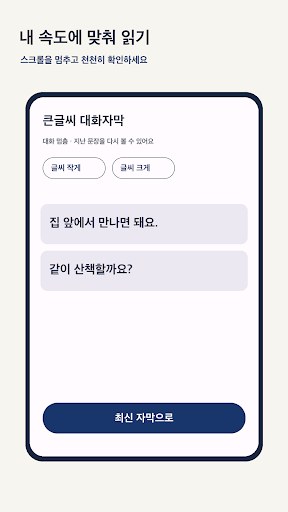

About 큰글씨 대화자막 - 실시간 음성인식
The description on the store listing
If you miss a moment while listening, check the conversation again on the screen.
Large text conversation subtitles display Korean audio as text, helping you have face-to-face conversations with your family.
■ Real-time Korean Voice Subtitles
Press "Start Conversation" and speak; the voice recognition results will be displayed on the screen. You can view subtitles in progress and confirmed sentences.
■ Large Text for Comfortable Reading
Adjust the font size to view the conversation in a comfortable reading format.
■ Revisit Missed Sentences
Press a past sentence to view it in larger text. Once you finish reading, you can return to the current conversation.
■ Read at …
Read the full description
If you miss a moment while listening, check the conversation again on the screen. Large text conversation subtitles display Korean audio as text, helping you have face-to-face conversations with your family. ■ Real-time Korean Voice Subtitles Press "Start Conversation" and speak; the voice recognition results will be displayed on the screen. You can view subtitles in progress and confirmed sentences. ■ Large Text for Comfortable Reading Adjust the font size to view the conversation in a comfortable reading format. ■ Revisit Missed Sentences Press a past sentence to view it in larger text. Once you finish reading, you can return to the current conversation. ■ Read at Your Own Pace Pause scrolling and read past subtitles slowly. Press the "Newest Subtitles" button to return to the most recent conversation. ■ Start Directly from Home Screen Add the "Start Conversation Subtitles" widget to your home screen to open the app and begin listening. ■ Simple Conversation Management Supports starting and stopping conversations, as well as clearing the list after confirmation. How to Use 1. Open the app and allow microphone permissions. 2. Press "Start Conversation" and check the "Listening" indicator. 3. Please speak one person at a time, holding your phone close to the microphone. 4. Please tap any missed sentences to hear them louder. User Guide • Voice recognition accuracy and subtitle latency may vary depending on your phone, pronunciation, ambient noise, network, and recognition method. • Basic recognition uses the voice recognition service installed on your phone, and this service may process the voice on a server. • Microphone permission is used for conversational voice recognition. • This app is a tool to assist with conversation and does not provide hearing tests or medical device functions.
Installs
The store publishes a range for this app
Daily history starts once this app is in our daily install sample.
Ratings
- 5 ★0.0%
- 4 ★0.0%
- 3 ★0.0%
- 2 ★0.0%
- 1 ★0.0%
Recent reviews
Latest public reviews from the store
No reviews in our sample for this app yet.
Top chart positions
Latest Google Play chart ranks by country, last 10 days
Not in any tracked top chart in the last 10 days.
Listing keywords
Words and phrases 큰글씨 대화자막 - 실시간 음성인식 repeats most in its store listing
Top phrases: voice recognition (4), home screen (3), large text (3), missed sentences (3), start conversation (3).
Highlighted words also appear in the title. Counts cover the title, short description and description.
Business model and tech
From the store listing and declared permissions
- Business model
- Free to downloadShows ads
- Sensitive access
- No sensitive permission declared
Compliance
What the listing and the app package show
- Store status
- Live
- Privacy policy
- Linked on the listing
- Advertising
- Shows ads
- In-app purchases
- None declared
- Age rating
- Everyone
Apps like 큰글씨 대화자막 - 실시간 음성인식
들어서 화면켜기Won3.5K installs★ 4.0
Height PredictionEcliptic App Ventures45.9K installs★ 2.4
Speicers`Pro VPNEldiablolucifer202021.2K installs★ 4.14
Lightning Tracker with AlertsYaksh Software4.3K installs★ 3.0
Mana Pathi (Unit Converter)Shirish Koirala2.2K installs★ 4.6
Multi-tab Calc - A simple app.Naoyuki Rikiji1.3K installs★ 5.0
Just Silence. Scheduled.Akid Soft1.6K installs★ 5.0
- WoWp AssistantВиталий Робиновский2K installs★ 4.2
LINKa: напишиLINKa7.9K installs★ 4.4
큰글씨 대화자막 - 실시간 음성인식: questions and answers
Who makes 큰글씨 대화자막 - 실시간 음성인식?
큰글씨 대화자막 - 실시간 음성인식 is published by BIG WAVE.
Is 큰글씨 대화자막 - 실시간 음성인식 free?
Yes. 큰글씨 대화자막 - 실시간 음성인식 is free to download, and it shows ads.
Is 큰글씨 대화자막 - 실시간 음성인식 still available?
Yes. 큰글씨 대화자막 - 실시간 음성인식 is live on Google Play as of 19 Nov 2026.
Track 큰글씨 대화자막 - 실시간 음성인식 and its competitors
Watch any app for new versions, rating drops, chart moves and removals. Free plan, no card.