
달력 메모장 - 메모, 일기장, 달력
Write a simple note on your calendar.
- Installs
- 41.10K
- Measured
- Rating
- —
- Ratings
- —
- Version
- 1.0.39
- Updated 17 Jul 2026
- Released
- 26 Oct 2022
- Tracked since 12 May 2026
- Size
- —
Screenshots
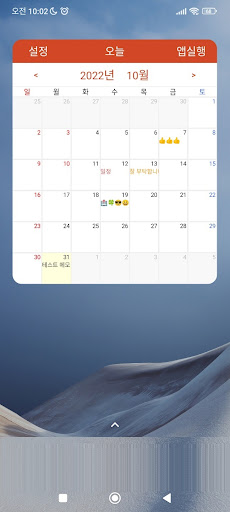
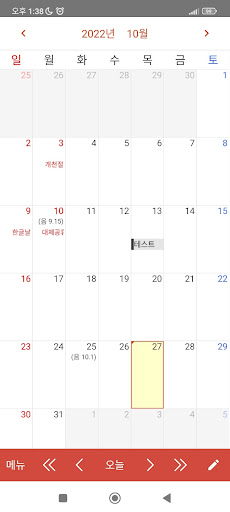
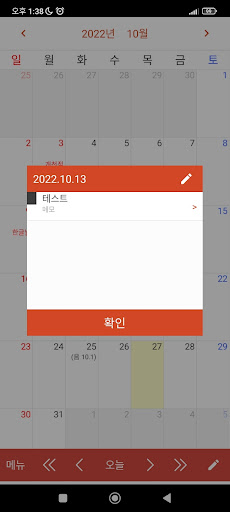
About 달력 메모장 - 메모, 일기장, 달력
The description on the store listing
※ "Christmas" and "Buddha's Birthday" have been confirmed as substitute holidays!!
[Guide on how to recover if there is data automatically backed up from the deleted app]
- You can visit https://moneyr.tistory.com/ and look at the [Calendar Notepad-Recovery] article. thank you
================================================== ===========
Use a simple notepad instead of a complicated scheduler!
A memo I was trying to remember in a hurry.
Did you even forget that you took notes?
Now check it out at a glance with the calendar notepad app!
Escape from forgetfulness!!! You can also use it as a diary.
[Calendar Notepad Functions and Features]
1. Calendar
2. Notepad
3. Memo …
Read the full description
※ "Christmas" and "Buddha's Birthday" have been confirmed as substitute holidays!! [Guide on how to recover if there is data automatically backed up from the deleted app] - You can visit https://moneyr.tistory.com/ and look at the [Calendar Notepad-Recovery] article. thank you ================================================== =========== Use a simple notepad instead of a complicated scheduler! A memo I was trying to remember in a hurry. Did you even forget that you took notes? Now check it out at a glance with the calendar notepad app! Escape from forgetfulness!!! You can also use it as a diary. [Calendar Notepad Functions and Features] 1. Calendar 2. Notepad 3. Memo lock function (secret memo function) 4. Display holiday/lunar calendar/today (lunar calendar until 2050) 5. Memo backup function (automatic/manual backup function) - Authorization is required to back up automatically. 6. Widget [Optional access rights] Files and media (storage space): Storage access is required to automatically back up schedules stored in the app. * You can use the app even if you do not agree to the optional access permission. However, please do not forget to manually back up your important data on a regular basis so as not to forget it. * Since the Korea Astronomical Research Institute provides the lunar calendar until 2050, only the year 2050 has been entered. After that, we will update when confirmed. It's a lacking app, but thank you for using it!!!
Installs since 1 Sep 2026 Measured
Exact Google Play install counts, collected daily
Ratings
- 5 ★0.0%
- 4 ★0.0%
- 3 ★0.0%
- 2 ★0.0%
- 1 ★0.0%
Recent reviews
Latest public reviews from the store
No reviews in our sample for this app yet.
Top chart positions
Latest Google Play chart ranks by country, last 10 days
Not in any tracked top chart in the last 10 days.
달력 메모장 - 메모, 일기장, 달력 history
Release, install milestones, listing and store changes
- Reached 10,000+ installs 3 Mar 2025
- Reached 5,000+ installs 29 Jan 2024
- Reached 1,000+ installs 16 Jan 2023
- Reached 500+ installs 19 Dec 2022
- Reached 100+ installs 8 Nov 2022
- First released on the store 26 Oct 2022
Update frequency
How often 달력 메모장 - 메모, 일기장, 달력 ships a new version, month by month
3 updates in the last 12 months. More often than most similar apps: they shipped a median of 0 updates in the same year.
Recent versions
Current version 1.0.39
- Version 1.0.3717 Jul 2026
📌 앱 안정화 * 옵션 추가 - 달력 아래의 버튼들을 맨 위쪽으로 이동시키는 옵션 * 공휴일 업데이트 - 2026년부터 5월 1일 "근로자의날"이 "노동절"로 바뀌고, 법정 공휴일입니다. - 2026년부터 7월 17일 "제헌절"은 법정 공휴일입니다. 📌 누적 업데이트 내역 - [앱 설정]에 [자동 백업 여부 확인] 옵션 재추가 - [메모 데이터 복원] 클릭 시, 팝업에 [도움말 링크] 버튼 추가 - 날짜 표시 왼쪽 정렬 (위젯에도 동일 적용) - 메모 데이터를 CSV 파일로 내보내기 (Excel에서 바로 열 수 있도록) - 중복 저장 방지 기능 개선 📌 알림 대체 공휴일은 2029년까지만 표출됩니다. 🔹 관련 사항이 변경되면, 앱을 다시 업데이트 하겠습니다. 열심히 테스트했지만, 오류가 있을 수 있습니다. 개발자 메일([email protected])로 피드백을 보내주시면 바로 살펴보겠습니다. 부족한 앱이지만, 사용해주셔서 감사합니다!!!
- Version 1.0.3617 Apr 2026
📌 앱 안정화 * 공휴일 업데이트 * 2026년부터 5월 1일 "근로자의날"이 "노동절"로 바뀌고, 법정 공휴일입니다. * 2026년부터 7월 17일 "제헌절"은 법정 공휴일입니다. (대체공휴일 여부는 모니터링중입니다. 관련 이슈 발생시 업데이트 예정입니다.) 📌 누적 업데이트 내역 - [앱 설정]에 [자동 백업 여부 확인] 옵션 재추가 - [메모 데이터 복원] 클릭 시, 팝업에 [도움말 링크] 버튼 추가 - 날짜 표시 왼쪽 정렬 (위젯에도 동일 적용) - 메모 데이터를 CSV 파일로 내보내기 (Excel에서 바로 열 수 있도록) - 중복 저장 방지 기능 개선 📌 알림 대체 공휴일은 2029년까지만 표출됩니다. 🔹 관련 사항이 변경되면, 앱을 다시 업데이트 하겠습니다. 열심히 테스트했지만, 오류가 있을 수 있습니다. 개발자 메일([email protected])로 피드백을 보내주시면 바로 살펴보겠습니다. 부족한 앱이지만, 사용해주셔서 감사합니다!!!
- Version 1.0.359 Dec 2025
- Version 1.0.3429 Sep 2025
Listing keywords
Words and phrases 달력 메모장 - 메모, 일기장, 달력 repeats most in its store listing
Top phrases: calendar notepad (4), lunar calendar (3), lunar calendar until (2), backup function (2), calendar until (2).
Highlighted words also appear in the title. Counts cover the title, short description and description.
Business model and tech
From the store listing and declared permissions
- Business model
- Free to downloadShows ads
- Sensitive access
- Phone and callsPhotos, videos and filesAdvertising ID
14 permissions
0 special access, 4 sensitive, 10 standard
- Change or delete shared storageSensitive
- Read music and audioREAD_MEDIA_AUDIOSensitive
- Read shared storageSensitive
- Read phone status and identitySensitive
- Ad attribution (Privacy Sandbox)ACCESS_ADSERVICES_ATTRIBUTIONStandard
- Ad topics (Privacy Sandbox)ACCESS_ADSERVICES_TOPICSStandard
- Read the advertising IDAD_IDStandard
- Read the advertising ID (Privacy Sandbox)ACCESS_ADSERVICES_AD_IDStandard
- Control vibrationStandard
- Keep the phone awakeStandard
- Run a foreground serviceFOREGROUND_SERVICEStandard
- Full internet accessStandard
Compliance
What the listing and the app package show
- Store status
- Live
- Upkeep
- Updated 17 Jul 2026
- Registered in
- South Korea
- Privacy policy
- Linked on the listing
- Advertising
- Shows ads
- In-app purchases
- None declared
- Age rating
- Everyone
- Sensitive permissions
- 4 sensitive of 14
- Location access
- No
- Camera and microphone
- Neither
Apps like 달력 메모장 - 메모, 일기장, 달력
영산강 안심 알림eICT융합소프트 & 스마트오더18.3K installs★ 4.0
JBLETRADOC Mobile10.3K installs★ 4.5
Two Point HeightOmega Centauri Software15.3K installs★ 2.22
Sheridan RecyclesCity of Sheridan634 installs★ 4.67
NAFNorges Automobil-Forbund200K installs★ 3.9
Ipsos Adria CAPIIpsos Serbia7.4K installs★ 3.9
Clock: Alarm Clock & TimerIntratech so36.1K installs★ 3.79
Süzme Sayaç HesaplamaNotsup30.3K installs★ 3.6
Cattle & Goat Record KeepingVetzKin10.3K installs★ 2.5
달력 메모장 - 메모, 일기장, 달력: questions and answers
How many downloads does 달력 메모장 - 메모, 일기장, 달력 have?
달력 메모장 - 메모, 일기장, 달력 has 41,101 installs on Google Play, measured from the store's own count on 10 Nov 2026.
Who makes 달력 메모장 - 메모, 일기장, 달력?
달력 메모장 - 메모, 일기장, 달력 is published by 꿈꾸는 개발자., a developer based in KR.
When was 달력 메모장 - 메모, 일기장, 달력 last updated?
The latest version (1.0.39) was released on 17 Jul 2026.
Is 달력 메모장 - 메모, 일기장, 달력 free?
Yes. 달력 메모장 - 메모, 일기장, 달력 is free to download, and it shows ads.
Is 달력 메모장 - 메모, 일기장, 달력 still available?
Yes. 달력 메모장 - 메모, 일기장, 달력 is live on Google Play as of 10 Nov 2026.
Track 달력 메모장 - 메모, 일기장, 달력 and its competitors
Watch any app for new versions, rating drops, chart moves and removals. Free plan, no card.