
欧路词典
Andrews system software easy to use offline dictionary
- Installs
- 390K
- Measured
- Rating
- 4.34
- Ratings
- 3.4K
- 586 reviews
- Version
- 26.9.2
- Updated 13 Oct 2026
- Released
- 21 Aug 2016
- Tracked since 13 May 2026
- Size
- 64 MB
- Needs 5.0
Screenshots



About 欧路词典
The description on the store listing
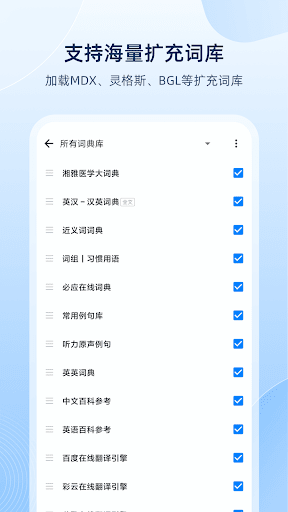
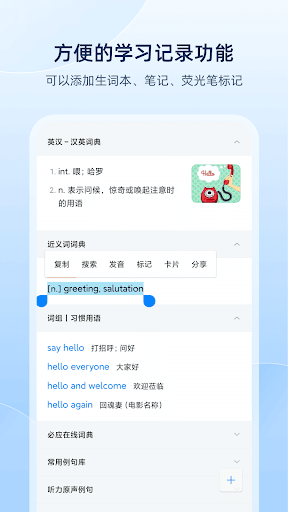
Oulu Dictionary is an essential reference software for English learners. Fast start-up, full-featured, no ads, do not disturb; massive expansion of thesaurus, custom editing; support Chinese, English, Japanese, French, German and other multilingual translation. Learning, translation, notes, exams, comprehensively covering all scenarios of language learning. Voice translation, photo translation, one-click access, easy to operate. Not only can you look up words, translate, take notes, and memorize words, but it also introduces AI functions such as theme writing, correction and error correction, etc., which will change your English learning in all aspects.
【Product Introduction】
Massive …
Read the full description
Oulu Dictionary is an essential reference software for English learners. Fast start-up, full-featured, no ads, do not disturb; massive expansion of thesaurus, custom editing; support Chinese, English, Japanese, French, German and other multilingual translation. Learning, translation, notes, exams, comprehensively covering all scenarios of language learning. Voice translation, photo translation, one-click access, easy to operate. Not only can you look up words, translate, take notes, and memorize words, but it also introduces AI functions such as theme writing, correction and error correction, etc., which will change your English learning in all aspects. 【Product Introduction】 Massive vocabulary: Built-in 300,000 common English and Chinese entries, 400,000 professional entries, and 1.78 million example sentence databases. Photo translation: the function of taking words by camera and looking up words by taking pictures, which can be searched immediately after shooting, a good helper for reading documents. Vocabulary review: custom learning objectives, a variety of charts, to help you better review your own learning. Online search: cloud-based dictionary based on massive data, uncommon words, example sentences, and pictures can be searched all at once. Pure pronunciation: free choice of American and British accents, self-defined pronunciation speed, and pronunciation of minor languages. File reading: You can read files in the dictionary, support word long-press query, and click to translate. 【Powerful Thesaurus】 Authoritative thesaurus: English-Chinese-Chinese-English dictionary, English-English dictionary, synonyms, antonyms dictionary, authoritative and detailed. Edit thesaurus: provide a computer-side thesaurus editor, support self-made expansion of thesaurus; Longman, Oxford, authoritative thesaurus can be added as much as you like. Expanded thesaurus: Download the expanded thesaurus in various languages through the Internet, supporting multiple dictionary formats such as Mdict, Lingoes, and Babylon, covering more than ten fields such as medicine, economics, engineering, and computers. 【Utilities】 Highlight mark: add mark to the key word, synchronize with the cloud, and check it at any time. Synchronization of notes: new vocabulary book, notes, history record function, support synchronization. Voice input: English sentence translation pronunciation function, support voice input. Cross-software word retrieval: When using other software, long press to look up words and automatically display definitions. 【AI function】 AI translation: Accurate and natural AI translation, surpassing major translation engines Correction and correction: After entering/pasting text, accurately and efficiently check spelling, grammar, punctuation and other errors Topic Writing: With the power of AI, given a topic, turn your thoughts into words Short sentence expansion: automatically expand according to the selected content, breaking through the writing bottleneck Article polishing: One-click text polishing and optimized expression to help your articles stand out 【contact us】 Official website http://www.eudic.net Inquiry email [email protected]
Installs, last 30 days Measured
Exact Google Play install counts, collected daily
Ratings
3,385 ratings, 586 reviews
- 5 ★65%
- 4 ★14%
- 3 ★8.3%
- 2 ★4.9%
- 1 ★8.3%
Recent reviews
Latest public reviews from the store
- 21 Feb 2026
very nice app
- 30 Sep 2024
非常好用,超級推薦
- 23 Jul 2024
Very good!!!
- 20 May 2024
It's very helpful!
What reviewers bring up
Topics mentioned in the latest 13 reviews, by how many reviews mention them
Liked in good reviews (11 reviews)
- tool 3
- helpful 2
- useful 2
Raised in bad reviews (1 reviews)
No topic comes up twice.
Top chart positions
Latest Google Play chart ranks by country, last 10 days
Not in any tracked top chart in the last 10 days.
欧路词典 history
Release, install milestones, listing and store changes
- First released on the store 21 Aug 2016
Update frequency
How often 欧路词典 ships a new version, month by month
12 updates in the last 12 months. More often than most similar apps: they shipped a median of 1 updates in the same year.
Recent versions
Current version 26.9.2
- Version 26.9.213 Oct 2026
【本次更新】 - 新增 生词笔记列表支持「做练习」功能 - 新增 文件阅读「朗读」支持仅播放译文 - 新增 词汇量测试支持单词PK - 新增 解释工具栏可以添加“查词”按钮 - 优化 添加生词本时,长按可以设置默认分组 - 优化「看视频学单词」引入更多视频 - 优化 单词卡片播放流程支持自定义单词发音为英音/美音 【近期更新】 - 新增 会员可以任意使用欧路AI翻译大模型 - 全新 背单词支持创建「课本组」,同时学习多个课本 - 新增 词典库管理支持批量操作和筛选 - 优化 背单词页面字体大小可以独立设置 - 新增 背单词卡片支持学习后确认解释 - 新增 背单词工具栏新增撤回按钮 - 新增 背单词统计增加很多详细信息 - 新增 离线翻译支持,可以在“翻译引擎”设置中开启
- Version 26.8.33 Aug 2026
【本次更新】 - 全新 背单词「看视频学单词」功能改版,通过视频带你更快掌握一个单词 - 全新 打卡小组件,lulu猫陪伴您的每一次坚持 - 新增 单词导出样式优化,并支持导出为csv、Anki卡片 - 新增 背单词单词列表支持自定义时间范围 - 新增 浮动图标取词支持设置取词位置 - 新增 话筒同传支持后台录制 - 新增 背单词填空模式支持手写笔输入 - 优化 复读模式可以在开启自动发音后自动复读 - 修复 epub 阅读无法拖动选择更多内容的问题 - 修复 epub 阅读单词等级某些情况无法调整的问题 【近期更新】 - 修复 查词页面翻译结果异常换行的问题 - 新增 笔记功能支持 Markdown 语法,提升排版体验 - 新增 背单词支持按词频学习 - 改进 单词卡片支持放大字体,跟随解释页面 - 新增 离线翻译支持,可以在“翻译引擎”设置中开启 - 新增 家长控制模式,限制使用网页和外部资源
- Version 26.8.11 Aug 2026
【本次更新】 - 全新 背单词「看视频学单词」功能改版,通过视频带你更快掌握一个单词 - 全新 打卡小组件,lulu猫陪伴您的每一次坚持 - 新增 单词导出样式优化,并支持导出为csv、Anki卡片 - 新增 背单词单词列表支持自定义时间范围 - 新增 浮动图标取词支持设置取词位置 - 新增 话筒同传支持后台录制 - 新增 背单词填空模式支持手写笔输入 - 优化 复读模式可以在开启自动发音后自动复读 - 修复 epub 阅读无法拖动选择更多内容的问题 - 修复 epub 阅读单词等级某些情况无法调整的问题 【近期更新】 - 修复 查词页面翻译结果异常换行的问题 - 新增 笔记功能支持 Markdown 语法,提升排版体验 - 新增 背单词支持按词频学习 - 改进 单词卡片支持放大字体,跟随解释页面 - 新增 离线翻译支持,可以在“翻译引擎”设置中开启 - 新增 家长控制模式,限制使用网页和外部资源
- Version 26.7.028 Jul 2026
【本次更新】 - 全新 打卡小组件,lulu猫陪伴您的每一次坚持 - 新增 单词导出样式优化,并支持导出为csv、Anki卡片 - 新增 背单词单词列表支持自定义时间范围 - 优化 复读模式可以在开启自动发音后自动复读 - 修复 epub 阅读无法拖动选择更多内容的问题 - 修复 epub 阅读单词等级某些情况无法调整的问题 【近期更新】 - 修复 查词页面翻译结果异常换行的问题 - 新增 笔记功能支持 Markdown 语法,提升排版体验 - 新增 背单词支持按词频学习 - 改进 单词卡片支持放大字体,跟随解释页面 - 新增 离线翻译支持,可以在“翻译引擎”设置中开启 - 新增 家长控制模式,限制使用网页和外部资源
Listing keywords
Words and phrases 欧路词典 repeats most in its store listing
Top phrases: expansion of thesaurus (2), look up words (2), ai translation (2), authoritative thesaurus (2), chinese english (2).
Highlighted words also appear in the title. Counts cover the title, short description and description.
Business model and tech
From the store listing and declared permissions
- Business model
- Free to download
- Sensitive access
- No sensitive permission declared
Compliance
What the listing and the app package show
- Store status
- Live
- Upkeep
- Updated 13 Oct 2026
- Registered in
- China
- Privacy policy
- Linked on the listing
- Advertising
- No ads declared
- In-app purchases
- None declared
- Age rating
- Everyone
Apps like 欧路词典
Marbel Kids Learn To CountEduca Studio708K installs★ 5.0
Matric Live Learning appSAADC Pty Ltd714K installs★ 4.11
Learn Arabic - 5,000 PhrasesFunEasyLearn930K installs★ 4.36
DoodleMath: Elementary MathDiscovery Education Europe Limited519K installs★ 3.38
ClevWordCleveni Inc.366K installs★ 4.65
French English DictionaryDragoma723K installs★ 4.22
الباك ساهل جميع الشعبMezghiche Aymen Apps168K installs★ 4.48
Yomikko: Master JapaneseNihongotools242K installs★ 4.63
RTO Hindi Test : Licence ExamTSB Empire531K installs★ 4.4
欧路词典: questions and answers
How many downloads does 欧路词典 have?
欧路词典 has 389,581 installs on Google Play, measured from the store's own count on 18 Nov 2026.
Who makes 欧路词典?
欧路词典 is published by QIANYAN NETWORK, a developer based in CN.
When was 欧路词典 last updated?
The latest version (26.9.2) was released on 13 Oct 2026.
Is 欧路词典 free?
Yes. 欧路词典 is free to download.
Is 欧路词典 still available?
Yes. 欧路词典 is live on Google Play as of 18 Nov 2026.
Track 欧路词典 and its competitors
Watch any app for new versions, rating drops, chart moves and removals. Free plan, no card.