スマートフォンセキュリティ
Global security manufacturer is known at the height of the virus detection rate, smart phones equipped with Bitdefender's engine, is an app for the tablet.
- Installs
- 207K
- Measured
- Rating
- 2.8
- Ratings
- 637
- Version
- Varies with device
- Updated 30 Jan 2025
- Released
- —
- Tracked since 13 May 2026
- Size
- 9 MB
- Needs 5.0
Screenshots

About スマートフォンセキュリティ
The description on the store listing
*If you are using the Smartphone Security Special Edition, please check the page below.
https://play.google.com/store/apps/details?id=com.sourcenext.ssforandroid.mvno
"Smartphone Security" is a smartphone app that uses the engine from Bitdefender, a global security manufacturer known for its high virus detection rate.
Received the ``Best Android Security 2021'' award from the German third-party organization ``AV-TEST'' as the product that can most safely protect Android smartphone devices.
■Advanced power saving design
Minimum battery consumption required
It is designed to prevent battery consumption, such as by not forcing a sleeping device to start up.
In a battery consumption …
Read the full description
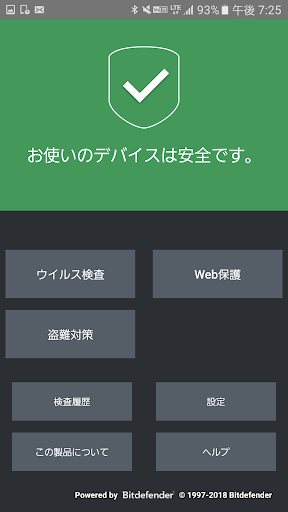
*If you are using the Smartphone Security Special Edition, please check the page below. https://play.google.com/store/apps/details?id=com.sourcenext.ssforandroid.mvno "Smartphone Security" is a smartphone app that uses the engine from Bitdefender, a global security manufacturer known for its high virus detection rate. Received the ``Best Android Security 2021'' award from the German third-party organization ``AV-TEST'' as the product that can most safely protect Android smartphone devices. ■Advanced power saving design Minimum battery consumption required It is designed to prevent battery consumption, such as by not forcing a sleeping device to start up. In a battery consumption test conducted by a third-party organization PCSL in February 2012, it was ranked first as the antivirus app with the least load on the device. ■Protect your smartphone from viruses ▼Scan automatically Automatically inspects installed apps. Of course, you can also scan manually. Virus apps that take over your device, leak personal information, display excessive advertisements, etc. are inspected at the time of installation to prevent threats. Of course, you can also manually scan installed apps. ▼Always up to date Virus testing is performed on the cloud, so you can always use it in the latest state. ▼SD cards are also safe You can scan not only your device but also your SD card. ■web security Check the safety of websites and display alerts for sites suspected of malware or phishing. ■Loss/theft measures ▼You can search your smartphone ・Map display You can check the current location of your smartphone on the web. ·alarm You can set the alarm to sound remotely. ·Send Messege You can display a message on the standby screen of your lost device. ▼Terminal lock and data deletion to prevent information leaks To prevent data on your device from being misused, you can remotely lock your device and erase data from the web. ■Operating environment ・Supported OS: Android OS 5.0 or higher ■Note ・This app is a "web protection function" and uses the device's "accessibility" service. By using accessibility, you can monitor access to phishing sites, fraudulent sites, etc. on your browser, and when a malicious site is detected, you can block access and display a warning screen. After certifying the license, check the instructions on the settings screen and enable it. (It will not be activated without your consent) Check out the demo video for instructions on how to enable it. https://rd.snxt.jp/63034 ・To install this product, you need the Google Play Store app. ・You must be connected to the Internet to perform a virus check. - Settings are required in advance to use the anti-theft function. ・This app uses administrator privileges on the device. When enabling Anti-Theft, if the permission setting screen appears, be sure to enable it. 1. Open the screen in the order of [Settings] - [Security] - [Device management function] or [Device management app], Select "Smartphone Security". 2. On the screen that appears, disable it. (If you disable the authority, you will not be able to use the anti-theft function) *The menu name may differ depending on the type of device.
Installs since 29 Aug 2026 Measured
Exact Google Play install counts, collected daily
Ratings
637 ratings
- 5 ★0.0%
- 4 ★0.0%
- 3 ★0.0%
- 2 ★0.0%
- 1 ★0.0%
Recent reviews
Latest public reviews from the store
No reviews in our sample for this app yet.
Top chart positions
Latest Google Play chart ranks by country, last 10 days
Not in any tracked top chart in the last 10 days.
スマートフォンセキュリティ history
Release, install milestones, listing and store changes
- Reached 100,000+ installs 25 Mar 2016
- Reached 50,000+ installs 29 Aug 2013
Update frequency
How often スマートフォンセキュリティ ships a new version, month by month
0 updates in the last 12 months. Less often than most similar apps: they shipped a median of 3 updates in the same year.
Recent versions
Current version Varies with device
- Version 8.3.130 Jan 2025
- Version 8.2.925 Dec 2023
- Version 8.2.817 Nov 2023
- Version 8.2.430 Mar 2022
Listing keywords
Words and phrases スマートフォンセキュリティ repeats most in its store listing
Top phrases: anti theft (3), battery consumption (3), smartphone security (3), anti theft function (2), global security manufacturer (2).
Highlighted words also appear in the title. Counts cover the title, short description and description.
Business model and tech
From the store listing, the SDKs in the app package and its declared permissions
- Business model
- Free to download
- Built with
- No cross-platform framework or game engine detected
- Ad networks (0)
- None detected
- Analytics and crash reports
- Firebase
- Sensitive access
- LocationPhone and callsPhotos, videos and files
1 ad, attribution and analytics SDKs detected. SDKs are read from the app package and permissions from the store listing, so code that loads later is not seen.
Technology
20 SDKs found in the app package
24 permissions
5 special access, 7 sensitive, 12 standard
- Ask to uninstall appsREQUEST_DELETE_PACKAGESSpecial access
- Change Do Not DisturbACCESS_NOTIFICATION_POLICYSpecial access
- Manage all filesMANAGE_EXTERNAL_STORAGESpecial access
- See every installed appQUERY_ALL_PACKAGESSpecial access
- Set exact alarmsSCHEDULE_EXACT_ALARMSpecial access
- Change or delete shared storageSensitive
- Read shared storageSensitive
- Approximate locationSensitive
- Location in the backgroundACCESS_BACKGROUND_LOCATIONSensitive
- Precise locationSensitive
- Show notificationsPOST_NOTIFICATIONSSensitive
- Read phone status and identitySensitive
Compliance
What the listing and the app package show
- Store status
- Live
- Upkeep
- Updated 30 Jan 2025
- Registered in
- Japan
- Privacy policy
- Linked on the listing
- Advertising
- No ads declared
- In-app purchases
- None declared
- Age rating
- Everyone
- Sensitive permissions
- 7 sensitive, 5 special access of 24
- Location access
- Yes, also in the background
- Camera and microphone
- Neither
Apps like スマートフォンセキュリティ
Felo SearchFelo Inc.351K installs★ 3.85
Bubble Level - Spirit Level天気105K installs★ 4.17
Cephalon Navis - Warframe hubSlayerOrnstein132K installs★ 4.47
Translator for Wear OSD and D Studios163K installs★ 3.6
MOESMOES317K installs★ 2.88
Stratum - Authenticator Appjmh.me47.6K installs★ 4.79
SD Agent - Управление заказамиSales Doctor Solution158K installs★ 4.5
Iphone 15 WallpapersBlueChipLTA349K installs★ 3.63
PokeZone - for Pokemon GOPyde Technologies LTD208K installs★ 4.51
スマートフォンセキュリティ: questions and answers
How many downloads does スマートフォンセキュリティ have?
スマートフォンセキュリティ has 207,095 installs on Google Play, measured from the store's own count on 14 Nov 2026.
Who makes スマートフォンセキュリティ?
スマートフォンセキュリティ is published by SOURCENEXT CORPORATION, a developer based in JP.
When was スマートフォンセキュリティ last updated?
The latest version (Varies with device) was released on 30 Jan 2025.
Is スマートフォンセキュリティ free?
Yes. スマートフォンセキュリティ is free to download.
Is スマートフォンセキュリティ still available?
Yes. スマートフォンセキュリティ is live on Google Play as of 14 Nov 2026.
Track スマートフォンセキュリティ and its competitors
Watch any app for new versions, rating drops, chart moves and removals. Free plan, no card.