달력 - 음력, 일정관리
Lunar calendar, 24 seasons, widgets, schedule management and reminders, backup and restore, a picture display function, etc. that can be used easily and conveniently.
- Installs
- 2.92M
- Measured
- Rating
- 4.74
- Ratings
- 6.4K
- 17 reviews
- Version
- 240241210
- Updated 2 Oct 2026
- Released
- 2 Jul 2012
- Tracked since 13 May 2026
- Size
- 12 MB
- Needs 7.0
Screenshots


About 달력 - 음력, 일정관리
The description on the store listing
It is a calendar app designed to be easy and convenient to use, supporting lunar calendar, widget, alarm, schedule input and backup.
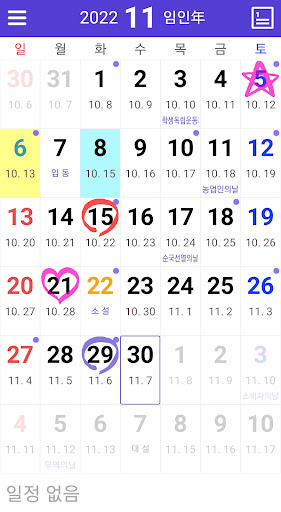
- Lunar calendar (1900 ~ 2050), public holidays, 24 solar terms, national anniversaries (optional), lunar calendar (optional), hands-free day (optional) displayed on the calendar
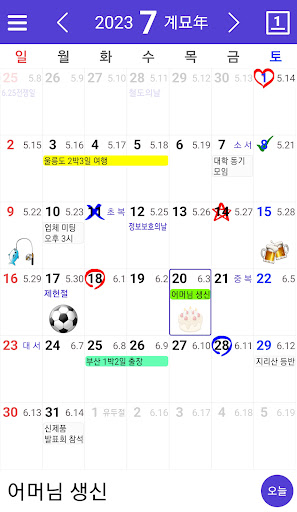
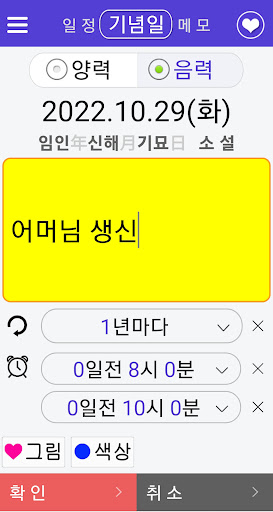
- Anniversary (separate solar and lunar calendar), schedule, save memos and attach photos to schedule
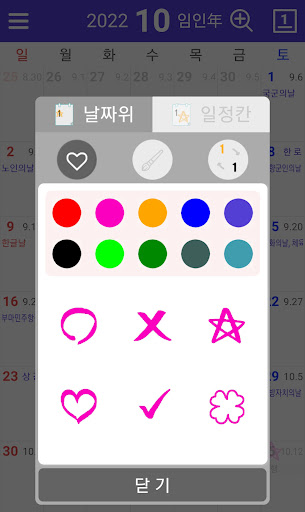
- Display O, X, ♡, ☆, emoticons, handwriting on the calendar → long-click on the date
- Provides two calendar views (large date view, schedule view on calendar)
- Notification function, password lock, magnified view, schedule search, yearly schedule view
- Provide 1x1, 4x4, …
Read the full description
It is a calendar app designed to be easy and convenient to use, supporting lunar calendar, widget, alarm, schedule input and backup. - Lunar calendar (1900 ~ 2050), public holidays, 24 solar terms, national anniversaries (optional), lunar calendar (optional), hands-free day (optional) displayed on the calendar - Anniversary (separate solar and lunar calendar), schedule, save memos and attach photos to schedule - Display O, X, ♡, ☆, emoticons, handwriting on the calendar → long-click on the date - Provides two calendar views (large date view, schedule view on calendar) - Notification function, password lock, magnified view, schedule search, yearly schedule view - Provide 1x1, 4x4, 5x5, 4x1 widgets, check the schedule right from the widget - Schedule backup and restoration through mail, SD card and cloud - Send/receive schedule (Bluetooth, Internet) - Weather and detailed dust display (optional function) - Constellation confirmation, date calculation (D-day, etc.) - 24 solar terms, definition and origin of seasonal customs How to use - You can enter, edit, or delete a memo by clicking the corresponding date on the calendar. - You can change the year and month by moving up, down, left, or right while holding down your finger. - After clicking the year or month, you can immediately select the value of the year and month to move. - Click the menu button => Select password lock, alarm, lunar zodiac and hand-free day display, schedule backup and restore, schedule search, view schedule by year, backup and restore, etc. - Long click on the date => O, X, ♡, ☆, emoticon, handwriting display on the date Information on optional access rights -Location: Check my location when receiving weather and fine dust information - Files and Media: Attach photos and files to the schedule - Nearby devices: Send/receive schedules - Contacts: import Google calendar events when logging in from event backup/restore - Calendar: import Google calendar events * Even if you do not agree to allow the optional access right, you can use the basic service except for the corresponding function * The Korea Astronomical Research Institute provides the lunar calendar until 2050 and the 24 solar terms only until 2025, so the lunar calendar and 24 solar terms are entered only up to the corresponding year. After that, data will be gradually upgraded as they come out.
Installs, last 30 days Measured
Exact Google Play install counts, collected daily
Ratings
6,419 ratings, 17 reviews
- 5 ★85%
- 4 ★12%
- 3 ★1.7%
- 2 ★0.0%
- 1 ★1.7%
Recent reviews
Latest public reviews from the store
- 2 Mar 2026
so far awesome
- 2 Dec 2025
quick easy accurate
- 27 May 2024
Works great on figuring yards if ots not square
- 27 Apr 2024
Great app for cubic yard
What reviewers bring up
Topics mentioned in the latest 14 reviews, by how many reviews mention them
Liked in good reviews (10 reviews)
- cubic yard 2
Raised in bad reviews (4 reviews)
No topic comes up twice.
Top chart positions
Latest Google Play chart ranks by country, last 10 days
Not in any tracked top chart in the last 10 days.
달력 - 음력, 일정관리 history
Release, install milestones, listing and store changes
- Moved from Lifestyle to Productivity 22 Nov 2024
- First released on the store 2 Jul 2012
Update frequency
How often 달력 - 음력, 일정관리 ships a new version, month by month
6 updates in the last 12 months. More often than most similar apps: they shipped a median of 2 updates in the same year.
Recent versions
Current version 240241210
- Version 2402412102 Oct 2026
날씨 오류 수정
- Version 24024120814 Jul 2026
물때 정보 수정
- Version 2402412063 Apr 2026
근로자의날을 "노동절"로 변경
- Version 24024120525 Mar 2026
Listing keywords
Words and phrases 달력 - 음력, 일정관리 repeats most in its store listing
Top phrases: lunar calendar (7), solar terms (4), backup and restore (3), view schedule (3), google calendar events (2).
Highlighted words also appear in the title. Counts cover the title, short description and description.
Business model and tech
From the store listing, the SDKs in the app package and its declared permissions
- Business model
- Free to downloadShows ads
- Built with
- No cross-platform framework or game engine detected
- Ad networks (2)
- AdMobFacebook Audience Network
- Analytics and crash reports
- Firebase
- Sign-in and social
- Kakao
- Sensitive access
- LocationContactsCalendarPhotos, videos and filesNearby devicesAdvertising ID
3 ad, attribution and analytics SDKs detected. SDKs are read from the app package and permissions from the store listing, so code that loads later is not seen.
Technology
26 SDKs found in the app package
Ad networks
Advertising and install-attribution SDKs found in the app package
- AdMob
- Facebook Audience Network
36 permissions
2 special access, 13 sensitive, 21 standard
- Set exact alarmsSCHEDULE_EXACT_ALARMSpecial access
- Show full-screen alertsUSE_FULL_SCREEN_INTENTSpecial access
- Read calendar eventsSensitive
- Read contactsSensitive
- Change or delete shared storageSensitive
- Read photosREAD_MEDIA_IMAGESSensitive
- Read photos and videos the user picksREAD_MEDIA_VISUAL_USER_SELECTEDSensitive
- Read shared storageSensitive
- Approximate locationSensitive
- Precise locationSensitive
- Advertise to nearby Bluetooth devicesBLUETOOTH_ADVERTISESensitive
- Connect to paired Bluetooth devicesBLUETOOTH_CONNECTSensitive
Compliance
What the listing and the app package show
- Store status
- Live
- Upkeep
- Updated 2 Oct 2026
- Registered in
- South Korea
- Privacy policy
- Linked on the listing
- Advertising
- Shows ads
- In-app purchases
- None declared
- Age rating
- Everyone
- Sensitive permissions
- 13 sensitive, 2 special access of 36
- Location access
- Yes, while in use
- Camera and microphone
- Neither
Apps like 달력 - 음력, 일정관리
Smart TranslatorSMARTWHO1.4M installs★ 4.51
AI Notes & Transcribe MemoNewway Apps1.2M installs★ 4.17
ScanAll - QR code & BarcodesGlilab524K installs★ 5.0
Sleep Time - Alarm CalculatorOleg Filimonov1.5M installs★ 4.6
RICOH Smart Device ConnectorRicoh Co., Ltd.3.3M installs★ 3.16
AdsCoin - Easy Mobile EarningsCDM Apps263K installs★ 3.37
TIM Segurança DigitalFS SECURITY SERVIÇOS DE TECNOLOGIA S A328K installs★ 4.69
All Document Reader - ViewerDragster Production2.1M installs★ 3.37
Habit Tracker - Habit RadarGoal Tracker203K installs★ 4.48
달력 - 음력, 일정관리: questions and answers
How many downloads does 달력 - 음력, 일정관리 have?
달력 - 음력, 일정관리 has 2,916,750 installs on Google Play, measured from the store's own count on 19 Nov 2026.
Who makes 달력 - 음력, 일정관리?
달력 - 음력, 일정관리 is published by EZ_APP, a developer based in KR.
When was 달력 - 음력, 일정관리 last updated?
The latest version (240241210) was released on 2 Oct 2026.
Is 달력 - 음력, 일정관리 free?
Yes. 달력 - 음력, 일정관리 is free to download, and it shows ads.
Is 달력 - 음력, 일정관리 still available?
Yes. 달력 - 음력, 일정관리 is live on Google Play as of 19 Nov 2026.
Track 달력 - 음력, 일정관리 and its competitors
Watch any app for new versions, rating drops, chart moves and removals. Free plan, no card.