
楽座
With this application, you can create the design data required for positioning with the field application "Rakusumi" from CAD drawings.
- Installs
- 602
- Measured
- Rating
- —
- Ratings
- —
- Version
- Varies with device
- Updated 16 Mar 2026
- Released
- —
- Tracked since 13 May 2026
- Size
- —
Screenshots


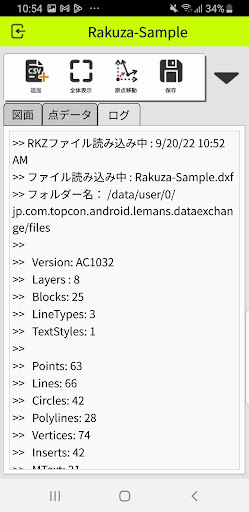


About 楽座
The description on the store listing
◆Anyone can easily create the coordinate data necessary for positioning with just a tap on a smartphone
You can create the coordinate data required when using Topcon's positioning system "Rakusho" and "LN-150 Pile Navi" at construction sites with simple operations on your smartphone or tablet.
◆ Connecting the site and design “easily” “3 easy steps with your smartphone!”
Step1: Import drawing data (DXF format)
Step2: Tap the point you want to locate
Step3: Load the data created in Rakuza into Rakubumi and start positioning!
◆Using Rakuza, you can do the following:
- Reading and viewing 2D CAD data (DXF format)
- Coordinate transformation for measurement
- Extraction and …
Read the full description
◆Anyone can easily create the coordinate data necessary for positioning with just a tap on a smartphone You can create the coordinate data required when using Topcon's positioning system "Rakusho" and "LN-150 Pile Navi" at construction sites with simple operations on your smartphone or tablet. ◆ Connecting the site and design “easily” “3 easy steps with your smartphone!” Step1: Import drawing data (DXF format) Step2: Tap the point you want to locate Step3: Load the data created in Rakuza into Rakubumi and start positioning! ◆Using Rakuza, you can do the following: - Reading and viewing 2D CAD data (DXF format) - Coordinate transformation for measurement - Extraction and registration of measurement points - Output of design data (CSV format) ◆Recommended for these people - I don't know the "coordinate" data - Want to save labor at construction sites with the latest positioning and surveying equipment - I want to perform accurate positioning according to the drawing. - Want to advance DX on-site and graduate from paper drawings - I want to work on site or on the go instead of in the office. This app does not support reading files other than the target DXF versions listed below. Additionally, files that include unsupported shapes may display differently than they do in the CAD software. Target DXF version: +AC1032 (AutoCAD 2018 format) +AC1027 (AutoCAD 2013 format) +AC1009 (AutoCAD R12/LT2 format) Recommended operating environment: +Android 8.0 or higher +RAM 4GB or more It does not work on 32-bit versions of Android devices. Please note that we cannot guarantee operation on all devices. Operation confirmed models: +Pixel 6 +Galaxy S9 +Galaxy S10
Installs since 2 Sep 2026 Measured
Exact Google Play install counts, collected daily
Daily history starts once this app is in our daily install sample.
Ratings
- 5 ★0.0%
- 4 ★0.0%
- 3 ★0.0%
- 2 ★0.0%
- 1 ★0.0%
Recent reviews
Latest public reviews from the store
- 20 Jun 2015
Does 90% of what I want in a contact manager. Over all, it is a great app & well worth the price.
Top chart positions
Latest Google Play chart ranks by country, last 10 days
Not in any tracked top chart in the last 10 days.
楽座 history
Release, install milestones, listing and store changes
- Reached 500+ installs 16 Mar 2026
- Reached 100+ installs 3 Sep 2023
- Reached 50+ installs 30 Apr 2023
Update frequency
How often 楽座 ships a new version, month by month
0 updates in the last 12 months. Less often than most similar apps: they shipped a median of 1 updates in the same year.
Recent versions
Current version Varies with device
- Version 1.1.026 Feb 2025
- Version 1.0.2E20 Apr 2023
- Version 1.0.1D7 Dec 2022
Listing keywords
Words and phrases 楽座 repeats most in its store listing
Top phrases: coordinate data (3), create the coordinate (2), data dxf format (2), autocad format (2), construction sites (2).
Highlighted words also appear in the title. Counts cover the title, short description and description.
Business model and tech
From the store listing and declared permissions
- Business model
- Free to downloadIn-app purchases
- Subscriptions and payments
- Google Play billing
- Sensitive access
- Photos, videos and files
5 permissions
0 special access, 2 sensitive, 3 standard
- Change or delete shared storageSensitive
- Read shared storageSensitive
- Full internet accessStandard
- See network connectionsStandard
- In-app purchases with Google PlayStandard
Compliance
What the listing and the app package show
- Store status
- Live
- Upkeep
- Updated 16 Mar 2026
- Registered in
- Japan
- Privacy policy
- Linked on the listing
- Advertising
- No ads declared
- In-app purchases
- Offered
- Age rating
- Everyone
- Sensitive permissions
- 2 sensitive of 5
- Location access
- No
- Camera and microphone
- Neither
Apps like 楽座
Great Clips ConnectGreat Clips19.3K installs★ 4.0
My NotebookArabic alphabet studio14.4K installs★ 5.0
DokandarDokandarltd8.2K installs★ 4.33
ELECTRICAL CONTRACTOR MagazineELECTRICAL CONTRACTOR Magazine17.2K installs★ 4.5
TicketManagerTicketManager12.2K installs★ 3.5
CrewConneXTA Connections15.1K installs★ 1.32
Flex Inventory ManagementUniGroup, Inc.5K installs★ 3.54
Unique Business WayPARAM COMPUTER3.3K installs★ 5.0
VeriTread CarrierVeriTread LLC12.5K installs★ 4.31
楽座: questions and answers
How many downloads does 楽座 have?
楽座 has 602 installs on Google Play, measured from the store's own count on 2 Sep 2026.
Who makes 楽座?
楽座 is published by TOPCON CORPORATION, a developer based in JP.
When was 楽座 last updated?
The latest version (Varies with device) was released on 16 Mar 2026.
Is 楽座 free?
Yes. 楽座 is free to download and offers in-app purchases.
Is 楽座 still available?
Yes. 楽座 is live on Google Play as of 2 Sep 2026.
Track 楽座 and its competitors
Watch any app for new versions, rating drops, chart moves and removals. Free plan, no card.