시간때우기 스도쿠
Enjoy each step of 1000 a total of 6,000 people Brain Games Sudoku (sudoku).
- Installs
- 196K
- Measured
- Rating
- 4.6
- Ratings
- 2.4K
- Version
- 1.10
- Updated 7 Jul 2024
- Released
- 10 Sep 2021
- Tracked since 14 May 2026
- Size
- 3 MB
- Needs 4.1
Screenshots


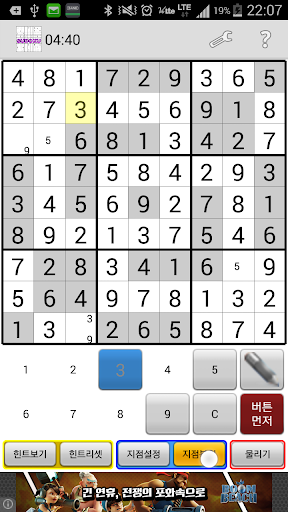
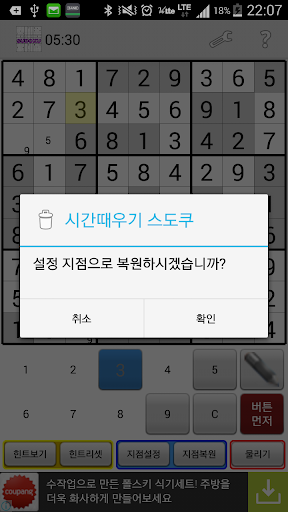
About 시간때우기 스도쿠
The description on the store listing
* Time Sudoku Game Features
- 6 levels for Sudoku enthusiast Total 6000 Sudoku (1000 steps)
- Filtering function in Sudoku list
- Hint function
- Can restore after setting branch
- 3 input modes
* Sudoku rules
1. There is only one number from 1 to 9 on the horizontal line,
2. There is only one number from 1 to 9 in the vertical line,
3. Small rectangle 3x3 must contain only one number from 1 to 9.
* Input mode (3 kinds of selection)
1. Button First: Click the number button you want to input first and then select the input cell of Sudoku board.
- Click the pencil button to activate the hint.
2. Sudoku First: Select the Sudoku cell and click the number button to enter the …
Read the full description
* Time Sudoku Game Features - 6 levels for Sudoku enthusiast Total 6000 Sudoku (1000 steps) - Filtering function in Sudoku list - Hint function - Can restore after setting branch - 3 input modes * Sudoku rules 1. There is only one number from 1 to 9 on the horizontal line, 2. There is only one number from 1 to 9 in the vertical line, 3. Small rectangle 3x3 must contain only one number from 1 to 9. * Input mode (3 kinds of selection) 1. Button First: Click the number button you want to input first and then select the input cell of Sudoku board. - Click the pencil button to activate the hint. 2. Sudoku First: Select the Sudoku cell and click the number button to enter the number. - Click the pencil button to activate the hint. 3. Pop-up: When you select the Sudoku cell you want to input, the keyboard pops up. - Click Edit Hint to enter the desired hint. * Help function 1. View Hint button: Automatically displays all hints in empty Sudoku cells. - After entering a value in Sudoku, click the View Hint button again to update the hint. 2. Hint Reset button: Reset all hints. 3. Point setting button: Click the Point setting button before entering the estimated value to set the restoration point. - If you need to click the snap button multiple times, you can set the point in advance to return to the convenient point. 4. Point restore button: Restores to the point you set. 5. Snap button: Return Sudoku cell input immediately. - If you click it several times, it goes back as much. * Notice of Privacy and Access Rights - Sudoku does not require any personal information or access privileges.
Installs since 17 Nov 2026 Measured
Exact Google Play install counts, collected daily
Daily history starts once this app is in our daily install sample.
Ratings
2,382 ratings
- 5 ★0.0%
- 4 ★0.0%
- 3 ★0.0%
- 2 ★0.0%
- 1 ★0.0%
Recent reviews
Latest public reviews from the store
- 7 Oct 2022
Hello hi do
Top chart positions
Latest Google Play chart ranks by country, last 10 days
Not in any tracked top chart in the last 10 days.
시간때우기 스도쿠 history
Release, install milestones, listing and store changes
- First released on the store 10 Sep 2021
- Reached 100,000+ installs 4 Sep 2017
- Reached 50,000+ installs 21 May 2017
- Reached 10,000+ installs 9 Dec 2016
- Reached 5,000+ installs 4 Nov 2016
- Reached 1,000+ installs 20 Jan 2016
- Reached 500+ installs 16 Aug 2015
- Reached 100+ installs 25 May 2015
Update frequency
How often 시간때우기 스도쿠 ships a new version, month by month
0 updates in the last 12 months. Less often than most similar apps: they shipped a median of 2 updates in the same year.
Recent versions
Current version 1.10
- Version 1.106 Jul 2024
- 안드로이드 최신 버전 적용 - 스도쿠 목록을 구글드라이브나 휴대폰에 저장할 수 있는 기능 추가 휴대폰 변경시 스도쿠를 불러와 그대로 플레이 할 수 있습니다. - 스도쿠 게임에서 동일한 값 하이라이트하는 기능 추가 - 설정에서 게임 환경 지정 가능 - 디자인 변경
- Version 1.919 Aug 2023
- Version 1.811 Jun 2022
- Version 1.710 Sep 2021
Listing keywords
Words and phrases 시간때우기 스도쿠 repeats most in its store listing
Top phrases: sudoku cell (3), activate the hint (2), button to activate (2), click the number (2), click the pencil (2).
Highlighted words also appear in the title. Counts cover the title, short description and description.
Business model and tech
From the store listing and declared permissions
- Business model
- Free to downloadShows ads
- Sensitive access
- No sensitive permission declared
Compliance
What the listing and the app package show
- Store status
- Live
- Upkeep
- No update since 7 Jul 2024
- Registered in
- South Korea
- Privacy policy
- Linked on the listing
- Advertising
- Shows ads
- In-app purchases
- None declared
- Age rating
- Everyone
Apps like 시간때우기 스도쿠
Yatzy Champ: Dice PVP Fun GameHCoo Studio96K installs★ 4.36
Dominó en EspañolJose Varela1.6M installs★ 3.97
Chess 3DDubixstudio1.4M installs★ 4.19
Ultimate Jewel 2 TutankhamunBalloon Island110K installs★ 4.48
Mahjong Solitaire SagaJose Varela147K installs★ 4.48
Slam Clash!Fairy Dragon358K installs★ 4.51
Snakes & Ladders: Online Dice!Playzio1.6M installs★ 3.7
詰碁の森 - 入門からプロまで遊べる囲碁アプリnaoki jinguji131K installs★ 4.9
Mahjong Christmasmahjong connect161K installs★ 4.58
시간때우기 스도쿠: questions and answers
How many downloads does 시간때우기 스도쿠 have?
시간때우기 스도쿠 has 195,877 installs on Google Play, measured from the store's own count on 17 Nov 2026.
Who makes 시간때우기 스도쿠?
시간때우기 스도쿠 is published by Goldenboard, a developer based in KR.
When was 시간때우기 스도쿠 last updated?
The latest version (1.10) was released on 7 Jul 2024.
Is 시간때우기 스도쿠 free?
Yes. 시간때우기 스도쿠 is free to download, and it shows ads.
Is 시간때우기 스도쿠 still available?
Yes. 시간때우기 스도쿠 is live on Google Play as of 17 Nov 2026.
Track 시간때우기 스도쿠 and its competitors
Watch any app for new versions, rating drops, chart moves and removals. Free plan, no card.