
血圧管理 血圧を管理するためのアプリ
Record and display blood pressure and pulse, and display blood pressure graphs.
- Installs
- 190
- Measured
- Rating
- —
- Ratings
- —
- Version
- Varies with device
- Updated 25 Oct 2025
- Released
- —
- Tracked since 14 May 2026
- Size
- —
Screenshots





About 血圧管理 血圧を管理するためのアプリ
The description on the store listing
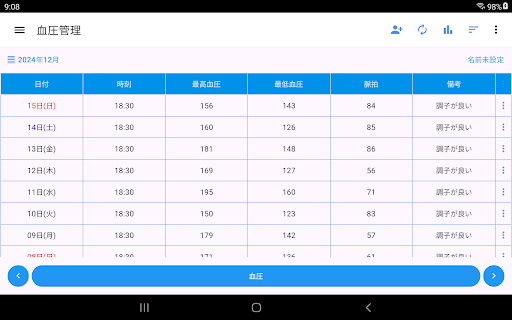
Press the blood pressure button to record your blood pressure.
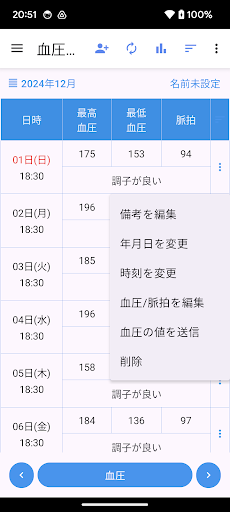
Notes can be recorded from the three dot menus in the table.
Blood pressure can be checked using line graphs and horizontal bar graphs.
・Record blood pressure
1. Tap the "Blood Pressure" button.
If you press/tap for a long time, step 2/step 3 will be skipped.
The current date and time will be set.
2. Select the year, month, and day and tap "Next".
3. Enter the time and tap OK.
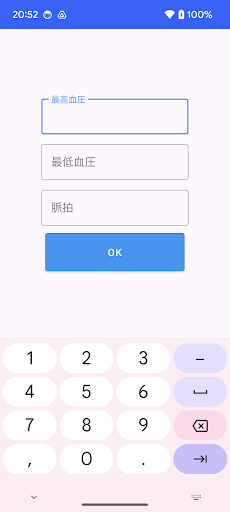
4. Enter the systolic blood pressure, diastolic blood pressure, and pulse rate and tap OK.
5. Press the save button.
▼ Sorting order
You can change the sort order of the table by tapping the three lines at the top right.
▼Notes
You …
Read the full description
Press the blood pressure button to record your blood pressure. Notes can be recorded from the three dot menus in the table. Blood pressure can be checked using line graphs and horizontal bar graphs. ・Record blood pressure 1. Tap the "Blood Pressure" button. If you press/tap for a long time, step 2/step 3 will be skipped. The current date and time will be set. 2. Select the year, month, and day and tap "Next". 3. Enter the time and tap OK. 4. Enter the systolic blood pressure, diastolic blood pressure, and pulse rate and tap OK. 5. Press the save button. ▼ Sorting order You can change the sort order of the table by tapping the three lines at the top right. ▼Notes You can add notes by tapping Edit notes from the menu on the right side of the table. ▼PDF file creation Create a PDF file from the displayed screen. You can create a PDF file with date and time, systolic blood pressure, diastolic blood pressure, pulse rate, and notes by specifying the year and month. If you want to print, please send it to the drive of the application that can print, and then print. ▼CSV file creation Create a CSV file by specifying user/year/month. You can create a CSV file that includes date and time, systolic blood pressure, diastolic blood pressure, pulse rate, and notes. If you want to print, please send it to the drive of the application that can print, and then print. ▼Add name Tap the person icon in the top right. You can record separately by adding additional names. Press the Add Name button, enter the name, and press the Add Name button. To edit the name, press the three lines to the left of the name from the name list and press Change Name to open the editing screen. To switch names, press the select button to switch names. ▼Graph Tap the graph icon at the top to display the graph screen. ・Horizontal bar graph of systolic blood pressure ・Horizontal bar graph of diastolic blood pressure ・Pulse horizontal bar graph ・Blood pressure 2-axis line graph for each record ・Pulse line graph for each record ・Blood pressure daily line graph ▼Dark theme When you turn on the dark theme, the screen display changes to a color scheme based on black. When set to OFF, the screen display will be based on normal white. ▼If you want to delete all records and names Initialize/delete all data from the top right menu You can delete all records. ▼Model change data transfer When you tap "Model change data transfer" in the menu, the following selection screen will be displayed. ・File creation (create a backup file for model change) ・Restore (Restore data from backup file) Step A. Steps to create a backup file 1. Tap "Model change data transfer" in the menu. 2.Tap Create file. 3.Tap "Create file" on the confirmation screen. 4.Tap "Select app" on the sending screen. 5.Tap “Save to Drive”. Step B. Restore (Restore data from the backup file in Step A) 1. Launch Google Drive on your new smartphone/tablet, select the backup file, and tap "Download" from the menu. 2. Install this app from Google Play on your new smartphone/tablet. Launch the app. 3. Tap "Model change data transfer" in the menu. 4.Tap Restore. 5. Tap the file you want to restore from the list of files to restore.
Installs since 16 Nov 2026 Measured
Exact Google Play install counts, collected daily
Daily history starts once this app is in our daily install sample.
Ratings
- 5 ★0.0%
- 4 ★0.0%
- 3 ★0.0%
- 2 ★0.0%
- 1 ★0.0%
Recent reviews
Latest public reviews from the store
No reviews in our sample for this app yet.
Top chart positions
Latest Google Play chart ranks by country, last 10 days
Not in any tracked top chart in the last 10 days.
血圧管理 血圧を管理するためのアプリ history
Release, install milestones, listing and store changes
- Reached 100+ installs 14 Sep 2025
- Reached 50+ installs 12 Nov 2024
- Reached 10+ installs 24 Jul 2024
- Reached 5+ installs 21 Jul 2024
Update frequency
How often 血圧管理 血圧を管理するためのアプリ ships a new version, month by month
0 updates in the last 12 months. Less often than most similar apps: they shipped a median of 1 updates in the same year.
Recent versions
Current version Varies with device
- Version 25.10.625 Oct 2025
- Version 25.8.59 Aug 2025
- Version 25.2.416 Feb 2025
- Version 24.8.32 Aug 2024
Listing keywords
Words and phrases 血圧管理 血圧を管理するためのアプリ repeats most in its store listing
Top phrases: blood pressure (17), backup file (5), model change (5), change data transfer (4), diastolic blood pressure (4).
Highlighted words also appear in the title. Counts cover the title, short description and description.
Business model and tech
From the store listing and declared permissions
- Business model
- Free to downloadShows ads
- Sensitive access
- No sensitive permission declared
Compliance
What the listing and the app package show
- Store status
- Live
- Upkeep
- Updated 25 Oct 2025
- Registered in
- Japan
- Privacy policy
- Linked on the listing
- Advertising
- Shows ads
- In-app purchases
- None declared
- Age rating
- Everyone
Apps like 血圧管理 血圧を管理するためのアプリ
Remote Vibratorrazuma24.4K installs★ 4.17
The Doctor KRDZ Tech | زی تێك3.3K installs★ 4.8
P3RRTRT.me17.3K installs★ 4.71
my nib NZnib nz limited63.6K installs★ 3.2
YMCA PulseSGA Software24.5K installs★ 2.66
HHC Rehab ConnectHartford HealthCare Apps8.4K installs★ 4.49
Boost PlanSusana Raquel Antunes33.1K installs★ 4.6
Home Remedies : Natural CureFitOlympia15.8K installs★ 3.5
TriadXP: Fitness & WellnessTriad Fitness Group, LLC2K installs★ 4.18
血圧管理 血圧を管理するためのアプリ: questions and answers
How many downloads does 血圧管理 血圧を管理するためのアプリ have?
血圧管理 血圧を管理するためのアプリ has 190 installs on Google Play, measured from the store's own count on 16 Nov 2026.
Who makes 血圧管理 血圧を管理するためのアプリ?
血圧管理 血圧を管理するためのアプリ is published by メモ 記録 アプリ ダイエットや目標を記録 お買い物メモ, a developer based in JP.
When was 血圧管理 血圧を管理するためのアプリ last updated?
The latest version (Varies with device) was released on 25 Oct 2025.
Is 血圧管理 血圧を管理するためのアプリ free?
Yes. 血圧管理 血圧を管理するためのアプリ is free to download, and it shows ads.
Is 血圧管理 血圧を管理するためのアプリ still available?
Yes. 血圧管理 血圧を管理するためのアプリ is live on Google Play as of 16 Nov 2026.
Track 血圧管理 血圧を管理するためのアプリ and its competitors
Watch any app for new versions, rating drops, chart moves and removals. Free plan, no card.