
ゲーム プレイ時間 記録
An app for recording game play time. Calculates game play time from the start date and time and end date and time.
- Installs
- 206
- Measured
- Rating
- —
- Ratings
- —
- Version
- Varies with device
- Updated 12 Jan 2026
- Released
- —
- Tracked since 14 May 2026
- Size
- —
Screenshots



About ゲーム プレイ時間 記録
The description on the store listing
Game play time is calculated and displayed from the start date and time and end date and time.
Displays game play time in line and bar graphs.
・Record game start date and time
1. Tap the "Game start date and time" button.
If you press/tap for a long time, step 2/step 3 will be skipped.
The current date and time will be set.
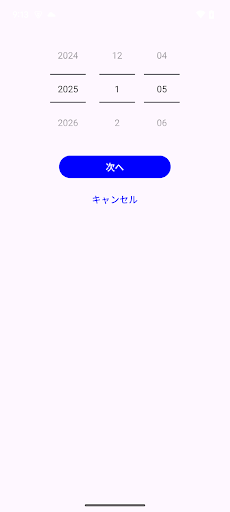
2. Select the year, month, and day and tap "Next".
3. Enter the time and tap OK.
・When recording the end date and time of the game
1. Tap the "Game End Date and Time" button in the End Date and Time column of the table.
If you press/tap for a long time, step 2/step 3 will be skipped.
The current date and time will be set.
2. Select the year, month, and …
Read the full description
Game play time is calculated and displayed from the start date and time and end date and time. Displays game play time in line and bar graphs. ・Record game start date and time 1. Tap the "Game start date and time" button. If you press/tap for a long time, step 2/step 3 will be skipped. The current date and time will be set. 2. Select the year, month, and day and tap "Next". 3. Enter the time and tap OK. ・When recording the end date and time of the game 1. Tap the "Game End Date and Time" button in the End Date and Time column of the table. If you press/tap for a long time, step 2/step 3 will be skipped. The current date and time will be set. 2. Select the year, month, and day and tap "Next". 3. Enter the end time and tap "Done". ▼ Sorting order You can change the sort order of the table by tapping the icon on the right side of the table. ▼Game name Tap the game name field in the table to enter the game name. ▼Contents You can add a memo by tapping the content from the menu on the right side of the table. ▼Game play time The game play time in the table is automatically displayed based on the start date and time and end date and time. ▼Setting the start time Set the time input by setting the start time. ▼Setting end time Set the time input in the end time setting. ▼Game name list settings Add the game name to the subject list in the game name list settings. ▼PDF file creation Create a PDF file from the displayed screen. You can create a PDF file that specifies the year and month and includes the start date and time, end date and time, gameplay time, game name, and notes. If you want to print, please send it to the drive of the application that can print, and then print. ▼CSV file creation Create a CSV file by specifying user/year/month. You can create a CSV file with start date and time, end date and time, gameplay time, game name, and notes. ▼Add new user You can record separately by adding a name from Add New User. Enter the user's name and group name (can be blank). To edit, tap the table from User Edit to open the editing screen. You can switch users by tapping the user switching button in user switching. ▼Graph Tap the graph to display the selection screen. You can select and display the following screens. ・Monthly graph ・Game play time graph ・Game play time rhythm table ・Annual total/average/graph ・Full period graph ▼Dark theme When you turn on the dark theme, the screen display changes to a color scheme based on black. When set to OFF, the screen display will be based on normal white. ▼Color settings You can change the screen color by selecting a color in the color settings and pressing OK. ▼If you want to delete all records From the top right menu, select Erase all data You can delete all records. ▼Model change data transfer When you tap "Model change data transfer" in the menu, the following selection screen will be displayed. ・File creation (create a backup file for model change) ・Restore (Restore data from backup file) Step A. Steps to create a backup file 1. Tap "Model change data transfer" in the menu. 2.Tap Create file. 3.Tap "Create file" on the confirmation screen. 4.Tap "Select app" on the sending screen. 5.Tap “Save to Drive”. Step B. Restore (Restore data from the backup file in Step A) 1. Launch Google Drive on your new smartphone/tablet, select the backup file, and tap "Download" from the menu. 2. Install this app from Google Play on your new smartphone/tablet. Launch the app. 3. Tap "Model change data transfer" in the menu. 4.Tap Restore. 5. Tap the file you want to restore from the list of files to restore. [Especially recommended for these people! ] People who want to manage their game play time for free People who want to check the game play time on a graph People who like simple apps People who want to know the total game play time People who want to check which month they spent the most time playing games People who are thinking about managing their game play time People who want to display game play time graphs for free People who have never managed their game play time before People who are concerned about playing too many games People who want to manage game play time by name People who want to check their game play time every year
Installs since 8 Nov 2026 Measured
Exact Google Play install counts, collected daily
Daily history starts once this app is in our daily install sample.
Ratings
- 5 ★0.0%
- 4 ★0.0%
- 3 ★0.0%
- 2 ★0.0%
- 1 ★0.0%
Recent reviews
Latest public reviews from the store
No reviews in our sample for this app yet.
Top chart positions
Latest Google Play chart ranks by country, last 10 days
Not in any tracked top chart in the last 10 days.
ゲーム プレイ時間 記録 history
Release, install milestones, listing and store changes
- Reached 100+ installs 13 Nov 2025
- Reached 50+ installs 16 Jun 2025
- Reached 10+ installs 28 Feb 2025
- Reached 5+ installs 15 Jan 2025
Update frequency
How often ゲーム プレイ時間 記録 ships a new version, month by month
2 updates in the last 12 months. More often than most similar apps: they shipped a median of 0 updates in the same year.
Recent versions
Current version Varies with device
- Version 26.1.1012 Jan 2026
- Version 26.1.911 Jan 2026
- Version 25.10.828 Oct 2025
- Version 25.8.715 Aug 2025
Listing keywords
Words and phrases ゲーム プレイ時間 記録 repeats most in its store listing
Top phrases: game play (16), end date (8), game name (8), people who want (7), start date (7).
Highlighted words also appear in the title. Counts cover the title, short description and description.
Business model and tech
From the store listing and declared permissions
- Business model
- Free to downloadShows ads
- Sensitive access
- No sensitive permission declared
Compliance
What the listing and the app package show
- Store status
- Live
- Upkeep
- Updated 12 Jan 2026
- Registered in
- Japan
- Privacy policy
- Linked on the listing
- Advertising
- Shows ads
- In-app purchases
- None declared
- Age rating
- Everyone
Apps like ゲーム プレイ時間 記録
목포해양대학교 도서관wiseneosco7.6K installs★ 4.8
Aza-e-HussainSyed Mehdi Raza5.2K installs★ 4.8
Jewish QuoteChabad.org Jewish Apps8.1K installs★ 4.85
Car Engine SoundsSboard.pro29K installs★ 4.17
Garland County LibrarySolus UK Ltd6K installs★ 4.78
Món Ngon 3 Miền - Nau an ngonWeOnline.VN9.1K installs★ 4.1
CARPORTPop-Pulse4.3K installs★ 4.06
블랙 심플 카톡테마은수우우45.5K installs★ 4.6
WMS WebControlWAREMA Renkhoff SE13.1K installs★ 3.5
ゲーム プレイ時間 記録: questions and answers
How many downloads does ゲーム プレイ時間 記録 have?
ゲーム プレイ時間 記録 has 206 installs on Google Play, measured from the store's own count on 8 Nov 2026.
Who makes ゲーム プレイ時間 記録?
ゲーム プレイ時間 記録 is published by メモ 記録 アプリ ダイエットや目標を記録 お買い物メモ, a developer based in JP.
When was ゲーム プレイ時間 記録 last updated?
The latest version (Varies with device) was released on 12 Jan 2026.
Is ゲーム プレイ時間 記録 free?
Yes. ゲーム プレイ時間 記録 is free to download, and it shows ads.
Is ゲーム プレイ時間 記録 still available?
Yes. ゲーム プレイ時間 記録 is live on Google Play as of 8 Nov 2026.
Track ゲーム プレイ時間 記録 and its competitors
Watch any app for new versions, rating drops, chart moves and removals. Free plan, no card.