
消費電力 記録 電気量料金 計算
This is an app for recording the power consumption of electrical equipment. Records modes such as sleep, standby, eco, etc.
- Installs
- 42
- Measured
- Rating
- —
- Ratings
- —
- Version
- Varies with device
- Released
- —
- Tracked since 14 May 2026
- Size
- —
Screenshots


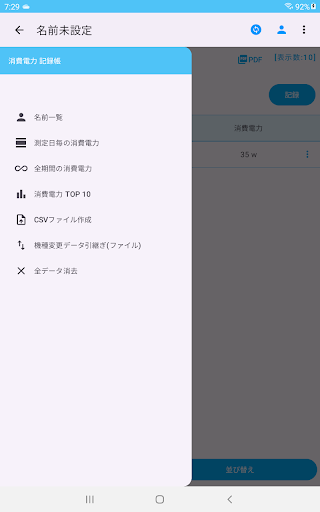
About 消費電力 記録 電気量料金 計算
The description on the store listing
Watt MonitorThis is an app for recording the power consumption of electrical devices measured with a power consumption meter.
Records modes such as sleep, standby, and eco.
You can calculate and check your electricity bill from power consumption and electricity charges.
You can check it with line graphs and bar graphs.
・Add electrical device
1. Press the "Add electrical device" button.
2. Enter the name of the electrical device and press "Save".
3. Confirm and press OK.
・Record power consumption
1. Press the "Record" button to the left of the electrical device name.
2. Select the measurement date (year, month, and day) and press "OK".
3. Enter or select the mode and press …
Read the full description
Watt MonitorThis is an app for recording the power consumption of electrical devices measured with a power consumption meter. Records modes such as sleep, standby, and eco. You can calculate and check your electricity bill from power consumption and electricity charges. You can check it with line graphs and bar graphs. ・Add electrical device 1. Press the "Add electrical device" button. 2. Enter the name of the electrical device and press "Save". 3. Confirm and press OK. ・Record power consumption 1. Press the "Record" button to the left of the electrical device name. 2. Select the measurement date (year, month, and day) and press "OK". 3. Enter or select the mode and press "Next". 4. Enter the power consumption, electricity charge, and remarks and press "Save". ▼Edit You can edit power consumption, etc. from the menu on the right side of the table. ▼Create PDF file Create a PDF file from the displayed screen. Press the PDF button to create a PDF file. If you want to print, please send it to a print app such as Drive before printing. ▼Create CSV file Create a CSV file from the power consumption record. You can create a CSV file with the measurement date, electrical device, mode, power consumption, electricity charge, and notes. If you want to print, please send it to a print app such as Drive before printing. ▼Add name Tap the person icon in the upper right. Adding an additional name allows you to record it separately. Press the Add name button, enter the name, and press the Add name button. To edit the name, press the three lines to the left of the name in the name list and press Change name to open the editing screen. To switch names, press the Select button to switch names. ▼Power consumption by measurement date Displays a list of power consumption by date. ▼Power consumption over the entire period Displays a list of power consumption by electrical devices. ▼Top 10 power consumption Displays a bar graph of the top 10 power consumption in descending order. ▼To delete all records and names You can delete all records by initializing and erasing all data from the menu in the upper right. ▼Data transfer when changing device When you tap "Data transfer when changing device" in the menu, the following selection screen will be displayed. -Create file (Create a backup file for changing device) -Restore (Restore data from backup file)
Installs since 3 Sep 2026 Measured
Exact Google Play install counts, collected daily
Ratings
- 5 ★0.0%
- 4 ★0.0%
- 3 ★0.0%
- 2 ★0.0%
- 1 ★0.0%
Recent reviews
Latest public reviews from the store
- 10 Dec 2025
Avoid using the touch screen, if possible.. It just isnt ideal, but, it is there if nothing else. Just bluetooth a controller to your phone, and the games just run flawless on s24-ultra. Games are top-notch quality arcade of old. This needs a steam release. Please fix "Ghox" controls for wireless controller and touch controls. The acceleration for the wireless joystick is too fast, once it is slightly tilted.
- 21 Apr 2025
Tough as nails classics, just bring a controller. Devices like the Retroid Pocket 5 will play this extremely well. One missing feature: you can't remap buttons, so you're stuck with what it gives you, but at least the layout isn't completely terrible. Emulation quality is great, so you're getting the full Toaplan experience. Very impressive.
- 6 Apr 2025
I'm enjoying it so far. You get Truxton for free, then it's $5 per game. It isn't bank-breaking, and it has a good selection of titles to choose from. Im gonna enjoy being able to mess around with Zero Wing and Dogyuun on the go even though I suck at them.
- 18 Feb 2025
Very nice keep up the good work, and add more games
What reviewers bring up
Topics mentioned in the latest 10 reviews, by how many reviews mention them
Liked in good reviews (5 reviews)
- controller 2
- experience 2
- quality 2
- toaplan 2
- isn't 2
Raised in bad reviews (5 reviews)
No topic comes up twice.
Top chart positions
Latest Google Play chart ranks by country, last 10 days
Not in any tracked top chart in the last 10 days.
Listing keywords
Words and phrases 消費電力 記録 電気量料金 計算 repeats most in its store listing
Top phrases: power consumption (15), electrical device (5), create csv file (3), create pdf file (3), press the add (3).
Highlighted words also appear in the title. Counts cover the title, short description and description.
Business model and tech
From the store listing and declared permissions
- Business model
- Free to downloadShows ads
- Sensitive access
- No sensitive permission declared
Compliance
What the listing and the app package show
- Store status
- Live
- Registered in
- Japan
- Privacy policy
- Linked on the listing
- Advertising
- Shows ads
- In-app purchases
- None declared
- Age rating
- Everyone
Apps like 消費電力 記録 電気量料金 計算
영산강 안심 알림eICT융합소프트 & 스마트오더18.3K installs★ 4.0
JBLETRADOC Mobile10.3K installs★ 4.5
Two Point HeightOmega Centauri Software15.3K installs★ 2.22
Sheridan RecyclesCity of Sheridan636 installs★ 4.67
NAFNorges Automobil-Forbund200K installs★ 3.9
Ipsos Adria CAPIIpsos Serbia7.4K installs★ 3.9
Clock: Alarm Clock & TimerIntratech so36.1K installs★ 3.79
Süzme Sayaç HesaplamaNotsup30.4K installs★ 3.6
Cattle & Goat Record KeepingVetzKin10.3K installs★ 2.5
消費電力 記録 電気量料金 計算: questions and answers
How many downloads does 消費電力 記録 電気量料金 計算 have?
消費電力 記録 電気量料金 計算 has 42 installs on Google Play, measured from the store's own count on 12 Nov 2026.
Who makes 消費電力 記録 電気量料金 計算?
消費電力 記録 電気量料金 計算 is published by メモ 記録 アプリ ダイエットや目標を記録 お買い物メモ, a developer based in JP.
Is 消費電力 記録 電気量料金 計算 free?
Yes. 消費電力 記録 電気量料金 計算 is free to download, and it shows ads.
Is 消費電力 記録 電気量料金 計算 still available?
Yes. 消費電力 記録 電気量料金 計算 is live on Google Play as of 12 Nov 2026.
Track 消費電力 記録 電気量料金 計算 and its competitors
Watch any app for new versions, rating drops, chart moves and removals. Free plan, no card.