
睡眠時間 記録帳
Record sleep time and graph display An app that records the date and time you went to bed and the date and time you woke up and calculates your sleep time
- Installs
- 8.24K
- Measured
- Rating
- —
- Ratings
- —
- Version
- Varies with device
- Updated 23 Feb 2026
- Released
- —
- Tracked since 14 May 2026
- Size
- —
Screenshots



About 睡眠時間 記録帳
The description on the store listing
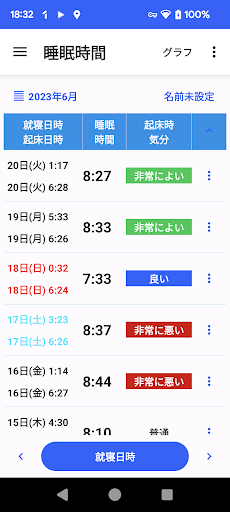
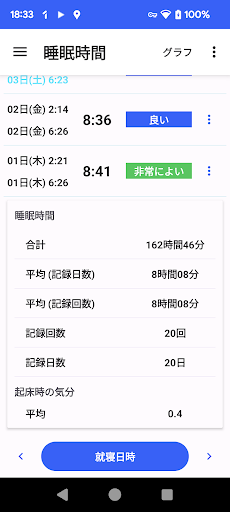
The sleep time is calculated and displayed from the date and time of going to bed and the date and time of waking up.
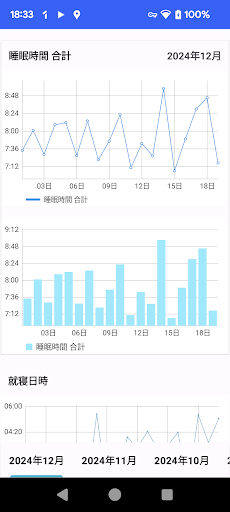
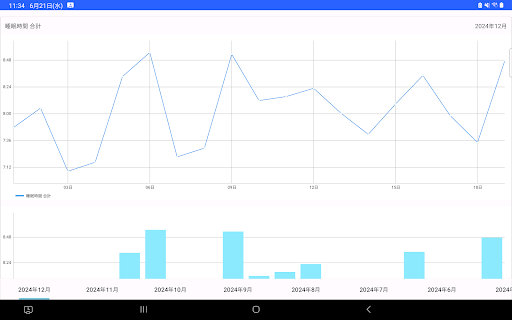
Display sleep time in line and bar graphs.
・ Record the date and time of going to bed
1. Tap the "Bedtime" button.
If you press and hold/long tap, step 2/step 3 will be skipped.
The current date and time will be set.
2. Select the date and tap "Next".
3. Enter your bedtime and tap OK.
・When recording the wake-up date and time
1. Tap the "Wake-up date and time" button in the wake-up date and time column of the table.
If you press and hold/long tap, step 2/step 3 will be skipped.
The current date and time will be set.
2. Select the date and tap …
Read the full description
The sleep time is calculated and displayed from the date and time of going to bed and the date and time of waking up. Display sleep time in line and bar graphs. ・ Record the date and time of going to bed 1. Tap the "Bedtime" button. If you press and hold/long tap, step 2/step 3 will be skipped. The current date and time will be set. 2. Select the date and tap "Next". 3. Enter your bedtime and tap OK. ・When recording the wake-up date and time 1. Tap the "Wake-up date and time" button in the wake-up date and time column of the table. If you press and hold/long tap, step 2/step 3 will be skipped. The current date and time will be set. 2. Select the date and tap "Next". 3. Enter your wake-up time and tap "Done". ▼ sleep time The sleep time in the table is automatically displayed from the date and time of going to bed and the date and time of waking up. ▼Recording your mood when you wake up 1. Tap "Mood" in the Wake-up Mood column of the table. 2. Choose how you feel when you wake up. ▼When deleting all records From the menu on the top right, select Erase All Data All records can be deleted. ▼Transfer of model change data Tap "Model change data transfer" in the menu to display the following selection screen. ・File creation (create a backup file for model change) ・Restore (restore data from backup file) Step A. Steps to create a backup file 1.Tap "Model change data transfer" in the menu. 2. Tap Create file. 3. Tap "Create file" on the confirmation screen. 4. Tap "Select app" on the send screen. 5. Tap “Save to Drive”. Step B. Restore (restore data from backup file in step A) 1. Launch Google Drive on your new smartphone/tablet, select the backup file, and tap "Download" from the menu. 2. Install this app on your new smartphone/tablet from google play. Launch the app. 3.Tap "Model change data transfer" in the menu. 4. Tap Restore. 5.Tap the file to restore from the list of files to restore.
Installs since 16 Nov 2026 Measured
Exact Google Play install counts, collected daily
Daily history starts once this app is in our daily install sample.
Ratings
- 5 ★0.0%
- 4 ★0.0%
- 3 ★0.0%
- 2 ★0.0%
- 1 ★0.0%
Recent reviews
Latest public reviews from the store
No reviews in our sample for this app yet.
Top chart positions
Latest Google Play chart ranks by country, last 10 days
Not in any tracked top chart in the last 10 days.
睡眠時間 記録帳 history
Release, install milestones, listing and store changes
- Reached 5,000+ installs 9 Oct 2025
- Reached 1,000+ installs 6 Jun 2024
- Reached 500+ installs 28 Mar 2024
- Reached 100+ installs 7 Oct 2023
- Reached 50+ installs 8 Aug 2023
- Reached 10+ installs 15 Jul 2023
Update frequency
How often 睡眠時間 記録帳 ships a new version, month by month
3 updates in the last 12 months. More often than most similar apps: they shipped a median of 1 updates in the same year.
Recent versions
Current version Varies with device
- Version 26.2.5123 Feb 2026
- Version 25.12.4720 Dec 2025
- Version 25.11.4626 Nov 2025
- Version 25.10.451 Oct 2025
Listing keywords
Words and phrases 睡眠時間 記録帳 repeats most in its store listing
Top phrases: backup file (5), model change (5), model change data (4), change data (4), change data transfer (3).
Highlighted words also appear in the title. Counts cover the title, short description and description.
Business model and tech
From the store listing and declared permissions
- Business model
- Free to downloadShows ads
- Sensitive access
- No sensitive permission declared
Compliance
What the listing and the app package show
- Store status
- Live
- Upkeep
- Updated 23 Feb 2026
- Registered in
- Japan
- Privacy policy
- Linked on the listing
- Advertising
- Shows ads
- In-app purchases
- None declared
- Age rating
- Everyone
Apps like 睡眠時間 記録帳
Remote Vibratorrazuma24.4K installs★ 4.17
The Doctor KRDZ Tech | زی تێك3.3K installs★ 4.8
P3RRTRT.me17.3K installs★ 4.71
my nib NZnib nz limited63.6K installs★ 3.2
YMCA PulseSGA Software24.5K installs★ 2.66
HHC Rehab ConnectHartford HealthCare Apps8.4K installs★ 4.49
Boost PlanSusana Raquel Antunes33.1K installs★ 4.6
Home Remedies : Natural CureFitOlympia15.8K installs★ 3.5
TriadXP: Fitness & WellnessTriad Fitness Group, LLC2K installs★ 4.18
睡眠時間 記録帳: questions and answers
How many downloads does 睡眠時間 記録帳 have?
睡眠時間 記録帳 has 8,244 installs on Google Play, measured from the store's own count on 16 Nov 2026.
Who makes 睡眠時間 記録帳?
睡眠時間 記録帳 is published by メモ 記録 アプリ ダイエットや目標を記録 お買い物メモ, a developer based in JP.
When was 睡眠時間 記録帳 last updated?
The latest version (Varies with device) was released on 23 Feb 2026.
Is 睡眠時間 記録帳 free?
Yes. 睡眠時間 記録帳 is free to download, and it shows ads.
Is 睡眠時間 記録帳 still available?
Yes. 睡眠時間 記録帳 is live on Google Play as of 16 Nov 2026.
Track 睡眠時間 記録帳 and its competitors
Watch any app for new versions, rating drops, chart moves and removals. Free plan, no card.