
ウォーキング 記録帳
An app that records walking time and displays graphs An app that records the start date and time of walking and calculates the time An app that records the number of steps, mood, and course
- Installs
- 105
- Measured
- Rating
- —
- Ratings
- —
- Version
- Varies with device
- Updated 12 Jan 2026
- Released
- —
- Tracked since 14 May 2026
- Size
- —
Screenshots




About ウォーキング 記録帳
The description on the store listing
Walking time is calculated and displayed from the start date and time and end date and time.
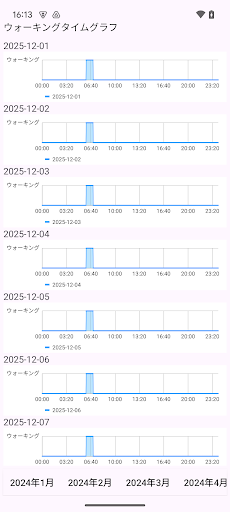
Displays walking time and number of steps in a line graph and bar graph.
This app does not have a pedometer function.
Please measure your steps with your pedometer.
・Record the start date and time of walking
1. Tap the "Walking" button.
If you press/tap for a long time, step 2/step 3 will be skipped.
The current date and time will be set.
2. Select the year, month, and day and tap "Next".
3. Enter the time and tap OK.
・When recording the end date and time of walking
1. Tap the "Walking end date and time" button in the end date and time column of the table.
If you press/tap for a …
Read the full description
Walking time is calculated and displayed from the start date and time and end date and time. Displays walking time and number of steps in a line graph and bar graph. This app does not have a pedometer function. Please measure your steps with your pedometer. ・Record the start date and time of walking 1. Tap the "Walking" button. If you press/tap for a long time, step 2/step 3 will be skipped. The current date and time will be set. 2. Select the year, month, and day and tap "Next". 3. Enter the time and tap OK. ・When recording the end date and time of walking 1. Tap the "Walking end date and time" button in the end date and time column of the table. If you press/tap for a long time, step 2/step 3 will be skipped. The current date and time will be set. 2. Select the year, month, and day and tap "Next". 3. Enter the end time and tap "Done". ▼ Sorting order You can change the sort order of the table by tapping the icon on the right side of the table. ▼Number of steps 1. Tap the number of steps column in the table. 2. Tap Enter number of steps. 3. Enter the number of steps and tap Save. ▼Mood 1. Tap the mood column in the table. 2. Tap Select Mood. 3. Choose your mood. ▼Course name 1. Tap the course column in the table. 2. Tap Select course. 3. Enter the course and tap Save. ▼Notes You can add notes by tapping the content from the menu on the right side of the table. ▼Walking time The times in the table are automatically displayed based on the start date and time and end date and time. ▼Course name list settings Add the walking course name to the subject list in the course name list settings. ▼PDF file creation Create a PDF file from the displayed screen. You can create a PDF file that specifies the year and month and includes start date and time, end date and time, time, number of steps, mood, course, and notes. If you want to print, please send it to the drive of the application that can print, and then print. ▼CSV file creation Create a CSV file by specifying user/year/month. You can create a CSV file that includes start date and time, end date and time, time, number of steps, mood, course, and notes. ▼Add new user You can record separately by adding a name from Add New User. Enter the user's name and group name (can be blank). To edit, tap the table from User Edit to open the editing screen. You can switch users by tapping the user switching button in user switching. ▼Graph Tap the graph to display the selection screen. You can select and display the following screens. ・Monthly graph ・Walking time graph ・Walking time rhythm table ・Time Annual total/Average/Graph ・Steps annual total/average/graph ・Full period graph ▼Dark theme When you turn on the dark theme, the screen display changes to a color scheme based on black. When set to OFF, the screen display will be based on normal white. ▼Color settings You can change the screen color by selecting a color in the color settings and pressing OK. ▼If you want to delete all records From the top right menu, select Erase all data You can delete all records. ▼Model change data transfer When you tap "Model change data transfer" in the menu, the following selection screen will be displayed. ・File creation (create a backup file for model change) ・Restore (Restore data from backup file) Step A. Steps to create a backup file 1. Tap "Model change data transfer" in the menu. 2.Tap Create file. 3.Tap "Create file" on the confirmation screen. 4.Tap "Select app" on the sending screen. 5.Tap “Save to Drive”. Step B. Restore (Restore data from the backup file in Step A) 1. Launch Google Drive on your new smartphone/tablet, select the backup file, and tap "Download" from the menu. 2. Install this app from Google Play on your new smartphone/tablet. Launch the app. 3. Tap "Model change data transfer" in the menu. 4.Tap Restore. 5. Tap the file you want to restore from the list of files to restore. [Especially recommended for these people! ] People who want to manage their walking time for free People who want to check their walking time on a graph People who like simple apps People who want to know the total walking time People who want to check which month they spent the most time walking People who are thinking about managing their walking time People who want to display walking time graphs for free People who have never managed their walking time before People who are concerned about walking too much People who want to manage walking time by name People who want to check their walking time every year People who want to manage their step count for free People who want to check the number of walking steps in a graph People who want to know the total number of walking steps People who want to check which month they took the most steps People who are thinking about managing their walking step count People who want to display a graph of walking steps for free People who have never managed their step count before People who want to manage their step count by name People who want to check their step count every year
Installs since 8 Nov 2026 Measured
Exact Google Play install counts, collected daily
Daily history starts once this app is in our daily install sample.
Ratings
- 5 ★0.0%
- 4 ★0.0%
- 3 ★0.0%
- 2 ★0.0%
- 1 ★0.0%
Recent reviews
Latest public reviews from the store
No reviews in our sample for this app yet.
Top chart positions
Latest Google Play chart ranks by country, last 10 days
Not in any tracked top chart in the last 10 days.
ウォーキング 記録帳 history
Release, install milestones, listing and store changes
- Reached 50+ installs 3 Nov 2025
- Reached 10+ installs 22 Mar 2025
Update frequency
How often ウォーキング 記録帳 ships a new version, month by month
1 updates in the last 12 months. About as often as similar apps, which shipped a median of 1 updates in the same year.
Recent versions
Current version Varies with device
- Version 26.1.812 Jan 2026
- Version 25.10.628 Oct 2025
- Version 25.8.515 Aug 2025
- Version 25.2.326 Mar 2025
Listing keywords
Words and phrases ウォーキング 記録帳 repeats most in its store listing
Top phrases: people who want (14), number of steps (8), end date (7), want to check (6), start date (6).
Highlighted words also appear in the title. Counts cover the title, short description and description.
Business model and tech
From the store listing and declared permissions
- Business model
- Free to downloadShows ads
- Sensitive access
- No sensitive permission declared
Compliance
What the listing and the app package show
- Store status
- Live
- Upkeep
- Updated 12 Jan 2026
- Registered in
- Japan
- Privacy policy
- Linked on the listing
- Advertising
- Shows ads
- In-app purchases
- None declared
- Age rating
- Everyone
Apps like ウォーキング 記録帳
Remote Vibratorrazuma24.4K installs★ 4.17
The Doctor KRDZ Tech | زی تێك3.3K installs★ 4.8
P3RRTRT.me17.3K installs★ 4.71
my nib NZnib nz limited63.6K installs★ 3.2
YMCA PulseSGA Software24.5K installs★ 2.66
HHC Rehab ConnectHartford HealthCare Apps8.4K installs★ 4.49
Boost PlanSusana Raquel Antunes33.1K installs★ 4.6
Home Remedies : Natural CureFitOlympia15.8K installs★ 3.5
TriadXP: Fitness & WellnessTriad Fitness Group, LLC2K installs★ 4.18
ウォーキング 記録帳: questions and answers
How many downloads does ウォーキング 記録帳 have?
ウォーキング 記録帳 has 105 installs on Google Play, measured from the store's own count on 8 Nov 2026.
Who makes ウォーキング 記録帳?
ウォーキング 記録帳 is published by メモ 記録 アプリ ダイエットや目標を記録 お買い物メモ, a developer based in JP.
When was ウォーキング 記録帳 last updated?
The latest version (Varies with device) was released on 12 Jan 2026.
Is ウォーキング 記録帳 free?
Yes. ウォーキング 記録帳 is free to download, and it shows ads.
Is ウォーキング 記録帳 still available?
Yes. ウォーキング 記録帳 is live on Google Play as of 8 Nov 2026.
Track ウォーキング 記録帳 and its competitors
Watch any app for new versions, rating drops, chart moves and removals. Free plan, no card.