App Lock - Secure Your Apps
Secure Lock for All Apps with a 4-digit passcode , Fingerprint or Pattern.
- Installs
- 193K
- Measured
- Rating
- 3.63
- Ratings
- 924
- 42 reviews
- Version
- 5.0.09.29
- Updated 27 Oct 2025
- Released
- 23 Nov 2018
- Tracked since 13 May 2026
- Size
- 6 MB
- Needs 4.1
Screenshots




About App Lock - Secure Your Apps
The description on the store listing
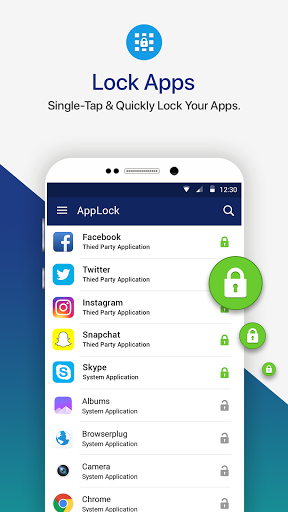
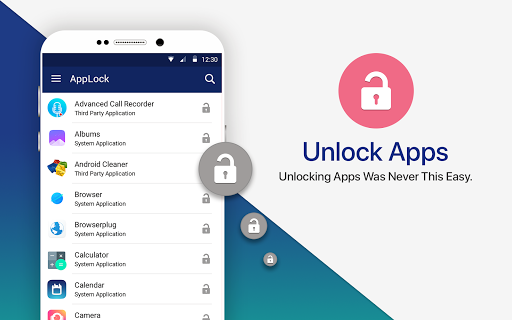
Protect Your Privacy, Lock Apps on Your Phone with One-Tap.
Want to lock popular apps like Facebook, WhatsApp, Snapchat, Instagram & Gmail on your device? Looking for a way to keep your confidential data secured & protected from prying eyes? With so many apps in the market claiming to secure user’s data saved on smartphones. Systweak brings one such app known as AppLock -Fast AppLocker with Fingerprint & Password that secure your apps & private stuff in a single-click!
As our smartphones often hold an excessive amount of important and sensitive information. Such as mobile banking apps, messaging apps, gallery, & social media apps, which all are required to be secured from people …
Read the full description
Protect Your Privacy, Lock Apps on Your Phone with One-Tap. Want to lock popular apps like Facebook, WhatsApp, Snapchat, Instagram & Gmail on your device? Looking for a way to keep your confidential data secured & protected from prying eyes? With so many apps in the market claiming to secure user’s data saved on smartphones. Systweak brings one such app known as AppLock -Fast AppLocker with Fingerprint & Password that secure your apps & private stuff in a single-click! As our smartphones often hold an excessive amount of important and sensitive information. Such as mobile banking apps, messaging apps, gallery, & social media apps, which all are required to be secured from people snooping on your phone. Although there are screen locks for the purpose, but having an additional security does no harm, right? Thankfully, you can use AppLock -Fast AppLocker with Fingerprint & Password by Systweak Software, that does the task for you and helps you to secure your data on Android device easily! It’s a lightweight & a must-have personal security application that prevents unauthorized access & keep bad guys out from snooping on you. It allows you to lock and protect apps using Passcode and fingerprint unlocking options. And doesn’t share your personal data with third parties. Additionally, it’s one of the most simple-to-use tool, and it just requires a single-tap to lock & unlock an application! Download this best app lock for Android to have an additional layer of security to protect all your apps and confidential data with ease! <b>How Does AppLock-Fast AppLocker with FingerPrint & Password Work? </b> To get started with AppLock-Fast AppLocker with FingerPrint & Password: • Install the Application. • Set a 4-digit passcode or fingerprint scanning. • Start locking applications you want to protect by tapping on ‘Lock’ icon. <b>AppLock-Fast AppLocker with FingerPrint & Password Features: </b> This smart app lock tool is a one-stop way to keep prying eyes out of your gallery, messaging apps & social media. And it boasts the following functionalities: • Ability to lock down just any app on your device. • Supports locking via Passcode & Fingerprint. • Simple & Easy-To-Use. • Mail recovery option, in case you forget your old passcode. • Easy reset password option, to set a new passcode. • Light-weight. • Doesn’t affect battery life. • Do not share users data with third-parties. <b>FAQ </b> <b>1. How Can I Change the Application Password? </b> To change your Application password: • Open the app. • Go to Change Passcode option. • Enter the new 4-digit passcode. <b>2. Does It Support Fingerprint Sensor? </b> Yes, Fingerprint app lock is supported to provide even better & tighter security for your apps and other crucial data. <b>3. What If I Forgot My Passcode? How To Recover It? </b> It’s damn simple to recover your password via AppLock-Fast AppLocker with FingerPrint & Password: • Launch the app. • Click on ‘three dots’ icon present at the top-right corner > select Forgot Passcode. • Click ‘OK’ to log out. • A recovery email will be sent to your registered email id. • Find your old passcode and get started with Secure Lock for Apps again. <b>4. Does It Collects Users Information? </b> No, Secure Lock for Apps doesn’t save or share its user's data with third-parties. This smart app protector is an ideal solution for people who are genuinely concerned about privacy and security. Download it now for optimum app lock security! Don’t forget to rate us & share your valuable feedback!
Installs since 26 Aug 2026 Measured
Exact Google Play install counts, collected daily
Ratings
924 ratings, 42 reviews
- 5 ★50%
- 4 ★14%
- 3 ★7.8%
- 2 ★4.6%
- 1 ★23%
Recent reviews
Latest public reviews from the store
- 8 Nov 2025
it is more recommended for your privacy
- 20 Oct 2025
salamat
- 22 Aug 2025
good
- 22 Aug 2025
It looks very good and promising but I have to test it for some time . Thank YOU
What reviewers bring up
Topics mentioned in the latest 50 reviews, by how many reviews mention them
Liked in good reviews (33 reviews)
- lock 4
- prevent 2
- far 2
Raised in bad reviews (13 reviews)
- open 2
- put 2
- ads 2
Top chart positions
Latest Google Play chart ranks by country, last 10 days
Not in any tracked top chart in the last 10 days.
App Lock - Secure Your Apps history
Release, install milestones, listing and store changes
- Reached 100,000+ installs 23 Jan 2023
- Reached 50,000+ installs 21 Mar 2022
- Reached 10,000+ installs 4 Jul 2020
- Reached 5,000+ installs 28 Mar 2020
- Reached 1,000+ installs 18 Apr 2019
- Reached 500+ installs 21 Feb 2019
- Reached 100+ installs 13 Dec 2018
- Reached 50+ installs 30 Nov 2018
Update frequency
How often App Lock - Secure Your Apps ships a new version, month by month
0 updates in the last 12 months. Less often than most similar apps: they shipped a median of 1 updates in the same year.
Recent versions
Current version 5.0.09.29
- Version 5.0.09.2927 Oct 2025
1. Support latest Android OS 2. Biometric passcode option has been added 3. A new multi-language option has been added, with support for ten languages.(English, Arabic, Deutsch, Portuguese, Chinese, French ,Russian, Greek, Hindi, Spanish) 4. Compatible with latest Android OS. 5. Fingerprint security system implemented. 6. Categorized in tabs for better user experience 7. Pattern lock added to enhance more security. 8. Improve UI 9. Minor bug fixes.
- Version 5.0.09.2020 Aug 2024
- Version 5.0.09.0918 Sep 2023
- Version 4.21.09.1924 Mar 2023
Listing keywords
Words and phrases App Lock - Secure Your Apps repeats most in its store listing
Top phrases: applock fast applocker (6), applocker with fingerprint (6), applock fast (6), fast applocker (6), fingerprint password (6).
Highlighted words also appear in the title. Counts cover the title, short description and description.
Business model and tech
From the store listing, the SDKs in the app package and its declared permissions
- Business model
- Free to downloadIn-app purchasesShows ads
- Built with
- No cross-platform framework or game engine detected
- Ad networks (1)
- AdMob
- Subscriptions and payments
- Google Play billing
- Analytics and crash reports
- FirebaseGoogle Analytics
- Sensitive access
- Phone and callsPhotos, videos and filesAccounts on the deviceDraws over other appsAdvertising ID
3 ad, attribution and analytics SDKs detected. SDKs are read from the app package and permissions from the store listing, so code that loads later is not seen.
Technology
42 SDKs found in the app package
Ad networks
Advertising and install-attribution SDKs found in the app package
- AdMob
22 permissions
2 special access, 4 sensitive, 16 standard
- Draw over other appsSpecial access
- See which apps are usedPACKAGE_USAGE_STATSSpecial access
- See accounts on the deviceSensitive
- Change or delete shared storageSensitive
- Read shared storageSensitive
- Read phone status and identitySensitive
- Ad attribution (Privacy Sandbox)ACCESS_ADSERVICES_ATTRIBUTIONStandard
- Ad topics (Privacy Sandbox)ACCESS_ADSERVICES_TOPICSStandard
- Read how it was installed (install referrer)BIND_GET_INSTALL_REFERRER_SERVICEStandard
- Read the advertising IDAD_IDStandard
- Read the advertising ID (Privacy Sandbox)ACCESS_ADSERVICES_AD_IDStandard
- Ask to skip battery optimisationREQUEST_IGNORE_BATTERY_OPTIMIZATIONSStandard
Compliance
What the listing and the app package show
- Store status
- Live
- Upkeep
- Updated 27 Oct 2025
- Registered in
- India
- Privacy policy
- Linked on the listing
- Advertising
- No ads declared
- In-app purchases
- None declared
- Age rating
- Everyone
- Sensitive permissions
- 4 sensitive, 2 special access of 22
- Location access
- No
- Camera and microphone
- Neither
Apps like App Lock - Secure Your Apps
Graffiti Battery Meter [WidgetTomoyuki Ono135K installs★ 4.46
Authenticator App - 2FAHoniry Xidoa799K installs★ 1.77
EasyBattery - Battery Managersteven he188K installs★ 4.44
Plant Identifier AI - CareAI Identifier Apps133K installs★ 4.32
How Long Widget - Time CounterRubén Mayayo195K installs★ 3.68
Aranet HomeSAF Tehnika A/S68.8K installs★ 4.79
RF Signal Tracker & DetectorMove More Solutions328K installs★ 2.68
LED Text ScrollerBlue Wave203K installs★ 3.5
Check VIN Number Lookup SearchCriminal Search Background4.6K installs★ 5.0
App Lock - Secure Your Apps: questions and answers
How many downloads does App Lock - Secure Your Apps have?
App Lock - Secure Your Apps has 193,055 installs on Google Play, measured from the store's own count on 18 Nov 2026.
Who makes App Lock - Secure Your Apps?
App Lock - Secure Your Apps is published by SYSTWEAK SOFTWARE, a developer based in IN.
When was App Lock - Secure Your Apps last updated?
The latest version (5.0.09.29) was released on 27 Oct 2025.
Is App Lock - Secure Your Apps free?
Yes. App Lock - Secure Your Apps is free to download.
Is App Lock - Secure Your Apps still available?
Yes. App Lock - Secure Your Apps is live on Google Play as of 18 Nov 2026.
Track App Lock - Secure Your Apps and its competitors
Watch any app for new versions, rating drops, chart moves and removals. Free plan, no card.