
App Shortcuts On LockScreen
Lock screen shortcuts for apps, notes, canvas & gestures.
- Installs
- 1.66K
- Measured
- Rating
- —
- Ratings
- —
- Version
- Varies with device
- Updated 16 Mar 2026
- Released
- 9 Apr 2025
- Tracked since 12 May 2026
- Size
- —
Screenshots




About App Shortcuts On LockScreen
The description on the store listing
🔓<b>Instantly access your most-used apps, tools, and notes directly from your lock screen – save time, stay productive, and simplify your daily tasks.</b>
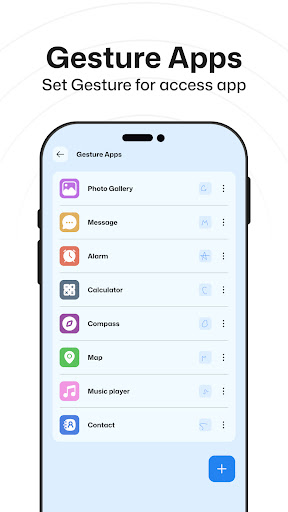
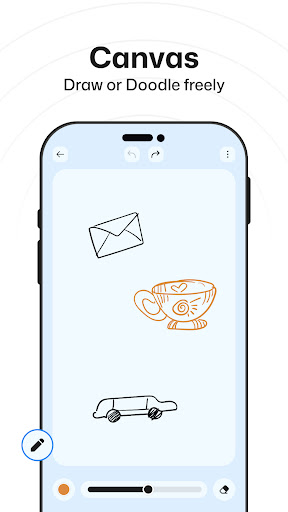
This app helps you quickly open your important apps from the lock screen. You just unlock and use them right away — no need to search inside your phone. For Quick text or note down use Notes and Canvas directly on the lock screen without unlocking. You can also schedule apps for different times and also you can set gestures to open apps. Everything you need is ready and easy to reach.
⚡ <b>Key Features:</b>
✅ <b>Actionable Apps</b>
Quickly open essential apps like Calculator, Calendar, Clock, Files, Messages, Settings, etc. Add …
Read the full description
🔓<b>Instantly access your most-used apps, tools, and notes directly from your lock screen – save time, stay productive, and simplify your daily tasks.</b> This app helps you quickly open your important apps from the lock screen. You just unlock and use them right away — no need to search inside your phone. For Quick text or note down use Notes and Canvas directly on the lock screen without unlocking. You can also schedule apps for different times and also you can set gestures to open apps. Everything you need is ready and easy to reach. ⚡ <b>Key Features:</b> ✅ <b>Actionable Apps</b> Quickly open essential apps like Calculator, Calendar, Clock, Files, Messages, Settings, etc. Add them to your lock screen from this app and access them instantly — no need to search inside your phone. ✅ <b>Scheduled Apps</b> Balance productivity and social time with smart scheduling. Show productive apps on your lock screen during work hours (like for an example, 10:00 AM to 4:00 PM) and social apps in the evening. Customize the schedule your way. ✅ <b>Gesture Apps</b> Assign gestures to your favorite apps. Just draw the gesture from lock screen Gesture button and instantly launch that app. ✅ <b>Canvas</b> Draw, doodle, sketch, or note down ideas freely on a canvas from lock screen Canvas button. Save your creativity or thoughts anytime. ✅ <b>Notes</b> Write and save important notes quickly. These notes appear right on your lock screen so you never miss or forget anything — perfect for reminders, to-dos, or quick thoughts. <b>🎯 Highlights:</b> - Open your important apps right after unlocking, no need to search. - Set different apps to show at different times of the day. - Use gestures to quickly open your favorite apps. - Write a quick note and keep it on your lock screen so you don’t forget. - Sketch something on the screen whenever you want. Permission: Overlay Permission: Allow this permission to show app shortcuts & other features as a overlay on lock screen.
Installs since 17 Nov 2026 Measured
Exact Google Play install counts, collected daily
Daily history starts once this app is in our daily install sample.
Ratings
- 5 ★0.0%
- 4 ★0.0%
- 3 ★0.0%
- 2 ★0.0%
- 1 ★0.0%
Recent reviews
Latest public reviews from the store
- 24 Aug 2025
Love ❤️ with some issues. This is one of 2 apps that lets you take notes on the lockscreen. When your phone doesn't have it's own stylus, this is the most you could hope for besides. My issues are 1.) Can't edit notes on the lockscreen after creating them (pretty big because it kills anything that needs to be added to, shopping etc) 2.) The "time range" is painful to set without overlapping even when you haven't finished setting them yet. 3.) Customization. For everything, esp the non-sched apps
Top chart positions
Latest Google Play chart ranks by country, last 10 days
Not in any tracked top chart in the last 10 days.
App Shortcuts On LockScreen history
Release, install milestones, listing and store changes
- Reached 1,000+ installs 17 Dec 2025
- Reached 500+ installs 24 Sep 2025
- First released on the store 9 Apr 2025
Update frequency
How often App Shortcuts On LockScreen ships a new version, month by month
1 updates in the last 12 months. More often than most similar apps: they shipped a median of 0 updates in the same year.
Recent versions
Current version Varies with device
- Version 1.0.116 Mar 2026
Listing keywords
Words and phrases App Shortcuts On LockScreen repeats most in its store listing
Top phrases: lock screen (11), need to search (3), quickly open (3), inside your phone (2), open your important (2).
Highlighted words also appear in the title. Counts cover the title, short description and description.
Business model and tech
From the store listing and declared permissions
- Business model
- Free to downloadIn-app purchasesShows ads
- Sensitive access
- No sensitive permission declared
Compliance
What the listing and the app package show
- Store status
- Removed (17 Nov 2026)
- Upkeep
- Updated 16 Mar 2026
- Registered in
- India
- Privacy policy
- Linked on the listing
- Advertising
- Shows ads
- In-app purchases
- Offered
- Age rating
- Everyone
Apps like App Shortcuts On LockScreen
들어서 화면켜기Won3.5K installs★ 4.0
Height PredictionEcliptic App Ventures45.9K installs★ 2.4
Speicers`Pro VPNEldiablolucifer202021.2K installs★ 4.14
Lightning Tracker with AlertsYaksh Software4.3K installs★ 3.0
Mana Pathi (Unit Converter)Shirish Koirala2.2K installs★ 4.6
Multi-tab Calc - A simple app.Naoyuki Rikiji1.3K installs★ 5.0
Photo Recovery PlusBillApps7.1K installs★ 4.53
Just Silence. Scheduled.Akid Soft1.6K installs★ 5.0
- WoWp AssistantВиталий Робиновский2K installs★ 4.2
App Shortcuts On LockScreen: questions and answers
How many downloads does App Shortcuts On LockScreen have?
App Shortcuts On LockScreen has 1,655 installs on Google Play, measured from the store's own count on 17 Nov 2026.
Who makes App Shortcuts On LockScreen?
App Shortcuts On LockScreen is published by GoNext, a developer based in IN.
When was App Shortcuts On LockScreen last updated?
The latest version (Varies with device) was released on 16 Mar 2026.
Is App Shortcuts On LockScreen free?
Yes. App Shortcuts On LockScreen is free to download and offers in-app purchases, and it shows ads.
Is App Shortcuts On LockScreen still available?
No. App Shortcuts On LockScreen is no longer listed on Google Play. We first saw it missing around 17 Nov 2026.
Track App Shortcuts On LockScreen and its competitors
Watch any app for new versions, rating drops, chart moves and removals. Free plan, no card.