
App Usage Tracker
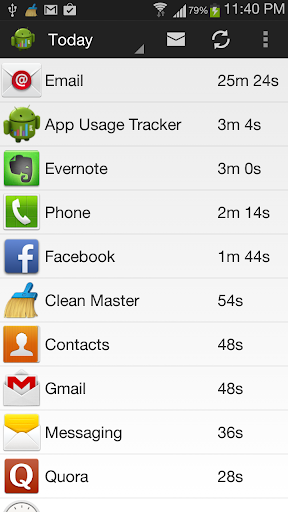
Tracks apps you are using on the device, and shows it in a graphical format.
- Installs
- 166K
- Measured
- Rating
- 4.24
- Ratings
- 1K
- 85 reviews
- Version
- 7.0
- Updated 16 May 2019
- Released
- 19 Aug 2011
- Tracked since 12 May 2026
- Size
- 1 MB
- Needs 4.1
Screenshots


About App Usage Tracker
The description on the store listing
Ever wondered for how much time you use that Facebook app? Is your facebook usage increasing or decreasing?
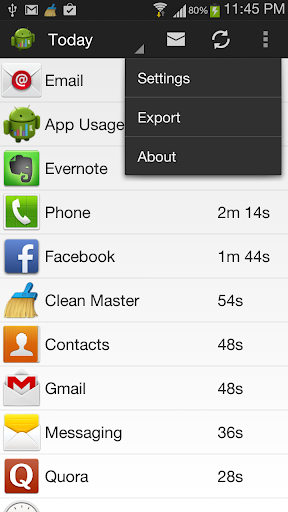
This App Usage Tracker app tracks what all apps are getting used on the device, and depicts the same in a graphical format. The usage stats can be exported out as well.
Note: This app starts tracking only when it is first launched after install / upgrade. Also, this app doesn't ask for INTERNET permission, so it cannot upload any usage data automatically without your consent.
Features include:
- Get to know what all apps that are not used and can be removed to save space.
- Monitor regularly which apps are used often.
- Usage detail can be exported and/or saved on the …
Read the full description
Ever wondered for how much time you use that Facebook app? Is your facebook usage increasing or decreasing? This App Usage Tracker app tracks what all apps are getting used on the device, and depicts the same in a graphical format. The usage stats can be exported out as well. Note: This app starts tracking only when it is first launched after install / upgrade. Also, this app doesn't ask for INTERNET permission, so it cannot upload any usage data automatically without your consent. Features include: - Get to know what all apps that are not used and can be removed to save space. - Monitor regularly which apps are used often. - Usage detail can be exported and/or saved on the device. - The exported details can be sent through installed e-mail service as attachment(Needs an SD Card/Storage). - Daily notifications with the most used app. - Disable tracking for certain apps. - App tracking stops when the phone is locked. - The usage data can be exported in the form of csv file, which could be sent through mail. - Older usage data get cleaned up regularly if configured. - Consumes very less battery. - Very light weight tracking mechanism. How to use the app: - As soon as the app is launched for the first time, the app usage tracking begins. - For the first launch of the app, the usage report will be empty. - On the main page, the usage duration can be selected, after which app usage info would be shown. - Tap on a particular app name in the list, will open up a time-series graph depicting the usage pattern. - Long press on the app name would show a popup menu using which the app can be launched or uninstalled. - The circular button on top, can be used for refreshing the usage for selected duration. Settings details: - The Usage Tracking can be enabled or disabled. - The duration of retention for tracking data would be used to clean up older usage data. - The accuracy of the tracking can also be controlled. There is a tradeoff here. If fine grain accuracy is required it would eat up more CPU and battery. Other levels would be little bit less accurate but would be fair on CPU and battery. - The default e-mail id on which the mail needs to be sent can also be configured. - The daily notification is enabled by default. This would trigger a notification automatically at 9 PM with the most used app of the day. - By default, uninstalled apps would not be shown in the usage report. Not supported yet: 1. Multi-user support. 2. Multi-window tracking. 3. Facebook chat head tracking. Procedure to export usage through e-mail: 1. Providing e-mail id in "Email id for export" setting is optional. If provided then the e-mail id would be pre-populated when sending app usage through e-mail. 2. Select the tracking duration on the main page for which usage report need to be generated and send. 3. Click on "Mail" button on top action bar. This will trigger a window listing down all the apps on the device using which the usage can be exported/send/updated. 4. Select the appropriate app to export. If it is an email provider, then the e-mail id provided in Step 1 would be pre-populated. If not, provide the e-mail id on which the e-mail need to be sent. This app is not endorsed or certified by Facebook. All Facebook(TM) logos and trademarks displayed on this app are property of Facebook.
Installs since 23 Jul 2026 Measured
Exact Google Play install counts, collected daily
Ratings
1,025 ratings, 85 reviews
- 5 ★61%
- 4 ★6.9%
- 3 ★14%
- 2 ★6.9%
- 1 ★11%
Recent reviews
Latest public reviews from the store
No reviews in our sample for this app yet.
Top chart positions
Latest Google Play chart ranks by country, last 10 days
Not in any tracked top chart in the last 10 days.
App Usage Tracker history
Release, install milestones, listing and store changes
- Reached 100,000+ installs 19 Jan 2017
- Reached 50,000+ installs 1 Sep 2014
- Reached 10,000+ installs 7 Dec 2012
- Reached 5,000+ installs 15 Jul 2012
- Reached 1,000+ installs 26 Feb 2012
- Reached 500+ installs 15 Nov 2011
- Reached 100+ installs 5 Sep 2011
- Reached 50+ installs 28 Aug 2011
Recent versions
Current version 7.0
- Version 7.016 May 2019
This app doesn't require INTERNET permission, so your usage data is completely secure. Refer to https://dontkillmyapp.com/ if this app is not tracking usage as per your expectation. - Enable app usage settings for this app when the pop-up shows up initially. Else go to Settings menu -> Enable Settings -> Provide app usage permission. - Long press on the app in the usage report to add them to the Keep On Track list. Those apps will be tracked even if device is locked.
- Version 6.231 Mar 2015
- Version 6.19 Dec 2014
- Version 6.023 Nov 2014
Listing keywords
Words and phrases App Usage Tracker repeats most in its store listing
Top phrases: mail id (5), usage data (4), usage report (3), button on top (2), cpu and battery (2).
Highlighted words also appear in the title. Counts cover the title, short description and description.
Business model and tech
From the store listing, the SDKs in the app package and its declared permissions
- Business model
- Free to download
- Built with
- No cross-platform framework or game engine detected
- Ad networks (0)
- None detected
- Sensitive access
- Photos, videos and files
0 ad, attribution and analytics SDKs detected. SDKs are read from the app package and permissions from the store listing, so code that loads later is not seen.
Technology
5 SDKs found in the app package
5 permissions
1 special access, 2 sensitive, 2 standard
- See which apps are usedPACKAGE_USAGE_STATSSpecial access
- Change or delete shared storageSensitive
- Read shared storageSensitive
- See running appsStandard
- Start when the phone turns onStandard
Compliance
What the listing and the app package show
- Store status
- Live
- Upkeep
- No update since 16 May 2019
- Registered in
- India
- Privacy policy
- Linked on the listing
- Advertising
- No ads declared
- In-app purchases
- None declared
- Age rating
- Everyone
- Sensitive permissions
- 2 sensitive, 1 special access of 5
- Location access
- No
- Camera and microphone
- Neither
Apps like App Usage Tracker
BatteryAlarmGoldLokik Soni58.2K installs★ 3.33
Photo Watch Face ProTiny Watch21.4K installs★ 4.42
GPS Location Sharing & LocatorNeo Utilities796K installs★ 4.2
Views Fans: CommunityaAa Designer36.5K installs★ 3.67
Space Clean ToolkitStarlume Tech597K installs★ 3.85
Calculator+ Photo&Video vaultGreen Water420K installs★ 4.37
Red Panic ButtonUltimate Communication Software LTD257K installs★ 3.31
Cutting Paper CalculatorTasikWeb.com84.5K installs★ 3.92
FORMSThe App Master848K installs★ 2.78
App Usage Tracker: questions and answers
How many downloads does App Usage Tracker have?
App Usage Tracker has 165,865 installs on Google Play, measured from the store's own count on 19 Nov 2026.
Who makes App Usage Tracker?
App Usage Tracker is published by Vaibhav Agrawal, a developer based in IN.
When was App Usage Tracker last updated?
The latest version (7.0) was released on 16 May 2019.
Is App Usage Tracker free?
Yes. App Usage Tracker is free to download.
Is App Usage Tracker still available?
Yes. App Usage Tracker is live on Google Play as of 19 Nov 2026.
Track App Usage Tracker and its competitors
Watch any app for new versions, rating drops, chart moves and removals. Free plan, no card.