- Installs
- 2.05K
- Measured
- Rating
- —
- Ratings
- —
- Version
- Varies with device
- Updated 23 Mar 2025
- Released
- 6 May 2021
- Tracked since 12 May 2026
- Size
- —
Screenshots
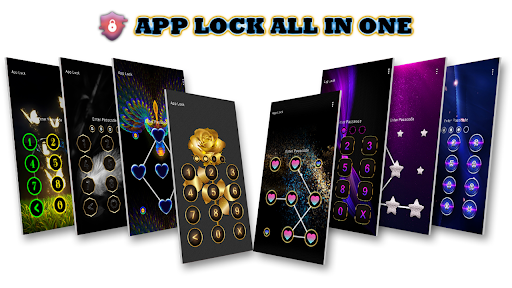
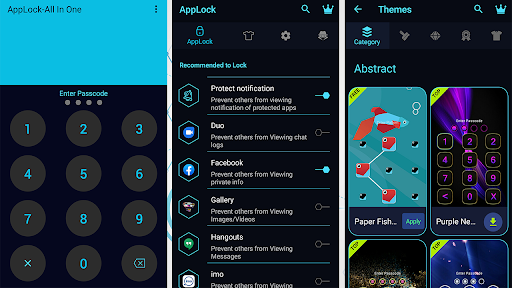
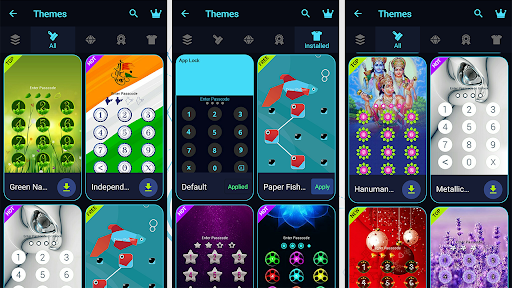
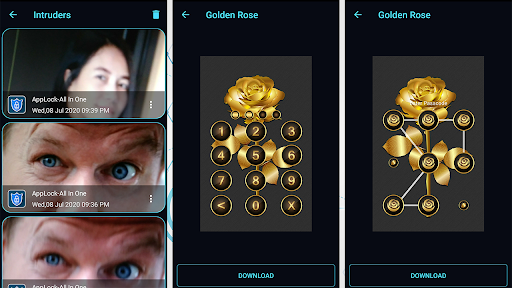
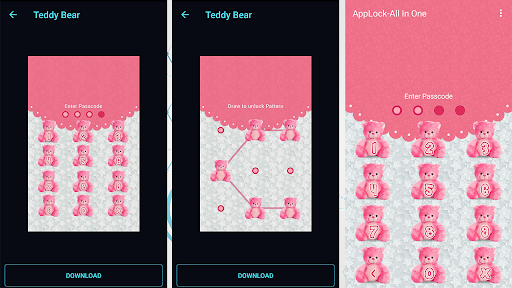

About AppLock - Fingerprint Locker
The description on the store listing
<b>About This AppLock - Fingerprint</b>
AppLock basically use to secure your personal data and your private social media apps. AppLock can secure multiple times wrong attempted security PIN and warn by loud warning tones. To secure your application with your personal data.
☞ AppLock can lock Facebook, WhatsApp, Gallery, Messenger, Snapchat, Instagram, SMS, Contacts, Gmail, Settings, incoming calls and any app you choose.
<b>★ Features :</b>
• Lock apps with password, pattern, or fingerprint lock.
• Well-designed 100+ Themes
•<b> Intruder Selfie: </b> take photos of invaders.
• You can auto-lock newly installed apps.
• Tap the lock icon at the upper right corner on Lock App …
Read the full description
<b>About This AppLock - Fingerprint</b> AppLock basically use to secure your personal data and your private social media apps. AppLock can secure multiple times wrong attempted security PIN and warn by loud warning tones. To secure your application with your personal data. ☞ AppLock can lock Facebook, WhatsApp, Gallery, Messenger, Snapchat, Instagram, SMS, Contacts, Gmail, Settings, incoming calls and any app you choose. <b>★ Features :</b> • Lock apps with password, pattern, or fingerprint lock. • Well-designed 100+ Themes •<b> Intruder Selfie: </b> take photos of invaders. • You can auto-lock newly installed apps. • Tap the lock icon at the upper right corner on Lock App page, to enable or disable AppLock. • <b>Advanced Protection:</b> prevent App being killed by task killer • <b>Random password keyboard: </b>prevent people peeping pin code • Allow a brief exit: no need password, pattern, fingerprint again within set time • Prevent uninstalling apps • Low memory usage. • Power saving mode • Beautiful & HD background images, specially designed for lock screen. <b>★ AppLock Need Permessions :</b> 1) App uses the Device Administrator permission.To enable Advanced Protection, please activate AppLock as "device administrator". It's only used for preventing intruders uninstalling AppLock. 2) App uses Accessibility service. To enable Power saving mode, please allow Accessibility services. The service is only used to remind users with disabilities to unlock apps, and reduce battery usage. Please be assured that App will never use these permissions to access your private data. Feel free to send your feedback to us! [email protected]
Installs since 13 Nov 2026 Measured
Exact Google Play install counts, collected daily
Daily history starts once this app is in our daily install sample.
Ratings
- 5 ★0.0%
- 4 ★0.0%
- 3 ★0.0%
- 2 ★0.0%
- 1 ★0.0%
Recent reviews
Latest public reviews from the store
- 23 Aug 2021
Very nice
- 7 Apr 2021
Very good
Top chart positions
Latest Google Play chart ranks by country, last 10 days
Not in any tracked top chart in the last 10 days.
AppLock - Fingerprint Locker history
Release, install milestones, listing and store changes
- First released on the store 6 May 2021
Recent versions
Current version Varies with device
- Version 1.523 Mar 2025
Listing keywords
Words and phrases AppLock - Fingerprint Locker repeats most in its store listing
Top phrases: power saving mode (2), advanced protection (2), applock fingerprint (2), device administrator (2), password pattern (2).
Highlighted words also appear in the title. Counts cover the title, short description and description.
Business model and tech
From the store listing and declared permissions
- Business model
- Free to download
- Sensitive access
- CameraPhotos, videos and filesDraws over other apps
16 permissions
4 special access, 5 sensitive, 7 standard
- Draw over other appsSpecial access
- Read all notificationsBIND_NOTIFICATION_LISTENER_SERVICESpecial access
- See every installed appQUERY_ALL_PACKAGESSpecial access
- See which apps are usedPACKAGE_USAGE_STATSSpecial access
- Take photos and videosSensitive
- Change or delete shared storageSensitive
- Read photosREAD_MEDIA_IMAGESSensitive
- Read shared storageSensitive
- Show notificationsPOST_NOTIFICATIONSSensitive
- Control vibrationStandard
- Keep the phone awakeStandard
- Start when the phone turns onStandard
Compliance
What the listing and the app package show
- Store status
- Live
- Upkeep
- Updated 23 Mar 2025
- Privacy policy
- Linked on the listing
- Advertising
- No ads declared
- In-app purchases
- None declared
- Age rating
- Everyone
- Sensitive permissions
- 5 sensitive, 4 special access of 16
- Location access
- No
- Camera and microphone
- Camera
Apps like AppLock - Fingerprint Locker
들어서 화면켜기Won3.5K installs★ 4.0
Height PredictionEcliptic App Ventures45.9K installs★ 2.4
Speicers`Pro VPNEldiablolucifer202021.2K installs★ 4.14
Lightning Tracker with AlertsYaksh Software4.3K installs★ 3.0
Mana Pathi (Unit Converter)Shirish Koirala2.2K installs★ 4.6
Multi-tab Calc - A simple app.Naoyuki Rikiji1.3K installs★ 5.0
Photo Recovery PlusBillApps7.1K installs★ 4.53
Just Silence. Scheduled.Akid Soft1.6K installs★ 5.0
- WoWp AssistantВиталий Робиновский2K installs★ 4.2
AppLock - Fingerprint Locker: questions and answers
How many downloads does AppLock - Fingerprint Locker have?
AppLock - Fingerprint Locker has 2,047 installs on Google Play, measured from the store's own count on 13 Nov 2026.
Who makes AppLock - Fingerprint Locker?
AppLock - Fingerprint Locker is published by Happy Trand.
When was AppLock - Fingerprint Locker last updated?
The latest version (Varies with device) was released on 23 Mar 2025.
Is AppLock - Fingerprint Locker free?
Yes. AppLock - Fingerprint Locker is free to download.
Is AppLock - Fingerprint Locker still available?
Yes. AppLock - Fingerprint Locker is live on Google Play as of 13 Nov 2026.
Track AppLock - Fingerprint Locker and its competitors
Watch any app for new versions, rating drops, chart moves and removals. Free plan, no card.