AppLock - Time Password
AppLock - Time PIN, Fingerprint & Pattern Lock secure all installed applications
- Installs
- 929K
- Measured
- Rating
- 3.98
- Ratings
- 5.2K
- 28 reviews
- Version
- Varies with device
- Updated 16 Mar 2026
- Released
- 31 Dec 2017
- Tracked since 11 May 2026
- Size
- 9 MB
- Needs 4.2
Screenshots
About AppLock - Time Password
The description on the store listing
Are you worried about exposing your PIN while you unlock your apps?
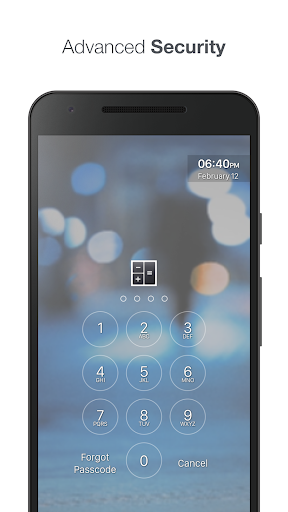
Here comes <b>App Lock - Time Password</b> (Dynamic Password) for the rescue.You can make your phone current time its app lock screen password.And time changes every minute, so does the password too, so no one can even guess it.
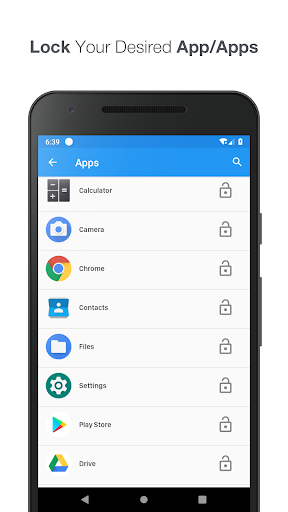
★ <b>App Lock (Privacy Protection)</b> can lock Facebook, Whatsapp, Gallery, Messenger, SMS, Contacts, Gmail, Settings, incoming calls and any app you choose. Prevent unauthorised access and guard privacy. Ensure security.
★ <b>Vault(Hide and protect photos & videos):</b> Photos and videos imported into phone can only be viewed after the correct password is entered.
★ <b>Private …
Read the full description
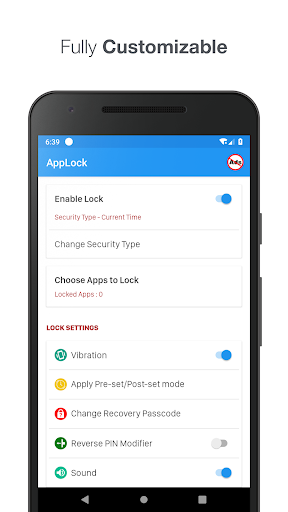
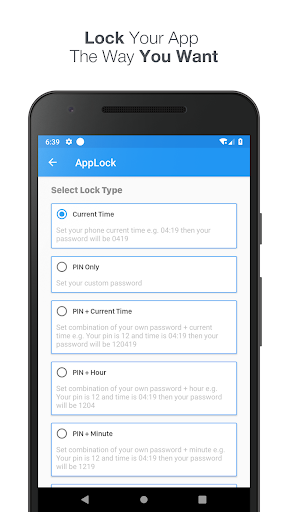
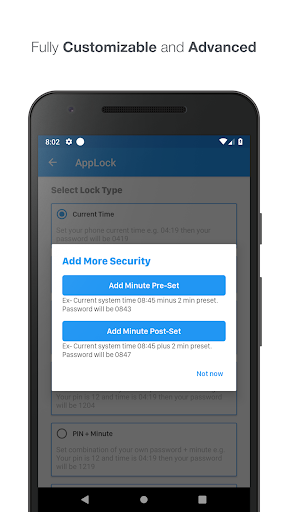
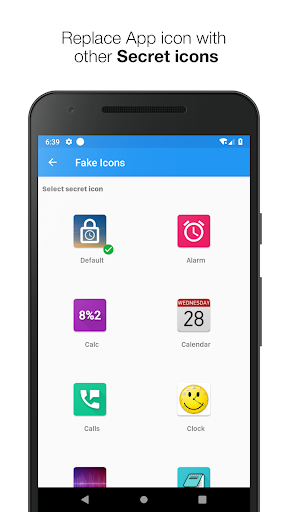
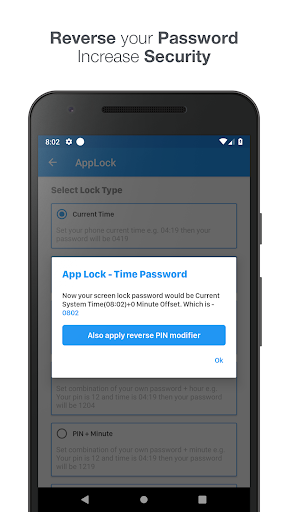
Are you worried about exposing your PIN while you unlock your apps? Here comes <b>App Lock - Time Password</b> (Dynamic Password) for the rescue.You can make your phone current time its app lock screen password.And time changes every minute, so does the password too, so no one can even guess it. ★ <b>App Lock (Privacy Protection)</b> can lock Facebook, Whatsapp, Gallery, Messenger, SMS, Contacts, Gmail, Settings, incoming calls and any app you choose. Prevent unauthorised access and guard privacy. Ensure security. ★ <b>Vault(Hide and protect photos & videos):</b> Photos and videos imported into phone can only be viewed after the correct password is entered. ★ <b>Private Browser:</b> With Private browser, your internet surf will leave no traces behind. There is also Bookmark feature. <b>Features</b> ☆ <b>Customise wallpaper for lock screen</b> - You can apply HD Screen wallpaper or choose from Gallery. ☆ Unlock sound enable/disable. ☆ Unlock vibration enable/disable. ☆ Support Fingerprint ☆ Support Break-in Alerts and know who is trying to break-in ☆ 12 hour and 24 hour format both supported. ☆ 100% safe and secure App Lock- Time Password ☆ <b>Reverse Pin Modifier </b>- Apply Reverse mode of your Current Lock either it is your Current Time, Own Security Pin or Pin+ Current Time. ☆ <b>Minute Pre-Set / Post-Set</b> - Means to give more security now Set Pre-Set or Post Set minute to your Current time. ☆ <b>Hide App Icon</b> - Hide this App icon to surprise your friends where is the App lock. Launch it by dialing #666#6 ☆ <b>Choose your own Lock Type</b> - Either you want Current System Time to make your AppLock Password or own custom PIN with different Time slot like Hour only, Minute Only or full time. All are possible by this App. ► <b>Current Time</b> - It is default password of your lock screen. e.g. If the time is 01:47, your PIN will be 0147. ► <b>Pin Passcode</b> - User can choose any password. ► <b>Pin + Minute Passcode</b> - e.g. if you choose digit is 12 and the time is 01:45 your PIN will be 1245. ► <b>Pin + Current Time Passcode</b> - e.g. if your choose digit is 45 and the time is 02:37 your PIN will be 450237. ► <b>Pin + Day Passcode</b> - e.g. if your choose digit is 45 and the date is 4 July 2017 your PIN will be 450407. ► <b>Pin + Hour Passcode</b> - e.g. if you choose digit is 12 and the time is 01:45 your PIN will be 4501. <b>---FAQ---</b> ☆ How to lock Xiaomi / MI phones? ►Xiaomi / MI phones have different permission management style. To use App Lock - Time Password on Xiaomi / MI phones, please follow the following steps. 1. Open Security App -> permissions. Choose option permissions -> App Lock - Time Password -> Allow all the permissions. 2. Go back to Permissions -> Auto Start -> Allow App Lock - Time Password to Auto Start. ►IMPORTANT NOTE FOR HUAWEI USERS Huawei devices have task killer services that interfere with the AppLock service. For our app to work, you need to add App Lock - Time Password to allowed apps in those devices' security settings. Huawei: Phone Manager App > Protected Apps > Add App Lock - Time Password to the list. ☆<b> Explanation for the permissions:</b> android.permission.INTERNET android.permission.READ_PHONE_STATE android.premission.ACCESS_NETWORK_STATE AD company need read phone state and network state to display and improve there AD quality. android.permission.SYSTEM_ALERT_WINDOW : to lock screen android.permission.RECEIVE_BOOT_COMPLETED : To lock device as soon as it restarts android.permission.CAMERA : Image capture for App lock wallpaper android.permission.READ_EXTERNAL_STORAGE : For change App lock wallpaper ★ <b>IMPORTANT:</b> Do not uninstall this app before restoring your personal files otherwise it will be lost forever. <b>App Lock - Time Password will not collect your any information.</b>
Installs, last 30 days Measured
Exact Google Play install counts, collected daily
Ratings
5,171 ratings, 28 reviews
- 5 ★60%
- 4 ★15%
- 3 ★8.1%
- 2 ★4.8%
- 1 ★13%
Recent reviews
Latest public reviews from the store
No reviews in our sample for this app yet.
Top chart positions
Latest Google Play chart ranks by country, last 10 days
Not in any tracked top chart in the last 10 days.
AppLock - Time Password history
Release, install milestones, listing and store changes
- Reached 500,000+ installs 26 Nov 2020
- Moved from Tools to Personalization 28 Aug 2020
- Reached 100,000+ installs 24 Sep 2018
- Reached 50,000+ installs 17 Apr 2018
- Reached 10,000+ installs 3 Feb 2018
- Reached 5,000+ installs 20 Jan 2018
- Reached 1,000+ installs 9 Jan 2018
- Reached 500+ installs 8 Jan 2018
Update frequency
How often AppLock - Time Password ships a new version, month by month
2 updates in the last 12 months. More often than most similar apps: they shipped a median of 1 updates in the same year.
Recent versions
Current version Varies with device
- Version 4.7.915 Mar 2026
Performance enhancements. UI improvements. Minor bug fixed.
- Version 4.7.81 Dec 2025
- Version 1.4.713 Oct 2025
- Version 1.4.626 Sep 2025
Listing keywords
Words and phrases AppLock - Time Password repeats most in its store listing
Top phrases: lock time password (8), android permission (6), choose digit (4), lock screen (4), xiaomi mi phones (3).
Highlighted words also appear in the title. Counts cover the title, short description and description.
Business model and tech
From the store listing and declared permissions
- Business model
- Free to downloadIn-app purchasesShows ads
- Subscriptions and payments
- Google Play billing
- Sensitive access
- CameraPhone and callsDraws over other appsAdvertising ID
23 permissions
2 special access, 3 sensitive, 18 standard
- Draw over other appsSpecial access
- See which apps are usedPACKAGE_USAGE_STATSSpecial access
- Take photos and videosSensitive
- Show notificationsPOST_NOTIFICATIONSSensitive
- Read phone status and identitySensitive
- Ad attribution (Privacy Sandbox)ACCESS_ADSERVICES_ATTRIBUTIONStandard
- Ad topics (Privacy Sandbox)ACCESS_ADSERVICES_TOPICSStandard
- Read how it was installed (install referrer)BIND_GET_INSTALL_REFERRER_SERVICEStandard
- Read the advertising IDAD_IDStandard
- Read the advertising ID (Privacy Sandbox)ACCESS_ADSERVICES_AD_IDStandard
- Ask to skip battery optimisationREQUEST_IGNORE_BATTERY_OPTIMIZATIONSStandard
- Control vibrationStandard
Compliance
What the listing and the app package show
- Store status
- Live
- Upkeep
- Updated 16 Mar 2026
- Registered in
- India
- Privacy policy
- Linked on the listing
- Advertising
- Shows ads
- In-app purchases
- Offered
- Age rating
- Everyone
- Sensitive permissions
- 3 sensitive, 2 special access of 23
- Location access
- No
- Camera and microphone
- Camera
Apps like AppLock - Time Password
Indic Keyboard Gesture Typingj15h.nu2.4M installs★ 4.23
Face PassCode Lock ScreenCatchy Tools3.2M installs★ 3.48
My Love Name Valentine Day LWPBhima Apps901K installs★ 4.36
Photo Lab-Photo EditorPhoto Frame Developer2.1M installs★ 3.88
My Photo Keyboard, Theme & PicDarvin Info3.7M installs★ 3.96
Zipper Lock Screen: Zip LockerMerryblue3.4M installs★ 4.64
Simple Wallpaper-Love Heart-+HOME by Ateam Entertainment1.2M installs★ 5.0
Emoji Keyboard: Fonts, EmojisYM, Inc.3.3M installs★ 3.63
Urdu Stickers for WhatsAppSnowBerry2M installs★ 3.6
AppLock - Time Password: questions and answers
How many downloads does AppLock - Time Password have?
AppLock - Time Password has 928,968 installs on Google Play, measured from the store's own count on 19 Nov 2026.
Who makes AppLock - Time Password?
AppLock - Time Password is published by Adria Devs, a developer based in IN.
When was AppLock - Time Password last updated?
The latest version (Varies with device) was released on 16 Mar 2026.
Is AppLock - Time Password free?
Yes. AppLock - Time Password is free to download and offers in-app purchases, and it shows ads.
Is AppLock - Time Password still available?
Yes. AppLock - Time Password is live on Google Play as of 19 Nov 2026.
Track AppLock - Time Password and its competitors
Watch any app for new versions, rating drops, chart moves and removals. Free plan, no card.