
Arc: AI Screen Assistant
AI sidebar to summarise, write & automate tasks in any app. Smart AI assistant.
- Installs
- 54.09K
- Measured
- Rating
- 4.41
- Ratings
- 524
- 41 reviews
- Version
- 1.0.26
- Updated 29 Sep 2026
- Released
- 31 Oct 2025
- Tracked since 13 May 2026
- Size
- —
Screenshots


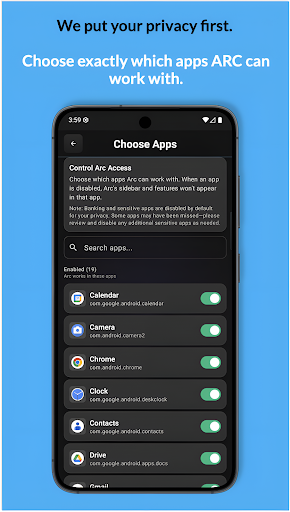
About Arc: AI Screen Assistant
The description on the store listing
Unlock the power of AI on every screen with Arc — your all-in-one AI Writing Assistant, Summarizer, Writer and Productivity Sidebar.
Arc is a system-wide AI assistant that works seamlessly inside every app. With a simple swipe from the floating sidebar, you can write, summarize, extract insights, and automate tasks — without switching apps or breaking your flow.
---
🆕 What’s New in v1.0.15
• AI Call Insights
• Flashcard Generation
• Smart Extract
• AI Writer upgrades (My Info Vault, Create Post, access past responses)
• Filter summaries & community actions by app, category, language & recency
• Arabic language support
• Major UI redesign
• Performance improvements & bug …
Read the full description
Unlock the power of AI on every screen with Arc — your all-in-one AI Writing Assistant, Summarizer, Writer and Productivity Sidebar. Arc is a system-wide AI assistant that works seamlessly inside every app. With a simple swipe from the floating sidebar, you can write, summarize, extract insights, and automate tasks — without switching apps or breaking your flow. --- 🆕 What’s New in v1.0.15 • AI Call Insights • Flashcard Generation • Smart Extract • AI Writer upgrades (My Info Vault, Create Post, access past responses) • Filter summaries & community actions by app, category, language & recency • Arabic language support • Major UI redesign • Performance improvements & bug fixes --- ✍️ AI Writer – Smart Writing Anywhere. Write better in any app on your device. My Info Vault: Store personal or reusable information to generate personalized responses on demand. Create Post: Generate social media posts (Reddit, X, Instagram, etc.) and product reviews instantly. Rewrite & Rephrase: Transform text into Professional, Polite, or Concise tones. Fix Grammar: Correct spelling and grammar in one tap. Smart AI Reply: Generate contextual replies for WhatsApp, Gmail, Slack, and more. Context-Aware Suggestions: Arc understands your conversation to deliver relevant writing assistance. --- 📝 Instant AI Summarizer Beat information overload and get key insights instantly. • Summarize articles, Reddit threads, PDFs, and social media posts • Automatically track source URLs for reference • Save and organize summaries in your personal library --- 🎧 AI Call Insights Turn call recordings into actionable intelligence. • Generate clear summaries and full transcripts • Identify key discussion points • Extract reminders, events, locations, and phone numbers • Instantly add to calendar, open in maps, save contacts, or place calls --- ⚡ Smart Extract Automatically detect actionable information from any screen. • Finds reminders, events, addresses, dates, and phone numbers • Provides one-tap actions like add to calendar, open in maps, save contact, or call --- 🎓 Flashcard Generator Create flashcards directly from on-screen content. • Automatically generate questions, hints, and answers • Perfect for students, professionals, and quick revision • Study smarter without leaving your current app --- 💬 Chat With Your Screen Have intelligent conversations about anything you’re viewing. • Ask questions about emails, articles, graphs, or documents • Attach screenshots for deeper visual analysis • Resume conversations anytime from your organized chat history --- ⚡ Custom & Community Actions Automate repetitive tasks with AI workflows. Create Custom Actions: Build prompts like “Fact Check,” “Explain Like I’m 5,” or “Find Calories in Food.” etc. 100+ Community Actions: Explore ready-made AI actions shared by other Arc users. --- 🎧 AI Read (Text-to-Speech) Listen to any screen content with natural AI voices. • Auto-detects 10+ languages (English, Spanish, German, French, Portuguese, Korean, Japanese, Indonesian, Arabic) • Multitask while listening to summaries or articles --- ♿ Accessibility-First Productivity Designed to support users with dyslexia, low vision, or ADHD. • WCAG 2.1 AA compliant • High-contrast UI and large touch targets • Full TalkBack support --- 🔒 Privacy & Security • Automatically disables in 200+ banking, crypto, and password manager apps • No background monitoring — Arc only works when you tap • All memories and chat history are stored securely on your device --- Accessibility Service Disclosure: Arc uses Android Accessibility Service to provide core features. It reads on-screen text only when you explicitly trigger an action (AI Summary, AI Read, Save Content, Chat, or Custom Actions). Screen capture occurs only with your consent when saving content or attaching screenshots. Arc does not monitor your screen in the background and does not collect data unless you initiate an action.
Installs since 29 Aug 2026 Measured
Exact Google Play install counts, collected daily
Ratings
524 ratings, 41 reviews
- 5 ★73%
- 4 ★13%
- 3 ★7.4%
- 2 ★0.0%
- 1 ★5.9%
Recent reviews
Latest public reviews from the store
- 28 Apr 2026
I found the app easy to setup and would happily recommend it. I would like there to be more options for the reminders as one of my bins is every eight weeks. Other than that it's very good.
- 25 Mar 2026
please add a small homescreen widget that displays the bins for the next collection date
- 1 Jan 2026
Does exactly what it should. clear notifications. Simple and easy to use, with extra features if you need them. Thank you for the great app!
- 27 Jul 2025
fantastic App and great support please can we have the facility to add an alarm for when the reminder goes off, currently there is only a silent alarm symbol but we need to be able to add sounds to the reminder thanks.keep up the good work must say really great app, pity you didn't do a smoke alarm reminder and test alarm option.
What reviewers bring up
Topics mentioned in the latest 10 reviews, by how many reviews mention them
Liked in good reviews (9 reviews)
- bin 5
- brown 4
- colour 3
- add 3
- set 3
- notifications 2
- collection 2
- reminder 2
Raised in bad reviews (0 reviews)
No topic comes up twice.
Top chart positions
Latest Google Play chart ranks by country, last 10 days
Not in any tracked top chart in the last 10 days.
Arc: AI Screen Assistant history
Release, install milestones, listing and store changes
- Reached 10,000+ installs 15 Jan 2026
- Reached 500+ installs 1 Jan 2026
- Reached 100+ installs 18 Dec 2025
- Reached 50+ installs 21 Nov 2025
- First released on the store 31 Oct 2025
Update frequency
How often Arc: AI Screen Assistant ships a new version, month by month
7 updates in the last 12 months. More often than most similar apps: they shipped a median of 3 updates in the same year.
Recent versions
Current version 1.0.26
- Version 1.0.2629 Sep 2026
• Upgrading to Arc Pro from the sidebar now opens the plans screen • More reliable purchases: prices load on slow connections, and delayed payments like UPI apply automatically • Plan screen shows renewal terms, Terms and Privacy • Weekly AI count now shows the right number • Sign out to switch Google accounts • New in Settings: Arc on other devices (Mac download, Windows and iPhone waitlist)
- Version 1.0.2422 May 2026
What's New 🚀 We've made several improvements to enhance your experience: - Improved onboarding flow for a smoother and faster setup. - Increased the weekly free quota. - Fixed issues with AI Call Analysis to improve reliability and accuracy. - Resolved accessibility-related issues affecting Pixel devices. - Simplified the Create Action flow by adding a dedicated option in the sidebar for quicker access. - Various bug fixes and performance improvements across the app.
- Version 1.0.2229 Apr 2026
Bug fixes and improvements.
- Version 1.0.1515 Feb 2026
Listing keywords
Words and phrases Arc: AI Screen Assistant repeats most in its store listing
Top phrases: community actions (3), add to calendar (2), ai call insights (2), open in maps (2), social media posts (2).
Highlighted words also appear in the title. Counts cover the title, short description and description.
Business model and tech
From the store listing and declared permissions
- Business model
- Free to downloadIn-app purchases
- Subscriptions and payments
- Google Play billing
- Sensitive access
- Photos, videos and filesDraws over other appsAdvertising ID
20 permissions
2 special access, 3 sensitive, 15 standard
- Draw over other appsSpecial access
- See every installed appQUERY_ALL_PACKAGESSpecial access
- Read music and audioREAD_MEDIA_AUDIOSensitive
- Read shared storageSensitive
- Show notificationsPOST_NOTIFICATIONSSensitive
- Ad attribution (Privacy Sandbox)ACCESS_ADSERVICES_ATTRIBUTIONStandard
- Read how it was installed (install referrer)BIND_GET_INSTALL_REFERRER_SERVICEStandard
- Read the advertising IDAD_IDStandard
- Read the advertising ID (Privacy Sandbox)ACCESS_ADSERVICES_AD_IDStandard
- Ask to skip battery optimisationREQUEST_IGNORE_BATTERY_OPTIMIZATIONSStandard
- Foreground service (special use)FOREGROUND_SERVICE_SPECIAL_USEStandard
- Keep the phone awakeStandard
Compliance
What the listing and the app package show
- Store status
- Live
- Upkeep
- Updated 29 Sep 2026
- Registered in
- India
- Privacy policy
- Linked on the listing
- Advertising
- No ads declared
- In-app purchases
- Offered
- Age rating
- Everyone
- Sensitive permissions
- 3 sensitive, 2 special access of 20
- Location access
- No
- Camera and microphone
- Neither
Apps like Arc: AI Screen Assistant
FotoCubeFotoCube46.5K installs★ 4.88
AI4Chat: Chat/Art/Music/VideoAI4Chat107K installs★ 4.27
PairVPNMOBILE COMPANY37K installs★ 4.45
生词本 - 英语背单词与词汇学习Lilyreading Software Studio32.8K installs★ 4.67
AI ASMR Video Generator: RelaxCupertino Tech20.4K installs★ 4.16
Amharic አባባሎች ና ጥቅሶች QuotesOromNet Software and Application Development247K installs★ 4.0
Remote UtilitiesRemote Utilities95.5K installs★ 2.7
Stitch CreatorMIXAImaging85.6K installs★ 4.34
Tiendatek POS - Punto de VentaGrupo Frogtek387K installs★ 5.0
Arc: AI Screen Assistant: questions and answers
How many downloads does Arc: AI Screen Assistant have?
Arc: AI Screen Assistant has 54,089 installs on Google Play, measured from the store's own count on 16 Nov 2026.
Who makes Arc: AI Screen Assistant?
Arc: AI Screen Assistant is published by MamataG, a developer based in IN.
When was Arc: AI Screen Assistant last updated?
The latest version (1.0.26) was released on 29 Sep 2026.
Is Arc: AI Screen Assistant free?
Yes. Arc: AI Screen Assistant is free to download and offers in-app purchases.
Is Arc: AI Screen Assistant still available?
Yes. Arc: AI Screen Assistant is live on Google Play as of 16 Nov 2026.
Track Arc: AI Screen Assistant and its competitors
Watch any app for new versions, rating drops, chart moves and removals. Free plan, no card.